


A command-line package manager for the xonotic-map-repository project.
Used with the unofficial Xonotic map repository, xonotic.co, by default.
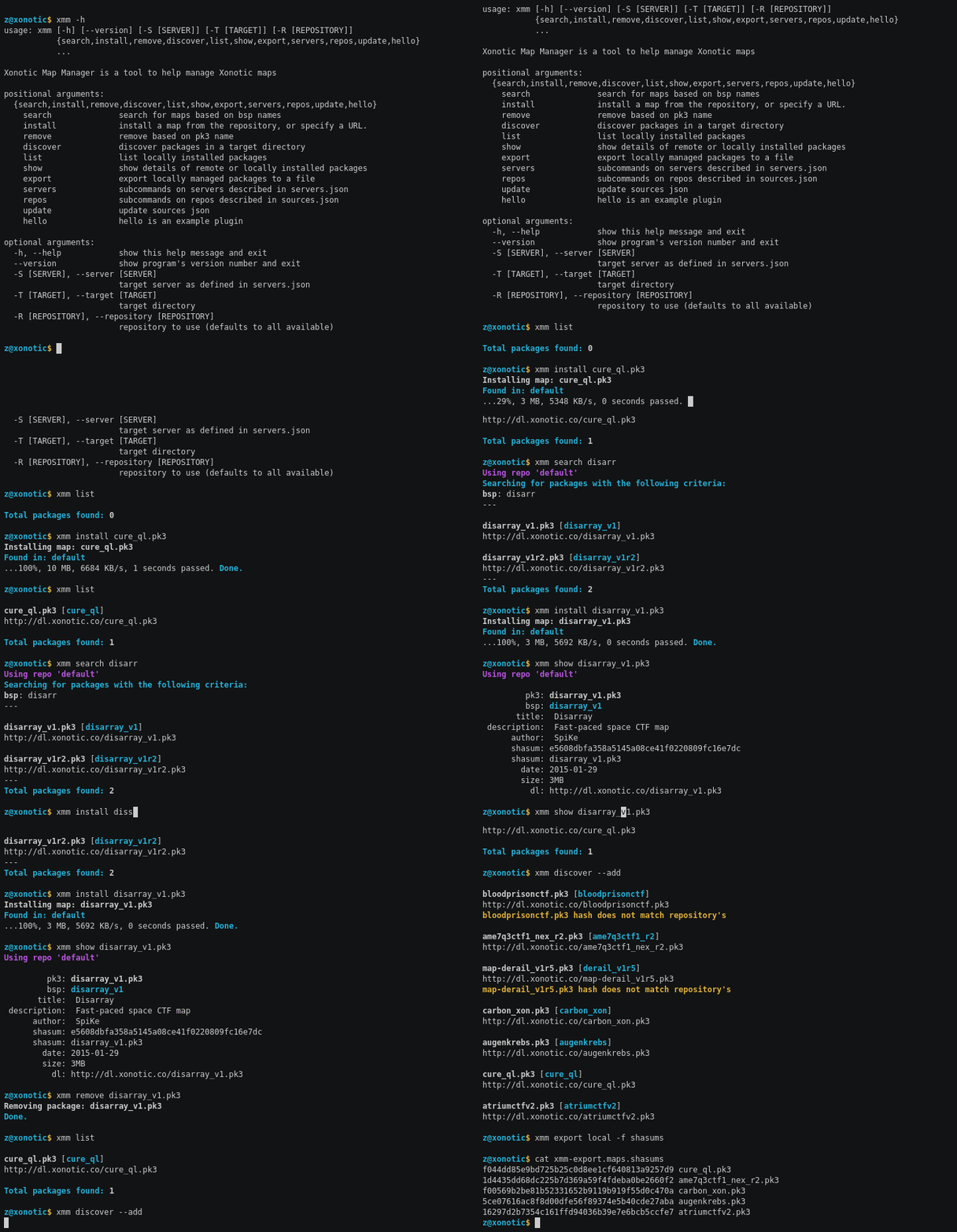
The JSON provides rich metadata about map packages which makes it easier to discern differences between them.
For information about what data is available check JSON Structure. ## Requirements
Debian/Ubuntu
If you do not already have pip and setuptools for Python 3:
sudo apt install python3-pip python3-setuptools
Installation
pip3 install xmm --user
or for development:
git clone https://github.com:z/xonotic-map-manager.git
cd xonotic-map-manager
python3 setup.py develop
Usage
usage: xmm [-h] [--version] [-S [SERVER]] [-T [TARGET]] [-R [REPOSITORY]]
           {search,install,remove,discover,list,show,export,servers,repos,update,hello}
           ...

Xonotic Map Manager is a tool to help manage Xonotic maps

positional arguments:
  {search,install,remove,discover,list,show,export,servers,repos,update,hello}
    search              search for maps based on bsp names
    install             install a map from the repository, or specify a URL.
    remove              remove based on pk3 name
    discover            discover packages in a target directory
    list                list locally installed packages
    show                show details of remote or locally installed packages
    export              export locally managed packages to a file
    servers             subcommands on servers described in servers.json
    repos               subcommands on repos described in sources.json
    update              update sources json
    hello               hello is an example plugin

optional arguments:
  -h, --help            show this help message and exit
  --version             show program's version number and exit
  -S [SERVER], --server [SERVER]
                        target server as defined in servers.json
  -T [TARGET], --target [TARGET]
                        target directory
  -R [REPOSITORY], --repository [REPOSITORY]
                        repository to use (defaults to all available)
Documentation
Documentation is hosted on readthedocs.io.
Contributing
Contributions to this project are welcome, please read CONTRIBUTING.md.
License
Copyright (c) 2016 Tyler Mulligan (z@xnz.me) and contributors.
Distributed under the MIT license. See the LICENSE file for more details.
0.8.0 / 2016-12-22
Added
Multi-repo support
Created documentation with sphinx, hosted at readthedocs.io
Integrated tests and CI with travis
arg completion for bash and zsh via argcomplete
-L flag on the xmm show subcommand to explicitly indicate showing map details from a locally installed map. Otherwise, the source_collection cache is used for all information.
-R flag to specify a single repository if using many
--version flag
export command supports two more formats, shasums, maplist (bsps), or repo JSON (#7)
servers command added with subcommand list
repos command added with subcommand list
--highlight, -H flags become --color
User-configurable Logging
Changed
Complete overhaul of code base exposing a Python API
No longer using pickle, storing data in JSON
Configuration updates, see Upgrading
1 maintainer

Release files for xmm 0.8.0
For a detailed explanation of source distributions (sdists) and built distributions (wheels), please see the package formats documentation.
Source distribution (sdist)
| File | Size | Uploaded | |
|---|---|---|---|
| xmm-0.8.0.tar.gz | 8.9 MB | Details |
Release files / xmm-0.8.0.tar.gz
| Download URL | xmm-0.8.0.tar.gz |
|---|---|
| Size | 8.9 MB |
| Tags | Source |
|
SHA-256 checksum How to use checksums |
3658ff3200084d6e30b876dd5f81fb732b8ebcd3b1af52c4129bc8a1c990f417
|
|
BLAKE2b-256 checksum How to use checksums |
8c7ebf3cb41249230653ab97798f790a1135a274a5af02014eb8778bca0630a3
|
| Upload date | |
|
Uploaded using Trusted Publishing? What is trusted publishing? |
No |













