
Xontrib Powerline 2
xontrib-powerline fork by santagada/xontrib-powerline.
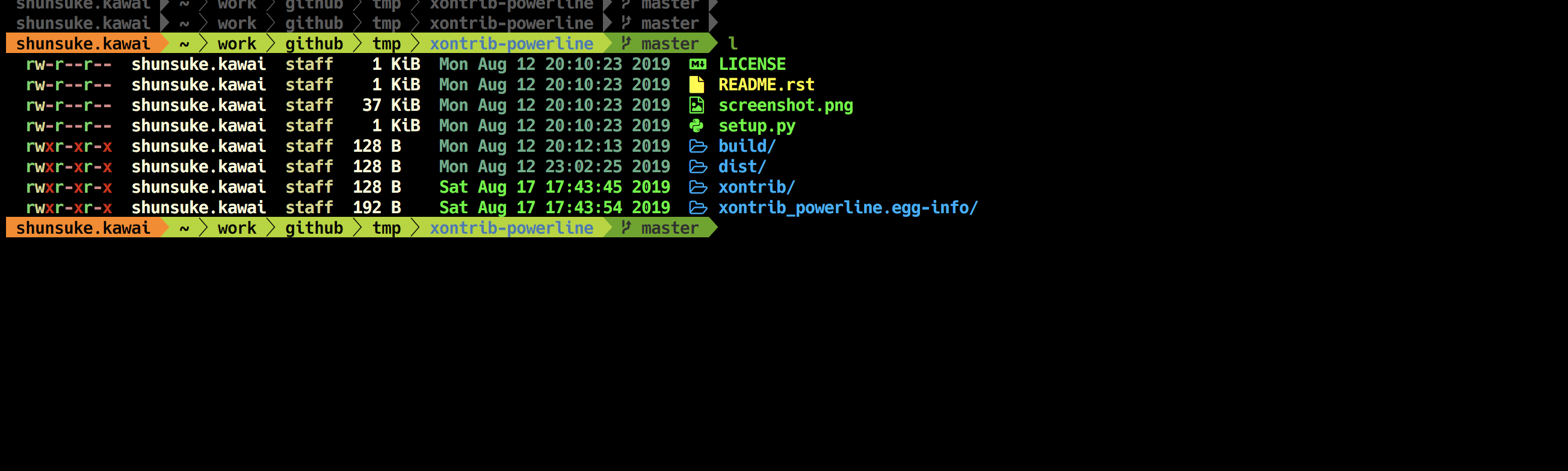
Install
pip install xontrib-powerline2
And them load it on your .xonshrc
xontrib load powerline2
Configuration
There are two variables that can be set, $PL_PROMPT for main prompt, $PL_PROMPT for the right prompt and $PL_TOOLBAR for the bottom toolbar.
They contain a list of sections that can be used separated by >. The value ! means not to use that prompt.
Examples:
$PL_PROMPT='cwd>branch'
$PL_RPROMPT = '!'  # for no toolbar
$PL_TOOLBAR = 'who>virtualenv>branch>cwd>full_proc'
xontrib load powerline2
Bulid prompt
If you want to override the settings after xontrib load, so commit changes to your prompt execute pl_build_prompt command.
Check config
To see all available sections type pl_available_sections command.
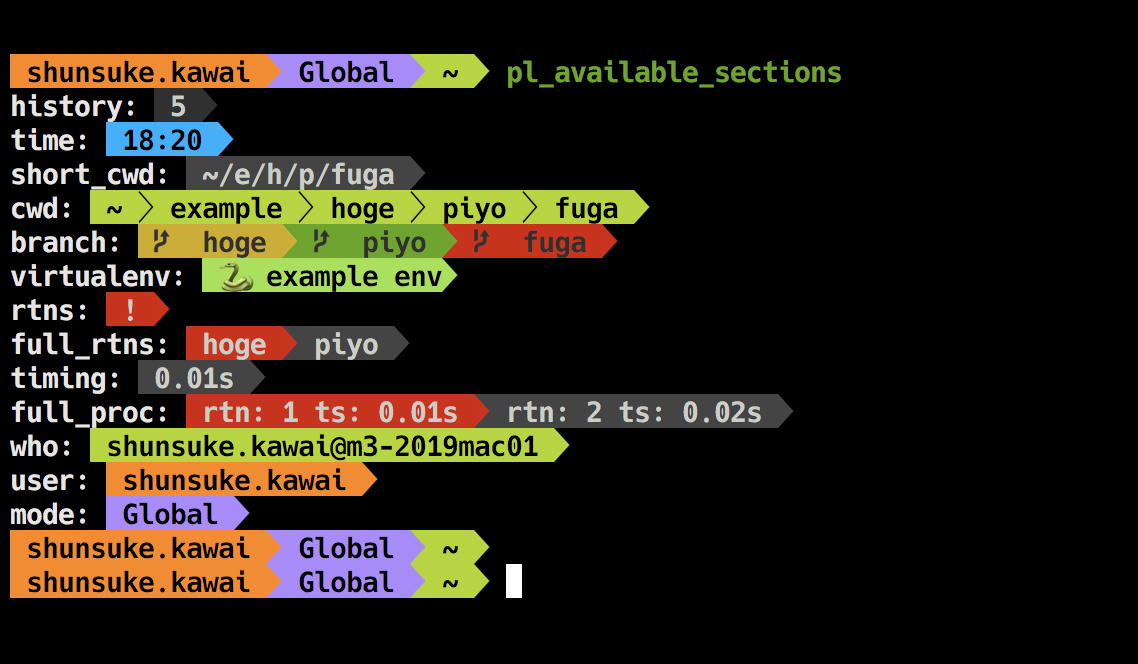
Default sections
| section | description |
|---|---|
| who | {user}@{hostname} |
| virtualenv | {env_name} |
| branch | {curr_branch} |
| cwd | $pwd using $pl_colors['cwd', 'git_root', 'git_sub_dir'] and $pl_parts |
| short_cwd | {short_cwd} |
| full_proc | run time of the previous command from history |
| timing | diff from previous command's executed time |
| time | strftime(' %h:%m ') |
| history | len(__xonsh__.history) |
| rtns | '!' if __xonsh__.history.rtns else none |
| full_rtns | rtns[-1] if __xonsh__.history.rtns else none |
If you want to know about {} sections, please look xonsh document.
Custom sections
We can add customize origin section by $PL_EXTRA_SEC.
# func return [format string, text color, background color]
$PL_EXTRA_SEC = {"user": lambda: [' I'm {user} ', 'BLACK', '#fd971f']}
$PL_PROMPT='user>cwd>branch'
$PL_TOOLBAR='!'
$PL_RPROMPT='!'
xontrib load powerline2

Section's color
We can change section color by $PL_COLORS.
$PL_COLORS is dict. Basically, the value is (text_color, background_color).
| key | default value | description |
|---|---|---|
| who | ("BLACK", "#a6e22e") | - |
| venv | ("BLACK", "INTENSE_GREEN") | - |
| branch | ("#333") | background color from $PROMPT_FIELDS['branch_bg_color'] |
| cwd | ("WHITE", "#444") | - |
| git_root | ("BLACK", "#00adee") | used by cwd |
| git_sub_dir | ("WHITE", "#00adee") | used by cwd |
| short_cwd | ("WHITE", "#444") | - |
| full_proc | ("WHITE", "RED", "#444") | There are two types of background depending on the situation |
| timing | ("WHITE", "#444") | - |
| time | ("BLACK", "#00adee") | - |
| history | ("WHITE", "#333333") | - |
| rtns | ("WHITE", "RED") | - |
| full_rtns | ("WHITE", "RED", "#444") | There are two types of background depending on the situation |
Multi line prompt
We can use multi line prompt by \n.
$PL_PROMPT='\nuser>mode>\ncwd'
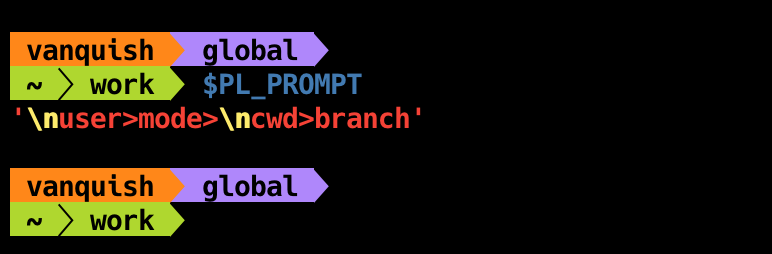
Separate mode
We can change the way of separation mode by $PL_SEP_MODE.
| mode | separate char |
|---|---|
| powerline | , , , |
| round | , , , |
| down | , , , |
| up | , , , |
| flame | , , , |
| squares | , , , |
| ruiny | , , , |
| lego | , |
For example
# set $PL_SEP_MODE or using pl_set_mode alias
$PL_SEP_MODE='round'
pl_set_mode round

If you want to use original separeter, you can use $PL_ORG_SEP, $PL_ORG_SEP_THIN, $PL_ORG_RSEP.
$PL_ORG_SEP = '■'
$PL_ORG_SEP_THIN = '□'
$PL_ORG_RSEP = '■'
xontrib load powerline2

Credits
laerus/cookiecutter-xontrib: https://github.com/laerus/cookiecutter-xontribsantagada/xontrib-powerline: https://github.com/santagada/xontrib-powerline
Similer Projects
jnoortheen/xontrib-powerline3: https://github.com/jnoortheen/xontrib-powerline3- That is also compatible with
ASYNC_PROMPT!
- That is also compatible with
1 maintainer

Metadata
1 maintainer
Release files for xontrib-powerline2 1.5.0
For a detailed explanation of source distributions (sdists) and built distributions (wheels), please see the package formats documentation.
Source distribution (sdist)
| File | Size | Uploaded | |
|---|---|---|---|
| xontrib-powerline2-1.5.0.tar.gz | 6.1 kB | Details |
Built distribution (wheel)
| File | Interpreter | ABI | Platform | Reset |
|---|---|---|---|---|
| xontrib_powerline2-1.5.0-py3-none-any.whl | Python 3 | none | any | Details |
Total release size: 13.1 kB
Release files / xontrib-powerline2-1.5.0.tar.gz
| Download URL | xontrib-powerline2-1.5.0.tar.gz |
|---|---|
| Size | 6.1 kB |
| Tags | Source |
|
SHA-256 checksum How to use checksums |
eaec5acd8ab0107d2564fd5719812f953b6e8fabbed796a2813de7ae4daa9b54
|
|
BLAKE2b-256 checksum How to use checksums |
f9a4bbf9e3e5724e6c1d17b23bddc84b143e0871e4005273fb7c9254309445f2
|
| Upload date | |
|
Uploaded using Trusted Publishing? What is trusted publishing? |
No |
| Uploaded via |
twine/3.2.0 pkginfo/1.5.0.1 requests/2.24.0 setuptools/50.3.2 requests-toolbelt/0.9.1 tqdm/4.46.1 CPython/3.7.3
|
Release files / xontrib_powerline2-1.5.0-py3-none-any.whl
| Download URL | xontrib_powerline2-1.5.0-py3-none-any.whl |
|---|---|
| Size | 7.0 kB |
| Tags | Python 3 |
|
SHA-256 checksum How to use checksums |
fd3f957404423003ec1d950154679409bc4f9a4974b7105ecc8dd232bd85bf64
|
|
BLAKE2b-256 checksum How to use checksums |
a0f3793f950b40350943071f2b005b59a68dab7aa6fd4f0b2a73358d7737836b
|
| Upload date | |
|
Uploaded using Trusted Publishing? What is trusted publishing? |
No |
| Uploaded via |
twine/3.2.0 pkginfo/1.5.0.1 requests/2.24.0 setuptools/50.3.2 requests-toolbelt/0.9.1 tqdm/4.46.1 CPython/3.7.3
|














