

Lines
Lines is a program for plotting powder diffraction patterns, and was initially developed for interactively modifying the background during the course of a Rietveld refinement with XRS-82 (Baerlocher, 1982). The modern way of removing backgrounds is by fitting a Chebyshev polynomial during the course of the Rietveld refinement. In practice, this method is unreliable when doing a Pawley or Le Bail fit, and offers little control over the shape of the background during a Rietveld refinement.
Background correction
The background of any pattern (.xy or .xye format) can be corrected with:
lines pattern.xye --bgcorrect 1
Then by clicking on the figure, the background can be specified. By closing the program, a list of X and Y coordinates is printed to console and written to the file lines.out. The command line option --bgcorrect 1 tells the program to perform a linear background correction, and print the corrected file to pattern_corr.xy. Lines respects your standard deviations and never overwrites the original data. The background points are by default written to the file lines.out. In case this file exists, the original is backed up to lines.out~.
It is then possible to continue the background correction process by loading in the points from the file lines.out like this:
lines pattern.xye --bgcorrect 1 --bgin lines.out
It is also possible to perform the background correction while doing a refinement with TOPAS. In order to do so, the observed, calculated and difference plot should be output from TOPAS with the following commands:
Out_X_Yobs(x_yobs.xy)
Out_X_Ycalc(x_ycalc.xy)
Out_X_Difference(x_ydiff.xy)
Then, to start the background correct prodecure:
lines pattern.xye --bgcorrect 1 --bgin lines.out --topasbg
The option --topasbg will tell the program to read the observed, calculated and difference plots and --bg_in lines.out will load previously saved background points from the file lines.out.
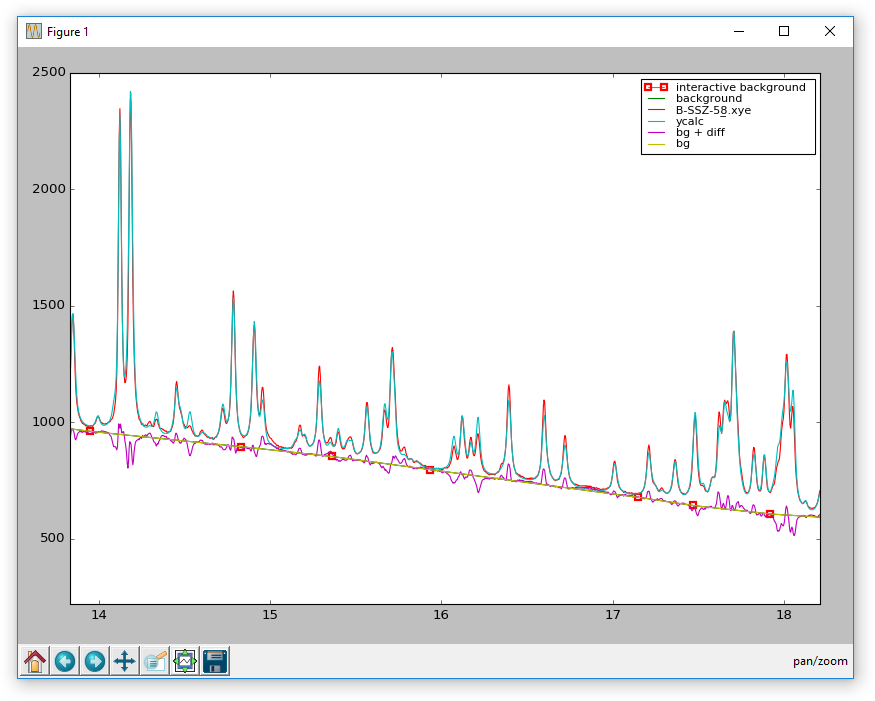
Since its inception, many functions for operations performed on powder diffraction data have been implemented. A number of different file formats can be read and visualized in numerous ways. Further options for diffraction pattern manipulation include the options to adjust the wavelength of the diffraction data, or to re-bin, normalize, and smooth them. All the functions are documented in the help file, which can be accessed via lines --help.
GUI
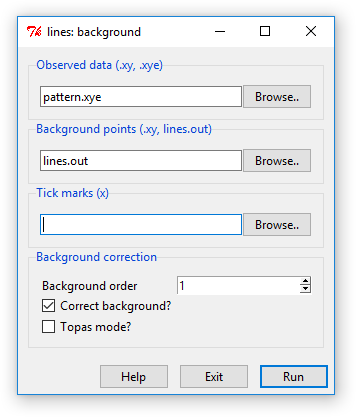
On Windows, a GUI for the background subtraction is available. It is accessible via the lines_bg.bat file in the bin directory or by typing lines gui.
Pressing run opens an instance of lines where the background can be modified. By closing the plot window, and the corrected and background patterns will be written.
Requirements
In brackets are known working versions.
- Python 3.9+
- numpy (1.24.1)
- scipy (1.10.0)
- matplotlib (3.6.3)
Installation
pip install xpdlines
Or, to install the latest version from this repository:
pip install git+https://github.com/stefsmeets/lines
1 maintainer

Metadata
1 maintainer
Release files for xpdlines 2.0.1
For a detailed explanation of source distributions (sdists) and built distributions (wheels), please see the package formats documentation.
Source distribution (sdist)
| File | Size | Uploaded | |
|---|---|---|---|
| xpdlines-2.0.1.tar.gz | 37.7 kB | Details |
Built distribution (wheel)
| File | Interpreter | ABI | Platform | Reset |
|---|---|---|---|---|
| xpdlines-2.0.1-py3-none-any.whl | Python 3 | none | any | Details |
Total release size: 74.7 kB
Release files / xpdlines-2.0.1.tar.gz
| Download URL | xpdlines-2.0.1.tar.gz |
|---|---|
| Size | 37.7 kB |
| Tags | Source |
|
SHA-256 checksum How to use checksums |
318cfa3dafdad62cd5f511dbf849c07cd44251e26b072431305d1cb78d9f1e0e
|
|
BLAKE2b-256 checksum How to use checksums |
ec684dc289ceb56591de92f5b8e7c46fcc3980600c769b722ddcfed1558b84ec
|
| Upload date | |
|
Uploaded using Trusted Publishing? What is trusted publishing? |
No |
| Uploaded via |
twine/4.0.2 CPython/3.9.2
|
Release files / xpdlines-2.0.1-py3-none-any.whl
| Download URL | xpdlines-2.0.1-py3-none-any.whl |
|---|---|
| Size | 37.0 kB |
| Tags | Python 3 |
|
SHA-256 checksum How to use checksums |
9e778a24c7a0180bf06fd28971eab3c5e95b6c1445891c308105a58fc4f59336
|
|
BLAKE2b-256 checksum How to use checksums |
c9810bdbee5d16c7a122094cd12828ea90a2e606388d982f181737ec9a31d7f0
|
| Upload date | |
|
Uploaded using Trusted Publishing? What is trusted publishing? |
No |
| Uploaded via |
twine/4.0.2 CPython/3.9.2
|














