
Yet Another Telegram Logger
A python library to log messages and exceptions to your Telegram bot.
Setup
1. Create a bot
First, create a new bot. It's basically sending some messages to @BotFather.
2. Create a config file (.yatlogger.json)
Next, create a file named .yatlogger.json and place it in the same directory as your code or in a one of the parent directories. The file must look like this:
{
    "token": "<your api key>"
}
Replace <your api key> with the API key you got from the BotFather.
3. Register chats
Your bot must know to which chats it should send the logs. So the next step is to register receiving chats.
Run python -m yatlogger to start the register service. As long as this service is running, you can register new chats.
To register a chat, start a chat with your bot and enter the 6 digit pin you see on the logging machine.
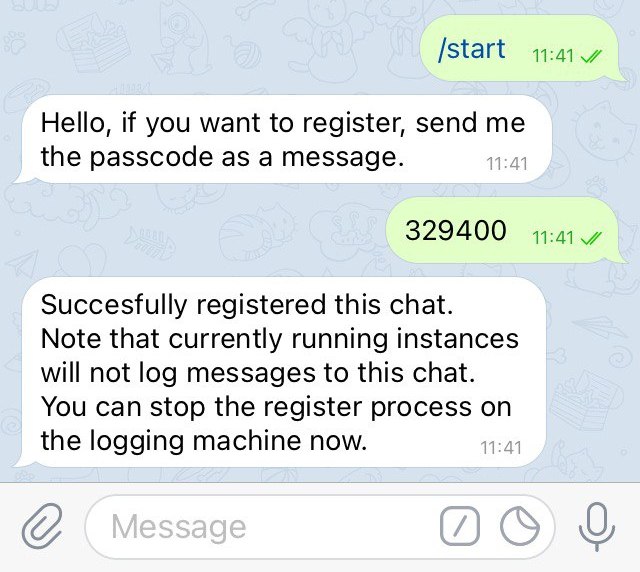
When you are done, you can simply interrupt the register service with Ctrl + C
Usage
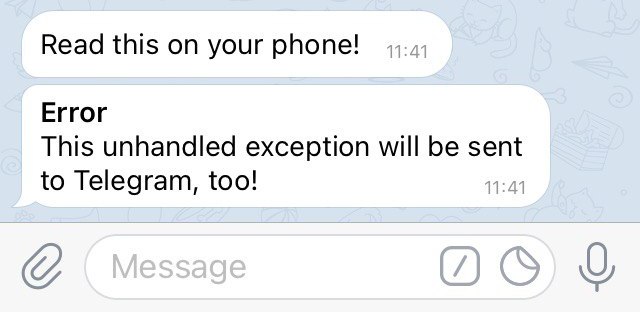
yatlogger registers itself as a handler for the built-in logging module. Here is an example:
import logging
import yatlogger

logger = yatlogger.register()
logger.setLevel(logging.INFO)

logger.info("Read this on your phone!")

raise ValueError("This unhandled exception will be sent to Telegram, too!")
And the resulting chat messages:
1 maintainer

Metadata
1 maintainer
Release files for yatlogger 0.1.3
For a detailed explanation of source distributions (sdists) and built distributions (wheels), please see the package formats documentation.
Source distribution (sdist)
| File | Size | Uploaded | |
|---|---|---|---|
| yatlogger-0.1.3.tar.gz | 4.7 kB | Details |
Built distribution (wheel)
| File | Interpreter | ABI | Platform | Reset |
|---|---|---|---|---|
| yatlogger-0.1.3-py3-none-any.whl | Python 3 | none | any | Details |
Total release size: 9.9 kB
Release files / yatlogger-0.1.3.tar.gz
| Download URL | yatlogger-0.1.3.tar.gz |
|---|---|
| Size | 4.7 kB |
| Tags | Source |
|
SHA-256 checksum How to use checksums |
403958ff7ae8091ded9cc150fcb742bda0f5fa863caf1104dbbde3312c9ea774
|
|
BLAKE2b-256 checksum How to use checksums |
b7f7003f9ffc93229d25b203b74a927713008d4dc4e3bd0bbea0dab3ad6043af
|
| Upload date | |
|
Uploaded using Trusted Publishing? What is trusted publishing? |
No |
| Uploaded via |
poetry/1.1.0 CPython/3.8.5 Linux/5.4.0-74-generic
|
Release files / yatlogger-0.1.3-py3-none-any.whl
| Download URL | yatlogger-0.1.3-py3-none-any.whl |
|---|---|
| Size | 5.3 kB |
| Tags | Python 3 |
|
SHA-256 checksum How to use checksums |
05e8eda4b8f20dd4ddc93f68be939996799ee3e5107e986d2a8e89a19774bcb1
|
|
BLAKE2b-256 checksum How to use checksums |
c82b2f256c345ecdb12072e176899652b8e12e9f8f02b168b0fcc21ec1401ce3
|
| Upload date | |
|
Uploaded using Trusted Publishing? What is trusted publishing? |
No |
| Uploaded via |
poetry/1.1.0 CPython/3.8.5 Linux/5.4.0-74-generic
|














