
YAWN: Yet Another Workflow Engine
YAWN provides a framework for executing a set of shell commands with dependencies in a distributed manner and on a repeating schedule. Other tools do similar things and are inspirations for this one; particularly Celery and Airflow.
Browse it live at https://yawn.live, deployed on GKE.


Principle Differences
YAWN is inspired by, but different from Celery and Airflow because it:
Runs each task in a separate subprocess, like Airflow but unlike Celery, which avoids polution of a shared python interpreter and makes memory usage easier to reason about.
Uses PostgreSQL as the message broker and database, alleviating the need for a separate broker like Redis or RabbitMQ. This avoids the visibility timeout issue when using Redis as a Celery broker. YAWN uses the new SELECT ... FOR UPDATE SKIP LOCKED statement to efficiently select from the queue table.
Stores the command, environment variables, stdout and stderror for each task execution, so its easier to see the logs and history of what happened. Re-running a task does not overwrite the previous run.
Does not support inputs or outputs other than the command line and environment variables, with the intention that client applications should handle state instead.
Components
- Web Server
The website provides a user interface to view the workflows and tasks running within them. It allows you to run an existing workflow or re-run a failed task. The web server also provides a REST API to remotely create and run workflows.
- Worker
The worker schedules and executes tasks. The worker uses subprocess.Popen to run tasks and capture stdout and stderr.
Concepts
- Workflow
A set of Tasks that can depend on each other, forming what is popularly known as a directed acyclic graph (DAG). Workflows can be scheduled to run on a regular basis and they are versioned so they can change over time.
- Run
An instance of a workflow, manually triggered or scheduled.
- Task
A shell command that specifies the upstream tasks it depends on, the number times to retry, and a timeout. The task is given environment variables configured in the workflow and run.
- Execution
A single execution of a Task’s command, capturing the exit code and standard output and error.
- Queue
A first-in, first-out list of Tasks to execute.
- Worker
A process that reads from a set of Queues and executes the associated Tasks, recording the results in an Execution.
Installation
To get started using YAWN:
# install the package - someone has yawn :-(
pip install yawns

# install postgres and create the yawn database
# the default settings localhost and no password
createdb yawn

# setup the tables by running db migrations
yawn migrate

# create a user to login with
yawn createsuperuser

# create some sample workflows
yawn examples

# start the webserver on port 8000
yawn webserver

# open a new terminal and start the worker
yawn worker
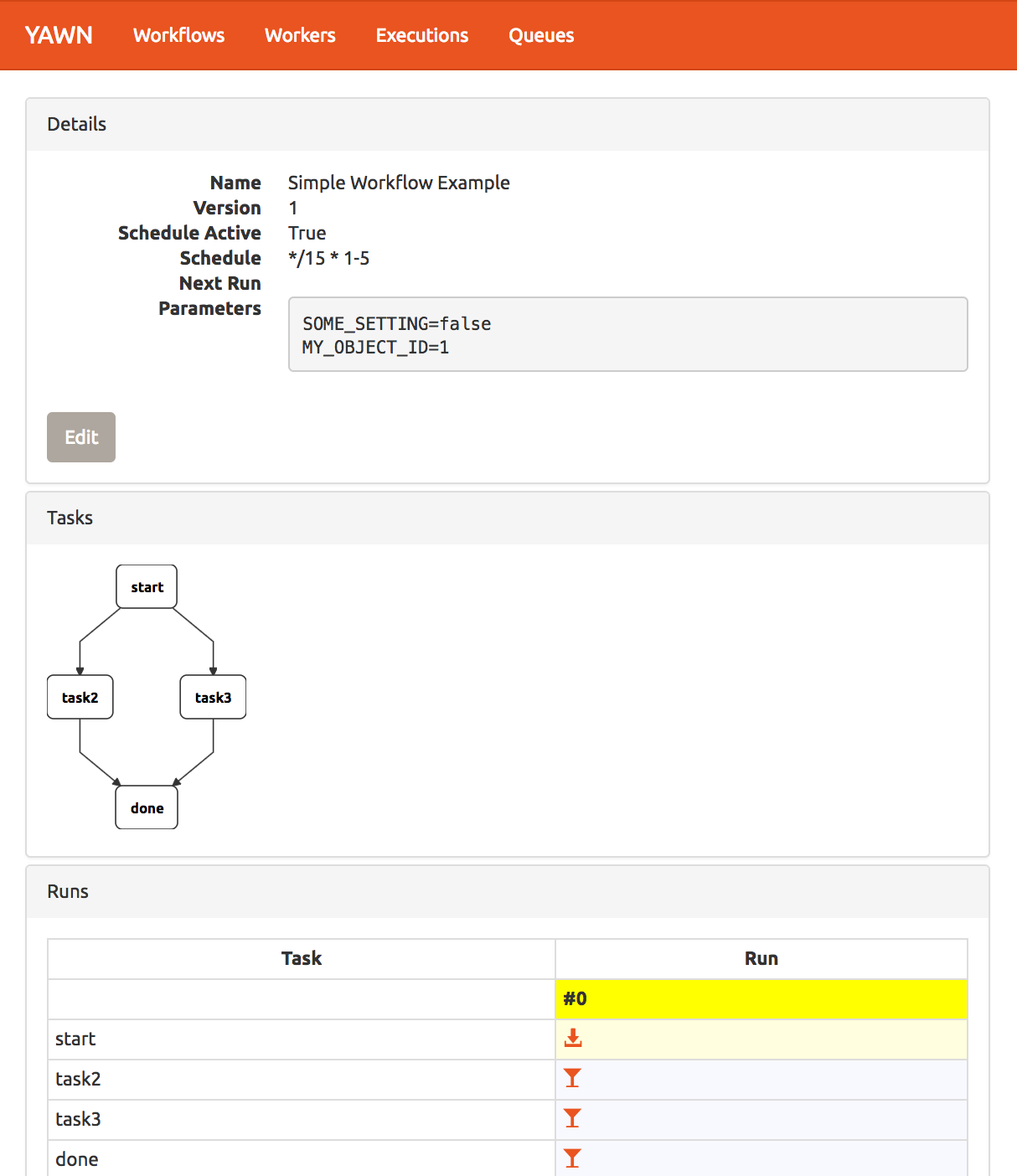
Here is a screenshot of the page for a single workflow:
REST API
Browse the API by going to http://127.0.0.1:8000/api/ in a browser.
When creating a workflow, the format is (shown as YAML for readability):
name: Example
parameters:
  ENVIRONMENT: production
  CALCULATION_DATE: 2017-01-01
schedule: 0 0 *
schedule_active: True

tasks:
- name: task_1
  queue: default
  max_retries: 1
  timeout: 30
  command: python my_awesome_program.py $ENVIRONMENT
- name: task_2
  queue: default
  command: echo $CALCULATION_DATE | grep 2017
  upstream:
  - task_1
- /api/workflows/
GET a list of versions or a single workflow version. POST to create or update a workflow using the schema show above. PATCH to change the schedule, schedule_active, or parameters fields only.
POST - use the schema shown above
PATCH {"schedule_active": false}
- /api/runs/
GET a list of runs, optionally filtering to a particular workflow using ?workflow=<id>. POST to create a new run. PATCH to change the parameters.
POST {"workflow_id": 1, "parameters": null}
PATCH {"parameters": {"ENVIRONMENT": "test"}}
- /api/tasks/<id>/
GET a single task from a workflow run, and its executions with their status and logging information. PATCH to enqueue a task or kill a running execution.
PATCH {"enqueue": true}
PATCH {"terminate": <execution_id>}
Python API
Import and use the Django models to create your workflow:
from yawn.workflow.models import WorkflowName
from yawn.task.models import Template

name, _ = WorkflowName.objects.get_or_create(name='Simple Workflow Example')
workflow = name.new_version(parameters={'MY_OBJECT_ID': '1', 'SOME_SETTING': 'false'})
task1 = Template.objects.create(workflow=workflow, name='start', command='echo Starting...')
task2 = Template.objects.create(workflow=workflow, name='task2', command='echo Working on $MY_OBJECT_ID')
task2.upstream.add(task1)
task3 = Template.objects.create(workflow=workflow, name='task3',
                                command='echo Another busy thing && sleep 20')
task3.upstream.add(task1)
task4 = Template.objects.create(workflow=workflow, name='done', command='echo Finished!')
task4.upstream.add(task2, task3)

workflow.submit_run(parameters={'child': 'true'})
Alternatively, use the serializer to give tasks as a dictionary in the format used by the API. This method checks if a version of the Workflow exists with the same structure, and will return the existing version if so:
from yawn.workflow.serializers import WorkflowSerializer

serializer = WorkflowSerializer(data=test_views.data())
serializer.is_valid(raise_exception=True)
workflow = serializer.save()
workflow.submit_run()
Links
1 maintainer

Metadata
1 maintainer
Release files for yawns 0.3.1
For a detailed explanation of source distributions (sdists) and built distributions (wheels), please see the package formats documentation.
Source distribution (sdist)
| File | Size | Uploaded | Provenance | Actions |
|---|---|---|---|---|
| yawns-0.3.1.tar.gz | 2.8 MB | Without provenance | Details for yawns-0.3.1.tar.gz |
Built distribution (wheel)
| File | Interpreter | ABI | Platform | Actions Reset |
|---|---|---|---|---|
| yawns-0.3.1-py3-none-any.whl | Python 3 | none | any | Details for yawns-0.3.1-py3-none-any.whl |
Total release size: 5.6 MB
Release files / yawns-0.3.1.tar.gz
| Download URL | yawns-0.3.1.tar.gz |
|---|---|
| Size | 2.8 MB |
| Tags | Source |
|
SHA-256 checksum How to use checksums |
d236bb13bf435d30359698cf0066e3387f1b66437ceb119973d861ab809b3fcf
|
|
BLAKE2b-256 checksum How to use checksums |
70a6486c47c0aba0ff4f3bbe21578ba4c1cea5d6b20dda94e010388acfe81759
|
| Upload date | |
|
Uploaded using Trusted Publishing? What is trusted publishing? |
No |
| Uploaded via |
twine/6.1.0 CPython/3.13.2
|
Release files / yawns-0.3.1-py3-none-any.whl
| Download URL | yawns-0.3.1-py3-none-any.whl |
|---|---|
| Size | 2.8 MB |
| Tags | Python 3 |
|
SHA-256 checksum How to use checksums |
d2af97f187915eb9f8eeedd80427957cc8ad0c5d6cba43d4b796ba1970c825de
|
|
BLAKE2b-256 checksum How to use checksums |
06662cbd9155db40ef63c70241e4f9cd26fe5174b939f16eb6a072f5391e500b
|
| Upload date | |
|
Uploaded using Trusted Publishing? What is trusted publishing? |
No |
| Uploaded via |
twine/6.1.0 CPython/3.13.2
|
Security for yawns 0.3.1
Provenance
Provenance describes where a file came from. On PyPI, provenance is shared via attestations, which provide a verifiable record of the build or publishing details. View details, limitations and caveats.
No provenance found
None of the files in this release were uploaded with provenance metadata.
A note on package security
PyPI is a repository for distributing packages, not a service for auditing them. While third-party security researchers and our staff do their best to detect and remove malicious packages, PyPI cannot guarantee the quality, security or suitability of any given package.
To learn more about protecting yourself from malicious actors, visit our package security documentation.














