
Tool that makes it easy to split YOLOs images and their associated labels into separate sets for training and testing.

Project description
yolo-splitter
Tool that makes it easy to split YOLOs images and their associated labels into separate sets for training and testing.
Installation
pip install yolosplitter
Uses
from yolosplitter import YoloSplitter

ys = YoloSplitter(imgFormat=['.jpg', '.jpeg', '.png'], labelFormat=['.txt'] )

# create dataframe
df = ys.from_mixed_dir(main_dir="mydataset/")

# saves the Images and labels in "new_dataset" dir. with data.yaml file.
ys.split_and_save(DF=df,output_dir="new_dataset",train_size=0.70)
df = ys.from_mixed_dir(main_dir="mydataset/")
df
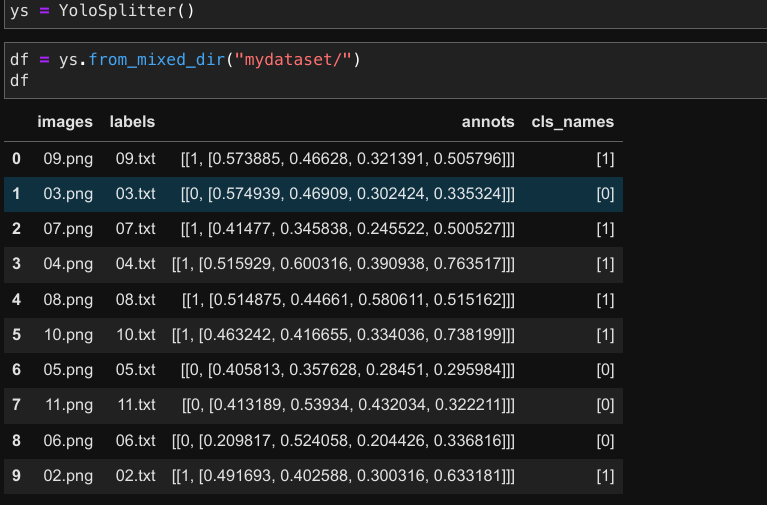
# When Image and Labels are in diffrent directory (Default yolo train and val directories)
df = ys.from_yolo_dir(image_dir="mydataset-splitted/train/images/",label_dir="mydataset-splitted/train/labels/")
df
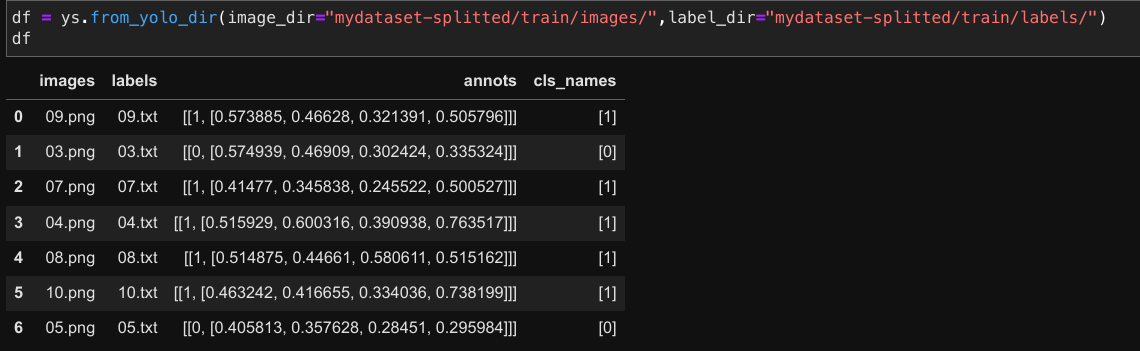
# Dataframe contains Image names, Label names, annoations and class names.
# In the dataframe, we can observe the number of classes present in each image.
Input Directory
MyDataset/
├── 02.png
├── 02.txt
├── 03.png
├── 03.txt
├── 04.png
├── 04.txt
├── 05.png
├── 05.txt
├── 06.png
├── 06.txt
├── 07.png
├── 07.txt
├── 08.png
├── 08.txt
├── 09.png
├── 09.txt
├── 10.png
├── 10.txt
├── 11.png
└── 11.txt
Output Directory
MyDataset-splitted/
├── data.yaml
├── train
│   ├── images
│   │   ├── 03.png
│   │   ├── 04.png
│   │   ├── 05.png
│   │   ├── 07.png
│   │   ├── 08.png
│   │   ├── 09.png
│   │   └── 10.png
│   └── labels
│       ├── 03.txt
│       ├── 04.txt
│       ├── 05.txt
│       ├── 07.txt
│       ├── 08.txt
│       ├── 09.txt
│       └── 10.txt
└── val
    ├── images
    │   ├── 02.png
    │   ├── 06.png
    │   └── 11.png
    └── labels
        ├── 02.txt
        ├── 06.txt
        └── 11.txt
Release history Release notifications | RSS feed


Download files
Download the file for your platform. If you're not sure which to choose, learn more about installing packages.
Source Distribution
yolosplitter-0.2.0.tar.gz
(3.6 kB
view details)
Built Distribution
Filter files by name, interpreter, ABI, and platform.
If you're not sure about the file name format, learn more about wheel file names.
Copy a direct link to the current filters
File details
Details for the file yolosplitter-0.2.0.tar.gz.
File metadata
- Download URL: yolosplitter-0.2.0.tar.gz
- Upload date:
- Size: 3.6 kB
- Tags: Source
- Uploaded using Trusted Publishing? No
- Uploaded via: twine/4.0.2 CPython/3.8.16
File hashes
| Algorithm | Hash digest | |
|---|---|---|
| SHA256 |
b558a2bafcc5595425d7388af1a93366918b8c9085e77f155d95360d931652ea
|
|
| MD5 |
2df66bfafb130eac3056b235126b7e3b
|
|
| BLAKE2b-256 |
f4f0e755230bfe363f2bb312c17393f6aa82d6e7d51a0a937c829da2f78f650d
|
File details
Details for the file yolosplitter-0.2.0-py3-none-any.whl.
File metadata
- Download URL: yolosplitter-0.2.0-py3-none-any.whl
- Upload date:
- Size: 3.7 kB
- Tags: Python 3
- Uploaded using Trusted Publishing? No
- Uploaded via: twine/4.0.2 CPython/3.8.16
File hashes
| Algorithm | Hash digest | |
|---|---|---|
| SHA256 |
39cfa63f76b92433e852ec810244b3b201b8af1b9efcc3ebb6b3adf221dfe805
|
|
| MD5 |
67049021ce91eb9df838449aac929f4e
|
|
| BLAKE2b-256 |
910e087f4224c879868895380c52e17850bbd3f5b97853ed8251b6a3f7484f80
|






