


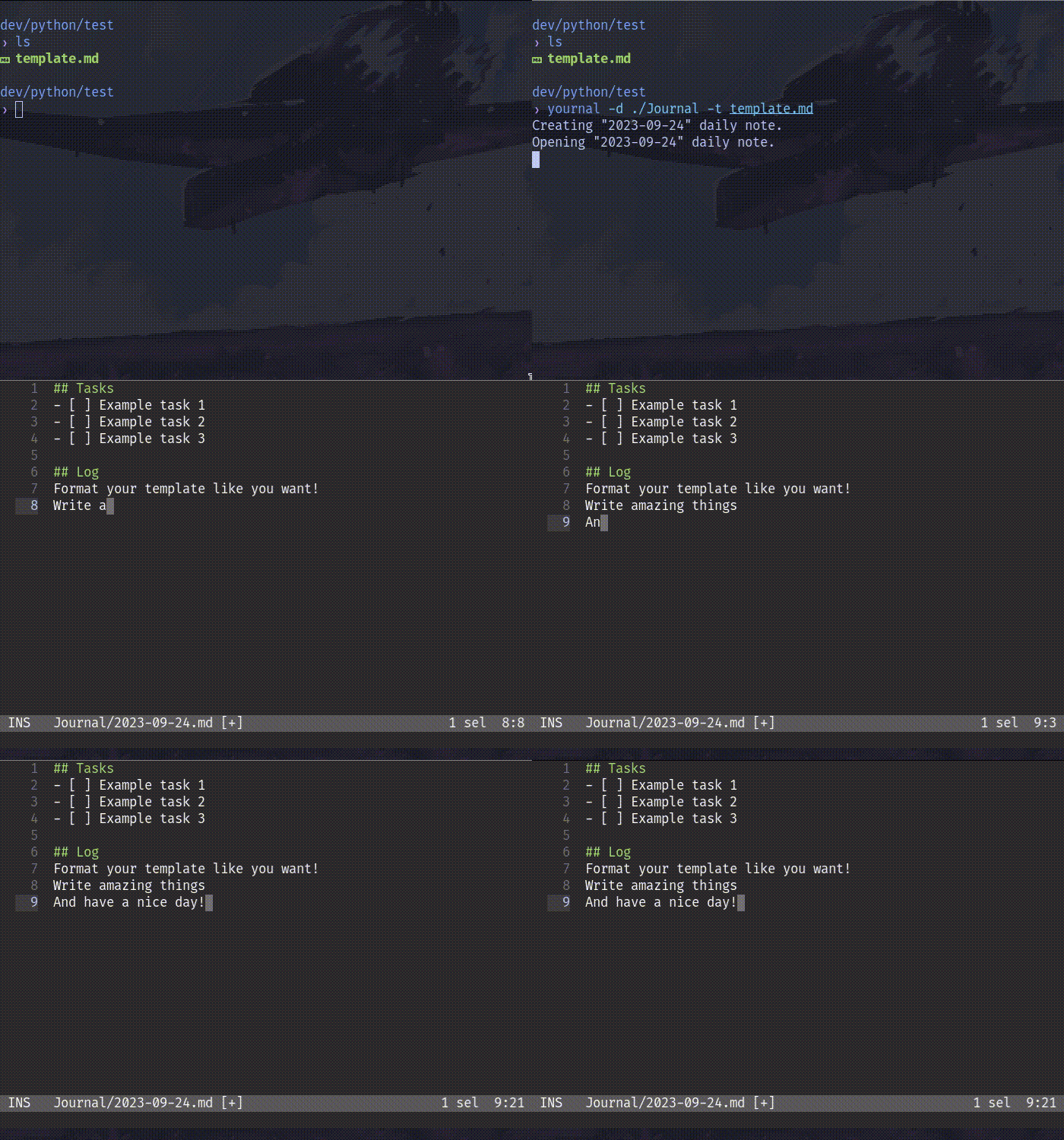
Features
- 🍃 Lighweight, fast and snappy. It is a pure Python script.
- 📅
[yesterday | today | tomorrow ]date navigation. - 🔧 Enviroment variables based configuration.
- 📄 Simple template support.
Usage
🍃 First open
In your shell, you can try one of these commands:
python yournal.py
./yournal.py
Or if you installed it..
yournal
📅 Open/create daily note by date
yournal [yesterday|today|tomorrow]
By default, the daily note will be opened with your
EDITORvariable. If this fails, the default text editor of your system will be used.
🔧📄 Configuration and templates
yournal -d <path/to/dir> -t <path/to/template>
For persistent configuration see this.
Installation
Minium Python version: 3.8
Pipx (Recommended)
The easy way. If you have Pipx installed simply type in your shell:
pipx install yournal
Pip
The classic way. Type in your shell:
pip install yournal
AUR (Arch Linux)

Use an AUR helper such as:
paru -S yournal
yay -S yournal
Manual
Download the lastest release and get the yournal.py file.
You can use this script directly with python yournal.py, but for a better integration, add the yournal.py file to your system PATH.
- For example, a common Linux user PATH is:
~/.local/bin. - For other systems, please investigate.
Rename
yournal.pytoyournalif you want a shorter command.
Configuration
Enviroment variables
By default, yournal will create the daily notes in the current working directory, along with other settings To change this behavior, you need to set these environment variables on your system:
YOURNAL_EXTENSIONfor daily note file extensionYOURNAL_DIRECTORYfor the directory where the daily notes will be saved.YOURNAL_TEMPLATEfor the template file to use.
Shell aliases
You can create a shell alias for yournal with custom arguments.
In Bash you can do this by adding the following to your .bashrc file. For Zsh, in .zshrc.
alias yournal="yournal -d path/to/dir -t path/to/template"
CLI (Command Line Interface)
usage: yournal [-x EXTENSION] [-d DIRECTORY] [-t TEMPLATE] [-h] [-i] [-e EDITOR] [{yesterday,today,tomorrow}]

Fast (y)ournal script to make daily notes on your terminal.

dates:
  {yesterday,today,tomorrow}
                        open daily note by date. DEFAULT: today

paths:
  -x EXTENSION, --extension EXTENSION
                        set daily note file extension. DEFAULT: "md" (markdown)
  -d DIRECTORY, --directory DIRECTORY
                        directory where save your daily notes. DEFAULT: cwd (current working directory)
  -t TEMPLATE, --template TEMPLATE
                        template file to use

options:
  -h, --help            show this help message and exit
  -i, --ignore          ignore EDITOR environment variable and use system editor
  -e EDITOR, --editor EDITOR
                        use a custom editor command

By default, yournal uses these environment variables when no arguments are provided:
    YOURNAL_EXTENSION for daily note file extension
    YOURNAL_DIRECTORY for DIRECTORY
    YOURNAL_TEMPLATE for TEMPLATE
1 maintainer

Metadata
1 maintainer
Release files for yournal 1.1.2
For a detailed explanation of source distributions (sdists) and built distributions (wheels), please see the package formats documentation.
Source distribution (sdist)
| File | Size | Uploaded | |
|---|---|---|---|
| yournal-1.1.2.tar.gz | 4.5 kB | Details |
Built distribution (wheel)
| File | Interpreter | ABI | Platform | Reset |
|---|---|---|---|---|
| yournal-1.1.2-py3-none-any.whl | Python 3 | none | any | Details |
Total release size: 9.9 kB
Release files / yournal-1.1.2.tar.gz
| Download URL | yournal-1.1.2.tar.gz |
|---|---|
| Size | 4.5 kB |
| Tags | Source |
|
SHA-256 checksum How to use checksums |
2f2c18935cf0359c1a41e3c92cd90c2de3195d9a43d31d6453392326fefb6316
|
|
BLAKE2b-256 checksum How to use checksums |
32ff4517a2ab3b17149d004f451ca5387ba7ffe9e48e39cdd51968a6dacf73c4
|
| Upload date | |
|
Uploaded using Trusted Publishing? What is trusted publishing? |
No |
| Uploaded via |
twine/4.0.2 CPython/3.9.18
|
Release files / yournal-1.1.2-py3-none-any.whl
| Download URL | yournal-1.1.2-py3-none-any.whl |
|---|---|
| Size | 5.4 kB |
| Tags | Python 3 |
|
SHA-256 checksum How to use checksums |
ca547fb8f6f1fef1e567d34e403886a3fa5c711c5e621cbccfec3f81ee1c151f
|
|
BLAKE2b-256 checksum How to use checksums |
aec9798092206ca6985d6df2715d5b03d0468c4f313ff91cb5a51b569ef0e587
|
| Upload date | |
|
Uploaded using Trusted Publishing? What is trusted publishing? |
No |
| Uploaded via |
twine/4.0.2 CPython/3.9.18
|














