

YouTer is a small terminal-based gui program that simplifies youtube-dl into a more user-friendly experience for downloading youtube videos and audios in mp4 or mp3 formats. There is also an option to enter your own custom youtube-dl commands.
Table of contents
Installation
Install from Source
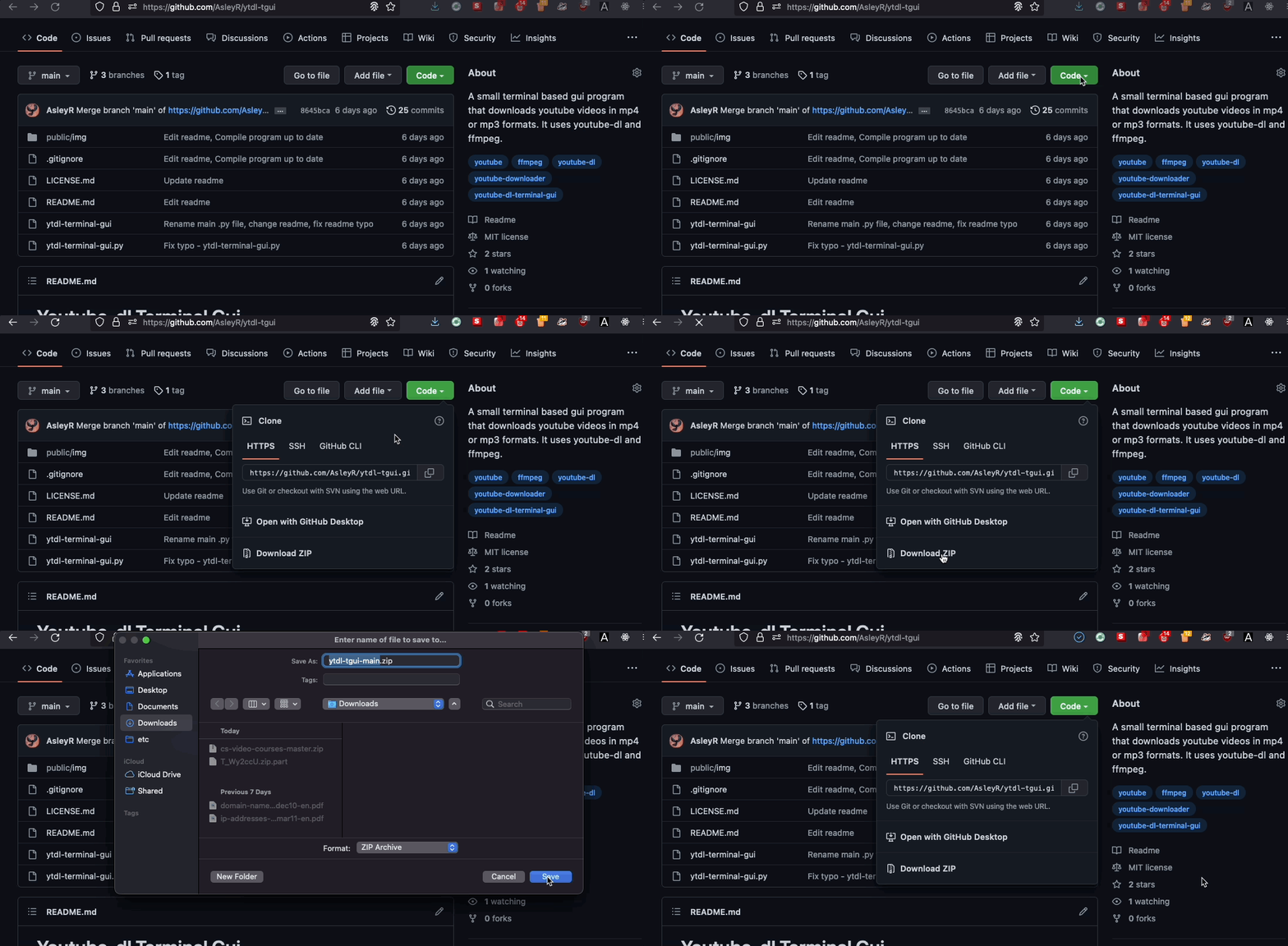
- Clone the repo into your local machine and voilá!
Usage
There are several ways in which you can open the program.
For instance, you can run the program with python, either by running the __main__.py directly, or by running the cloned repo itself.
# Run __main__.py option
python3 -m __main__.py
# Run the cloned repo folder
python3 ytdl-tgui
Moreover, there is also the option of compiling the __main__.py into an exectubable .exe file using PyInstaller.
For that, I recommend you read first the guide on how to build the .exe with PyInstaller.
Dependencies
YouTer uses the youtube-dl and ffmpeg packages in the background. To install them, you can run the following commands:
# Installs youtube_dl
pip install youtube_dl
# Installs ffmpeg
pip install ffmpeg
Don't have pip? Scroll down a little to see how to install it.
Pip installation
Linux & MacOs
python3 -m ensurepip
Windows
py -m ensurepip
Please note that the installation of pip in windows can sometimes be... complicated. If you are having problems making pip work, I recommend you this video guide on how to install it.
You don't have python either? You can download it from the oficial website here.
How does the program work?
YouTer is simply a kind of gui wrapper of the youtube-dl command tool. A good way to explain how it works would be like this:
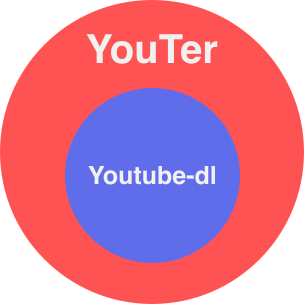
So basically, any command that works in youtube-dl works with this program too. If you check the __main__.py file, you may find that YouTer works by simply running youtube-dl commands in the background.
That's why there's an option inside the program to enter your custom youtube-dl commands, for those who want more control over the output command.
Contributions
Any type of contributions are welcome! Please read the contribution guidelines first before all.
License
1 maintainer

Release files for YouTer 1.0.7
For a detailed explanation of source distributions (sdists) and built distributions (wheels), please see the package formats documentation.
Source distribution (sdist)
| File | Size | Uploaded | |
|---|---|---|---|
| YouTer-1.0.7.tar.gz | 9.3 kB | Details |
Built distribution (wheel)
| File | Interpreter | ABI | Platform | Reset |
|---|---|---|---|---|
| YouTer-1.0.7-py3-none-any.whl | Python 3 | none | any | Details |
Total release size: 22.6 kB
Release files / YouTer-1.0.7.tar.gz
| Download URL | YouTer-1.0.7.tar.gz |
|---|---|
| Size | 9.3 kB |
| Tags | Source |
|
SHA-256 checksum How to use checksums |
2ca6fa544120b4565cb3699e64aabe4c51073a54af857ac5b7864b0239845b18
|
|
BLAKE2b-256 checksum How to use checksums |
9a9466b45d6656f9dbe745ad4bf3d4103a56158c3355cc5759374ec633904d5e
|
| Upload date | |
|
Uploaded using Trusted Publishing? What is trusted publishing? |
No |
| Uploaded via |
twine/4.0.1 CPython/3.8.8
|
Release files / YouTer-1.0.7-py3-none-any.whl
| Download URL | YouTer-1.0.7-py3-none-any.whl |
|---|---|
| Size | 13.3 kB |
| Tags | Python 3 |
|
SHA-256 checksum How to use checksums |
3a68f291b3530c31a1835e17cdfea90581301dc2c4bfdd2f0bcb43e6249dd96c
|
|
BLAKE2b-256 checksum How to use checksums |
e3f3dc04d29843b21629cfce51764cb649e7fc4b369bb22b4e97a9ef0b802967
|
| Upload date | |
|
Uploaded using Trusted Publishing? What is trusted publishing? |
No |
| Uploaded via |
twine/4.0.1 CPython/3.8.8
|














