
Youtube_subscription_manager




- Description
- Installation
- Usage
- Commands
- Support Platforms
- Example
- Type of File
- Cache
- Requirements
- Compatible
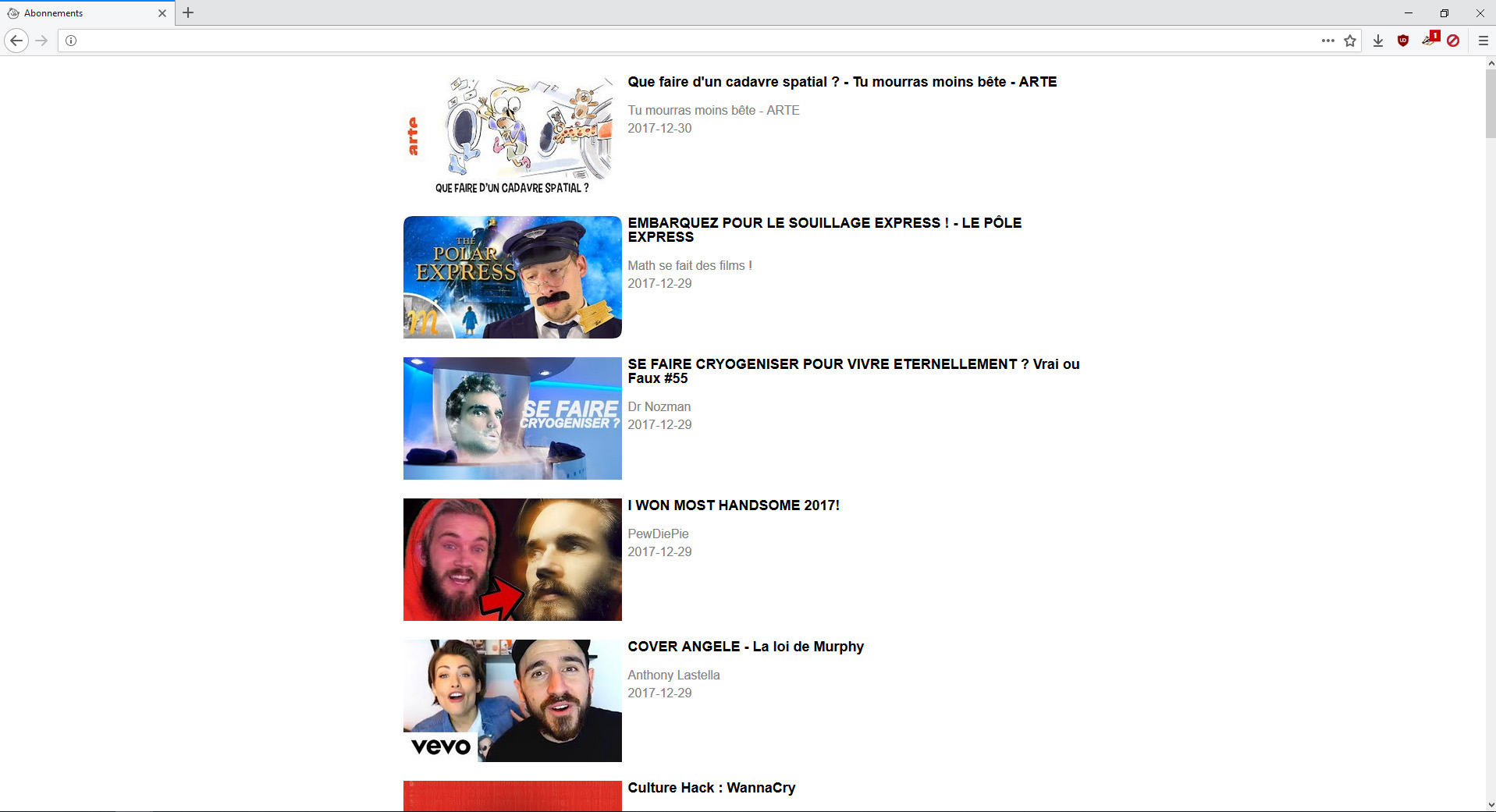
- Screenshots
If you have a problem, create an issue rather than sending me an email otherwise the response time will be longer, Thanks.
Description
Youtube_subscription_manager is an alternative to youtube.com to retrieve the videos of your subscriptions feed without requires an account (You can also recover the videos of other platform).
It can gather informations about every video in a playlist, a channel or your subsciptions feed and outputs it as a html page, a detailed list or a list of links.
Installation
- Clone the project:
git clone https://github.com/sawyerf/youtube-sm.git - Open the folder you just cloned :
cd youtube-sm - Execute the setup:
sudo python3 setup.py install - Recover your subscription file in youtube and you are ready to go !
Usage
- Download your subscriptions configuration from youtube.com (here)
- Once this is done, you may load it by using the following command :
youtube-sm --init [file]
- Finally, you can start using the program using the commands shown below :
youtube-sm [OPTIONS]
Commands
-a           URL       Add a sub to your sub list.
-e                     Edit your sub list.
-h                     Print this help text and exit.
-l           URL       Analyze only one sub.
-m           MODE      Choose the type of the output file (html, json, raw, list).
-r                     Remove the cache.
-t           DAYS      Select how many DAYS ago the last content written to your file will be dated .
-v                     Verbose.
--af         FILE      Add a list of sub to your sub list.
--ax         FILE      Add a xml file in your sub list.
--cat                  View your subscriptions.
--css        STYLE     Export the css files (light, dark, switch).
--dead                 Show the dead channels + those who posted no videos.
--help                 Print this help text and exit.
--html                 Recover sub with html page instead of RSS. This method recover more videos.
--init       FILE      Remove all your subs and add new.
--loading              Print a progress bar.
--old                  Show channels who didn't post videos since DAYS.
--output     FILE      Write the output in FILE.
--version              Print version.
--test
Support Platforms
Dailymotion- Evous Manifestation
- Infoconcert
- La Quadrature du Net
- Peertube
- Revolution Permanente
- Youtube
Example
- Basic
youtube-sm
- Your sub since 1 month
youtube-sm -t 30 --css --loading
- All the videos of a channel
youtube-sm -l https://www.youtube.com/channel/UC-lHJZR3Gqxm24_Vd_AJ5Yw -t -1 -m list --loading -r --output test.csv
- Add a sub
youtube-sm -a https://www.youtube.com/channel/UC-lHJZR3Gqxm24_Vd_AJ5Yw
Type of File
Raw :
{date} {video_id} {channel_id} {title} {channel} {link_pic}
List :
https://www.youtube.com/watch?v={video_id}
View :
{views}
Json :
{
	"url": {
		"content": "https://www.youtube.com/watch?v=ID",
		"image": "https://i.ytimg.com/vi/ID/mqdefault.jpg",
		"uploader": "https://youtube.com/channel/ID"
	},
	"date": "2020-04-23 16:08:22",
	"title": "Video Title",
	"uploader": "Channel",
	"views": "228283"
}
Html :
<!--NEXT -->
<div class="video">
	<a class="left" href="{video_id}">
		<div class="container">
			<img src="{link_pic}">
			<div class="bottom-right">{time}</div>
		</div>
	</a>
	<a href="https://www.youtube.com/watch?v={video_id}"><h4>{title}</h4> </a>
	<a href="https://www.youtube.com/channel/{channel_id}"> <p>{channel}</p> </a>
	<p>{date}</p>
	<p class="clear"></p>
</div>
Cache
3 files are generated by the program : sub.swy, log and data/.
sub.swyis a list of yours subscriptions.logcontains the script's time of execution.data/is a folder where the information for every video are stored.
These 3 files are generated in:
- Windows:
C:\Users\<name>\.youtube_sm\. - Linux/MacOS:
/home/<name>/.cache/youtube_sm/..
Requirements
- Python 3
Compatible
- Linux
- Windows
- Android (Termux)
- MacOS
Screenshots

1 maintainer

Metadata
1 maintainer
Release files for youtube-sm 2024.6.19
For a detailed explanation of source distributions (sdists) and built distributions (wheels), please see the package formats documentation.
Source distribution (sdist)
| File | Size | Uploaded | |
|---|---|---|---|
| youtube_sm-2024.6.19.tar.gz | 29.3 kB | Details |
Built distribution (wheel)
| File | Interpreter | ABI | Platform | Reset |
|---|---|---|---|---|
| youtube_sm-2024.6.19-py3-none-any.whl | Python 3 | none | any | Details |
Total release size: 66.7 kB
Release files / youtube_sm-2024.6.19.tar.gz
| Download URL | youtube_sm-2024.6.19.tar.gz |
|---|---|
| Size | 29.3 kB |
| Tags | Source |
|
SHA-256 checksum How to use checksums |
f908e4a4079edd912de004026f96fd6580f7e67de477494ff8fa6b7240c4b47a
|
|
BLAKE2b-256 checksum How to use checksums |
e51bb8fb24bbfc9de8ffa696c45541779a341e2257c74fe50916a8bc7d51d0b0
|
| Upload date | |
|
Uploaded using Trusted Publishing? What is trusted publishing? |
No |
| Uploaded via |
twine/5.1.0 CPython/3.11.3
|
Release files / youtube_sm-2024.6.19-py3-none-any.whl
| Download URL | youtube_sm-2024.6.19-py3-none-any.whl |
|---|---|
| Size | 37.4 kB |
| Tags | Python 3 |
|
SHA-256 checksum How to use checksums |
0beeb650e4b1913a705ed34f44c1e779ee7a03ddf08f59d8320445e3363fd3d2
|
|
BLAKE2b-256 checksum How to use checksums |
be522be2e2803abf3df3618480f0174b0ac0996058bba0538e613c9fa245bcda
|
| Upload date | |
|
Uploaded using Trusted Publishing? What is trusted publishing? |
No |
| Uploaded via |
twine/5.1.0 CPython/3.11.3
|














