






Zoish
Zoish is a Python package that simplifies the machine learning process by using SHAP values for feature importance. It integrates with a range of machine learning models, provides feature selection to enhance performance, and improves model interpretability. With Zoish, users can also visualize feature importance through SHAP summary and bar plots, creating an efficient and user-friendly environment for machine learning development.
Introduction
Zoish is a powerful tool for streamlining your machine learning pipeline by leveraging SHAP (SHapley Additive exPlanations) values for feature selection. Designed to work seamlessly with binary and multi-class classification models as well as regression models from sklearn, Zoish is also compatible with gradient boosting frameworks such as CatBoost, LightGBM and GPBoost.
Features
-
Model Flexibility: Zoish exhibits outstanding flexibility as it can work with most of the estimators and others supported by and even GPBoost or a superior estimator emerging from a tree-based optimization process. This enables it to integrate seamlessly into binary or multi-class Sklearn classification models, all Sklearn regression models, as well as with advanced gradient boosting frameworks such as CatBoost, LightGBM and GPBoost.
-
Feature Selection: By utilizing SHAP values, Zoish efficiently determines the most influential features for your predictive models. This improves the interpretability of your model and can potentially enhance model performance by reducing overfitting.
-
Visualization: Zoish includes capabilities for plotting important features using SHAP summary plots and SHAP bar plots, providing a clear and visual representation of feature importance.
Dependencies
The core dependency of Zoish is the shap package, which is used to compute the SHAP values for tree based machine learning model and others too. SHAP values are a unified measure of feature importance and they offer an improved interpretation of machine learning models. They are based on the concept of cooperative game theory and provide a fair allocation of the contribution of each feature to the prediction of each instance.
Installation
To install Zoish, use pip:
Installation
Zoish package is available on PyPI and can be installed with pip:
pip install zoish
For log configuration in development environment use
export env=dev
For log configuration in production environment use
export env=prod
Examples
# Built-in libraries
import pandas as pd

# Scikit-learn libraries for model selection, metrics, pipeline, impute, preprocessing, compose, and ensemble
from sklearn.compose import ColumnTransformer
from sklearn.ensemble import RandomForestClassifier
from sklearn.feature_selection import SelectFromModel
from sklearn.impute import SimpleImputer
from sklearn.metrics import classification_report, confusion_matrix, f1_score, make_scorer
from sklearn.model_selection import GridSearchCV, KFold, train_test_split
from sklearn.pipeline import Pipeline
from sklearn.preprocessing import StandardScaler

# Other libraries
from category_encoders import TargetEncoder
from xgboost import XGBClassifier
from zoish.feature_selectors.shap_selectors import ShapFeatureSelector, ShapPlotFeatures
import logging
from zoish import logger
logger.setLevel(logging.ERROR)
from feature_engine.imputation import (
    CategoricalImputer,
    MeanMedianImputer
    )

# Set logging level
logger.setLevel(logging.ERROR)
Example: Audiology (Standardized) Data Set
https://archive.ics.uci.edu/ml/datasets/Audiology+%28Standardized%29
Read data
urldata = "https://archive.ics.uci.edu/ml/machine-learning-databases/lymphography/lymphography.data"
urlname = "https://archive.ics.uci.edu/ml/machine-learning-databases/lung-cancer/lung-cancer.names"
# column names
col_names = [
    "class",
    "lymphatics",
    "block of affere",
    "bl. of lymph. c",
    "bl. of lymph. s",
    "by pass",
    "extravasates",
    "regeneration of",
    "early uptake in",
    "lym.nodes dimin",
    "lym.nodes enlar",
    "changes in lym.",
    "defect in node",
    "changes in node",
    "special forms",
    "dislocation of",
    "exclusion of no",
    "no. of nodes in",

]

data = pd.read_csv(urldata,names=col_names)
data.head()
Define labels and train-test split
data.loc[(data["class"] == 1) | (data["class"] == 2), "class"] = 0
data.loc[data["class"] == 3, "class"] = 1
data.loc[data["class"] == 4, "class"] = 2
data["class"] = data["class"].astype(int)
Train test split
X = data.loc[:, data.columns != "class"]
y = data.loc[:, data.columns == "class"]

X_train, X_test, y_train, y_test = train_test_split(
    X, y, test_size=0.33,  random_state=42
)
Defining the feature pipeline steps:
Here, we use an untuned XGBClassifier model with the ShapFeatureSelector.In the next section, we will repeat the same process but with a tuned XGBClassifier. The aim is to demonstrate that a better estimator can yield improved results when used with the ShapFeatureSelector.
estimator_for_feature_selector= XGBClassifier()
estimator_for_feature_selector.fit(X_train, y_train)
shap_feature_selector = ShapFeatureSelector(model=estimator_for_feature_selector, num_features=5, cv = 5, scoring='accuracy', direction='maximum', n_iter=10, algorithm='auto')

# Define pre-processing for numeric columns (float and integer types)
numeric_features = X_train.select_dtypes(include=['int64', 'float64']).columns
numeric_transformer = Pipeline(steps=[
    ('imputer', SimpleImputer(strategy='mean')),
    ('scaler', StandardScaler())])

# Define pre-processing for categorical features
categorical_features = X_train.select_dtypes(include=['object']).columns
categorical_transformer = Pipeline(steps=[
    ('imputer', SimpleImputer(strategy='constant', fill_value='missing')),
    ('encoder', TargetEncoder(handle_missing='return_nan'))])

# Combine preprocessing into one column transformer
preprocessor = ColumnTransformer(
    transformers=[
        ('num', numeric_transformer, numeric_features),
        ('cat', categorical_transformer, categorical_features)])

# Feature Selection using ShapSelector
feature_selection = shap_feature_selector

# Classifier model
classifier = RandomForestClassifier(n_estimators=100)

# Create a pipeline that combines the preprocessor with a feature selection and a classifier
pipeline = Pipeline(steps=[('preprocessor', preprocessor),
                           ('feature_selection', feature_selection),
                           ('classifier', classifier)])

# Fit the model
pipeline.fit(X_train, y_train)

# Predict on test data
y_test_pred = pipeline.predict(X_test)

# Output first 10 predictions
print(y_test_pred[:10])
Check performance of the Pipeline
print("F1 score : ")
print(f1_score(y_test, y_test_pred,average='micro'))
print("Classification report : ")
print(classification_report(y_test, y_test_pred))
print("Confusion matrix : ")
print(confusion_matrix(y_test, y_test_pred))
Use better estimator:
In this iteration, we will utilize the optimally tuned estimator with the ShapFeatureSelector, which is expected to yield improved results."
int_cols =  X_train.select_dtypes(include=['int']).columns.tolist()


# Define the XGBClassifier
xgb_clf = XGBClassifier()

# Define the parameter grid for XGBClassifier
param_grid = {
    'learning_rate': [0.01, 0.1],
    'max_depth': [ 4, 5],
    'min_child_weight': [1, 2, 3],
    'gamma': [0, 0.1, 0.2],
}

# Define the scoring function
scoring = make_scorer(f1_score, average='micro')  # Use 'micro' average in case of multiclass target

# Set up GridSearchCV
grid_search = GridSearchCV(xgb_clf, param_grid, cv=5, scoring=scoring, verbose=1)
grid_search.fit(X_train, y_train)
# Fit the GridSearchCV object
estimator_for_feature_selector= grid_search.best_estimator_
shap_feature_selector = ShapFeatureSelector(model=estimator_for_feature_selector, num_features=5, scoring='accuracy', algorithm='auto',cv = 5, n_iter=10, direction='maximum')


pipeline =Pipeline([
            # int missing values imputers
            ('floatimputer', MeanMedianImputer(
                imputation_method='mean', variables=int_cols)),

            ('shap_feature_selector', shap_feature_selector),
            ('classfier', RandomForestClassifier(n_estimators=100))


 ])


# Fit the model
pipeline.fit(X_train, y_train)

# Predict on test data
y_test_pred = pipeline.predict(X_test)

# Output first 10 predictions
print(y_test_pred[:10])
Performance has improved
print("F1 score : ")
print(f1_score(y_test, y_test_pred,average='micro'))
print("Classification report : ")
print(classification_report(y_test, y_test_pred))
print("Confusion matrix : ")
print(confusion_matrix(y_test, y_test_pred))

#### Shap related plots
Plot the features importance
plot_factory = ShapPlotFeatures(shap_feature_selector)
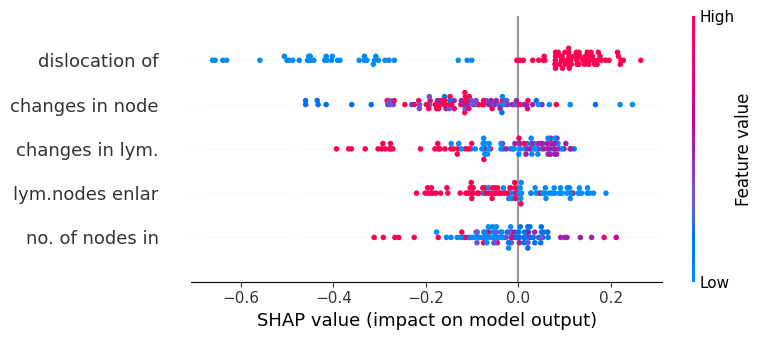
Summary Plot of the selected features
plot_factory.summary_plot()
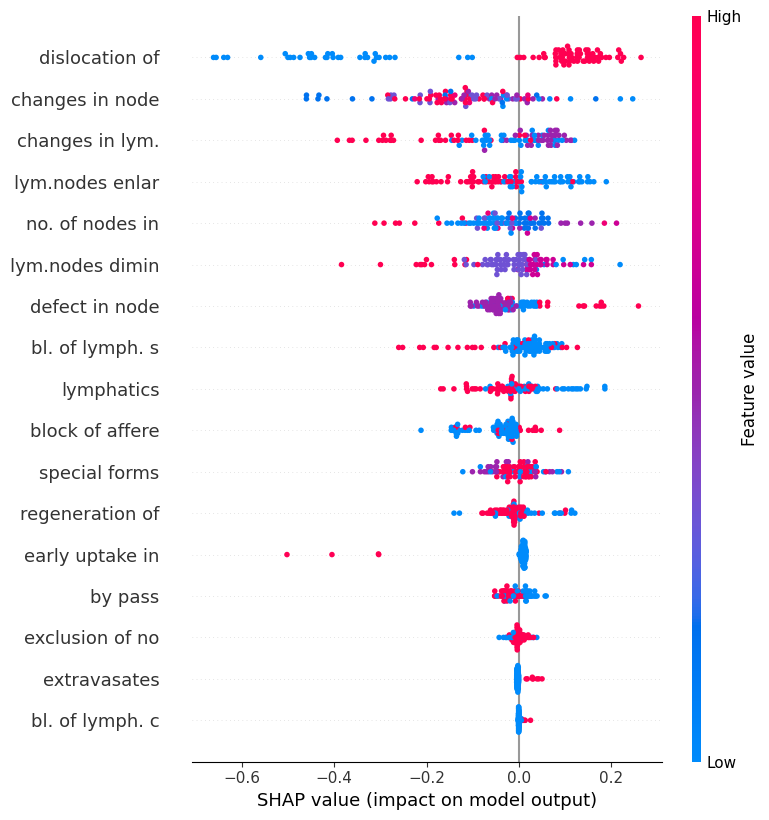
Summary Plot of the all features
plot_factory.summary_plot_full()
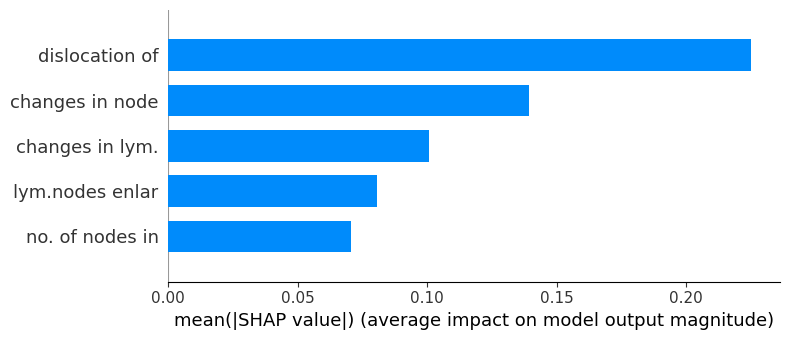
Bar Plot of the selected features
plot_factory.bar_plot()
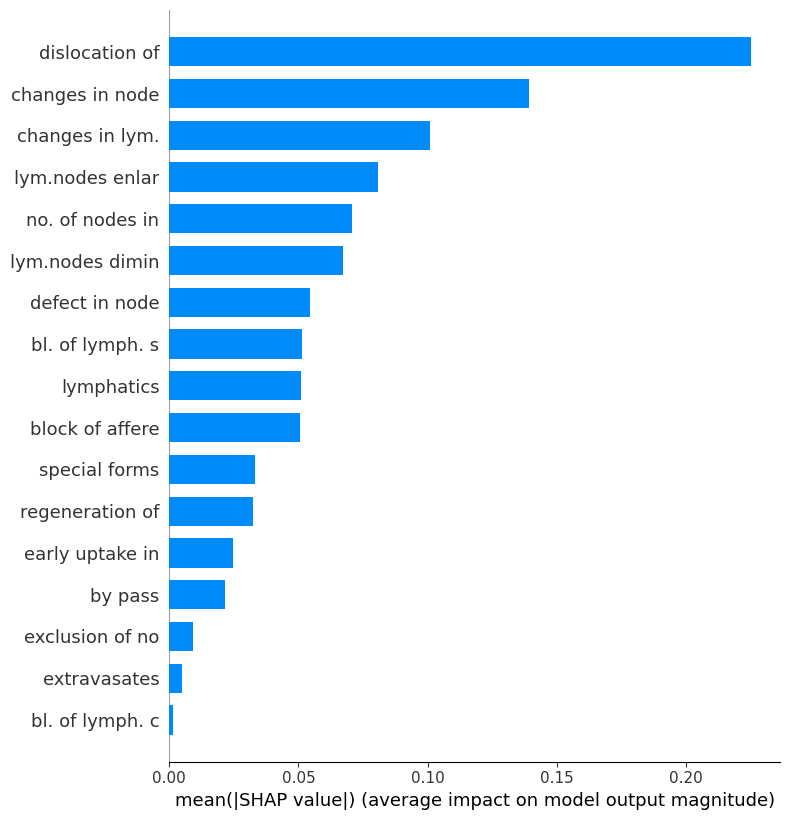
Bar Plot of the all features
plot_factory.bar_plot_full()
More examples are available in the examples.
License
Licensed under the BSD 2-Clause License.
1 maintainer

Metadata
1 maintainer
Release files for zoish 5.0.8
For a detailed explanation of source distributions (sdists) and built distributions (wheels), please see the package formats documentation.
Source distribution (sdist)
| File | Size | Uploaded | Provenance | Actions |
|---|---|---|---|---|
| zoish-5.0.8.tar.gz | 18.9 kB | Without provenance | Details for zoish-5.0.8.tar.gz |
Built distribution (wheel)
| File | Interpreter | ABI | Platform | Actions Reset |
|---|---|---|---|---|
| zoish-5.0.8-py3-none-any.whl | Python 3 | none | any | Details for zoish-5.0.8-py3-none-any.whl |
Total release size: 34.1 kB
Release files / zoish-5.0.8.tar.gz
| Download URL | zoish-5.0.8.tar.gz |
|---|---|
| Size | 18.9 kB |
| Tags | Source |
|
SHA-256 checksum How to use checksums |
d711f93fa175ee2dd765f2fc4140bdfa51c6873d150db550d468027a5aca5431
|
|
BLAKE2b-256 checksum How to use checksums |
49758d5508bc1c9ac5d5dfc42ecbacdc3aacacae55bd6a91e03eef008970f8e3
|
| Upload date | |
|
Uploaded using Trusted Publishing? What is trusted publishing? |
No |
| Uploaded via |
twine/6.1.0 CPython/3.13.7
|
Release files / zoish-5.0.8-py3-none-any.whl
| Download URL | zoish-5.0.8-py3-none-any.whl |
|---|---|
| Size | 15.2 kB |
| Tags | Python 3 |
|
SHA-256 checksum How to use checksums |
b2abc370b936944bffdab5f0722c65cee38545687cba2f4875a2842de7d45078
|
|
BLAKE2b-256 checksum How to use checksums |
1d9a6f8e3a6f4e8634fdfba9c898708e6f6c978ee0701eaa477ddad6e33d8b17
|
| Upload date | |
|
Uploaded using Trusted Publishing? What is trusted publishing? |
No |
| Uploaded via |
twine/6.1.0 CPython/3.13.7
|
Security for zoish 5.0.8
Provenance
Provenance describes where a file came from. On PyPI, provenance is shared via attestations, which provide a verifiable record of the build or publishing details. View details, limitations and caveats.
No provenance found
None of the files in this release were uploaded with provenance metadata.
A note on package security
PyPI is a repository for distributing packages, not a service for auditing them. While third-party security researchers and our staff do their best to detect and remove malicious packages, PyPI cannot guarantee the quality, security or suitability of any given package.
To learn more about protecting yourself from malicious actors, visit our package security documentation.














