
AIS Cursor-On-Target Gateway.

Project description
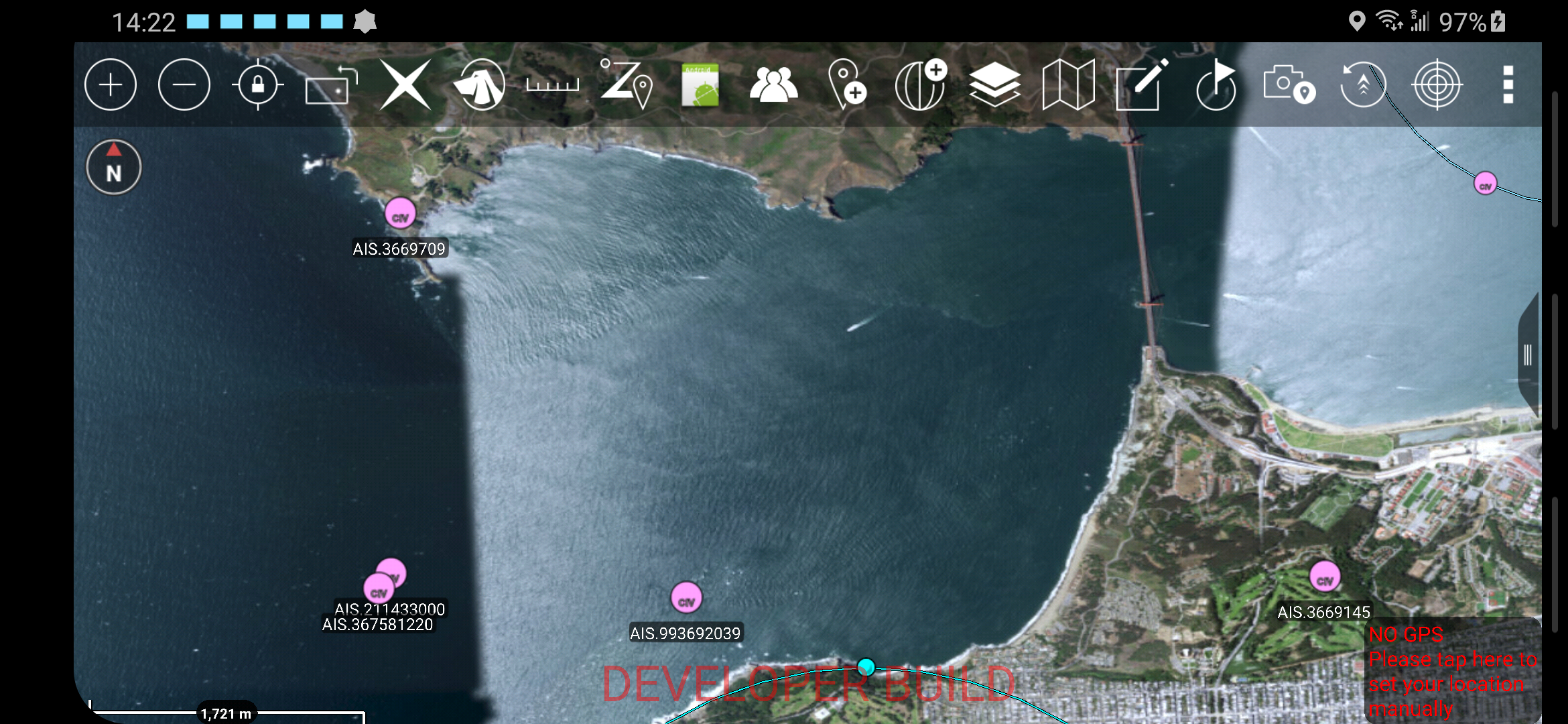
AISCOT transforms AIS data to Cursor-On-Target for display on Situational Awareness applications like ATAK, WinTAK, iTAK, TAKX, COPERS, et al. See https://www.tak.gov/ for more information on the TAK program.
AISCOT was original developed to support an open ocean boat race in the Northern Pacific Ocean, as described in this article: http://ampledata.org/boat_race_support.html
AISCOT Concept of Operation
AISCOT can operate in two different modes, as described in detail below:
AIS Over-the-air
AIS Aggregator
AIS Over-the-air Operation (RF)
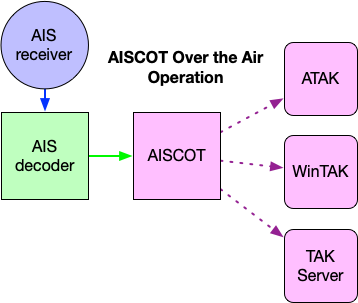
Receive AIS data from a VHF AIS receiver, such as the Megwatt dAISy+. From there AIS can be decoded by AIS Dispatcher and forwarded to AISCOT to be transformed to COT and transmitted to COT destinations.
AIS Aggregator Operation (AISHUB.com)
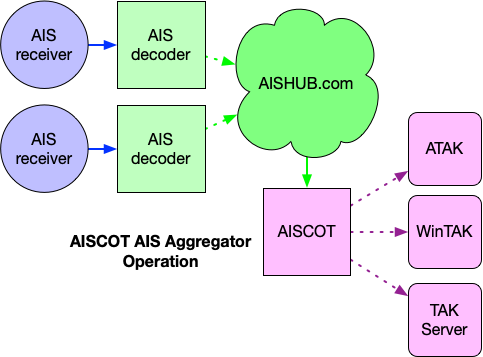
Receive AIS data from the AISHUB service. Requires a subscription to AISHUB.
Support Development
Tech Support: Email support@undef.net or Signal/WhatsApp: +1-310-621-9598
This tool has been developed for the Disaster Response, Public Safety and Frontline Healthcare community. This software is currently provided at no-cost to users. Any contribution you can make to further this project’s development efforts is greatly appreciated.

Installation
AISCOT functionality is provided by a command-line tool called aiscot, which can be installed several ways.
AISCOT requires Python 3.6 or above.
Installing as a Debian/Ubuntu Package [Use Me!]:
$ wget https://github.com/ampledata/pytak/releases/latest/download/python3-pytak_latest_all.deb
$ sudo apt install -f ./python3-pytak_latest_all.deb
$ wget https://github.com/ampledata/aiscot/releases/latest/download/python3-aiscot_latest_all.deb
$ sudo apt install -f ./python3-aiscot_latest_all.deb
Install from the Python Package Index [Alternative]:
$ python3 -m pip install -U pytak
$ python3 -m pip install -U aiscot
Install from this source tree [Developer]:
$ git clone https://github.com/ampledata/aiscot.git
$ cd aiscot/
$ python3 setup.py aiscot
Usage
AISCOT can be configured with a INI-style configuration file, or using environmental variables.
- Command-line options:
- -h, --help
show this help message and exit
- -c CONFIG_FILE, --CONFIG_FILE
If specified, use this config file. Default ‘config.ini’.
- Configuration options:
- COT_URLstr, default: udp://239.2.3.1:6969
URL to COT destination. Must be a URL, e.g. tcp://1.2.3.4:1234 or tls://...:1234, etc.
- AIS_PORTint, default: 5050
AIS UDP Listen Port.
- COT_STALEint, default: 3600
CoT Stale period (“timeout”), in seconds. Default 3600 seconds (1 hour).
- COT_TYPEstr, default: a-u-S-X-M
Override COT Event Type (“marker type”).
- AISHUB_URLstr, optional
AISHUB feed URL. See AISHUB usage notes in README below.
- KNOWN_CRAFTstr, optional
Known Craft hints file. CSV file containing callsign/marker hints.
- INCLUDE_ALL_CRAFTbool, optional
If using KNOWN_CRAFT, still include other craft not in our KNOWN_CRAFT list.
See example-config.ini in the source tree for example configuration.
COT destination notes
The COT_URL configuration option must be specified as a fully-qualified URL. By default this tool will send COT to the default ATAK & WinTAK network multicast UDP group & port: udp://239.2.3.1:6969. You can specify other destinations by either setting the COT_URL configuration option in the config INI, or by setting the COT_URL environmental variable.
Example COT_URL:
tcp://172.17.2.100:4242 : Send COT as TCP to host 172.17.2.100 on port 4242.
tls://192.168.2.1:8089 : Send COT as TLS to host 192.168.2.1 on port 8089. Requires setting additional environmental variables, see PyTAK TLS documentation.
udp://10.0.1.99:8087 : Send COT as unicast UDP to host 10.0.1.99 on port 8087.
AISHUB usage notes
AISHUB.com requires registration. Once registered the site will provide you with a Username that you’ll use with their feed. You’ll also need to specify a Bounding Box when accessing the feed.
The AISHUB_URL must be specified as follows:
https://data.aishub.net/ws.php?format=1&output=json&compress=0&username=AISHUB_USERNAME&latmin=BBOX_LAT_MIN&latmax=BBOX_LAT_MAX&lonmin=BBOX_LON_MON&lonmax=BBOX_LON_MAX
Replacing AISHUB_USERNAME with your AISHUB.com username, and specifying the Bounding Box is specified as follows:
- latminsigned float
The minimum latitude of the Bounding Box (degrees from Equator) as a signed float (use negative sign for East: -).
- latmaxsigned float
The maximum latitude of the Bounding Box (degrees from Equator) as a signed float (use negative sign for East: -).
- lonminsigned float
The minimum longitude of the Bound Box (degrees from Prime Meridian) as a signed float (use negative sign for North: -).
- lonmaxsigned float
The maximum longitude of the Bound Box (degrees from Prime Meridian) as a signed float (use negative sign for North: -).
For example, the following Bound Box paints a large swath around Northern California: latmin=35&latmax=38&lonmin=-124&lonmax=-121. This can be read as: “Between 35° and 38° latitude & -121° and -124° longitude”.
Example Setup
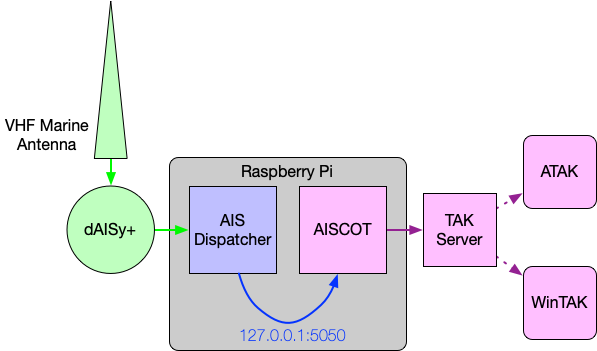
The following diagram shows an example setup of AISCOT utilizing a dAISy+ AIS receiver with an outboard Marine VHF antenna, a Raspberry Pi running aisdispatcher and AISCOT, forwarding COT to a TAK Server and WinTAK & ATAK clients.
Source
Copyright
aiscot Copyright 2022 Greg Albrecht <oss@undef.net>
pyAISm.py Copyright 2016 Pierre Payen
License
Copyright 2022 Greg Albrecht <oss@undef.net>
Licensed under the Apache License, Version 2.0 (the “License”); you may not use this file except in compliance with the License. You may obtain a copy of the License at http://www.apache.org/licenses/LICENSE-2.0
Unless required by applicable law or agreed to in writing, software distributed under the License is distributed on an “AS IS” BASIS, WITHOUT WARRANTIES OR CONDITIONS OF ANY KIND, either express or implied. See the License for the specific language governing permissions and limitations under the License.
pyAISm.py is licensed under the MIT License. See aiscot/pyAISm.py for details.
Release history Release notifications | RSS feed


Download files
Download the file for your platform. If you're not sure which to choose, learn more about installing packages.
Source Distribution
Built Distribution
Filter files by name, interpreter, ABI, and platform.
If you're not sure about the file name format, learn more about wheel file names.
Copy a direct link to the current filters
File details
Details for the file aiscot-5.1.0.tar.gz.
File metadata
- Download URL: aiscot-5.1.0.tar.gz
- Upload date:
- Size: 1.0 MB
- Tags: Source
- Uploaded using Trusted Publishing? No
- Uploaded via: twine/4.0.1 CPython/3.9.14
File hashes
| Algorithm | Hash digest | |
|---|---|---|
| SHA256 |
b1875e6587fb96b0a09735e54e43af041f2296cf83c06176c3efd397ad86c8b2
|
|
| MD5 |
8fc913bdbe9992c4e0a5e17680fa5695
|
|
| BLAKE2b-256 |
92a3d9fe38a953a502e08ce4319546d3b39ae7d8f05089d73810a6da71b43dbd
|
File details
Details for the file aiscot-5.1.0-py3-none-any.whl.
File metadata
- Download URL: aiscot-5.1.0-py3-none-any.whl
- Upload date:
- Size: 1.0 MB
- Tags: Python 3
- Uploaded using Trusted Publishing? No
- Uploaded via: twine/4.0.1 CPython/3.9.14
File hashes
| Algorithm | Hash digest | |
|---|---|---|
| SHA256 |
eeff1fbd185e6901df7e88b840f012c01b09eba77dcf19093424e4ce6bb6361c
|
|
| MD5 |
ab13dcb0412326b2219233a1f62231a5
|
|
| BLAKE2b-256 |
02b1fa13a4957198d0749402c3cf0abfc86daed17a3257d3746773ead6b2b90e
|






