
A PostgreSQL profiler for Django that uses pg_stat_statements extension

Project description
django-pg-trunk



A PostgreSQL query profiler for Django that uses pg_stat_statements extension.
Changelog
v0.1.0
- Project is created.
Requirements
- Python >= 3.7
- PostgreSQL >= 13
- Django >= 2.2
Installation
Install using pip:
pip install django-pg-trunk
Then add django_pg_trunk to your INSTALLED_APPS.
INSTALLED_APPS = [
    ...
    'django_pg_trunk',
]
django-pg-trunk will automatically install pg_stat_statements extension for PostgreSQL if it doesn't exist, however pg_stat_statements should be added to shared_preload_libraries in the PostgreSQL config. To do this, you can either run postgres server as following as in the test Docker Compose configuration:
postgres -c shared_preload_libraries=pg_stat_statements
or you should change postgresql.conf file manually and restart the postgres server. You can use the helper script to change postgresql.conf.
Usage
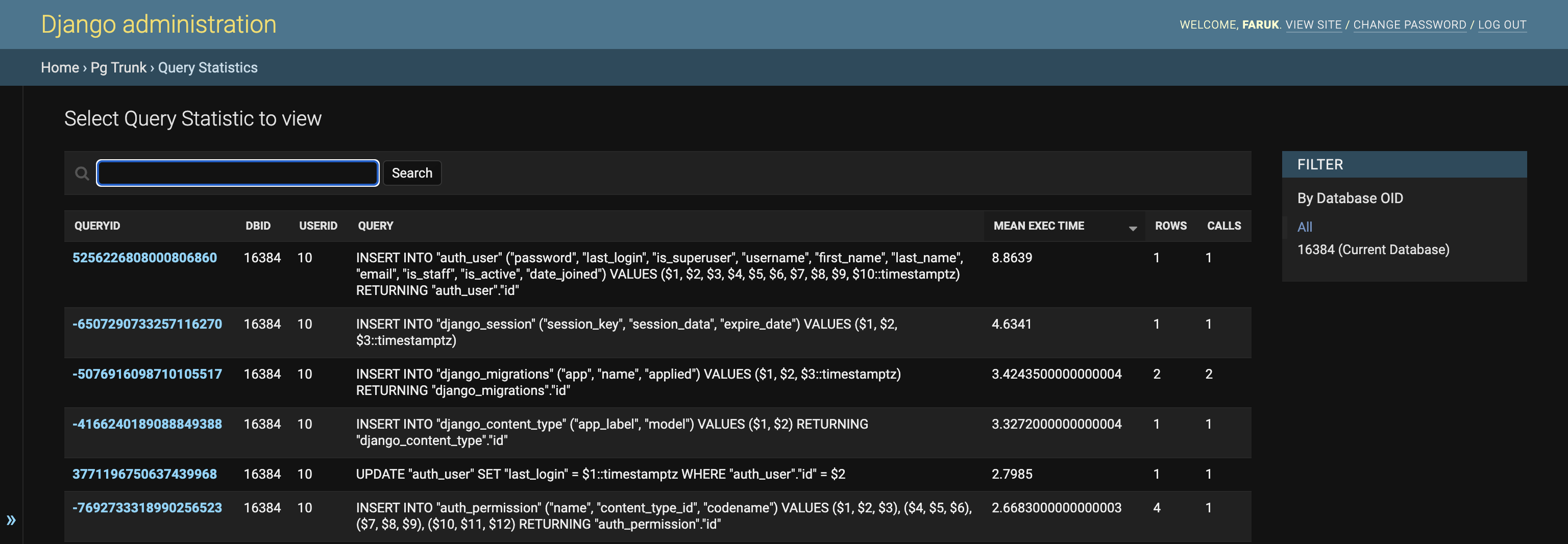
After installing the package, database queries can be examined under Pg Trunk > Query Statistics in Django admin.
Change view have more detailed statistics. All of the columns of pg_stat_statements can be found here.
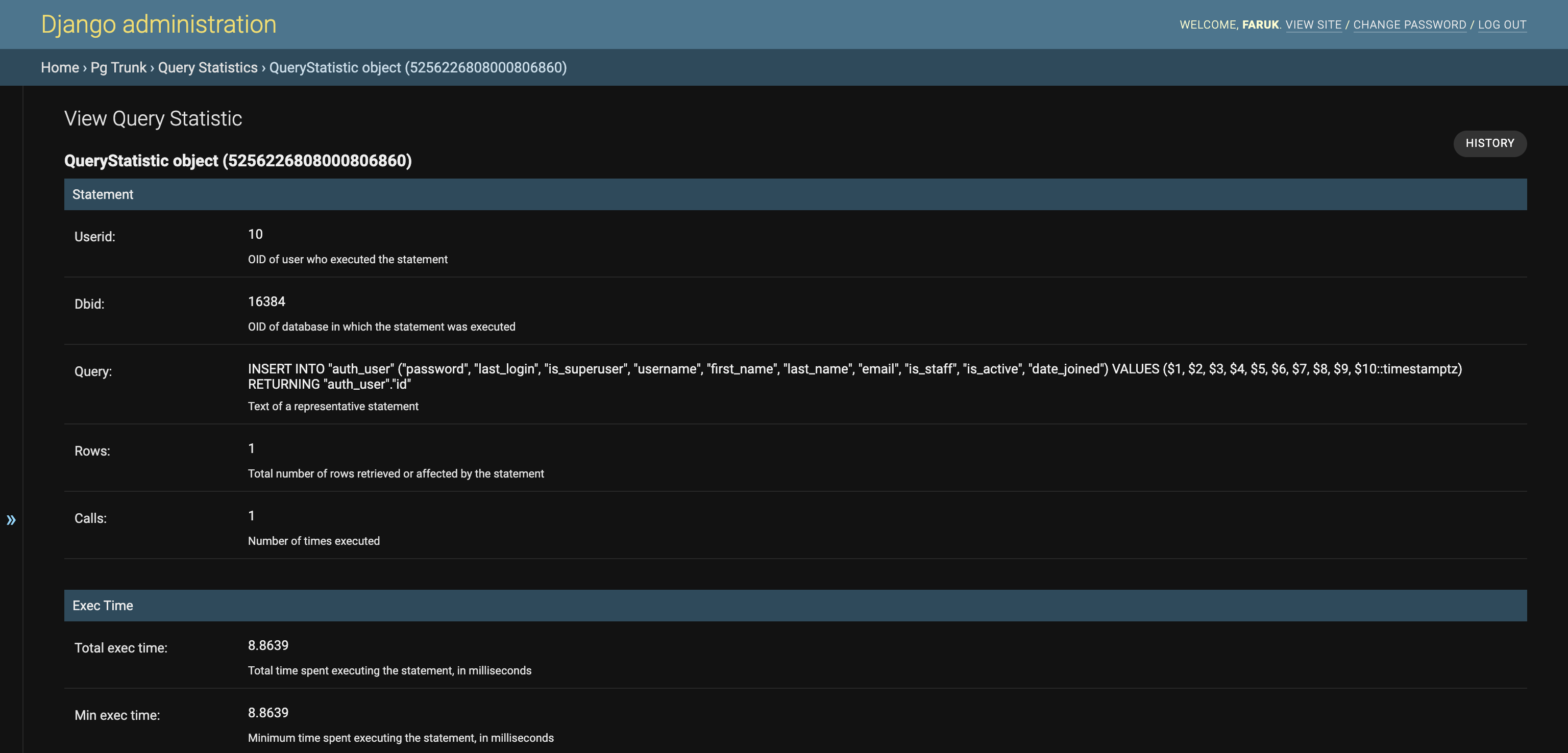
A possible usecase of QueryStatistic model can be running a cron job that checks if there is a query that takes more time than a specific thershold, and send related alerts (emails, Slack notifications, etc.).
Contribution
As a first step, please open an issue about the feature/bug.
- Development environment can be created using
source scripts/run_development.sh. - Tests can be run using
pytestcommand. Tests for different environments will be run on CircleCI. - Changes on Django Admin can be tested using
python manage.py runserver 0:8000in development Docker container and navigating to http://127.0.0.1/admin.
Release history Release notifications | RSS feed


Download files
Download the file for your platform. If you're not sure which to choose, learn more about installing packages.
Source Distribution
Built Distribution
Filter files by name, interpreter, ABI, and platform.
If you're not sure about the file name format, learn more about wheel file names.
Copy a direct link to the current filters
File details
Details for the file django-pg-trunk-0.1.3.tar.gz.
File metadata
- Download URL: django-pg-trunk-0.1.3.tar.gz
- Upload date:
- Size: 11.7 kB
- Tags: Source
- Uploaded using Trusted Publishing? No
- Uploaded via: twine/3.7.1 importlib_metadata/4.10.1 pkginfo/1.8.2 requests/2.27.1 requests-toolbelt/0.9.1 tqdm/4.62.3 CPython/3.10.0
File hashes
| Algorithm | Hash digest | |
|---|---|---|
| SHA256 |
ffa31c1e65737b4575f379e2e4757d848577ebb41d2511b111b0a9c754a10a5e
|
|
| MD5 |
5b29db41395e11516b3131931003bc3a
|
|
| BLAKE2b-256 |
67775b927f56d5ba4ced70f221992022a938a97022e1609d8e39ff0921e07a0c
|
File details
Details for the file django_pg_trunk-0.1.3-py3-none-any.whl.
File metadata
- Download URL: django_pg_trunk-0.1.3-py3-none-any.whl
- Upload date:
- Size: 12.4 kB
- Tags: Python 3
- Uploaded using Trusted Publishing? No
- Uploaded via: twine/3.7.1 importlib_metadata/4.10.1 pkginfo/1.8.2 requests/2.27.1 requests-toolbelt/0.9.1 tqdm/4.62.3 CPython/3.10.0
File hashes
| Algorithm | Hash digest | |
|---|---|---|
| SHA256 |
b0363a5575a36ec1136721ce534776f365fb9b163bcf6afef1e8efdbc2b8e728
|
|
| MD5 |
53cec2f1009bcb585ded4ce314cc4b37
|
|
| BLAKE2b-256 |
b1c3df951737e2cd27b63286a6e4f49ace62e4040129536ef4ebd88dacd601ea
|






