
An open source ecosystem for IoT development. Cross-platform build system and library manager. Continuous and IDE integration. Arduino and MBED compatible. Ready for Cloud compiling.

Project description







Home | IDE | Project Examples | Docs | Twitter | Facebook | Hackaday | Bintray | Community | Donate | Contact Us

PlatformIO is an open source ecosystem for IoT development. Cross-platform build system and library manager. Continuous and IDE integration. Arduino and MBED compatible. Ready for Cloud compiling.
PlatformIO IDE - The next-generation integrated development environment for IoT. C/C++ Intelligent Code Completion and Smart Code Linter for the super-fast coding. Multi-projects workflow with Multiple Panes. Themes Support with dark and light colors. Built-in Terminal with PlatformIO CLI tool and support for the powerful Serial Port Monitor. All advanced instruments without leaving your favourite development environment.
Development Platforms - Embedded and Desktop development platforms with pre-built toolchains, debuggers, uploaders and frameworks which work under popular host OS: Mac, Windows, Linux (+ARM)
Embedded Boards - Rapid Embedded Programming, IDE and Continuous Integration in a few steps with PlatformIO thanks to built-in project generator for the most popular embedded boards and IDE
Library Manager - Hundreds Popular Libraries are organized into single Web 2.0 platform: list by categories, keywords, authors, compatible platforms and frameworks; learn via examples; be up-to-date with the latest version.
Atmel AVR & SAM, Espressif, Freescale Kinetis, Intel ARC32, Lattice iCE40, Microchip PIC32, Nordic nRF51, NXP LPC, Silicon Labs EFM32, ST STM32, TI MSP430 & Tiva, Teensy, Arduino, mbed, libOpenCM3, etc.

Use whenever. Run everywhere.
PlatformIO is written in pure Python and doesn’t depend on any additional libraries/tools from an operating system. It allows you to use PlatformIO beginning from PC (Mac, Linux, Win) and ending with credit-card sized computers (Raspberry Pi, BeagleBone, CubieBoard).
Embedded Development. Easier Than Ever.
PlatformIO is well suited for embedded development and has pre-configured settings for most popular Embedded Boards.
Colourful command-line output
IDE Integration with Arduino, Atom, Eclipse, Emacs, Energia, Qt Creator, Sublime Text, Vim, Visual Studio
Cloud compiling and Continuous Integration with AppVeyor, Circle CI, Drone, Shippable, Travis CI
Built-in Serial Port Monitor and configurable build -flags/-options
Automatic firmware uploading
Pre-built tool chains, frameworks for the popular Hardware Platforms
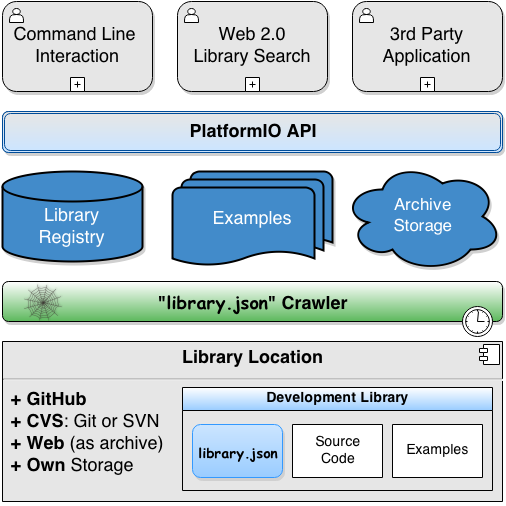
The Missing Library Manager. It’s here!
PlatformIO Library Manager is the missing library manager for development platforms which allows you to organize and have up-to-date external libraries.
Friendly Command-Line Interface
Modern Web 2.0 Library Search
Open Source Library Registry API
Library Crawler based on library.json specification
Library dependency management
Automatic library updating
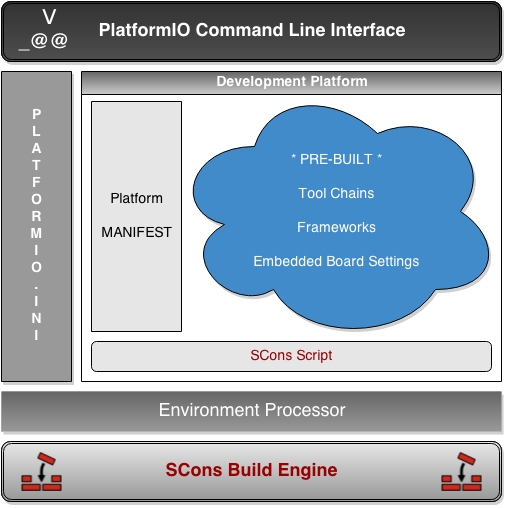
Smart Build System. Fast and Reliable.
PlatformIO Code Builder is built-on a next-generation software construction tool named SCons. Think of SCons as an improved, cross-platform substitute for the classic Make utility.
Reliable, automatic dependency analysis
Reliable detection of build changes
Improved support for parallel builds
Ability to share built files in a cache
Lookup for external libraries which are installed via Library Manager
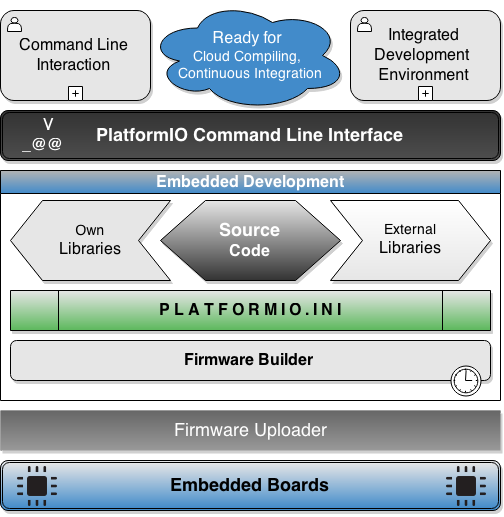
Single source code. Multiple platforms.
PlatformIO allows the developer to compile the same code with different development platforms using only One Command platformio run. This happens due to Project Configuration File (platformio.ini) where you can setup different environments with specific options (platform type, firmware uploading settings, pre-built framework, build flags and many more).
It has support for the most popular embedded platforms:
Frameworks:
For further details, please refer to What is PlatformIO?
Contributing
Fork the repository on GitHub.
Make a branch off of develop
Run pip install tox
Go to the root of project where is located tox.ini and run tox -e develop
Activate current development environment:
Windows: .tox\develop\Scripts\activate
Bash/ZSH: source .tox/develop/bin/activate
Fish: source .tox/bin/activate.fish
Make changes to code, documentation, etc.
Lint source code tox -e lint
Run the tests tox -e py27
Build documentation tox -e docs (creates a directory _build under docs where you can find the html)
Commit changes to your forked repository
Submit a Pull Request on GitHub.
Licence
Copyright 2014-2016 Ivan Kravets <me@ikravets.com>
The PlatformIO is licensed under the permissive Apache 2.0 licence, so you can use it in both commercial and personal projects with confidence.
Release history Release notifications | RSS feed


Download files
Download the file for your platform. If you're not sure which to choose, learn more about installing packages.
Source Distribution
Built Distribution
Filter files by name, interpreter, ABI, and platform.
If you're not sure about the file name format, learn more about wheel file names.
Copy a direct link to the current filters
File details
Details for the file platformio-2.11.0.tar.gz.
File metadata
- Download URL: platformio-2.11.0.tar.gz
- Upload date:
- Size: 102.1 kB
- Tags: Source
- Uploaded using Trusted Publishing? No
File hashes
| Algorithm | Hash digest | |
|---|---|---|
| SHA256 |
11775c303fc3cb82fd353574bd2258b4ec6504855dcde6c557624a963a88fe08
|
|
| MD5 |
74af932690bd09bcb79d64e57f256338
|
|
| BLAKE2b-256 |
717605dd805502dc5f9adadc7cdfd91f89320f505038884d97d0c05024a98e0f
|
File details
Details for the file platformio-2.11.0-py27-none-any.whl.
File metadata
- Download URL: platformio-2.11.0-py27-none-any.whl
- Upload date:
- Size: 183.3 kB
- Tags: Python 2.7
- Uploaded using Trusted Publishing? No
File hashes
| Algorithm | Hash digest | |
|---|---|---|
| SHA256 |
af0ffba5c6ce29f93e0cc0f424845bd2d41b9497df90c289e4de6048e5b9e36c
|
|
| MD5 |
a95bd8e34477d9b7c332101819b856f6
|
|
| BLAKE2b-256 |
814dcd6c95cfe7461579e4dc138195a448e49d4a9b8ee518bd4e19efcda2830d
|







