
Redis fixtures and fixture factories for Pytest.

Project description

pytest-redis




What is this?
This is a pytest plugin that enables you to test your code that relies on a running Redis database. It allows you to specify additional fixtures for Redis process and client.
Quickstart: first test
Install the plugin and your test dependencies (as you normally do for your project).
Ensure Redis is available (local install or container). The redis-server executable must be on PATH, or pass it explicitly with --redis-exec. If Redis can’t be found or started, pytest-redis raises RedisMisconfigured.
Create a test that uses the built-in fixture:
def test_can_connect(redisdb):
    redisdb.set("ping", "pong")
    assert redisdb.get("ping") == b"pong"
Run your tests:
pytestThe plugin contains three fixtures:
redisdb - function-scoped client fixture that cleans all databases after each test.
redis_proc - session-scoped fixture that starts Redis at first use and stops at the end of the tests.
redis_noproc - no-process fixture that connects to an already running Redis instance.
Simply include one of these fixtures in your test fixture list.
How to use
#
def test_redis(redisdb):
    """Check that it's actually working on redis database."""
    redisdb.set('test1', 'test')
    redisdb.set('test2', 'test')

    my_functionality = MyRedisBasedComponent()
    my_functionality.do_something()
    assert my_functionality.did_something

    assert redisdb.get("did_it") == 1
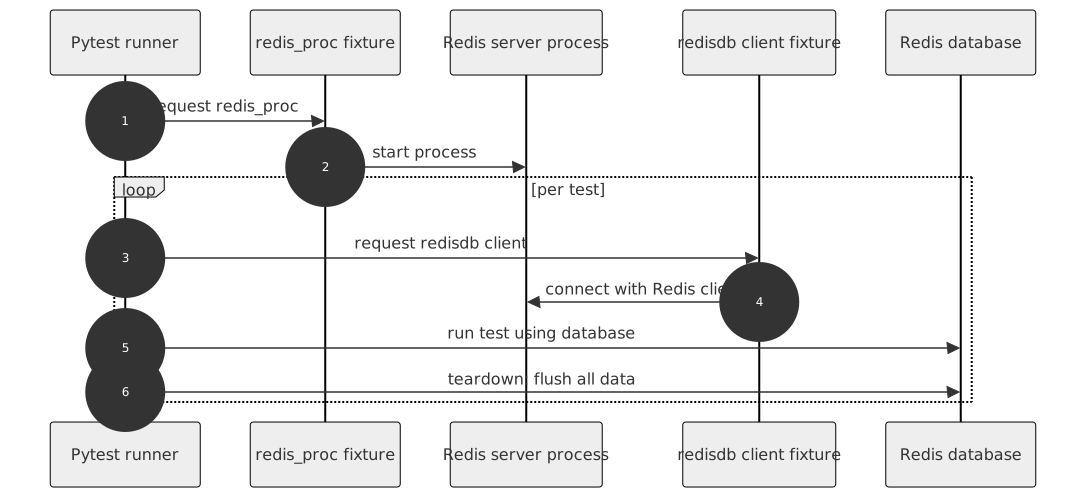
The example above works as follows:
pytest runs tests
redis_proc starts redis database server
redisdb creates client connection to the server
test itself runs and finishes
redisdb cleans up the redis
redis_proc stops server (if that was the last test using it)
pytest ends running tests
You can also create additional redis client and process fixtures if you need to:
from pytest_redis import factories

redis_my_proc = factories.redis_proc(port=None)
redis_my = factories.redisdb('redis_my_proc')

def test_my_redis(redis_my):
    """Check that it's actually working on redis database."""
    redis_my.set('test1', 'test')
    redis_my.set('test2', 'test')

    my_functionality = MyRedisBasedComponent()
    my_functionality.do_something()
    assert my_functionality.did_something

assert redis_my.get("did_it") == 1Connecting to already existing redis database
Some projects use already running Redis servers (i.e. on Docker instances). In order to connect to them, one would be using the redis_noproc fixture.
redis_external = factories.redisdb('redis_noproc')

def test_redis(redis_external):
    """Check that it's actually working on redis database."""
    redis_external.set('test1', 'test')
    redis_external.set('test2', 'test')

    my_functionality = MyRedisBasedComponent()
    my_functionality.do_something()
    assert my_functionality.did_something

    assert redis_external.get("did_it") == 1
Standard configuration options apply to it. Note that the modules configuration option has no effect with the redis_noproc fixture, it is the responsibility of the already running redis server to be properly started with extension modules, if needed.
By default the redis_noproc fixture would connect to Redis instance using 6379 port attempting to make a successful socket connection within 15 seconds. The fixture will block your test run within this timeout window. You can overwrite the timeout like so:
# set the blocking wait to 5 seconds
redis_noproc = factories.redis_noproc(startup_timeout=5)
redis_external = factories.redisdb('redis_noproc')

def test_redis(redis_external):
    """Check that it's actually working on redis database."""
    redis_external.set('test1', 'test')
    # etc etc
These are the configuration options that are working on all levels with the redis_noproc fixture:
Configuration
You can define your settings in three ways, it’s fixture factory argument, command line option and pytest.ini configuration option. You can pick which you prefer, but remember that these settings are handled in the following order:
Fixture factory argument
Command line option
Configuration option in your pytest.ini file
Redis server option |
Fixture factory argument |
Command line option |
pytest.ini option |
Noop process fixture |
Default |
|---|---|---|---|---|---|
executable |
executable |
–redis-exec |
redis_exec |
Look in PATH for redis-server via shutil.which |
|
host |
host |
–redis-host |
redis_host |
host |
127.0.0.1 |
port |
port |
–redis-port |
redis_port |
port |
random |
Free port search count |
port_search_count |
–redis-port-search-count |
redis_port_search_count |
5 |
|
username |
username |
–redis-username |
redis_username |
username |
None |
password |
password |
–redis-password |
redis_password |
password |
None |
connection timeout |
timeout |
–redis-timeout |
redis_timeout |
15 |
|
number of databases |
db_count |
–redis-db-count |
redis_db_count |
8 |
|
Whether to enable logging to the system logger |
syslog |
–redis-syslog |
redis_syslog |
False |
|
Redis log verbosity level |
loglevel |
–redis-loglevel |
redis_loglevel |
notice |
|
Compress dump files |
compress |
–redis-compress |
redis_compress |
True |
|
Add checksum to RDB files |
checksum |
–redis-rdbcompress |
redis_rdbchecksum |
False |
|
Save configuration |
save |
–redis-save |
redis_save |
“” |
|
Redis test instance data directory path |
datadir |
–redis-datadir |
redis_datadir |
“” |
|
Redis test instance extension module(s) path |
modules (list of paths) |
–redis-modules (comma-separated string) |
redis_modules (comma-separated string) |
“” |
Example usage:
pass it as an argument in your own fixture
redis_proc = factories.redis_proc(port=8888)use --redis-port command line option when you run your tests
py.test tests --redis-port=8888specify your port as redis_port in your pytest.ini file.
To do so, put a line like the following under the [pytest] section of your pytest.ini:
[pytest]
redis_port = 8888
Options below are for configuring redis client fixture.
Redis client option |
Fixture factory argument |
Command line option |
pytest.ini option |
Default |
|---|---|---|---|---|
decode_response |
decode |
–redis-decode |
redis_decode |
False |
Release
Install pipenv and –dev dependencies first, Then run:
pipenv run tbump [NEW_VERSION]Release history Release notifications | RSS feed


Download files
Download the file for your platform. If you're not sure which to choose, learn more about installing packages.
Source Distribution
Built Distribution
Filter files by name, interpreter, ABI, and platform.
If you're not sure about the file name format, learn more about wheel file names.
Copy a direct link to the current filters
File details
Details for the file pytest_redis-4.0.0.tar.gz.
File metadata
- Download URL: pytest_redis-4.0.0.tar.gz
- Upload date:
- Size: 40.1 kB
- Tags: Source
- Uploaded using Trusted Publishing? No
- Uploaded via: twine/6.1.0 CPython/3.13.7
File hashes
| Algorithm | Hash digest | |
|---|---|---|
| SHA256 |
f577be24f0d98fd4c3a81c2fa9fe59977cf394eca5b675758e369f430ffb8414
|
|
| MD5 |
829045446f1aabdd8fb6a2f9b9fd41ec
|
|
| BLAKE2b-256 |
dbb8f2eac2ea84206a9e8266d413237084150c9a083aa0a8feba8c93012064fa
|
File details
Details for the file pytest_redis-4.0.0-py3-none-any.whl.
File metadata
- Download URL: pytest_redis-4.0.0-py3-none-any.whl
- Upload date:
- Size: 33.6 kB
- Tags: Python 3
- Uploaded using Trusted Publishing? No
- Uploaded via: twine/6.1.0 CPython/3.13.7
File hashes
| Algorithm | Hash digest | |
|---|---|---|
| SHA256 |
c7f64bef64f20f0ea1174e87e7ed8499454f94b8f561791150cbe3b8a932d676
|
|
| MD5 |
bdc3714f0efcb18dc0842697d7c03ad3
|
|
| BLAKE2b-256 |
76c08e846cd6be9ac3f7746607a88430b8412ce09f8f1eba1dd510cadb7aeba9
|






