
immuneML is a software platform for machine learning analysis of immune receptor repertoires.

Project description
immuneML



immuneML is a platform for machine learning-based analysis and classification of adaptive immune receptors and repertoires (AIRR).
It supports the analyses of experimental B- and T-cell receptor data, as well as synthetic data for benchmarking purposes.
In immuneML, users can define flexible workflows supporting different machine learning libraries (such as scikit-learn or PyTorch), benchmarking of different approaches, numerous reports of data characteristics, ML algorithms and their predictions, and visualizations of results.
Additionally, users can extend the platform by defining their own data representations, ML models, reports and visualizations.
Useful links:
- Main website: https://immuneml.uio.no
- Documentation: https://docs.immuneml.uio.no
- Galaxy web interface: https://galaxy.immuneml.uiocloud.no
Installation
immuneML can be installed directly using pip. immuneML uses Python 3.7 or 3.8, we recommend installing immuneML inside a virtual environment with one of these Python versions.
For more detailed instructions (virtual environment, troubleshooting, Docker, developer installation), please see the installation documentation.
Installation using pip
To install the immuneML core package, run:
pip install immuneML
Alternatively, to use the TCRdistClassifier ML method and corresponding TCRdistMotifDiscovery report, install immuneML with the optional TCRdist extra:
pip install immuneML[TCRdist]
Optionally, if you want to use the DeepRC ML method and and corresponding DeepRCMotifDiscovery report, you also have to install DeepRC dependencies using the requirements_DeepRC.txt file. Important note: DeepRC uses PyTorch functionalities that depend on GPU. Therefore, DeepRC does not work on a CPU. To install the DeepRC dependencies, run:
pip install -r requirements_DeepRC.txt --no-dependencies
Validating the installation
To validate the installation, run:
immune-ml -h
This should display a help message explaining immuneML usage.
To quickly test out whether immuneML is able to run, try running the quickstart command:
immune-ml-quickstart ./quickstart_results/
This will generate a synthetic dataset and run a simple machine machine learning analysis
on the generated data. The results folder will contain two sub-folders: one for the generated dataset (synthetic_dataset)
and one for the results of the machine learning analysis (machine_learning_analysis).
The files named specs.yaml are the input files for immuneML that describe how to generate
the dataset and how to do the machine learning analysis. The index.html files can be used
to navigate through all the results that were produced.
Usage
Quickstart
The quickest way to familiarize yourself with immuneML usage is to follow one of the Quickstart tutorials. These tutorials provide a step-by-step guide on how to use immuneML for a simple machine learning analysis on an adaptive immune receptor repertoire (AIRR) dataset, using either the command line tool or the Galaxy web interface.
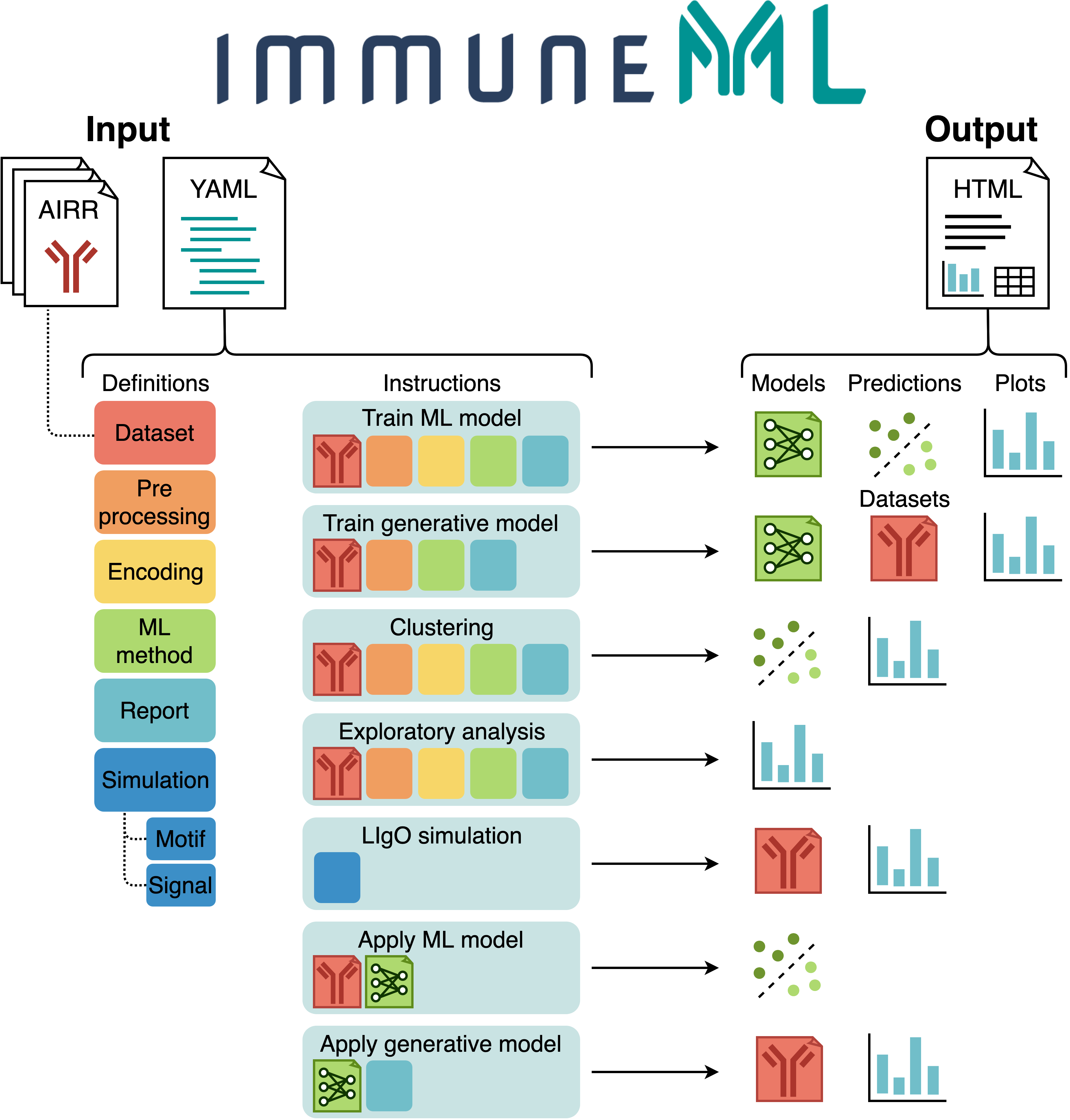
Overview of input, analyses and results
The figure below shows an overview of immuneML usage.
All parameters for an immuneML analysis are defined in the a YAML specification file.
In this file, the settings of the analysis components are defined (also known as definitions,
shown in six different colors in the figure).
Additionally, the YAML file describes one or more instructions, which are workflows that are
applied to the defined analysis components.
Each instruction uses at least a dataset component, and optionally additional components.
AIRR datasets may either be imported from files,
or generated synthetically during runtime.
Each instruction produces different types of results, including trained ML models, ML model predictions on a given dataset, plots or other reports describing the dataset or trained models, and modified datasets. To navigate over the results, immuneML generates a summary HTML file.
For a detailed explanation of the YAML specification file, see the tutorial How to specify an analysis with YAML.
See also the following tutorials for specific instructions:
- Training ML models for repertoire classification (e.g., disease prediction) or receptor sequence classification (e.g., antigen binding prediction). In immuneML, the performance of different machine learning (ML) settings can be compared by nested cross-validation. These ML settings consist of data preprocessing steps, encodings and ML models and their hyperparameters.
- Exploratory analysis of datasets by applying preprocessing and encoding, and plotting descriptive statistics without training ML models.
- Simulating immune events, such as disease states, into experimental or synthetic repertoire datasets. By implanting known immune signals into a given dataset, a ground truth benchmarking dataset is created. Such a dataset can be used to test the performance of ML settings under known conditions.
- Applying trained ML models to new datasets with unknown class labels.
- And other tutorials
Command line usage
The immune-ml command takes only two parameters: the YAML specification file and a result path.
An example is given here:
immune-ml path/to/specification.yaml result/folder/path/
For each instruction specified in the YAML specification file, a subfolder is created in the
result/folder/path. Each subfolder will contain:
- An
index.htmlfile which shows an overview of the results produced by that instruction. Inspecting the results of an immuneML analysis typically starts here. - A copy of the used YAML specification (
full_specification.yaml) with all default parameters explicitly set. - A folder containing all raw results produced by the instruction.
- A folder containing the imported dataset(s) in optimized binary (Pickle) format.
Support
We will prioritize fixing important bugs, and try to answer any questions as soon as possible. We may implement suggested features and enhancements as time permits.
If you run into problems when using immuneML, please see the documentation. In particular, we recommend you check out:
- The Quickstart tutorial for new users
- The Troubleshooting page
If this does not answer your question, you can contact us via:
- Twitter
@immuneml - Email
contact@immuneml.uio.no
To report a potential bug or suggest new features, please submit an issue on GitHub.
If you would like to make contributions, for example by adding a new ML method, encoding, report or preprocessing, please see our developer documentation and submit a pull request.
Requirements
- Python 3.7 or 3.8
- Python packages:
- airr (1 or higher)
- dill (0.3 or higher)
- editdistance (0.5.3 or higher)
- fishersapi
- gensim (3.8 or higher, < 4)
- h5py (2.10.0 or lower when using the optional DeepRC dependency)
- logomaker (0.8 or higher)
- matplotlib (3.1 or higher)
- matplotlib-venn (0.11 or higher)
- numpy (1.18 or higher)
- pandas (1 or higher)
- plotly (4 or higher)
- pystache (0.5.4)
- Pytorch (1.5.1 or higher)
- PyYAML (5.3 or higher)
- regex
- requests (2.21 or higher)
- scikit-learn (0.23 or higher)
- scipy
- tensorboard (1.14.0 or higher)
- tqdm (0.24 or higher)
- tzlocal
- Optional dependencies when using DeepRC:
- DeepRC (0.0.1)
- widis-lstm-tools (0.4)
- Optional dependencies when using TCRdist:
Citing immuneML
If you are using immuneML in any published work, please cite:
Pavlović, M., Scheffer, L., Motwani, K. et al. The immuneML ecosystem for machine learning analysis of adaptive immune receptor repertoires. Nat Mach Intell 3, 936–944 (2021). https://doi.org/10.1038/s42256-021-00413-z
© Copyright 2021, Milena Pavlovic, Lonneke Scheffer, Keshav Motwani, Victor Greiff, Geir Kjetil Sandve
Release history Release notifications | RSS feed


Download files
Download the file for your platform. If you're not sure which to choose, learn more about installing packages.
Source Distribution
Built Distribution
Filter files by name, interpreter, ABI, and platform.
If you're not sure about the file name format, learn more about wheel file names.
Copy a direct link to the current filters
File details
Details for the file immuneML-2.2.2.tar.gz.
File metadata
- Download URL: immuneML-2.2.2.tar.gz
- Upload date:
- Size: 336.1 kB
- Tags: Source
- Uploaded using Trusted Publishing? No
- Uploaded via: twine/3.3.0 pkginfo/1.7.0 requests/2.25.1 setuptools/62.1.0 requests-toolbelt/0.9.1 tqdm/4.56.0 CPython/3.8.3
File hashes
| Algorithm | Hash digest | |
|---|---|---|
| SHA256 |
df56569f4c2a38204ed6f972466269449007ce2bed6307bbd33014c5040d564a
|
|
| MD5 |
bdbe6beaa98ca0f9a136ca0a10dd67d6
|
|
| BLAKE2b-256 |
1409ca2eedfc02a11ff05479dad103216ddd4ba969f8146254472a9ee89dd2ac
|
File details
Details for the file immuneML-2.2.2-py3-none-any.whl.
File metadata
- Download URL: immuneML-2.2.2-py3-none-any.whl
- Upload date:
- Size: 547.4 kB
- Tags: Python 3
- Uploaded using Trusted Publishing? No
- Uploaded via: twine/3.3.0 pkginfo/1.7.0 requests/2.25.1 setuptools/62.1.0 requests-toolbelt/0.9.1 tqdm/4.56.0 CPython/3.8.3
File hashes
| Algorithm | Hash digest | |
|---|---|---|
| SHA256 |
4aca3745ffa55e78e2a5e32bffd1c7c0853fb1436bef0a9fc4096372dc83e829
|
|
| MD5 |
7d2d25859abb7f53d9fe0e9bccfb3846
|
|
| BLAKE2b-256 |
d2b46a7548f2b4235996e8e7c0c223fa8b607470ec26d068d1a8881b8a96b259
|






