
CellMet is cell segmentation shape analysis library

Project description
CellMet
A generalist algorithm to analyse cell shape from 3D labeled image.

This code is made to analyse cell shape from 3D labeled image. It is divide in three parts:
- Prerequisite that will create image containing one cell. This is mandatory to fasten the following analysis.
- We determine edges and faces associated to each cell. Quality of this analysis is dependant of the quality of the labeled image. There is no segmentation correction.
- Analysis of cells, faces and edges.
There is a Python API to allow user to integrate CellMet into your custom workflow.
Input/Output and datas organisation
Input
In order to be able to use this project. You first need to segment you image using CellPose (or any other software that gives 3D label image). You need to be satisfied by your label image, since there is no manual correction (only filter can be apply to remove cells that has a volume below a threshold for example).
Then, you can perform 3D cell segmentation with CellMet.
Output and datas organisation
You can generate ply/obj file for each cells.
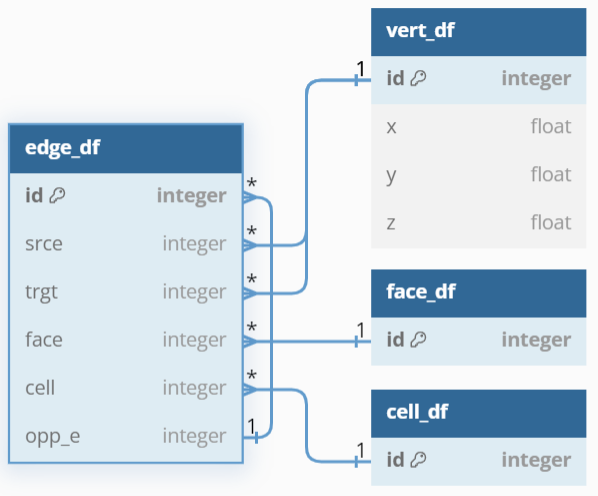
| Datas are organised as half-edge structures. The vertex, edge, face and cell tables are interconnected to represent and navigate through the mesh's elements. |
|

Prerequisite
It creates two folders names "npz" and "obj_mesh" that stores numpy array of binary one cell image and ply/obj file of each cell respectively. npz file are mandatory for the analyse, while obj_mesh allows to visualise cells in 3D with Blender. All files are named after the cell id in the original image.
Segmentation
This part consists of analysing the labelled image in order to determine neighbouring relationship between cells; contact between two cells (i.e. face); contact between three cells (i.e. edge).

Analysis
Cell information (cell_df.csv)
|
|
|

Cell plane information (cell_plane.csv)
|
Plane measure :
|
|

Edge information (edge_df.csv)
- Real distance $D_r$
- Short distance $D_s$
- Curvature index $1-(D_s/D_r)$
Face information (face_df.csv)
|
:warning: Only lateral face (coloured face in scheme)
|
|

Install
See INSTALL.md for a step by step install. A datasets to test the program can be found here.
Troubleshooting
Kernel crash due to lack of memory: reduce the number of core used for parallelized task.
Roadmap
- Add GUI with python or as a Napari plugin
Release history Release notifications | RSS feed


Download files
Download the file for your platform. If you're not sure which to choose, learn more about installing packages.
Source Distribution
Built Distribution
Filter files by name, interpreter, ABI, and platform.
If you're not sure about the file name format, learn more about wheel file names.
Copy a direct link to the current filters
File details
Details for the file cellmet-1.1.0.tar.gz.
File metadata
- Download URL: cellmet-1.1.0.tar.gz
- Upload date:
- Size: 64.5 kB
- Tags: Source
- Uploaded using Trusted Publishing? No
- Uploaded via: twine/6.1.0 CPython/3.11.5
File hashes
| Algorithm | Hash digest | |
|---|---|---|
| SHA256 |
d69b000bcb4eaa4734901bf3967fb07de613c4a2c8f28c11e35ebb99369a6ae7
|
|
| MD5 |
7377a758d9979c615a02045f418045aa
|
|
| BLAKE2b-256 |
26062acda04234508f790b0173a9573f441f3b614e9e9ea7f3605ae8b388cf1a
|
File details
Details for the file cellmet-1.1.0-py3-none-any.whl.
File metadata
- Download URL: cellmet-1.1.0-py3-none-any.whl
- Upload date:
- Size: 71.8 kB
- Tags: Python 3
- Uploaded using Trusted Publishing? No
- Uploaded via: twine/6.1.0 CPython/3.11.5
File hashes
| Algorithm | Hash digest | |
|---|---|---|
| SHA256 |
d3d8821ec8ff7b2e5c7be1a24945c92c29fb39608e7dadea9afb3b564d3ec5ac
|
|
| MD5 |
1fc4f6722d29f636f8a81cf3de7d00e5
|
|
| BLAKE2b-256 |
61fe1d485c93c3d64e793701a9a901da04531f9d967e5c53c591c76585d1e0fa
|






