
A Dataverse client for Python
Verified details
These details have been verified by PyPIProject links
GitHub Statistics
Maintainers

Project description
DataversePython
A Python client for interacting with Microsoft Dataverse (Dynamics 365) Web API, supporting authentication via Azure Entra ID (formerly Azure Active Directory), and providing convenient methods for querying, inserting, upserting, merging, and managing many-to-many relationships in Dataverse entities using pandas DataFrames.
Features
- Authentication: Secure interactive login using MSAL and Azure Entra ID.
- Querying: Retrieve entity records as pandas DataFrames with flexible filtering and column selection.
- Insert/Upsert: Insert or upsert records from DataFrames into Dataverse entities.
- Merge: Merge duplicate records (accounts, contacts) programmatically.
- Many-to-Many: Manage many-to-many relationships between entities.
- Logging: Detailed logging to
DataverseClient.logfor all operations and errors.
Installation
Use the following command to install this module:
pip install DataversePython
After successfully installing it into your python environment you can import the "DataverseClient" class in your code or notebook:
from DataversePython import DataverseClient
Usage
-
Setup
-
Create the required Azure app registration, see
App Registration Guide. -
Add the created Service Principal (App Registration) as an application user your environments, see
Add Application User Guide -
Create a JSON config file (see sample_config.json) with your Azure app registration and Dataverse environment details. The config JSON looks like this:
{
"environmentURI": "https://<your-org>.crm.dynamics.com/",
"scopeSuffix": "user_impersonation",
"clientID": "<your-client-id>",
"authorityBase": "https://login.microsoftonline.com/",
"tenantID": "<your-tenant-id>"
}
-
-
Basic Example
from DataversePython.DataverseClient import DataverseClient
import pandas as pd

# Initialize client
client = DataverseClient('sample_config.json')

# Get records
df = client.get_rows(entity='accounts', top=50, columns=['name', 'emailaddress1'], filter='revenue gt 100000')

print(df.head())
-
Get, Insert, Upsert, Merge, and Many-to-Many
- See docstrings in
DataverseClient.pyfor details on each method. - Go to my blog to see detailed examples:
- get_rows()
- insert_rows()
- upsert_rows() (coming soon)
- insert_m_n() (coming soon)
- merge_rows() (coming soon)
- See docstrings in
Logging
All operations and errors are logged to DataverseClient.log in the project root. Reference this log file for troubleshooting.
Tips for Using DataversePython
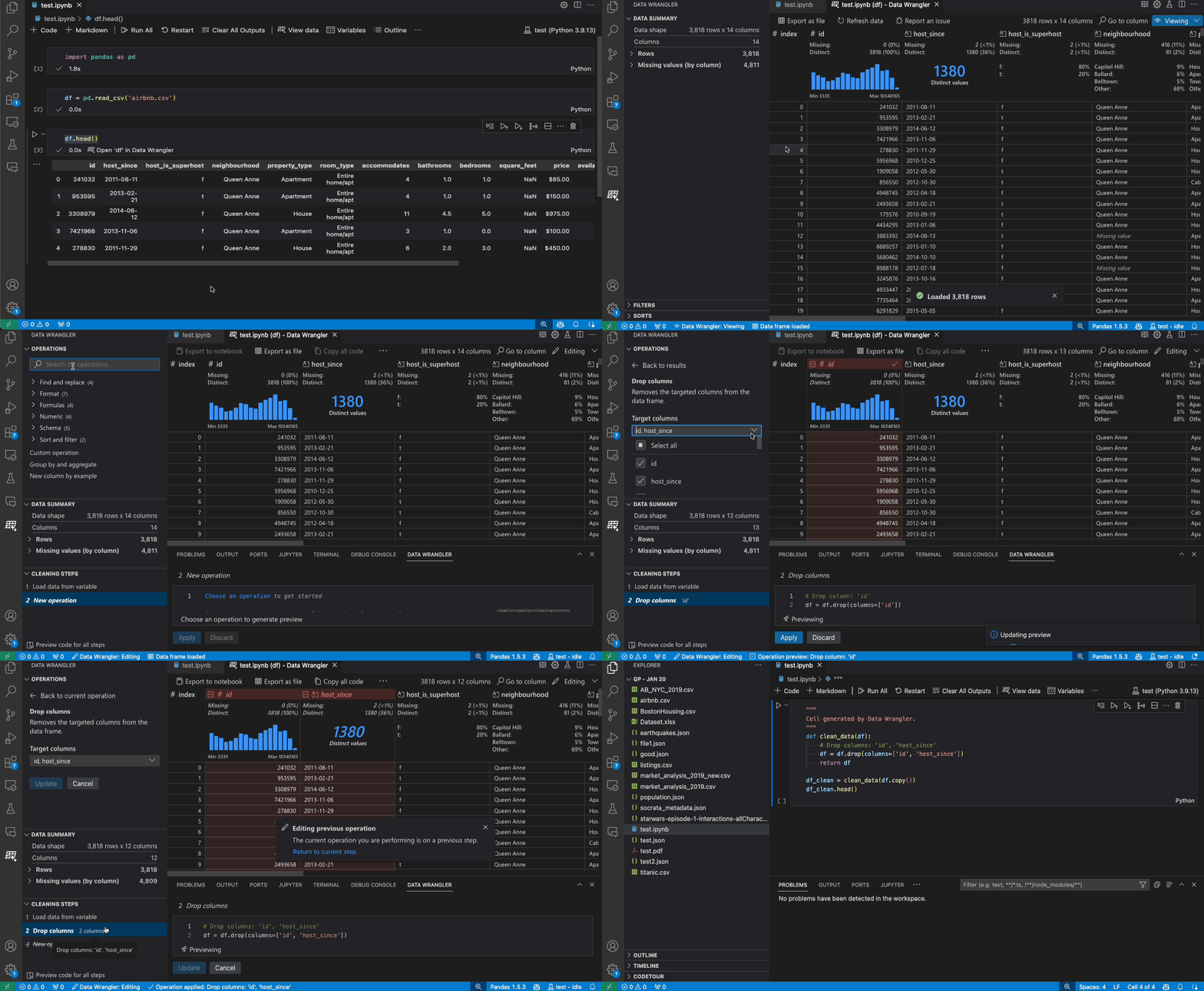
- Visualize and Explore DataFrames Easily: Install the Data Wrangler extension in VS Code to interactively view, clean, and analyze pandas DataFrames. This makes it much easier to inspect and manipulate your data when working with Dataverse records.
- Work Interactively with Notebooks: For the best experience, use Jupyter (
.ipynb) notebooks in VS Code. Notebooks allow you to run code in cells, visualize results, and document your workflow, making it ideal for data exploration and Dataverse integration tasks.
Resources
Below are some useful resources and documentation that were referenced during the development of this module:
Project details
Verified details
These details have been verified by PyPIProject links
GitHub Statistics
Maintainers


Download files
Download the file for your platform. If you're not sure which to choose, learn more about installing packages.
Source Distribution
Built Distribution
Filter files by name, interpreter, ABI, and platform.
If you're not sure about the file name format, learn more about wheel file names.
Copy a direct link to the current filters
File details
Details for the file dataversepython-1.1.0.tar.gz.
File metadata
- Download URL: dataversepython-1.1.0.tar.gz
- Upload date:
- Size: 15.7 kB
- Tags: Source
- Uploaded using Trusted Publishing? Yes
- Uploaded via: twine/6.1.0 CPython/3.13.7
File hashes
| Algorithm | Hash digest | |
|---|---|---|
| SHA256 |
9e4aadde0cbade6329173ac43177d2c0c50e91f307773cc1c355e42a6cc49244
|
|
| MD5 |
f2a27a7b08ab1549a168afc16c0138a7
|
|
| BLAKE2b-256 |
d2608d2c66e4928544f3f6d173018fecb0e6bde96e30e641dafff242fcbb4a32
|
Provenance
The following attestation bundles were made for dataversepython-1.1.0.tar.gz:
Publisher:
publish.yml on fabipfr/DataversePython
-
Statement:
-
Statement type:
https://in-toto.io/Statement/v1 -
Predicate type:
https://docs.pypi.org/attestations/publish/v1 -
Subject name:
dataversepython-1.1.0.tar.gz -
Subject digest:
9e4aadde0cbade6329173ac43177d2c0c50e91f307773cc1c355e42a6cc49244 - Sigstore transparency entry: 774167314
- Sigstore integration time:
-
Permalink:
fabipfr/DataversePython@d3a144b01dabf700726aa5a63ec30ab22b8ce4d1 -
Branch / Tag:
refs/tags/v1.1.0 - Owner: https://github.com/fabipfr
-
Access:
public
-
Token Issuer:
https://token.actions.githubusercontent.com -
Runner Environment:
github-hosted -
Publication workflow:
publish.yml@d3a144b01dabf700726aa5a63ec30ab22b8ce4d1 -
Trigger Event:
release
-
Statement type:
File details
Details for the file dataversepython-1.1.0-py3-none-any.whl.
File metadata
- Download URL: dataversepython-1.1.0-py3-none-any.whl
- Upload date:
- Size: 18.6 kB
- Tags: Python 3
- Uploaded using Trusted Publishing? Yes
- Uploaded via: twine/6.1.0 CPython/3.13.7
File hashes
| Algorithm | Hash digest | |
|---|---|---|
| SHA256 |
ce17962c157fe7691aa94038343d5fc4370d3c17ae222ef2b055d67f499572ab
|
|
| MD5 |
4b9f25584a5a8cf625318fae5ba7d6a0
|
|
| BLAKE2b-256 |
0ab502d148428b5316ff924355a188f3de941a649e8a2689bea0c29fde8f010d
|
Provenance
The following attestation bundles were made for dataversepython-1.1.0-py3-none-any.whl:
Publisher:
publish.yml on fabipfr/DataversePython
-
Statement:
-
Statement type:
https://in-toto.io/Statement/v1 -
Predicate type:
https://docs.pypi.org/attestations/publish/v1 -
Subject name:
dataversepython-1.1.0-py3-none-any.whl -
Subject digest:
ce17962c157fe7691aa94038343d5fc4370d3c17ae222ef2b055d67f499572ab - Sigstore transparency entry: 774167316
- Sigstore integration time:
-
Permalink:
fabipfr/DataversePython@d3a144b01dabf700726aa5a63ec30ab22b8ce4d1 -
Branch / Tag:
refs/tags/v1.1.0 - Owner: https://github.com/fabipfr
-
Access:
public
-
Token Issuer:
https://token.actions.githubusercontent.com -
Runner Environment:
github-hosted -
Publication workflow:
publish.yml@d3a144b01dabf700726aa5a63ec30ab22b8ce4d1 -
Trigger Event:
release
-
Statement type:






