
Generate Microsoft Teams Adaptive Cards for new Connectors

Project description
MsTeamsAdaptiveCard
Description
Python lib to move from ConnectorCards to AdaptiveCards in MS Teams As O365 Connectors will be deprecated, new usage is via Workflows/Power Automate
Documentation and Examples
Documentation and Examples are available at GitHub
Installation
This lib is available in PyPi, you can install it via pip:
pip install PyMsTeamsAdaptiveCard
Usage
python import pyadaptivecard
Getting your New Connector Url
To get your connector url, you must create a flow in Workflows/Power Automate.
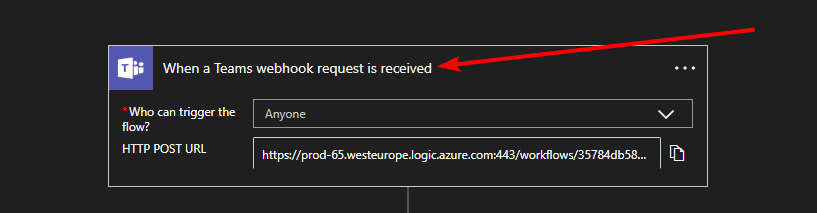
Trigger to choose is When a Teams webhook request is received
If you used O365 connectors without authentication, you must set Anyone as Who can trigger the flow?
Usage with this library is to create an action Apply to each, select attachments (dynamic content) as input.
Link with the action Post card in a chat or channel
As opposed to previous Connectors that only existed in Teams Channels, you can publish your cards in Group Chats as well.
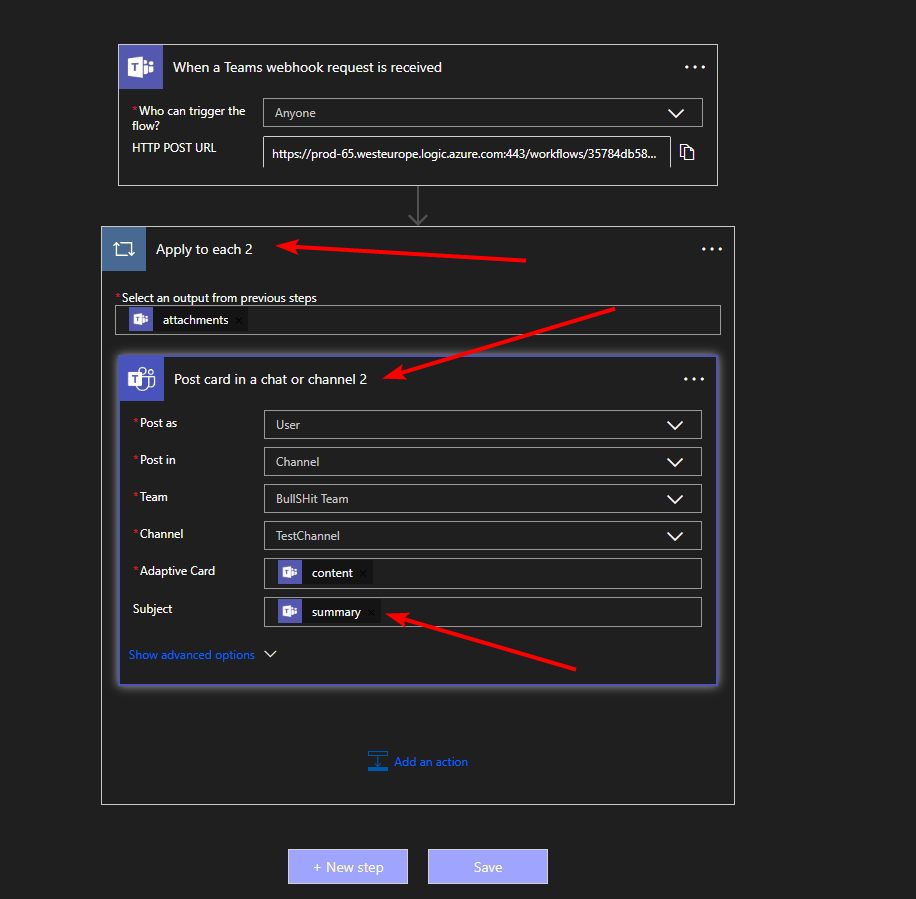
You must fill the following fields:
Adaptive Card: items('Apply_to_each_2')?['content'] (replace with the name of your action)
Summary: items('Apply_to_each_2')?['summary'] (replace with the name of your action)
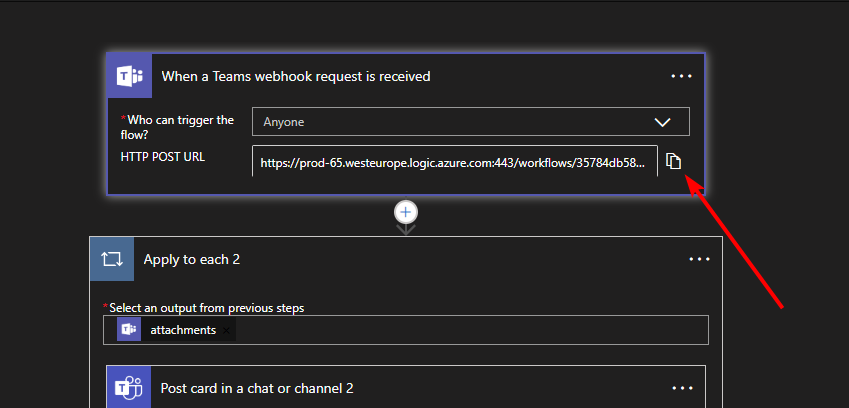
After saving, Workflows/Power Automate will give you your HTTP POST URL:
Using AdaptiveCards
You can refer to the examples for usage of AdaptiveCard, CardSection and ActivitySection All outputs are displayed as images Example of a Multi Section Card:
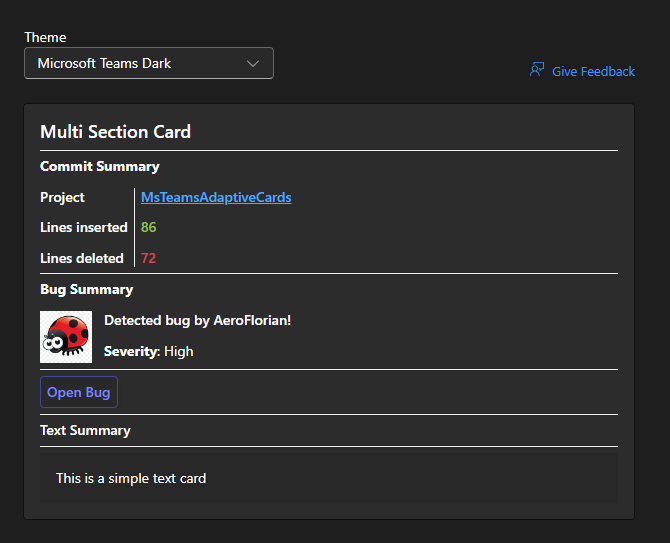
instead of printing the contents of the cards, just do card.send() and check the result of your workflow!
Proxy Support
You can add your proxy by setting it to the card
card.proxy("https://my.proxy:8080")
Release history Release notifications | RSS feed


Download files
Download the file for your platform. If you're not sure which to choose, learn more about installing packages.
Source Distribution
Built Distribution
Filter files by name, interpreter, ABI, and platform.
If you're not sure about the file name format, learn more about wheel file names.
Copy a direct link to the current filters
File details
Details for the file pymsteamsadaptivecard-0.5.0.tar.gz.
File metadata
- Download URL: pymsteamsadaptivecard-0.5.0.tar.gz
- Upload date:
- Size: 5.1 kB
- Tags: Source
- Uploaded using Trusted Publishing? Yes
- Uploaded via: twine/6.1.0 CPython/3.13.7
File hashes
| Algorithm | Hash digest | |
|---|---|---|
| SHA256 |
2c35c7640cbad6356c1d9275901a046a37dd8b6444760491c433b04fccc51b1e
|
|
| MD5 |
d36ce563bfcdfbc6e213592961188ca2
|
|
| BLAKE2b-256 |
31e90f085bf61eeb9056cc0bfa3f677cc9a2b41da08a23f00bf690275b9bc986
|
Provenance
The following attestation bundles were made for pymsteamsadaptivecard-0.5.0.tar.gz:
Publisher:
publish-to-pypi.yml on AeroFlorian/MsTeamsAdaptiveCard
-
Statement:
-
Statement type:
https://in-toto.io/Statement/v1 -
Predicate type:
https://docs.pypi.org/attestations/publish/v1 -
Subject name:
pymsteamsadaptivecard-0.5.0.tar.gz -
Subject digest:
2c35c7640cbad6356c1d9275901a046a37dd8b6444760491c433b04fccc51b1e - Sigstore transparency entry: 662437598
- Sigstore integration time:
-
Permalink:
AeroFlorian/MsTeamsAdaptiveCard@b7c817de20176ac13bb9c852294e1037a5f4c7dd -
Branch / Tag:
refs/tags/v0.5.0 - Owner: https://github.com/AeroFlorian
-
Access:
public
-
Token Issuer:
https://token.actions.githubusercontent.com -
Runner Environment:
github-hosted -
Publication workflow:
publish-to-pypi.yml@b7c817de20176ac13bb9c852294e1037a5f4c7dd -
Trigger Event:
push
-
Statement type:
File details
Details for the file pymsteamsadaptivecard-0.5.0-py3-none-any.whl.
File metadata
- Download URL: pymsteamsadaptivecard-0.5.0-py3-none-any.whl
- Upload date:
- Size: 5.3 kB
- Tags: Python 3
- Uploaded using Trusted Publishing? Yes
- Uploaded via: twine/6.1.0 CPython/3.13.7
File hashes
| Algorithm | Hash digest | |
|---|---|---|
| SHA256 |
0d2a9ebdde8211257ca9eb46ac495eab94c25a778ae51e2290f4c58c9aa7a2c5
|
|
| MD5 |
ae56af9b7bd76b6a10a3f6b37377d74c
|
|
| BLAKE2b-256 |
1ad7e394d068037657beb534ba109a33a15bcc0728f0a6ab0a1b3195d317dade
|
Provenance
The following attestation bundles were made for pymsteamsadaptivecard-0.5.0-py3-none-any.whl:
Publisher:
publish-to-pypi.yml on AeroFlorian/MsTeamsAdaptiveCard
-
Statement:
-
Statement type:
https://in-toto.io/Statement/v1 -
Predicate type:
https://docs.pypi.org/attestations/publish/v1 -
Subject name:
pymsteamsadaptivecard-0.5.0-py3-none-any.whl -
Subject digest:
0d2a9ebdde8211257ca9eb46ac495eab94c25a778ae51e2290f4c58c9aa7a2c5 - Sigstore transparency entry: 662437600
- Sigstore integration time:
-
Permalink:
AeroFlorian/MsTeamsAdaptiveCard@b7c817de20176ac13bb9c852294e1037a5f4c7dd -
Branch / Tag:
refs/tags/v0.5.0 - Owner: https://github.com/AeroFlorian
-
Access:
public
-
Token Issuer:
https://token.actions.githubusercontent.com -
Runner Environment:
github-hosted -
Publication workflow:
publish-to-pypi.yml@b7c817de20176ac13bb9c852294e1037a5f4c7dd -
Trigger Event:
push
-
Statement type:






