
EggAI SDK
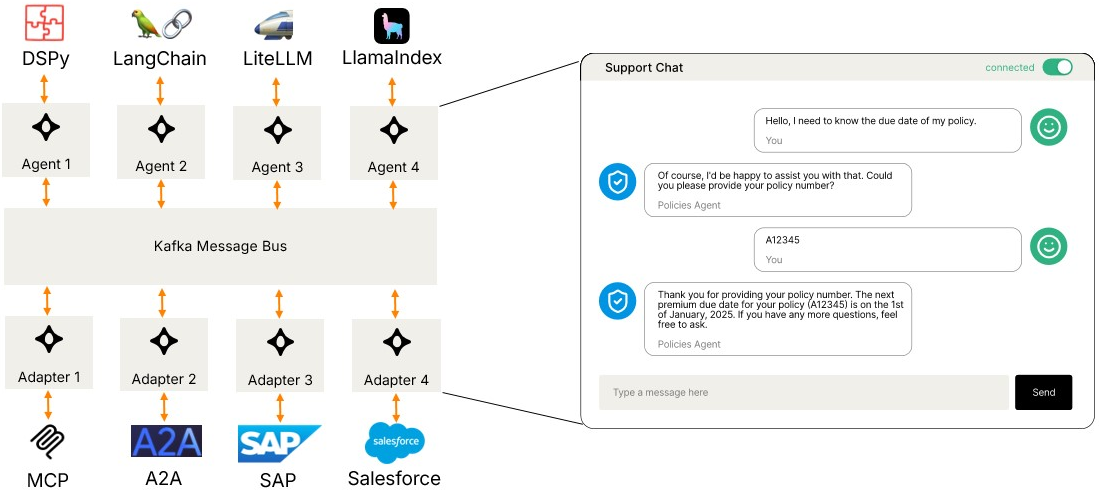
EggAI Multi-Agent Meta Framework is an async-first framework for building, deploying, and scaling multi-agent systems for modern enterprise environments.
Features
- Multi-Transport Support: In-Memory, Redis Streams, Kafka, and extensible for custom transports
- Async-First: Built on asyncio for high-performance concurrent processing
- Type-Safe: Full type hints and Pydantic validation with CloudEvents-compliant message protocol
- Production-Ready: Comprehensive error handling, logging, and monitoring
- Flexible Architecture: Easily extensible with custom transports and middleware
- Protocol Interoperability: A2A for agent collaboration, MCP for LLM tools, CloudEvents for messaging
Installation
pip install eggai
Redis Streams and Kafka support are included by default.
Optional extras:
pip install eggai[otel]   # Distributed tracing via OpenTelemetry
pip install eggai[cli]    # CLI tools for scaffolding
pip install eggai[a2a]    # A2A (Agent-to-Agent) SDK integration
pip install eggai[mcp]    # MCP (Model Context Protocol) support
Quick Start
Using In-Memory Transport (Testing & Development)
Perfect for unit tests, prototyping, and local development.
from eggai import Agent, Channel
from eggai.transport.memory import InMemoryTransport

# Create an in-memory transport
transport = InMemoryTransport()

# Create an agent
agent = Agent(name="my-agent", transport=transport)

# Define message handler
@agent.subscribe(channel=Channel("input-channel", transport=transport))
async def handle_message(message):
    # Process message
    result = await process(message)
    # Publish to output channel
    output_channel = Channel("output-channel", transport=transport)
    await output_channel.publish(result)

# Start the agent
await agent.start()
Using Redis Streams (Recommended for Production)
Redis Streams provides durable message delivery with consumer groups, perfect for microservices and production deployments.
from eggai import Agent, Channel
from eggai.transport.redis import RedisTransport

# Create a Redis transport
transport = RedisTransport(url="redis://localhost:6379")

# Create an agent
agent = Agent(name="my-agent", transport=transport)

# Define message handler
@agent.subscribe(channel=Channel("input-channel", transport=transport))
async def handle_message(message):
    # Process message
    result = await process(message)
    # Publish to output channel
    output_channel = Channel("output-channel", transport=transport)
    await output_channel.publish(result)

# Start the agent
await agent.start()
Using Kafka (Production - High Throughput)
Kafka is ideal for high-throughput, large-scale distributed streaming workloads.
from eggai import Agent, Channel
from eggai.transport.kafka import KafkaTransport

# Create a Kafka transport
transport = KafkaTransport(
    bootstrap_servers="localhost:9092"
)

# Create an agent
agent = Agent(name="my-agent", transport=transport)

# Define message handler
@agent.subscribe(channel=Channel("input-topic", transport=transport))
async def handle_message(message):
    # Process message
    result = await process(message)
    # Publish to output topic
    output_channel = Channel("output-topic", transport=transport)
    await output_channel.publish(result)

# Start the agent
await agent.start()
Transport Comparison
| Feature | In-Memory | Redis Streams | Kafka |
|---|---|---|---|
| Use Case | Testing, prototyping | Production microservices | Large-scale production |
| Persistence | ❌ No | ✅ Yes (AOF/RDB) | ✅ Yes (highly durable) |
| Setup Complexity | None | Simple | Moderate |
| Throughput | Very High | High (100K+ msgs/sec) | Very High (1M+ msgs/sec) |
| Consumer Groups | ❌ No | ✅ Native support | ✅ Native support |
| Message Retention | N/A | Time or count-based | Time or size-based |
| Production Ready | ❌ No | ✅ Recommended | ✅ Recommended |
| Best For | Unit tests, local dev | Most production workloads | High-throughput distributed systems |
| Operational Cost | None | Lower | Higher |
Reliable Message Delivery (Redis Streams)
Pending Entries List (PEL) and Retry Streams
With NACK_ON_ERROR (the default), a handler exception leaves the message in Redis's Pending
Entries List (PEL). FastStream only reads new messages, so a failed message would be stuck
forever without intervention.
Enable SDK-managed retry by setting retry_on_idle_ms on any subscription:
from eggai import Agent, Channel
from eggai.transport import RedisTransport

transport = RedisTransport(url="redis://localhost:6379")
agent = Agent("order-service", transport=transport)
orders = Channel("orders", transport=transport)

@agent.subscribe(
    channel=orders,
    retry_on_idle_ms=30_000,          # reclaim after 30s idle (required to enable retry)
    max_retries=5,                    # route to DLQ after 5 retries (default: 5, None = unlimited)
    retry_reclaim_interval_s=15.0,    # PEL scan interval (default: 15.0)
    retry_backoff_multiplier=2.0,     # exponential backoff between retries (default: 1.0 = constant)
    retry_backoff_max_ms=900_000,     # cap the escalated delay (default: None = uncapped)
    retry_backoff_jitter=0.2,         # add up to 20% on top of each delay to avoid a thundering herd (default: 0.0)
    on_dlq=None,                      # optional async/sync callback(fields, msg_id, count)
)
async def handle_order(message):
    # If this raises, the message stays in the PEL.
    # After 30s idle the reclaimer moves it to a per-handler retry stream
    # (e.g. eggai.orders.order-service-handle_order-1.retry) and this same
    # handler is called again. After 5 failed retries, the message is routed
    # to the per-handler DLQ (eggai.orders.order-service-handle_order-1.dlq).
    await process_order(message)

await agent.start()
The SDK automatically:
- Starts a background reclaimer that scans the PEL every 15 seconds (configurable via
retry_reclaim_interval_s). - Moves idle messages (older than
retry_on_idle_ms) to a dedicated per-handler{channel}.{handler_suffix}.retrystream. The per-handler suffix keeps one handler's failures from being broadcast to other handlers on the same channel. - Subscribes the same handler to the retry stream.
- Runs a second reclaimer on the retry stream that re-queues back to itself (no
.retry.retrychain). - After
max_retriesretry attempts (default 5), routes the message to a per-handler{channel}.{handler_suffix}.dlqDead Letter Queue instead of retrying again.
Delivery guarantee: at-least-once. XADD and XACK are not atomic — a crash between
them will re-deliver the message on the next cycle. Handlers must be idempotent.
Two fields are injected on retry delivery to aid deduplication:
| Field | Value |
|---|---|
_retry_count |
"1", "2", … — incremented on each reclaim cycle |
_original_message_id |
Redis stream ID of the original message |
Dead Letter Queue (DLQ): Messages that exceed max_retries (default 5) are routed to
the per-handler {channel}.{handler_suffix}.dlq. The DLQ is terminal — no automatic
reclaimer. Set max_retries=None for unlimited retries. An optional on_dlq callback
fires when a message lands in the DLQ.
Shared DLQ channel: A DLQ stream is an ordinary stream, so an eggai subscriber can
consume it — but with one key per handler there is nothing stable to subscribe to. Pass
dlq_channel to dead-letter every handler (or every service) into one stream instead:
dlq = Channel("dlq", transport=transport)

@agent.subscribe(channel=orders, retry_on_idle_ms=30_000, max_retries=3, dlq_channel=dlq)
async def handle_order(message): ...

@agent.subscribe(channel=payments, retry_on_idle_ms=30_000, max_retries=3, dlq_channel="dlq")
async def handle_payment(message): ...          # a topic name is namespaced like Channel("dlq")

# One consumer for all of them — start the group at "0" to pick up failures that
# happened before this service booted.
@ops_agent.subscribe(channel=dlq, group_start="0")
async def on_dead_letter(message):
    print(message["_dlq_source"], message["_dlq_handler"], message["_dlq_retries"])
Only the terminal sink is shared; each handler keeps its own .retry stream (a shared
retry stream would re-introduce the cross-handler fan-out of #225). dlq_channel requires
retry_on_idle_ms and a non-None max_retries, and must not be the channel the handler
subscribes to. Don't give the sink itself retry_on_idle_ms with the same dlq_channel.
Every DLQ entry — shared or per-handler — carries provenance in its body so a shared consumer can tell entries apart:
| Field | Value |
|---|---|
_dlq_source |
full key of the channel the handler subscribed to (e.g. eggai.orders) |
_dlq_handler |
handler suffix / consumer group (e.g. order-service-handle_order-1) |
_dlq_at |
ISO-8601 UTC timestamp of the DLQ write |
_dlq_reason |
"max_retries", or "poison" for an envelope the reclaimer could not parse |
_dlq_retries |
how many retries actually ran before giving up (max_retries; "0" for poison) |
_retry_count |
reset to "0" on the DLQ write, so a DLQ consumer with its own retry_on_idle_ms starts with a fresh budget |
_original_message_id |
as on retry delivery |
If a DLQ consumer itself gives up on an entry and dead-letters it again, _dlq_source,
_dlq_handler and _dlq_at keep the original failure while _dlq_reason and
_dlq_retries describe the latest hop.
A shared DLQ is written without MAXLEN by default — retry_max_len applies to the
retry streams and to per-handler DLQs only. XADD MAXLEN trims the whole stream regardless
of which writer appended, so one service's cap would silently delete other services'
unconsumed dead letters. Retention of a shared DLQ is the sink's job (XTRIM, or ack and
trim on a schedule). Operators who prefer a hard memory ceiling can opt in with
RedisTransport(dlq_max_len=...); set the same value on every writer to that DLQ.
A poison entry (unparseable envelope) is no longer copied to the DLQ verbatim: it is
wrapped in a fresh envelope whose body holds the metadata above plus the original bytes
as _dlq_raw_b64, so a DLQ subscriber always receives a decodable JSON object.
Freeing memory with delete_on_ack: acked stream entries stay in Redis until MAXLEN
trims them, and MAXLEN trims by count regardless of whether an entry was processed.
subscribe(..., delete_on_ack=True) XDELs each entry when it is acked (XACK + XDEL
in one MULTI): after the handler returns, on the retry stream, and when the reclaimer
moves an entry to .retry or the DLQ. A failing handler's entry still stays in the PEL
for retry (under the default NACK_ON_ERROR). It assumes one consumer group per
stream: XDEL removes the entry for every group, so don't use it on a stream that
fans out to several groups. connect() raises if another group already reads the stream;
if one joins later, the group monitor turns deletion off for that stream and logs an error.
Deleted entries can't be replayed, and a generous max_len is still worth keeping as a
backstop for the few paths that leave acked entries behind.
Retry backoff: By default retries fire at a constant cadence equal to
retry_on_idle_ms. Set retry_backoff_multiplier > 1.0 to back off exponentially: a
message is treated as due for reclaim once it has been idle for
retry_on_idle_ms * (retry_backoff_multiplier ** _retry_count), capped at
retry_backoff_max_ms. With a 30s base and multiplier 2.0 the attempts space out as
30s → 60s → 120s → 240s …, giving an overloaded or recovering downstream room to breathe
instead of being retried on a fixed clock. retry_backoff_jitter (a fraction in [0, 1])
adds a random 0..jitter slice on top of each computed threshold so a fleet of workers
that failed during the same outage don't come due in lockstep. Jitter is applied upward,
never below retry_on_idle_ms — that base is a hard floor, since the reclaimer won't touch
a message idle for less than it (it may be slow rather than stuck). Note the spread is only
effective once jitter × threshold is comparable to retry_reclaim_interval_s (the scan
cadence quantises smaller jitter away). Backoff is opt-in and backward compatible —
the default multiplier=1.0 preserves the constant retry_on_idle_ms spacing exactly.
Automatic recovery from Redis stream loss (NOGROUP):
If Redis loses streams (restart without persistence, failover, memory eviction), the SDK
auto-recovers. A background monitor periodically ensures consumer groups exist via
XGROUP CREATE with MKSTREAM, and the reclaimer recreates groups on NOGROUP errors.
No configuration needed — always active with RedisTransport.
Constraints:
min_idle_time(FastStream XAUTOCLAIM) andretry_on_idle_msare mutually exclusive on the same subscription — mixing them raisesValueError.- Binary (non-UTF-8) field values are not supported; use JSON-serialisable payloads.
Retry delivery reference
The eggai. prefix below is the default EGGAI_NAMESPACE, not a fixed prefix: with EGGAI_NAMESPACE=prod the same keys are prod.orders, prod.orders.<handler>.retry and prod.orders.<handler>.dlq.
Main stream  (eggai.orders)
    │
    ├── FastStream consumer  (group/consumer: order-service-handle_order-1)
    │       on exception → NACK → message stays in main PEL
    │
    └── Reclaimer            (consumer: order-service-handle_order-1-reclaimer)
            every 15s: XPENDING → idle > 30s → XCLAIM
            _retry_count ≤ max_retries → XADD <retry stream> → XACK
            _retry_count > max_retries → XADD <dlq stream>   → XACK

Retry stream (eggai.orders.order-service-handle_order-1.retry)   ← per-handler
    │
    ├── FastStream consumer  (group: order-service-handle_order-1-retry)
    │       same handler — on exception → NACK → message stays in retry PEL
    │
    └── Reclaimer            (target: same retry stream — no .retry.retry chain)
            every 15s: XPENDING → idle > 30s → XCLAIM
            _retry_count ≤ max_retries → XADD <retry stream> → XACK
            _retry_count > max_retries → XADD <dlq stream>   → XACK

DLQ stream   (eggai.orders.order-service-handle_order-1.dlq)      ← per-handler by default,
        terminal — no reclaimer                                      or one shared key via dlq_channel=
        entries carry _dlq_source / _dlq_handler / _dlq_at / _dlq_reason
Observability (OpenTelemetry)
EggAI has built-in distributed tracing via OpenTelemetry. Every message hop — from publisher through to handler — shares a single trace_id, giving you end-to-end visibility across agents.
Install the optional tracing dependencies:
pip install eggai[otel]
Auto-configuration via environment variables
If OTEL_EXPORTER_OTLP_ENDPOINT is set when the process starts, tracing activates automatically. The protocol is selected from OTEL_EXPORTER_OTLP_PROTOCOL (defaults to grpc):
# gRPC backend (Jaeger, Grafana Tempo, …)
export OTEL_EXPORTER_OTLP_ENDPOINT=http://localhost:4317
export OTEL_EXPORTER_OTLP_PROTOCOL=grpc
export OTEL_SERVICE_NAME=my-agent

# HTTP backend (Langfuse, Honeycomb, Datadog, …)
export OTEL_EXPORTER_OTLP_ENDPOINT=https://cloud.langfuse.com/api/public/otel
export OTEL_EXPORTER_OTLP_PROTOCOL=http/protobuf
export OTEL_EXPORTER_OTLP_HEADERS="Authorization=Basic <base64-encoded-key>"
export OTEL_SERVICE_NAME=my-agent
No code changes needed — just set the env vars and run your agent.
Explicit setup in code
from eggai import setup_tracing, Agent, Channel

# gRPC (default)
setup_tracing(service_name="my-agent")

# HTTP (required for Langfuse, Honeycomb, Datadog, etc.)
setup_tracing(exporter="otlp-http", service_name="my-agent")

# Console (useful during development)
setup_tracing(exporter="console", service_name="my-agent")
Call setup_tracing() once at startup, before any agents publish or subscribe.
What gets traced automatically
Every channel.publish() creates a producer span and every handler invocation creates a consumer span. All spans within a single request share the same trace_id:
eggai.publish eggai.orders          ← producer span (your publish call)
  └─ eggai.process eggai.orders     ← consumer span (handler invocation)
       └─ eggai.publish eggai.bills ← producer span (handler publishes downstream)
            └─ eggai.process …      ← and so on
Span attributes set on every span:
| Attribute | Value |
|---|---|
messaging.system |
eggai |
messaging.destination |
channel name |
messaging.operation |
publish or process |
eggai.message.id |
message UUID |
eggai.message.type |
message type field |
eggai.message.source |
message source field |
Langfuse
Langfuse supports OTLP natively (HTTP only, v3.22+). Point EggAI at its endpoint and your agent traces appear as Langfuse traces with each span as an observation:
export OTEL_EXPORTER_OTLP_ENDPOINT=https://cloud.langfuse.com/api/public/otel
export OTEL_EXPORTER_OTLP_PROTOCOL=http/protobuf
export OTEL_EXPORTER_OTLP_HEADERS="Authorization=Basic $(echo -n 'pk-lf-...:sk-lf-...' | base64)"
export OTEL_SERVICE_NAME=my-agent
To attach a Langfuse session or user to spans, set the attributes on your own root span before publishing:
from opentelemetry import trace

tracer = trace.get_tracer("myapp")

with tracer.start_as_current_span("handle-user-request") as span:
    span.set_attribute("langfuse.session.id", "session-abc")
    span.set_attribute("langfuse.user.id", "user-123")
    await channel.publish(msg)  # EggAI spans are nested under this span
Self-hosted Langfuse: replace the endpoint with http://your-host:3000/api/public/otel.
Production Recommendations
For production deployments, we recommend:
- Redis Streams: Best for most production workloads. Simpler to operate, lower cost, excellent performance for microservices and event-driven architectures.
- Kafka: Best for very high-throughput requirements (1M+ messages/sec), complex stream processing, or when you need advanced features like exactly-once semantics.
The In-Memory transport should only be used for testing and development.
Interoperability
EggAI is designed as a meta-framework that enables seamless integration with other agent systems and protocols:
Agent-to-Agent (A2A) Protocol
Connect EggAI agents with other agent frameworks and systems using the A2A protocol:
pip install eggai[a2a]
A2A enables:
- Cross-framework agent communication
- Standardized message formats for multi-agent systems
- Integration with existing agent ecosystems (AutoGen, LangChain, etc.)
- HTTP-based service discovery via AgentCards
Model Context Protocol (MCP)
Integrate with LLM tools and services through MCP:
pip install eggai[mcp]
MCP support enables:
- LLM tool calling and function execution
- Context sharing across agent conversations
- Integration with Claude, GPT, and other LLM providers
- Standardized tool interfaces via FastMCP
Transport Flexibility
EggAI's transport abstraction allows agents to communicate regardless of underlying infrastructure:
- Hybrid deployments: Mix local (in-memory) and distributed (Redis/Kafka) agents
- Migration paths: Start with Redis, scale to Kafka without changing agent code
- Multi-cloud: Deploy agents across different cloud providers using different transports
- Custom transports: Extend with your own transport implementations
Extensibility
Build custom integrations through:
- Custom Transport API: Implement your own message broker backends
- Middleware system: Add cross-cutting concerns (logging, metrics, auth)
- Message adapters: Transform messages between different protocols
- Plugin architecture: Extend agent capabilities with reusable components
Documentation
Core Documentation
- Message Protocol: CloudEvents-based message structure for agent communication
- Agent: Core agent abstraction for building autonomous units
- Channel: Communication layer for event publishing and subscription
Additional Resources
For full documentation, visit: https://docs.egg-ai.com/
License
MIT License - see LICENSE file for details
3 maintainers


Metadata
3 maintainers
Release files for eggai 0.7.0
For a detailed explanation of source distributions (sdists) and built distributions (wheels), please see the package formats documentation.
Source distribution (sdist)
| File | Size | Uploaded | |
|---|---|---|---|
| eggai-0.7.0.tar.gz | 74.0 kB | Details |
Built distribution (wheel)
| File | Interpreter | ABI | Platform | Reset |
|---|---|---|---|---|
| eggai-0.7.0-py3-none-any.whl | Python 3 | none | any | Details |
Total release size: 154.4 kB
Release files / eggai-0.7.0.tar.gz
| Download URL | eggai-0.7.0.tar.gz |
|---|---|
| Size | 74.0 kB |
| Tags | Source |
|
SHA-256 checksum How to use checksums |
f9ad10b6a182b16fa8fe9f09f7812c69904bba70c34c7acfef9678d8fbe81137
|
|
BLAKE2b-256 checksum How to use checksums |
10da34b30b0f13eb5ace64d8d1fbba4a11374d09f368aee2af40f2783f6dce44
|
| Upload date | |
|
Uploaded using Trusted Publishing? What is trusted publishing? |
Yes |
| Uploaded via |
twine/7.0.0 CPython/3.13.14
|
Provenance
Provenance describes where a file came from. On PyPI, provenance is shared via attestations, which provide a verifiable record of the build or publishing details. View details, limitations and caveats.


PyPI Publish Attestation
PyPI verified that this artifact, at this checksum, originated from the publisher listed below.
Signed by GitHub Actions, verified by PyPI on Oct 6, 2026.
Transparency logRelease files / eggai-0.7.0-py3-none-any.whl
| Download URL | eggai-0.7.0-py3-none-any.whl |
|---|---|
| Size | 80.4 kB |
| Tags | Python 3 |
|
SHA-256 checksum How to use checksums |
7354bb73376c3c3cf675b3fdaddca1efcad379881fb29de2f94a5758ab7f7244
|
|
BLAKE2b-256 checksum How to use checksums |
6757161e5f9596f4826fed540d0ebde6c84d913e11e441ffdfa4a48a3ed074b9
|
| Upload date | |
|
Uploaded using Trusted Publishing? What is trusted publishing? |
Yes |
| Uploaded via |
twine/7.0.0 CPython/3.13.14
|
Provenance
Provenance describes where a file came from. On PyPI, provenance is shared via attestations, which provide a verifiable record of the build or publishing details. View details, limitations and caveats.
PyPI Publish Attestation
PyPI verified that this artifact, at this checksum, originated from the publisher listed below.
Signed by GitHub Actions, verified by PyPI on Oct 6, 2026.
Transparency log













