
Load ML models fast

Project description

Disk-to-GPU Tensor loading at up to 25Gbps without GDS
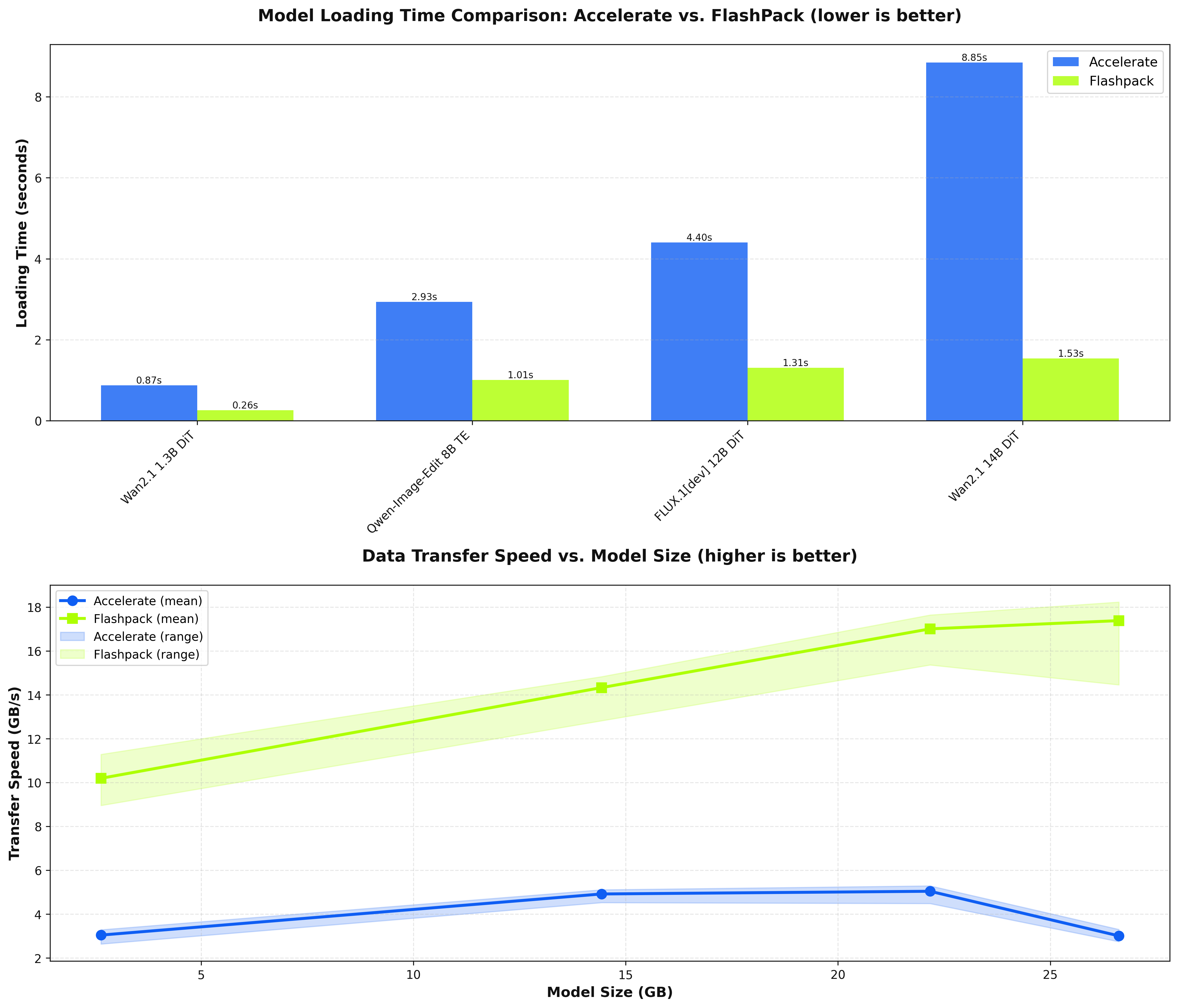
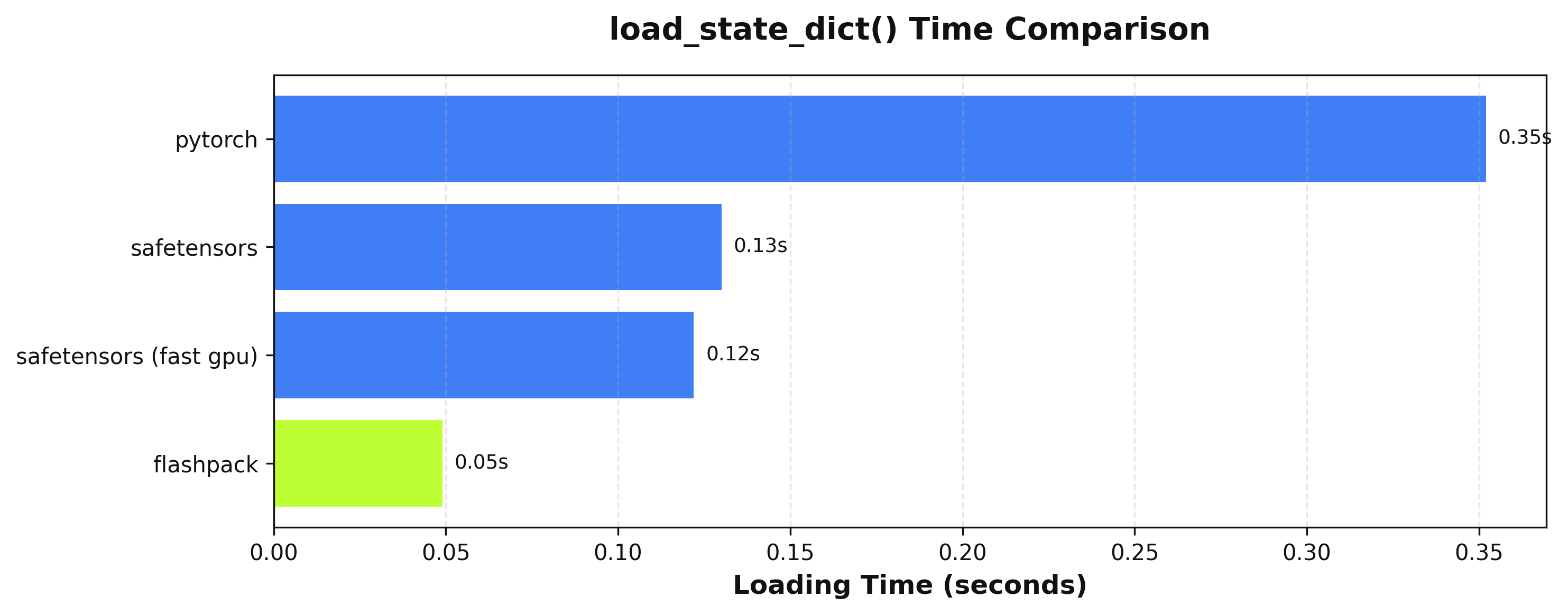
Updates
- 2025-11-25: Now supports multiple data types per checkpoint with no regressions in speed!
Integration Guide
Mixins
Diffusers/Transformers
# Integration classes
from flashpack.integrations.diffusers import FlashPackDiffusersModelMixin, FlashPackDiffusionPipeline
from flashpack.integrations.transformers import FlashPackTransformersModelMixin

# Base classes
from diffusers.models import MyModel, SomeOtherModel
from diffusers.pipelines import MyPipeline

# Define mixed classes
class FlashPackMyModel(MyModel, FlashPackDiffusersModelMixin):
    pass

class FlashPackMyPipeline(MyPipeline, FlashPackDiffusionPipine):
    def __init__(
        self,
        my_model: FlashPackMyModel,
        other_model: SomeOtherModel,
    ) -> None:
        super().__init__()

# Load base pipeline
pipeline = FlashPackMyPipeline.from_pretrained("some/repository")

# Save flashpack pipeline
pipeline.save_pretrained_flashpack(
    "some_directory",
    push_to_hub=False,  # pass repo_id when using this
)

# Load directly from flashpack directory or repository
pipeline = FlashPackMyPipeline.from_pretrained_flashpack("my/flashpack-repository")
Vanilla PyTorch
from flashpack import FlashPackMixin

class MyModule(nn.Module, FlashPackMixin):
    def __init__(self, some_arg: int = 4) -> None:
        ...

module = MyModule(some_arg = 4)
module.save_flashpack("model.flashpack")

loaded_module = module.from_flashpack("model.flashpack", some_arg=4)
Direct Integration
from flashpack import pack_to_file, assign_from_file

flashpack_path = "/path/to/model.flashpack"
model = nn.Module(...)

pack_to_file(model, flashpack_path)  # write state dict to file
assign_from_file(model, flashpack_path)  # load state dict from file
CLI Commands
FlashPack provides a command-line interface for converting, inspecting, and reverting flashpack files.
flashpack convert
Convert a model to a flashpack file.
flashpack convert <path_or_repo_id> [destination_path] [options]
Arguments:
path_or_repo_id- Local path or Hugging Face repository IDdestination_path- (Optional) Output path for the flashpack file
Options:
| Option | Description |
|---|---|
--subfolder |
Subfolder of the model (for repo_id) |
--variant |
Model variant (for repo_id) |
--dtype |
Target dtype for the flashpack file. When omitted, no type changes are made |
--ignore-names |
Tensor names to ignore (can be specified multiple times) |
--ignore-prefixes |
Tensor prefixes to ignore (can be specified multiple times) |
--ignore-suffixes |
Tensor suffixes to ignore (can be specified multiple times) |
--use-transformers |
Load the path as a transformers model |
--use-diffusers |
Load the path as a diffusers model |
-v, --verbose |
Enable verbose output |
Examples:
# Convert a local model
flashpack convert ./my_model ./my_model.flashpack

# Convert from Hugging Face
flashpack convert stabilityai/stable-diffusion-xl-base-1.0 --subfolder unet --use-diffusers

# Convert with specific dtype
flashpack convert ./my_model ./my_model.flashpack --dtype float16
flashpack revert
Revert a flashpack file back to safetensors or torch format.
flashpack revert <path> [destination_path] [options]
Arguments:
path- Path to the flashpack filedestination_path- (Optional) Output path for the reverted file
Options:
| Option | Description |
|---|---|
-v, --verbose |
Enable verbose output |
Example:
flashpack revert ./my_model.flashpack ./my_model.safetensors
flashpack metadata
Print the metadata of a flashpack file.
flashpack metadata <path> [options]
Arguments:
path- Path to the flashpack file
Options:
| Option | Description |
|---|---|
-i, --show-index |
Show the tensor index |
-j, --json |
Output metadata in JSON format |
Examples:
# View basic metadata
flashpack metadata ./my_model.flashpack

# View metadata with tensor index
flashpack metadata ./my_model.flashpack --show-index

# Output as JSON
flashpack metadata ./my_model.flashpack --json


Download files
Download the file for your platform. If you're not sure which to choose, learn more about installing packages.
Source Distribution
Built Distribution
Filter files by name, interpreter, ABI, and platform.
If you're not sure about the file name format, learn more about wheel file names.
Copy a direct link to the current filters
File details
Details for the file flashpack-0.2.2.tar.gz.
File metadata
- Download URL: flashpack-0.2.2.tar.gz
- Upload date:
- Size: 942.5 kB
- Tags: Source
- Uploaded using Trusted Publishing? Yes
- Uploaded via: twine/6.1.0 CPython/3.13.7
File hashes
| Algorithm | Hash digest | |
|---|---|---|
| SHA256 |
fd90ebb13dca2950169fd4c6576712099cc1775e15d3c385e4fa549f6f3f394d
|
|
| MD5 |
59e1f9b1afce42989e3eaea59a68bcff
|
|
| BLAKE2b-256 |
4de76491940dfd98488380e5fa0bfb186b9c0f1b3bb9e9e24f5df0459873f8e8
|
Provenance
The following attestation bundles were made for flashpack-0.2.2.tar.gz:
Publisher:
pypi.yaml on fal-ai/flashpack
-
Statement:
-
Statement type:
https://in-toto.io/Statement/v1 -
Predicate type:
https://docs.pypi.org/attestations/publish/v1 -
Subject name:
flashpack-0.2.2.tar.gz -
Subject digest:
fd90ebb13dca2950169fd4c6576712099cc1775e15d3c385e4fa549f6f3f394d - Sigstore transparency entry: 845276198
- Sigstore integration time:
-
Permalink:
fal-ai/flashpack@8564d3a46fb2c70c30a7894327cf37eccce615f1 -
Branch / Tag:
refs/tags/v0.2.2 - Owner: https://github.com/fal-ai
-
Access:
public
-
Token Issuer:
https://token.actions.githubusercontent.com -
Runner Environment:
github-hosted -
Publication workflow:
pypi.yaml@8564d3a46fb2c70c30a7894327cf37eccce615f1 -
Trigger Event:
release
-
Statement type:
File details
Details for the file flashpack-0.2.2-py3-none-any.whl.
File metadata
- Download URL: flashpack-0.2.2-py3-none-any.whl
- Upload date:
- Size: 42.9 kB
- Tags: Python 3
- Uploaded using Trusted Publishing? Yes
- Uploaded via: twine/6.1.0 CPython/3.13.7
File hashes
| Algorithm | Hash digest | |
|---|---|---|
| SHA256 |
2bebbc4baf2dbabf9a17e967441c9d49065bbf2cca377740748e2ae782861358
|
|
| MD5 |
ac424ccee75a7fee126617ed793d8cec
|
|
| BLAKE2b-256 |
f88586b1279f6039ce6808ec10b17a8871fd9edf4e623a47e5bec68570020082
|
Provenance
The following attestation bundles were made for flashpack-0.2.2-py3-none-any.whl:
Publisher:
pypi.yaml on fal-ai/flashpack
-
Statement:
-
Statement type:
https://in-toto.io/Statement/v1 -
Predicate type:
https://docs.pypi.org/attestations/publish/v1 -
Subject name:
flashpack-0.2.2-py3-none-any.whl -
Subject digest:
2bebbc4baf2dbabf9a17e967441c9d49065bbf2cca377740748e2ae782861358 - Sigstore transparency entry: 845276243
- Sigstore integration time:
-
Permalink:
fal-ai/flashpack@8564d3a46fb2c70c30a7894327cf37eccce615f1 -
Branch / Tag:
refs/tags/v0.2.2 - Owner: https://github.com/fal-ai
-
Access:
public
-
Token Issuer:
https://token.actions.githubusercontent.com -
Runner Environment:
github-hosted -
Publication workflow:
pypi.yaml@8564d3a46fb2c70c30a7894327cf37eccce615f1 -
Trigger Event:
release
-
Statement type:






