
Forest cover change from Google Earth Engine
Verified details
These details have been verified by PyPIProject links
GitHub Statistics
Maintainers

Project description
geefcc Python package





Overview
The geefcc Python package can be used to make forest cover change (fcc) maps from Google Earth Engine (GEE) and download them locally. Forest cover change maps are obtained from two global tree/forest cover change products: Global Forest Change or Tropical Moist Forests. These two products are derived from the Landsat satellite image archive and provide tree/forest cover data at 30 m resolution.
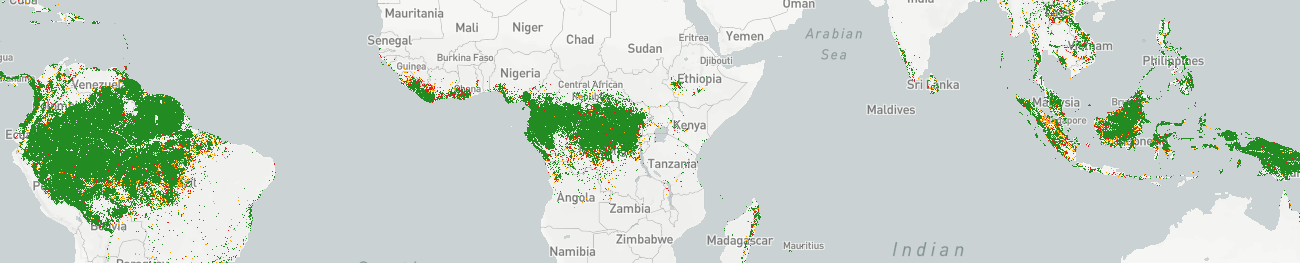
The geefcc package depends on the xee Python package, which allows opening GEE datasets locally without exporting data to GEE assets or Google Drive. The user only has to specify an area of interest (aoi), either with an extent, a polygon vector file, or a country iso code (e.g. PER for Peru), and the years defining the time periods considered for the forest cover change (e.g. 2000, 2010, 2020). For the Global Forest Change product, the users also has to specify a tree cover threshold to define the forest (e.g. 75%).
Prerequisites
Access to Google Earth Engine
To use the geefcc Python package, you need a Google account and an access to Earth Engine either via a Google Cloud project that’s registered to use Earth Engine or via an individually signed-up account. Please follow this link to register for Earth Engine.
You must always initialize GEE before using geefcc functions specifying a Google Cloud project name and Earth Engine high-volume endpoint:
ee.Initialize(
  credentials=credentials,
  project=project,
  opt_url="https://earthengine-highvolume.googleapis.com"
)
GDAL
GDAL must be installed on your system.
To install GDAL on Windows, use the OSGeo4W network installer. OSGeo4W is a binary distribution of a broad set of open source geospatial software for Windows environments (Windows 11 down to 7). Select Express Install and install GDAL. Several Gb of space will be needed on disk to install this programs. This will also install OSGeo4W Shell to execute command lines.
To install GDAL on other systems, use your package manager, for example apt for Debian/Ubuntu Linux distributions.
sudo apt update
sudo apt install gdal-bin libgdal-dev
After installing GDAL, you can test the installation by running gdalinfo --version in the command prompt or terminal, which should display the installed GDAL version.
GADM website
The geefcc package downloads country administrative borders from the GADM website. From time to time, their server is not responding. In case of problem with downloading country borders, check directly on the GADM website that data can be downloaded manually to be sure that the problem is coming from geefcc.
Installation
The easiest way to install the geefcc Python package is via pip in the OSGeo4W Shell for Windows or in a virtual environment for Linux.
For Linux, create and activate a virtual environment before installing geefcc with pip:
cd ~
# Create a directory for virtual environments
mkdir venvs
# Create the virtual environment with venv
python3 -m venv ~/venvs/venv-geefcc
# Activate (start) the virtual environment
source ~/venvs/venv-geefcc/bin/activate
Install Python dependencies and geefcc in the OSGeo4W Shell or in the newly created virtual environment:
# Upgrade pip, setuptools, and wheel
python3 -m pip install --upgrade pip setuptools wheel
# Install numpy
python3 -m pip install numpy
# Install gdal Python bindings (the correct version)
python3 -m pip install gdal==$(gdal-config --version)
# Install geefcc. This will install all other dependencies
python3 -m pip install geefcc
If you want to install the development version of geefcc, replace the last line with:
python3 -m pip install https://github.com/ghislainv/geefcc/archive/master.zipTo deactivate and delete the virtual environment:
deactivate
rm -R ~/venvs/venv-geefcc # Just remove the repository
In case of problem while installing GDAL Python bindings, try the following command:
python3 -m pip install --no-cache-dir --force-reinstall gdal==$(gdal-config --version)Contributing
The geefcc Python package is Open Source and released under the GNU GPL version 3 license. Anybody who is interested can contribute to the package development following our Community guidelines. Every contributor must agree to follow the project’s Code of conduct.
Project details
Verified details
These details have been verified by PyPIProject links
GitHub Statistics
Maintainers


Download files
Download the file for your platform. If you're not sure which to choose, learn more about installing packages.
Source Distribution
Built Distribution
Filter files by name, interpreter, ABI, and platform.
If you're not sure about the file name format, learn more about wheel file names.
Copy a direct link to the current filters
File details
Details for the file geefcc-0.1.6.tar.gz.
File metadata
- Download URL: geefcc-0.1.6.tar.gz
- Upload date:
- Size: 32.9 kB
- Tags: Source
- Uploaded using Trusted Publishing? Yes
- Uploaded via: twine/6.1.0 CPython/3.12.9
File hashes
| Algorithm | Hash digest | |
|---|---|---|
| SHA256 |
a1ce254ea46523166d51009e3f25699bbbe52c8ae04367db5d0f8d0ad9d56128
|
|
| MD5 |
ff54c577614b92f95e850becbfb44454
|
|
| BLAKE2b-256 |
5283671364d64a691f7f4682ac3e3c822b3e2ef9c06d45dbc7a1b9a913daa6b8
|
Provenance
The following attestation bundles were made for geefcc-0.1.6.tar.gz:
Publisher:
wheel-pypi.yml on ghislainv/geefcc
-
Statement:
-
Statement type:
https://in-toto.io/Statement/v1 -
Predicate type:
https://docs.pypi.org/attestations/publish/v1 -
Subject name:
geefcc-0.1.6.tar.gz -
Subject digest:
a1ce254ea46523166d51009e3f25699bbbe52c8ae04367db5d0f8d0ad9d56128 - Sigstore transparency entry: 173634028
- Sigstore integration time:
-
Permalink:
ghislainv/geefcc@71f53c2da4453868ad718bf7219a6a8782ee31ea -
Branch / Tag:
refs/tags/v0.1.6 - Owner: https://github.com/ghislainv
-
Access:
public
-
Token Issuer:
https://token.actions.githubusercontent.com -
Runner Environment:
github-hosted -
Publication workflow:
wheel-pypi.yml@71f53c2da4453868ad718bf7219a6a8782ee31ea -
Trigger Event:
push
-
Statement type:
File details
Details for the file geefcc-0.1.6-py2.py3-none-any.whl.
File metadata
- Download URL: geefcc-0.1.6-py2.py3-none-any.whl
- Upload date:
- Size: 33.0 kB
- Tags: Python 2, Python 3
- Uploaded using Trusted Publishing? Yes
- Uploaded via: twine/6.1.0 CPython/3.12.9
File hashes
| Algorithm | Hash digest | |
|---|---|---|
| SHA256 |
f32c4213711886d456929a415364ec21b80c79a6b88d694c380219655d8d2f36
|
|
| MD5 |
ece89145ff4475a10cb8ed5b5d173838
|
|
| BLAKE2b-256 |
ffadb3f641824b0ce5e9822bfde2b9dccfc0adfe4d2d21a830de41253a210900
|
Provenance
The following attestation bundles were made for geefcc-0.1.6-py2.py3-none-any.whl:
Publisher:
wheel-pypi.yml on ghislainv/geefcc
-
Statement:
-
Statement type:
https://in-toto.io/Statement/v1 -
Predicate type:
https://docs.pypi.org/attestations/publish/v1 -
Subject name:
geefcc-0.1.6-py2.py3-none-any.whl -
Subject digest:
f32c4213711886d456929a415364ec21b80c79a6b88d694c380219655d8d2f36 - Sigstore transparency entry: 173634029
- Sigstore integration time:
-
Permalink:
ghislainv/geefcc@71f53c2da4453868ad718bf7219a6a8782ee31ea -
Branch / Tag:
refs/tags/v0.1.6 - Owner: https://github.com/ghislainv
-
Access:
public
-
Token Issuer:
https://token.actions.githubusercontent.com -
Runner Environment:
github-hosted -
Publication workflow:
wheel-pypi.yml@71f53c2da4453868ad718bf7219a6a8782ee31ea -
Trigger Event:
push
-
Statement type:






