
Command-line interface for ChatGPT and Claude
Verified details
These details have been verified by PyPIProject links
GitHub Statistics
Maintainers

Project description
gpt-cli
Command-line interface for chat LLMs.
Try now
export ANTHROPIC_API_KEY=xcxc
uvx --from gpt-command-line gpt
Supported providers
- OpenAI
- Anthropic
- Google Gemini
- Cohere
- Other APIs compatible with OpenAI (e.g. Together, OpenRouter, local models with LM Studio)
Features
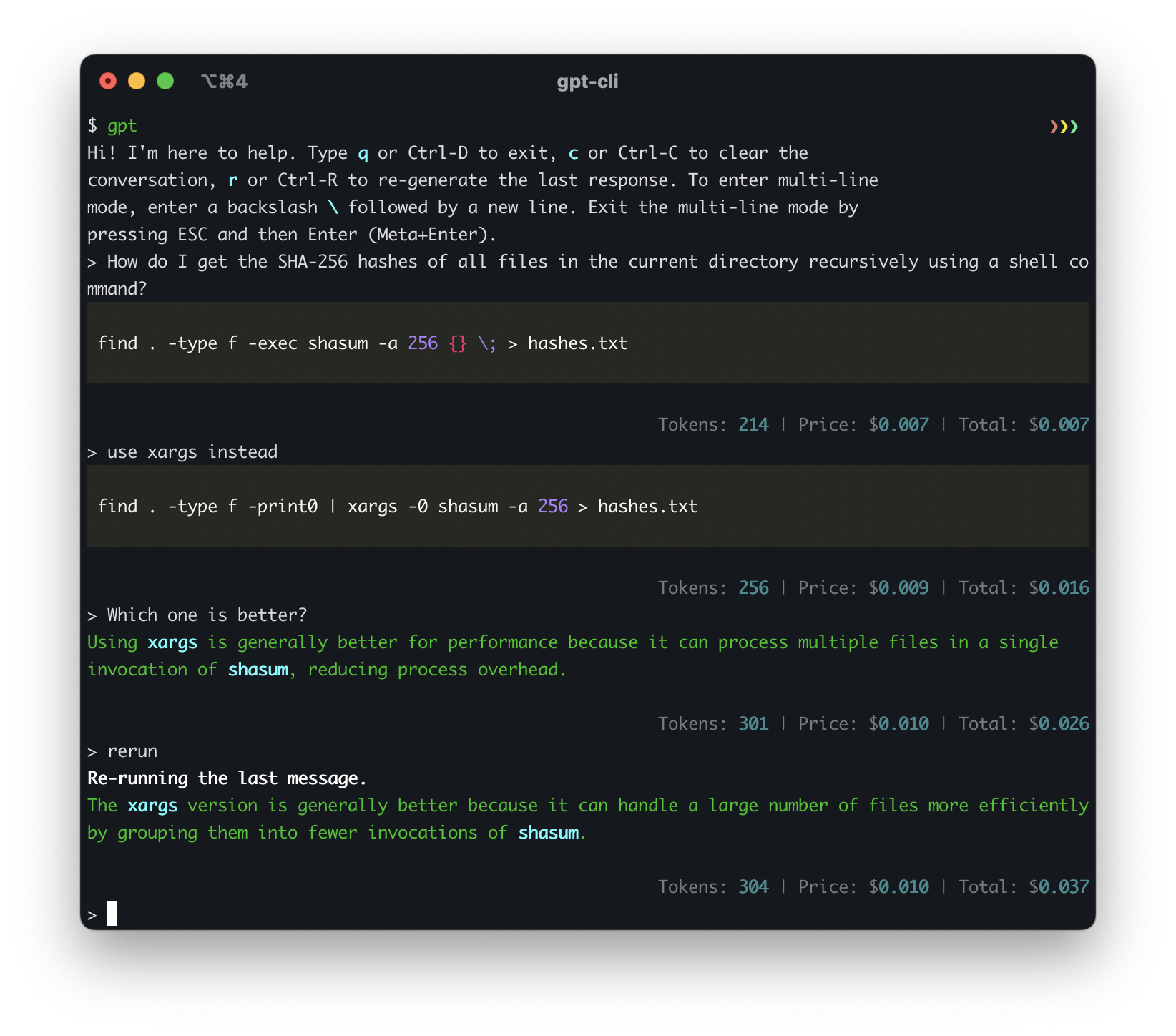
- Command-Line Interface: Interact with ChatGPT or Claude directly from your terminal.
- Model Customization: Override the default model, temperature, and top_p values for each assistant, giving you fine-grained control over the AI's behavior.
- Extended Thinking Mode: Enable Claude 3.7's extended thinking capability to see its reasoning process for complex problems.
- Usage tracking: Track your API usage with token count and price information.
- Keyboard Shortcuts: Use Ctrl-C, Ctrl-D, and Ctrl-R shortcuts for easier conversation management and input control.
- Multi-Line Input: Enter multi-line mode for more complex queries or conversations.
- Markdown Support: Enable or disable markdown formatting for chat sessions to tailor the output to your preferences.
- Predefined Messages: Set up predefined messages for your custom assistants to establish context or role-play scenarios.
- Multiple Assistants: Easily switch between different assistants, including general, dev, and custom assistants defined in the config file.
- Flexible Configuration: Define your assistants, model parameters, and API key in a YAML configuration file, allowing for easy customization and management.
Installation
This install assumes a Linux/OSX machine with Python and pip available.
pip install gpt-command-line
Install latest version from source:
pip install git+https://github.com/kharvd/gpt-cli.git
Or install by cloning the repository manually:
git clone https://github.com/kharvd/gpt-cli.git
cd gpt-cli
pip install .
Add the OpenAI API key to your .bashrc file (in the root of your home folder).
In this example we use nano, you can use any text editor.
nano ~/.bashrc
export OPENAI_API_KEY=<your_key_here>
Run the tool
gpt
You can also use a gpt.yml file for configuration. See the Configuration section below.
Usage
Make sure to set the OPENAI_API_KEY environment variable to your OpenAI API key (or put it in the ~/.config/gpt-cli/gpt.yml file as described below).
usage: gpt [-h] [--no_markdown] [--model MODEL] [--temperature TEMPERATURE] [--top_p TOP_P]
              [--thinking THINKING_BUDGET] [--log_file LOG_FILE]
              [--log_level {DEBUG,INFO,WARNING,ERROR,CRITICAL}] [--prompt PROMPT]
              [--execute EXECUTE] [--no_stream] [{dev,general,bash}]

Run a chat session with ChatGPT. See https://github.com/kharvd/gpt-cli for more information.

positional arguments:
  {dev,general,bash}
                        The name of assistant to use. `general` (default) is a generally helpful
                        assistant, `dev` is a software development assistant with shorter
                        responses. You can specify your own assistants in the config file
                        ~/.config/gpt-cli/gpt.yml. See the README for more information.

optional arguments:
  -h, --help            show this help message and exit
  --no_markdown         Disable markdown formatting in the chat session.
  --model MODEL         The model to use for the chat session. Overrides the default model defined
                        for the assistant.
  --temperature TEMPERATURE
                        The temperature to use for the chat session. Overrides the default
                        temperature defined for the assistant.
  --top_p TOP_P         The top_p to use for the chat session. Overrides the default top_p defined
                        for the assistant.
  --thinking THINKING_BUDGET
                        Enable Claude's extended thinking mode with the specified token budget.
                        Only applies to Claude 3.7 models.
  --log_file LOG_FILE   The file to write logs to. Supports strftime format codes.
  --log_level {DEBUG,INFO,WARNING,ERROR,CRITICAL}
                        The log level to use
  --prompt PROMPT, -p PROMPT
                        If specified, will not start an interactive chat session and instead will
                        print the response to standard output and exit. May be specified multiple
                        times. Use `-` to read the prompt from standard input. Implies
                        --no_markdown.
  --execute EXECUTE, -e EXECUTE
                        If specified, passes the prompt to the assistant and allows the user to
                        edit the produced shell command before executing it. Implies --no_stream.
                        Use `-` to read the prompt from standard input.
  --no_stream           If specified, will not stream the response to standard output. This is
                        useful if you want to use the response in a script. Ignored when the
                        --prompt option is not specified.
  --no_price            Disable price logging.
Type :q or Ctrl-D to exit, :c or Ctrl-C to clear the conversation, :r or Ctrl-R to re-generate the last response.
To enter multi-line mode, enter a backslash \ followed by a new line. Exit the multi-line mode by pressing ESC and then Enter.
The dev assistant is instructed to be an expert in software development and provide short responses.
$ gpt dev
The bash assistant is instructed to be an expert in bash scripting and provide only bash commands. Use the --execute option to execute the commands. It works best with the gpt-4 model.
gpt bash -e "How do I list files in a directory?"
This will prompt you to edit the command in your $EDITOR it before executing it.
Configuration
You can configure the assistants in the config file ~/.config/gpt-cli/gpt.yml. The file is a YAML file with the following structure (see also config.py)
default_assistant: <assistant_name>
markdown: False
openai_api_key: <openai_api_key>
anthropic_api_key: <anthropic_api_key>
log_file: <path>
log_level: <DEBUG|INFO|WARNING|ERROR|CRITICAL>
assistants:
  <assistant_name>:
    model: <model_name>
    temperature: <temperature>
    top_p: <top_p>
    thinking_budget: <token_budget>  # Claude 3.7 models only
    messages:
      - { role: <role>, content: <message> }
      - ...
  <assistant_name>:
    ...
You can override the parameters for the pre-defined assistants as well.
You can specify the default assistant to use by setting the default_assistant field. If you don't specify it, the default assistant is general. You can also specify the model, temperature and top_p to use for the assistant. If you don't specify them, the default values are used. These parameters can also be overridden by the command-line arguments.
Example:
default_assistant: dev
markdown: True
openai_api_key: <openai_api_key>
assistants:
  pirate:
    model: gpt-4
    temperature: 1.0
    messages:
      - { role: system, content: "You are a pirate." }
$ gpt pirate

> Arrrr
Ahoy, matey! What be bringing ye to these here waters? Be it treasure or adventure ye seek, we be sailing the high seas together. Ready yer map and compass, for we have a long voyage ahead!
Read other context to the assistant with !include
You can read in files to the assistant's context with !include <file_path>.
default_assistant: dev
markdown: True
openai_api_key: <openai_api_key>
assistants:
  pirate:
    model: gpt-4
    temperature: 1.0
    messages:
      - { role: system, content: !include "pirate.txt" }
Customize OpenAI API URL
If you are using other models compatible with the OpenAI Python SDK, you can configure them by modifying the openai_base_url setting in the config file or using the OPENAI_BASE_URL environment variable .
Example:
openai_base_url: https://your-custom-api-url.com/v1
Use oai-compat: prefix for the model name to pass non-GPT model names to the API. For example, to chat with Llama3-70b on Together, use the following command:
OPENAI_API_KEY=$TOGETHER_API_KEY OPENAI_BASE_URL=https://api.together.xyz/v1 gpt general --model oai-compat:meta-llama/Llama-3-70b-chat-hf
The prefix is stripped before sending the request to the API.
Similarly, use the oai-azure: model name prefix to use a model deployed via Azure Open AI. For example, oai-azure:my-deployment-name.
With assistant configuration, you can override the base URL and API key for a specific assistant.
# ~/.config/gpt-cli/gpt.yml
assistants:
  llama:
    model: oai-compat:meta-llama/llama-3.3-70b-instruct
    openai_base_url_override: https://openrouter.ai/api/v1
    openai_api_key_override: $OPENROUTER_API_KEY
Other chat bots
Anthropic Claude
To use Claude, you should have an API key from Anthropic (currently there is a waitlist for API access). After getting the API key, you can add an environment variable
export ANTHROPIC_API_KEY=<your_key_here>
or a config line in ~/.config/gpt-cli/gpt.yml:
anthropic_api_key: <your_key_here>
Now you should be able to run gpt with --model claude-3-(opus|sonnet|haiku)-<date>.
gpt --model claude-3-opus-20240229
Claude 3.7 Sonnet Extended Thinking Mode
Claude 3.7 Sonnet supports an extended thinking mode, which shows Claude's reasoning process before delivering the final answer. This is useful for complex analysis, advanced STEM problems, and tasks with multiple constraints.
Enable it with the --thinking parameter, specifying the token budget for the thinking process:
gpt --model claude-3-7-sonnet-20250219 --thinking 32000
You can also configure thinking mode for specific assistants in your config:
assistants:
  math:
    model: claude-3-7-sonnet-20250219
    thinking_budget: 32000
    messages:
      - { role: system, content: "You are a math expert." }
Note: When thinking mode is enabled, the temperature is automatically set to 1.0 and top_p is unset as required by the Claude API.
Google Gemini
export GOOGLE_API_KEY=<your_key_here>
or
google_api_key: <your_key_here>
Cohere
export COHERE_API_KEY=<your_key_here>
or
cohere_api_key: <your_key_here>
Project details
Verified details
These details have been verified by PyPIProject links
GitHub Statistics
Maintainers
Release history Release notifications | RSS feed


Download files
Download the file for your platform. If you're not sure which to choose, learn more about installing packages.
Source Distribution
Built Distribution
Filter files by name, interpreter, ABI, and platform.
If you're not sure about the file name format, learn more about wheel file names.
Copy a direct link to the current filters
File details
Details for the file gpt_command_line-0.4.3.tar.gz.
File metadata
- Download URL: gpt_command_line-0.4.3.tar.gz
- Upload date:
- Size: 22.4 kB
- Tags: Source
- Uploaded using Trusted Publishing? Yes
- Uploaded via: twine/6.1.0 CPython/3.12.9
File hashes
| Algorithm | Hash digest | |
|---|---|---|
| SHA256 |
e33de61615e59815249902f4901b03c666e40dab0f875adff84bffe1cad499c6
|
|
| MD5 |
8240ea0023d9c776f7ce53335308cb48
|
|
| BLAKE2b-256 |
dabbfa93dd4caf8db6915fb2d4ccc7b973efaa9c1aeb9f750a7ab921081bc7e0
|
Provenance
The following attestation bundles were made for gpt_command_line-0.4.3.tar.gz:
Publisher:
pypi-publish.yml on kharvd/gpt-cli
-
Statement:
-
Statement type:
https://in-toto.io/Statement/v1 -
Predicate type:
https://docs.pypi.org/attestations/publish/v1 -
Subject name:
gpt_command_line-0.4.3.tar.gz -
Subject digest:
e33de61615e59815249902f4901b03c666e40dab0f875adff84bffe1cad499c6 - Sigstore transparency entry: 197360814
- Sigstore integration time:
-
Permalink:
kharvd/gpt-cli@219eca45c8233a9d0a71914c9cbbad35cc94a01b -
Branch / Tag:
refs/tags/v0.4.3 - Owner: https://github.com/kharvd
-
Access:
public
-
Token Issuer:
https://token.actions.githubusercontent.com -
Runner Environment:
github-hosted -
Publication workflow:
pypi-publish.yml@219eca45c8233a9d0a71914c9cbbad35cc94a01b -
Trigger Event:
release
-
Statement type:
File details
Details for the file gpt_command_line-0.4.3-py3-none-any.whl.
File metadata
- Download URL: gpt_command_line-0.4.3-py3-none-any.whl
- Upload date:
- Size: 27.6 kB
- Tags: Python 3
- Uploaded using Trusted Publishing? Yes
- Uploaded via: twine/6.1.0 CPython/3.12.9
File hashes
| Algorithm | Hash digest | |
|---|---|---|
| SHA256 |
a6c6a89402e7a1d626b3b30b88a82852606eb2a7c9446b95b181ac1b64fa8e1b
|
|
| MD5 |
8215ed3ca18dc6e8f1b8c0b9fb952ece
|
|
| BLAKE2b-256 |
93545032587131ca519820205dcdbf9bee3215279a6a5c96229bd68c229ce8bc
|
Provenance
The following attestation bundles were made for gpt_command_line-0.4.3-py3-none-any.whl:
Publisher:
pypi-publish.yml on kharvd/gpt-cli
-
Statement:
-
Statement type:
https://in-toto.io/Statement/v1 -
Predicate type:
https://docs.pypi.org/attestations/publish/v1 -
Subject name:
gpt_command_line-0.4.3-py3-none-any.whl -
Subject digest:
a6c6a89402e7a1d626b3b30b88a82852606eb2a7c9446b95b181ac1b64fa8e1b - Sigstore transparency entry: 197360816
- Sigstore integration time:
-
Permalink:
kharvd/gpt-cli@219eca45c8233a9d0a71914c9cbbad35cc94a01b -
Branch / Tag:
refs/tags/v0.4.3 - Owner: https://github.com/kharvd
-
Access:
public
-
Token Issuer:
https://token.actions.githubusercontent.com -
Runner Environment:
github-hosted -
Publication workflow:
pypi-publish.yml@219eca45c8233a9d0a71914c9cbbad35cc94a01b -
Trigger Event:
release
-
Statement type:






