
Interfaces with keepa.com's API.
Verified details
These details have been verified by PyPIProject links
GitHub Statistics
Maintainers

Project description





This Python library allows you to interface with the API at Keepa to query for Amazon product information and history. It also contains a plotting module to allow for plotting of a product.
Sign up for Keepa Data Access.
Documentation can be found at Keepa Documentation.
Requirements
This library is compatible with Python >= 3.10 and requires:
numpy
aiohttp
matplotlib
tqdm
Product history can be plotted from the raw data when matplotlib is installed.
Interfacing with the keepa requires an access key and a monthly subscription from Keepa API.
Installation
Module can be installed from PyPi with:
pip install keepaSource code can also be downloaded from GitHub and installed using:
cd keepa
pip install .
Brief Example
import keepa
accesskey = 'XXXXXXXXXXXXXXXX' # enter real access key here from https://get.keepa.com/d7vrq
api = keepa.Keepa(accesskey)

# Single ASIN query
products = api.query('B0088PUEPK')  # returns list of product data

# Plot result (requires matplotlib)
keepa.plot_product(products[0])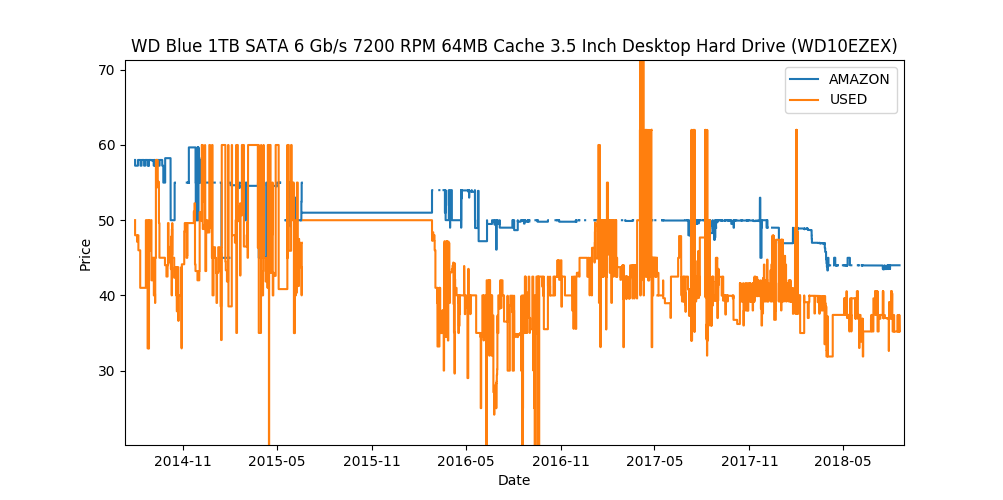
Product Price Plot
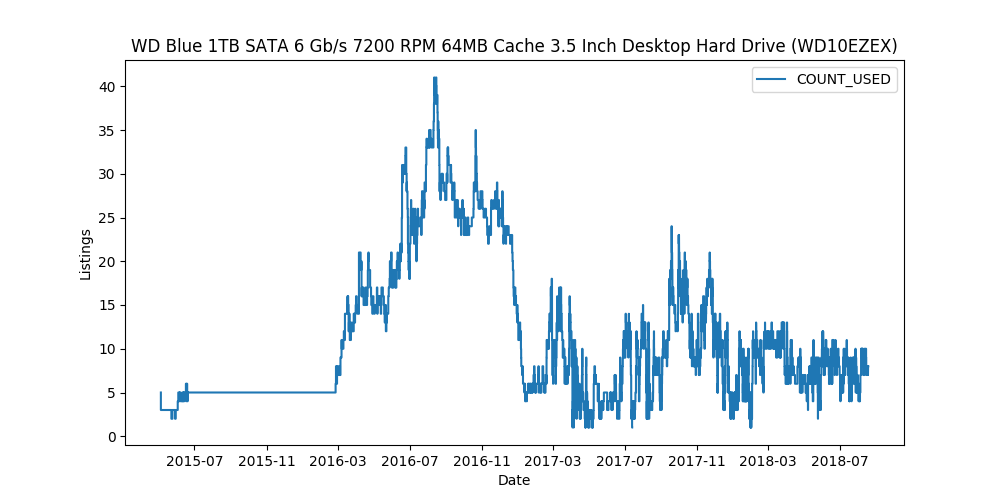
Product Offers Plot
Brief Example using async
Here’s an example of obtaining a product and plotting its price and offer history using the keepa.AsyncKeepa class:
>>> import asyncio
>>> import keepa
>>> product_parms = {'author': 'jim butcher'}
>>> async def main():
...     key = '<REAL_KEEPA_KEY>'
...     api = await keepa.AsyncKeepa().create(key)
...     return await api.product_finder(product_parms)
>>> asins = asyncio.run(main())
>>> asins
['B000HRMAR2',
 '0578799790',
 'B07PW1SVHM',
...
 'B003MXM744',
 '0133235750',
 'B01MXXLJPZ']
Query for product with ASIN 'B0088PUEPK' using the asynchronous keepa interface.
>>> import asyncio
>>> import keepa
>>> async def main():
...     key = '<REAL_KEEPA_KEY>'
...     api = await keepa.AsyncKeepa().create(key)
...     return await api.query('B0088PUEPK')
>>> response = asyncio.run(main())
>>> response[0]['title']
'Western Digital 1TB WD Blue PC Internal Hard Drive HDD - 7200 RPM,
SATA 6 Gb/s, 64 MB Cache, 3.5" - WD10EZEX'
Detailed Examples
Import interface and establish connection to server
import keepa
accesskey = 'XXXXXXXXXXXXXXXX' # enter real access key here
api = keepa.Keepa(accesskey)
Single ASIN query
products = api.query('059035342X')

# See help(api.query) for available options when querying the API
You can use keepa witch async / await too
import keepa
accesskey = 'XXXXXXXXXXXXXXXX' # enter real access key here
api = await keepa.AsyncKeepa.create(accesskey)
Single ASIN query (async)
products = await api.query('059035342X')Multiple ASIN query from List
asins = ['0022841350', '0022841369', '0022841369', '0022841369']
products = api.query(asins)
Multiple ASIN query from numpy array
asins = np.asarray(['0022841350', '0022841369', '0022841369', '0022841369'])
products = api.query(asins)
Products is a list of product data with one entry per successful result from the Keepa server. Each entry is a dictionary containing the same product data available from Amazon.
# Available keys
print(products[0].keys())

# Print ASIN and title
print('ASIN is ' + products[0]['asin'])
print('Title is ' + products[0]['title'])
The raw data is contained within each product result. Raw data is stored as a dictionary with each key paired with its associated time history.
# Access new price history and associated time data
newprice = products[0]['data']['NEW']
newpricetime = products[0]['data']['NEW_time']

# Can be plotted with matplotlib using:
import matplotlib.pyplot as plt
plt.step(newpricetime, newprice, where='pre')

# Keys can be listed by
print(products[0]['data'].keys())
The product history can also be plotted from the module if matplotlib is installed
keepa.plot_product(products[0])You can obtain the offers history for an ASIN (or multiple ASINs) using the offers parameter. See the documentation at Request Products for further details.
products = api.query(asins, offers=20)
product = products[0]
offers = product['offers']

# each offer contains the price history of each offer
offer = offers[0]
csv = offer['offerCSV']

# convert these values to numpy arrays
times, prices = keepa.convert_offer_history(csv)

# for a list of active offers, see
indices = product['liveOffersOrder']

# with this you can loop through active offers:
indices = product['liveOffersOrder']
offer_times = []
offer_prices = []
for index in indices:
    csv = offers[index]['offerCSV']
    times, prices = keepa.convert_offer_history(csv)
    offer_times.append(times)
    offer_prices.append(prices)

# you can aggregate these using np.hstack or plot at the history individually
import matplotlib.pyplot as plt
for i in range(len(offer_prices)):
    plt.step(offer_times[i], offer_prices[i])
plt.show()
If you plan to do a lot of simulatneous query, you might want to speedup query using wait=False arguments.
products = await api.query('059035342X', wait=False)Buy Box Statistics
To load used buy box statistics, you have to enable offers. This example loads in product offers and converts the buy box data into a pandas.DataFrame.
>>> import keepa
>>> key = '<REAL_KEEPA_KEY>'
>>> api = keepa.Keepa(key)
>>> response = api.query('B0088PUEPK', offers=20)
>>> product = response[0]
>>> buybox_info = product['buyBoxUsedHistory']
>>> df = keepa.process_used_buybox(buybox_info)
               datetime         user_id         condition  isFBA
0   2022-11-02 16:46:00  A1QUAC68EAM09F   Used - Like New   True
1   2022-11-13 10:36:00  A18WXU4I7YR6UA  Used - Very Good  False
2   2022-11-15 23:50:00   AYUGEV9WZ4X5O   Used - Like New  False
3   2022-11-17 06:16:00  A18WXU4I7YR6UA  Used - Very Good  False
4   2022-11-17 10:56:00   AYUGEV9WZ4X5O   Used - Like New  False
..                  ...             ...               ...    ...
115 2023-10-23 10:00:00   AYUGEV9WZ4X5O   Used - Like New  False
116 2023-10-25 21:14:00  A1U9HDFCZO1A84   Used - Like New  False
117 2023-10-26 04:08:00   AYUGEV9WZ4X5O   Used - Like New  False
118 2023-10-27 08:14:00  A1U9HDFCZO1A84   Used - Like New  False
119 2023-10-27 12:34:00   AYUGEV9WZ4X5O   Used - Like New  False
Contributing
Contribute to this repository by forking this repository and installing in development mode with:
git clone https://github.com/<USERNAME>/keepa
pip install -e .[test]
You can then add your feature or commit your bug fix and then run your unit testing with:
pytest
Unit testing will automatically enforce minimum code coverage standards.
Next, to ensure your code meets minimum code styling standards, run:
pre-commit run --all-files
Finally, create a pull request from your fork and I’ll be sure to review it.
Credits
This Python module, written by Alex Kaszynski and several contribitors, is based on Java code written by Marius Johann, CEO Keepa. Java source is can be found at keepacom/api_backend.
License
Apache License, please see license file. Work is credited to both Alex Kaszynski and Marius Johann.
Project details
Verified details
These details have been verified by PyPIProject links
GitHub Statistics
Maintainers
Release history Release notifications | RSS feed


Download files
Download the file for your platform. If you're not sure which to choose, learn more about installing packages.
Source Distribution
Built Distribution
Filter files by name, interpreter, ABI, and platform.
If you're not sure about the file name format, learn more about wheel file names.
Copy a direct link to the current filters
File details
Details for the file keepa-1.4.3.tar.gz.
File metadata
- Download URL: keepa-1.4.3.tar.gz
- Upload date:
- Size: 46.0 kB
- Tags: Source
- Uploaded using Trusted Publishing? Yes
- Uploaded via: twine/6.1.0 CPython/3.13.7
File hashes
| Algorithm | Hash digest | |
|---|---|---|
| SHA256 |
b03a3f993a208fa787db2a4ad0818e46d1cfb8a8c27888df5bbc062e210c34be
|
|
| MD5 |
5c6deeefc092c879eebb761e64c4cad5
|
|
| BLAKE2b-256 |
bf0304bf05c8e4dd3adb00fde7cbe724f52a16784675d20f59d75110ff540ccd
|
Provenance
The following attestation bundles were made for keepa-1.4.3.tar.gz:
Publisher:
testing-and-deployment.yml on akaszynski/keepa
-
Statement:
-
Statement type:
https://in-toto.io/Statement/v1 -
Predicate type:
https://docs.pypi.org/attestations/publish/v1 -
Subject name:
keepa-1.4.3.tar.gz -
Subject digest:
b03a3f993a208fa787db2a4ad0818e46d1cfb8a8c27888df5bbc062e210c34be - Sigstore transparency entry: 797330301
- Sigstore integration time:
-
Permalink:
akaszynski/keepa@5e6655a715102e59cf1589c0ff24711490c247be -
Branch / Tag:
refs/tags/v1.4.3 - Owner: https://github.com/akaszynski
-
Access:
public
-
Token Issuer:
https://token.actions.githubusercontent.com -
Runner Environment:
github-hosted -
Publication workflow:
testing-and-deployment.yml@5e6655a715102e59cf1589c0ff24711490c247be -
Trigger Event:
push
-
Statement type:
File details
Details for the file keepa-1.4.3-py3-none-any.whl.
File metadata
- Download URL: keepa-1.4.3-py3-none-any.whl
- Upload date:
- Size: 46.8 kB
- Tags: Python 3
- Uploaded using Trusted Publishing? Yes
- Uploaded via: twine/6.1.0 CPython/3.13.7
File hashes
| Algorithm | Hash digest | |
|---|---|---|
| SHA256 |
e5379c466b3d80b363da09649643f3d9369a9ddbaa82c7ee9dc84616badd25ed
|
|
| MD5 |
d3798a0f0733b483c89940ef1a772ad9
|
|
| BLAKE2b-256 |
ede6059e0f2a291258702bff44fa19a1c42c84e27213441a8beffeed20c0a4b6
|
Provenance
The following attestation bundles were made for keepa-1.4.3-py3-none-any.whl:
Publisher:
testing-and-deployment.yml on akaszynski/keepa
-
Statement:
-
Statement type:
https://in-toto.io/Statement/v1 -
Predicate type:
https://docs.pypi.org/attestations/publish/v1 -
Subject name:
keepa-1.4.3-py3-none-any.whl -
Subject digest:
e5379c466b3d80b363da09649643f3d9369a9ddbaa82c7ee9dc84616badd25ed - Sigstore transparency entry: 797330305
- Sigstore integration time:
-
Permalink:
akaszynski/keepa@5e6655a715102e59cf1589c0ff24711490c247be -
Branch / Tag:
refs/tags/v1.4.3 - Owner: https://github.com/akaszynski
-
Access:
public
-
Token Issuer:
https://token.actions.githubusercontent.com -
Runner Environment:
github-hosted -
Publication workflow:
testing-and-deployment.yml@5e6655a715102e59cf1589c0ff24711490c247be -
Trigger Event:
push
-
Statement type:






