

| Badges | |
|---|---|
| Packages and Releases |    |
| DOI |  |
| Build Status |    |
| License |  |
Overview
ParaDigMa (Parkinson's disease Digital Markers) is a Python toolbox for extracting validated digital biomarkers from wrist sensor data in Parkinson's disease. It processes accelerometer, gyroscope, and PPG signals collected during passive monitoring in daily life.
Key Features:
- Arm swing during gait analysis
- Tremor analysis
- Pulse rate analysis
- Scientifically validated in peer-reviewed publications
- Modular, extensible architecture for custom analyses
Quick Start
Installation
For regular use:
pip install paradigma
Requires Python 3.11+.
For development or running tutorials:
Example data requires git-lfs. See the installation guide for setup instructions.
Basic Usage
from paradigma.orchestrator import run_paradigma

# Example 1: Single DataFrame with default output directory
results = run_paradigma(
    dfs=df,
    pipelines=['gait', 'tremor'],
    watch_side='left',  # Required for gait pipeline
    save_intermediate=['quantification', 'aggregation']  # Saves to ./output by default
)

# Example 2: Multiple DataFrames as list (assigned to 'df_1', 'df_2', etc.)
results = run_paradigma(
    dfs=[df1, df2, df3],
    pipelines=['gait', 'tremor'],
    output_dir="./results",  # Custom output directory
    watch_side='left',
    save_intermediate=['quantification', 'aggregation']
)

# Example 3: Dictionary of DataFrames (custom segment/file names)
results = run_paradigma(
    dfs={'morning_session': df1, 'evening_session': df2},
    pipelines=['gait', 'tremor'],
    watch_side='right',
    save_intermediate=[]  # No files saved - results only in memory
)

# Example 4: Load from data directory
results = run_paradigma(
    data_path='./my_data',
    pipelines=['gait', 'tremor'],
    watch_side='left',
    file_pattern='*.parquet',
    save_intermediate=['quantification', 'aggregation']
)

# Access results (nested by pipeline)
# For gait, results are nested by filtered/unfiltered
gait_filtered = results['quantifications']['gait']['filtered']
gait_unfiltered = results['quantifications']['gait']['unfiltered']
tremor_measures = results['quantifications']['tremor']
gait_aggregates = results['aggregations']['gait']  # Contains 'filtered' and 'unfiltered' keys
tremor_aggregates = results['aggregations']['tremor']

# Check for errors
if results['errors']:
    print(f"Warning: {len(results['errors'])} error(s) occurred")
See our tutorials for complete examples.
Pipelines
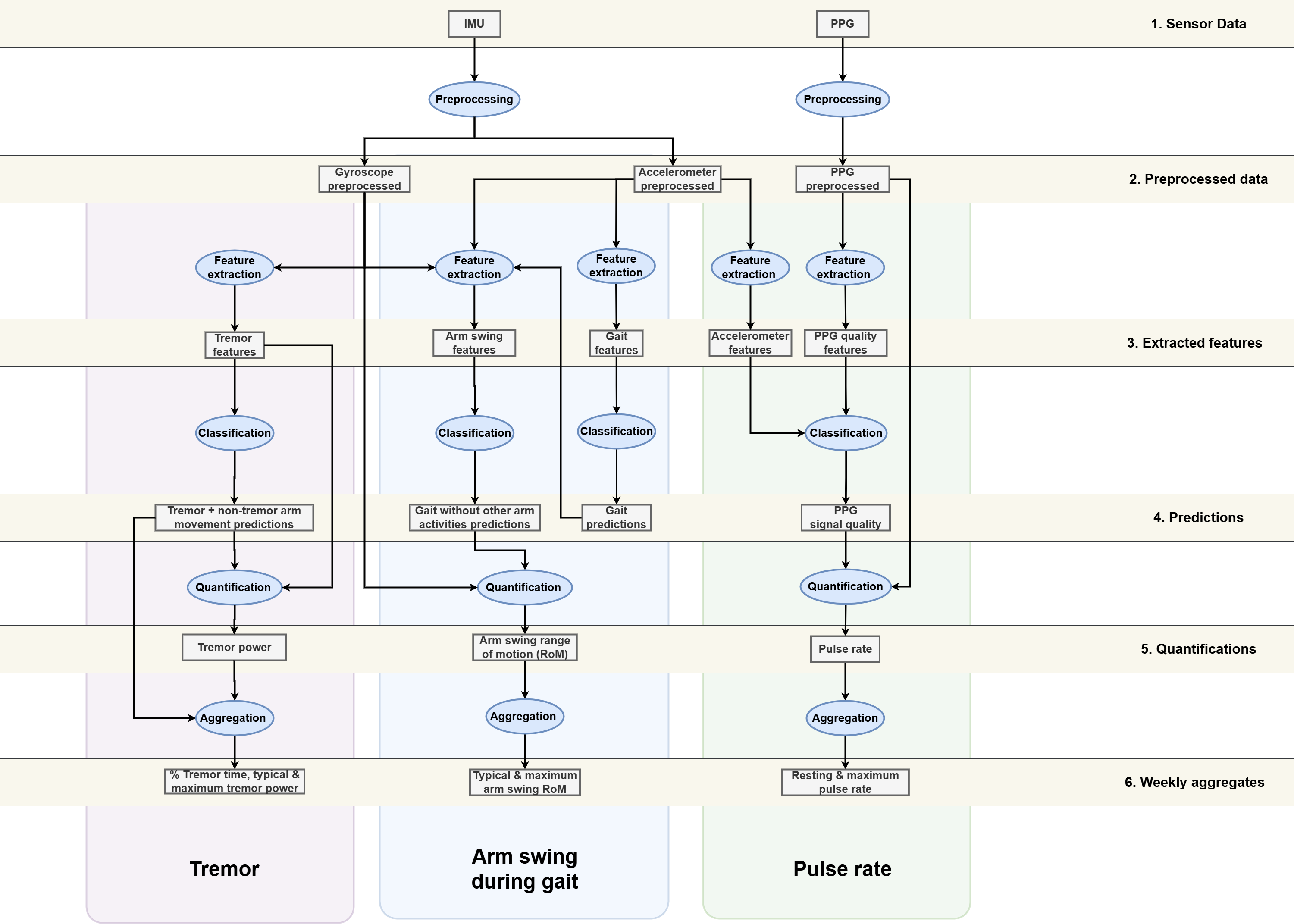
Validated Processing Pipelines
| Pipeline | Input sensors | Output week-level aggregation | Publications | Tutorial |
|---|---|---|---|---|
| Arm swing during gait | Accelerometer + Gyroscope | Typical, maximum & variability of arm swing range of motion | Post 2025, Post 2026* | Guide |
| Tremor | Gyroscope | % tremor time, typical & maximum tremor power | Timmermans 2025, Timmermans 2026 | Guide |
| Pulse rate | PPG (+ Accelerometer) | Resting & maximum pulse rate | Veldkamp 2026 | Guide |
* Indicates pre-print
Pipeline Architecture
ParaDigMa can best be understood by categorizing the sequential processes:
| Process | Description |
|---|---|
| Preprocessing | Preparing raw sensor signals for further processing |
| Feature extraction | Extracting features based on windowed sensor signals |
| Classification | Detecting segments of interest using validated classifiers (e.g., gait segments) |
| Quantification | Extracting specific measures from the detected segments (e.g., arm swing measures) |
| Aggregation | Aggregating the measures over a specific time period (e.g., week-level aggregates) |
Usage
Documentation
- Tutorials - Step-by-step usage examples
- Installation Guide - Setup and troubleshooting
- Sensor Data Requirements - Data specifications and compliance
- Supported Devices - Validated hardware
- Input Formats Guide - Input format options and data loading
- Configuration Guide - Pipeline configuration
- API Reference - Complete API documentation
Sensor Requirements & Supported Devices
ParaDigMa is designed for wrist sensor data collected during passive monitoring in persons with Parkinson's disease. While designed to work with any compliant device, it has been empirically validated on:
- Verily Study Watch (gait, tremor, pulse rate)
- Axivity AX6 (gait, tremor)
- Gait-up Physilog 4 (gait, tremor)
- Empatica EmbracePlus (data loading)
Please check before running the pipelines whether your sensor data complies with the requirements for the sensor configuration and context of use. See the sensor requirements guide for data specifications and the supported devices guide for device-specific setup instructions.
Data Formats
ParaDigMa supports the following data formats:
- In-memory (recommended): Pandas DataFrames (see examples above)
- Data loading file extensions: TSDF, Parquet, CSV, Pickle and several device-specific formats (AVRO (Empatica), CWA (Axivity))
Troubleshooting
For installation issues, see the installation guide troubleshooting section.
For other issues, check our issue tracker or contact paradigma@radboudumc.nl.
Scientific Validation
The following publications contain details and validation of the pipelines:
Arm swing during gait
- Post, E. et al. (2025) - Quantifying arm swing in Parkinson's disease: a method account for arm activities during free-living gait
- Post, E. et al. (2026) - (Pre-print) Longitudinal progression of digital arm swing measures during free-living gait in early Parkinson's disease
Tremor
- Timmermans, N.A. et al. (2025) - A generalizable and open-source algorithm for real-life monitoring of tremor in Parkinson's disease
- Timmermans, N.A. et al. (2026) - Daily-Life, Sensor-Derived Tremor Measures Are Sensitive to Progression in Early Parkinson's Disease
Pulse rate
Contributing
We welcome contributions! Please see:
Citation
If you use ParaDigMa in your research, please cite:
@software{paradigma2024,
  author = {Post, Erik and Veldkamp, Kars and Timmermans, Nienke and
            Soriano, Diogo Coutinho and Kasalica, Vedran and
            Kok, Peter and Evers, Luc},
  title = {ParaDigMa: Parkinson's disease Digital Markers},
  year = {2024},
  doi = {10.5281/zenodo.13838392},
  url = {https://github.com/biomarkersParkinson/paradigma}
}
License
Licensed under the Apache License 2.0. See LICENSE for details.
Acknowledgements
Core Team: Erik Post, Kars Veldkamp, Nienke Timmermans, Diogo Coutinho Soriano, Vedran Kasalica, Peter Kok, Twan van Laarhoven, Luc Evers
Advisors: Max Little, Jordan Raykov, Hayriye Cagnan, Bas Bloem
Funding: the initial release was funded by the Michael J Fox Foundation (grant #020425) and the Dutch Research Council (grants #ASDI.2020.060, #2023.010)
Contact
5 maintainers


Metadata
5 maintainers
Release files for paradigma 1.1.2
For a detailed explanation of source distributions (sdists) and built distributions (wheels), please see the package formats documentation.
Source distribution (sdist)
| File | Size | Uploaded | Provenance | |
|---|---|---|---|---|
| paradigma-1.1.2.tar.gz | 4.4 MB | With provenance | Details |
Built distribution (wheel)
| File | Interpreter | ABI | Platform | Reset |
|---|---|---|---|---|
| paradigma-1.1.2-py3-none-any.whl | Python 3 | none | any | Details |
Total release size: 8.9 MB
Release files / paradigma-1.1.2.tar.gz
| Download URL | paradigma-1.1.2.tar.gz |
|---|---|
| Size | 4.4 MB |
| Tags | Source |
|
SHA-256 checksum How to use checksums |
baddbaedc4f6c94d2c233e38182af1fde5f60e4c699a011c51de8e6ae6b3e09e
|
|
BLAKE2b-256 checksum How to use checksums |
f2c96fbc05c65fecd9a18325500b572c570a9a9ac25f693b2ab885df15ee0bd3
|
| Upload date | |
|
Uploaded using Trusted Publishing? What is trusted publishing? |
Yes |
| Uploaded via |
twine/6.1.0 CPython/3.13.12
|
Provenance
Provenance describes where a file came from. On PyPI, provenance is shared via attestations, which provide a verifiable record of the build or publishing details. View details, limitations and caveats.


PyPI Publish Attestation
PyPI verified that this artifact, at this checksum, originated from the publisher listed below.
Signed by GitHub Actions, verified by PyPI on Jun 18, 2026.
Transparency logRelease files / paradigma-1.1.2-py3-none-any.whl
| Download URL | paradigma-1.1.2-py3-none-any.whl |
|---|---|
| Size | 4.5 MB |
| Tags | Python 3 |
|
SHA-256 checksum How to use checksums |
cac5b28396af6e60e509a3953dd50769de96f96a0e4837fe0e28411346216ee2
|
|
BLAKE2b-256 checksum How to use checksums |
4b59523748e7be1344c019915f76de2079123b2f7e0cb4f1446fed53a19d9e2d
|
| Upload date | |
|
Uploaded using Trusted Publishing? What is trusted publishing? |
Yes |
| Uploaded via |
twine/6.1.0 CPython/3.13.12
|
Provenance
Provenance describes where a file came from. On PyPI, provenance is shared via attestations, which provide a verifiable record of the build or publishing details. View details, limitations and caveats.
PyPI Publish Attestation
PyPI verified that this artifact, at this checksum, originated from the publisher listed below.
Signed by GitHub Actions, verified by PyPI on Jun 18, 2026.
Transparency logSecurity for paradigma 1.1.2
Provenance
Provenance describes where a file came from. On PyPI, provenance is shared via attestations, which provide a verifiable record of the build or publishing details. View details, limitations and caveats.
Full provenance
All 2 files in this release have been uploaded with provenance metadata.
Attestation for paradigma-1.1.2.tar.gz
PyPI Publish Attestation
PyPI verified that this artifact, at this checksum, originated from the publisher listed below.
Signed by GitHub Actions, verified by PyPI on Jun 18, 2026.
Transparency logA note on package security
PyPI is a repository for distributing packages, not a service for auditing them. While third-party security researchers and our staff do their best to detect and remove malicious packages, PyPI cannot guarantee the quality, security or suitability of any given package.
To learn more about protecting yourself from malicious actors, visit our package security documentation.














