
RQ Dashboard FastAPI 🛠



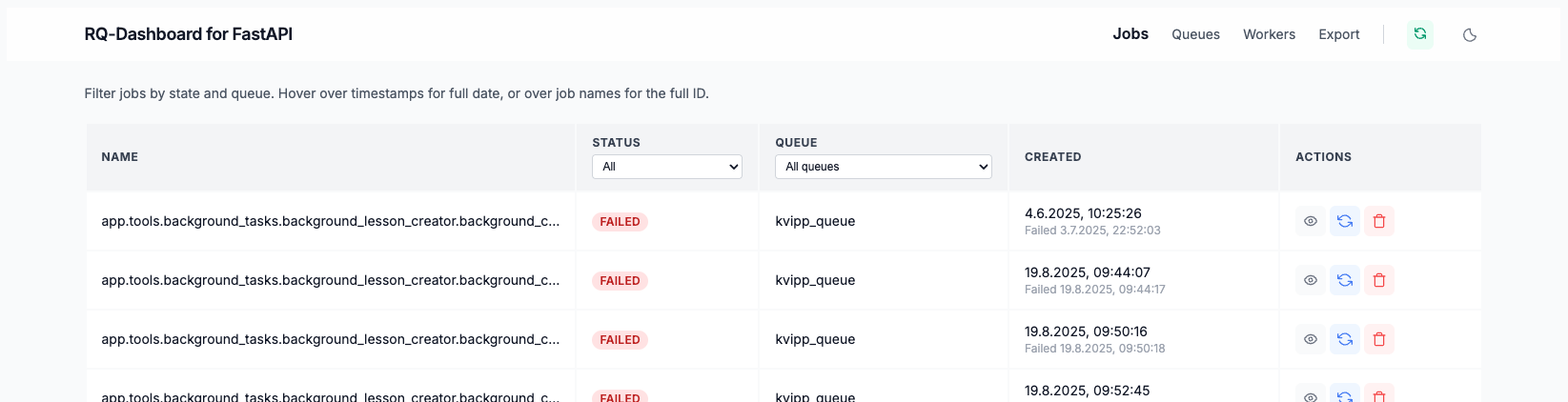
RQ Dashboard FastAPI is a general purpose, lightweight FastAPI-based web frontend to monitor your RQ queues, jobs, and workers in real-time.
Goal of this package is to ease integration into FastAPI-Applications and provide a Docker Image for convenience.
Featured in Related Projects Redis Queue Docs
Features
- Real-time monitoring — live view of queues, jobs, and workers with adaptive auto-refresh
- Queue card view — donut charts showing job state breakdown at a glance, toggle between card and table view
- Job management — inspect, requeue, and delete jobs; view tracebacks with syntax highlighting; export to CSV/JSON
- Scheduled & recurring jobs — first-class support for one-off future jobs (
enqueue_at/enqueue_in) and recurring cron jobs via RQ's nativeCronScheduler - Worker monitoring — live worker status, queue assignments, and job throughput
- Token-based authentication with access scopes — issue per-token credentials that restrict visibility to specific queues, hide workers or schedulers, enforce read-only mode, and set a custom dashboard title. Ideal for sharing a scoped view with team members or clients without exposing your full infrastructure
- Dark mode — OS-aware with manual toggle, persisted across sessions
- Mountable or standalone — embed as a FastAPI sub-application on any existing app, or run directly from the terminal
- Docker-ready — official images for linux/amd64 and linux/arm64
Example Usage
from fastapi import FastAPI
from rq_dashboard_fast import RedisQueueDashboard
import uvicorn

app = FastAPI()
dashboard = RedisQueueDashboard("redis://redis:6379/", "/rq")

app.mount("/rq", dashboard)

if __name__ == "__main__":
    uvicorn.run(app, host="0.0.0.0", port=8000)
Access the Dashboard at
http://127.0.0.1:8000/rq
Installing from PyPi
PyPi: rq-dashboard-fast
$ pip install rq-dashboard-fast
Running Standalone
After installing, you can run the dashboard directly from the terminal:
$ rq-dashboard-fast
This starts the dashboard at http://localhost:8000/rq using Redis at redis://localhost:6379.
Available options:
$ rq-dashboard-fast --help
$ rq-dashboard-fast --redis-url redis://my-redis:6379 --port 9000
$ rq-dashboard-fast --host 127.0.0.1 --prefix /dashboard
| Flag | Default | Environment Variable |
|---|---|---|
--redis-url |
redis://localhost:6379 |
REDIS_URL |
--host |
0.0.0.0 |
FASTAPI_HOST |
--port |
8000 |
FASTAPI_PORT |
--prefix |
/rq |
— |
--auth-config |
— | RQ_DASH_AUTH_CONFIG |
Authentication
The dashboard supports opt-in token-based authentication with per-queue access control. Generate a token, create a YAML config file with hashed tokens and queue scopes, and pass it via --auth-config or RQ_DASH_AUTH_CONFIG. When no config is provided, the dashboard runs with open access as before.
rq-dashboard-fast generate-token          # generate a token + hash pair
rq-dashboard-fast --auth-config auth.yaml # start with auth enabled
See the full documentation in docs/authentication.md.
Scheduled & Recurring Jobs
The dashboard displays both one-off future-scheduled jobs (via queue.enqueue_at() / queue.enqueue_in()) and recurring cron jobs (via CronScheduler). Each appears in a different part of the UI.
See docs/scheduling.md for a full explanation.
Running in Docker
- You can run the RQ Dashboard FastAPI as a Docker container with custom Redis URL:
docker run -e REDIS_URL=<your_redis_url> hannes221/rq-dashboard-fast
Access the Dashboard at
http://127.0.0.1:8000/rq
To change change the port, you can specify the following flag:
docker run -e REDIS_URL=<your_redis_url> -e FASTAPI_PORT=<your_fastapi_port> hannes221/rq-dashboard-fast
Replace <your_fastapi_port> with your desired FastAPI and host port.
- You can use Docker Compose by creating a docker-compose.yml file:
services:
  dashboard:
    image: hannes221/rq-dashboard-fast
    ports:
      - '8000:8000'
    environment:
      - REDIS_URL=<your_redis_url>
Then run:
docker compose up
Access the Dashboard at
http://127.0.0.1:8000/rq
To change the part update the compose file:
services:
  dashboard:
    image: hannes221/rq-dashboard-fast
    ports:
      - '<your_fastapi_port>:<your_fastapi_port>'
    environment:
      - REDIS_URL=<your_redis_url>
      - FASTAPI_PORT=<your_fastapi_port>
Replace <your_fastapi_port> with your desired FastAPI and host port.
Docker Hub: hannes221/rq-dashboard-fast
Github Repository
Github: rq-dashboard-fast
$ pip install rq-dashboard-fast
Development
Frontend CSS (UnoCSS)
The dashboard uses UnoCSS with utility classes applied directly in Jinja2 templates. The generated CSS file (rq_dashboard_fast/static/css/uno.css) is committed to the repo, so no Node.js is needed to run the dashboard — only to modify styles.
npm install                # Install UnoCSS CLI (first time only)
npm run dev:css            # Watch mode — rebuilds on template changes
npm run build:css          # One-off build
UnoCSS scans all rq_dashboard_fast/templates/**/*.html files and outputs to rq_dashboard_fast/static/css/uno.css. Configuration lives in uno.config.ts and includes:
- Shortcuts — reusable class groups for buttons (
btn-delete,btn-requeue, etc.), table cells (th-cell,td-cell), and status badges (badge-failed,badge-started, etc.) - Safelist — badge classes that are constructed dynamically in JS (
'badge-' + state) and wouldn't be detected by static scanning - Dark mode — class-based (
darkMode: 'class'), toggled on<html>via a button in the header
After modifying templates or uno.config.ts, run npm run build:css and commit the updated uno.css.
Additional CSS
rq_dashboard_fast/static/css/custom.css contains styles that can't be expressed as utilities: notification toasts (dynamically created by JS) and Pygments dark mode overrides.
Contributing
If you want to contribute, reach out or create a PR directly.


Release files for rq-dashboard-fast 0.9.2
For a detailed explanation of source distributions (sdists) and built distributions (wheels), please see the package formats documentation.
Source distribution (sdist)
| File | Size | Uploaded | |
|---|---|---|---|
| rq_dashboard_fast-0.9.2.tar.gz | 261.5 kB | Details |
Built distribution (wheel)
| File | Interpreter | ABI | Platform | Reset |
|---|---|---|---|---|
| rq_dashboard_fast-0.9.2-py3-none-any.whl | Python 3 | none | any | Details |
Total release size: 532.2 kB
Release files / rq_dashboard_fast-0.9.2.tar.gz
| Download URL | rq_dashboard_fast-0.9.2.tar.gz |
|---|---|
| Size | 261.5 kB |
| Tags | Source |
|
SHA-256 checksum How to use checksums |
262ffd2a87d991fe677ecb653dc303058aadd8bc8eb7016ab426b0fc5a580e43
|
|
BLAKE2b-256 checksum How to use checksums |
7e909d008dbe649c4228d68dd80d0d94b28777bb244420f34bd177e3dc49da6a
|
| Upload date | |
|
Uploaded using Trusted Publishing? What is trusted publishing? |
Yes |
| Uploaded via |
twine/6.1.0 CPython/3.13.7
|
Provenance
Provenance describes where a file came from. On PyPI, provenance is shared via attestations, which provide a verifiable record of the build or publishing details. View details, limitations and caveats.


PyPI Publish Attestation
PyPI verified that this artifact, at this checksum, originated from the publisher listed below.
Signed by GitHub Actions, verified by PyPI on Apr 6, 2026.
Transparency logRelease files / rq_dashboard_fast-0.9.2-py3-none-any.whl
| Download URL | rq_dashboard_fast-0.9.2-py3-none-any.whl |
|---|---|
| Size | 270.7 kB |
| Tags | Python 3 |
|
SHA-256 checksum How to use checksums |
2cc2872f751a9c7010a7b60ceb9e0f4cf96e2aa79c16799675c6499baa11101c
|
|
BLAKE2b-256 checksum How to use checksums |
8f84e6a7cae7c945b48ac7c5c8cabc931b5a0b115fb5a920aabeae59985e8679
|
| Upload date | |
|
Uploaded using Trusted Publishing? What is trusted publishing? |
Yes |
| Uploaded via |
twine/6.1.0 CPython/3.13.7
|
Provenance
Provenance describes where a file came from. On PyPI, provenance is shared via attestations, which provide a verifiable record of the build or publishing details. View details, limitations and caveats.
PyPI Publish Attestation
PyPI verified that this artifact, at this checksum, originated from the publisher listed below.
Signed by GitHub Actions, verified by PyPI on Apr 6, 2026.
Transparency log













