

Welcome to 3DFin: 3D Forest inventory's official repository!
3DFin is a free software for automatic computation of tree parameters in terrestrial point clouds. It offers the users a quick, ease-of-use interface to load their forest plots and generate tree metrics with just a few clicks.
Getting Started
Be sure to check the Documentation, which features detailed explanations on how the program works and an User Manual.
Also, the Tutorial covers the basics of 3DFin and is a great tool to get started.
Download
3DFin is freely available in 4 ways:
- As a CloudCompare plugin (Windows and Linux)
- As a QGIS plugin
- As a standalone program (Only in Windows)
- As a Python package (In Windows, Linux and macOS)
1. CloudCompare plugin
3DFin is available in Windows as a plugin in CloudCompare (2.13) thanks to CloudCompare PythonRuntime (see References). You can download the latest version CloudCompare (Windows installer version) including the 3DFin plugin here:
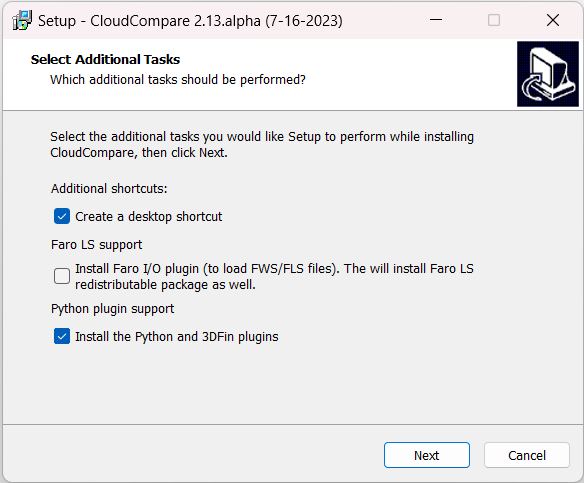
Simply install the latest version of CloudCompare and tick Python and 3DFin's checkbox during the installation:
To install 3DFin plugin, tick the 'Python plugin support' checkbox during CloudCompare installation.
For Linux, the plugin is embedded into the CloudCompare flatpak.
3DFin plugin in CloudCompare.
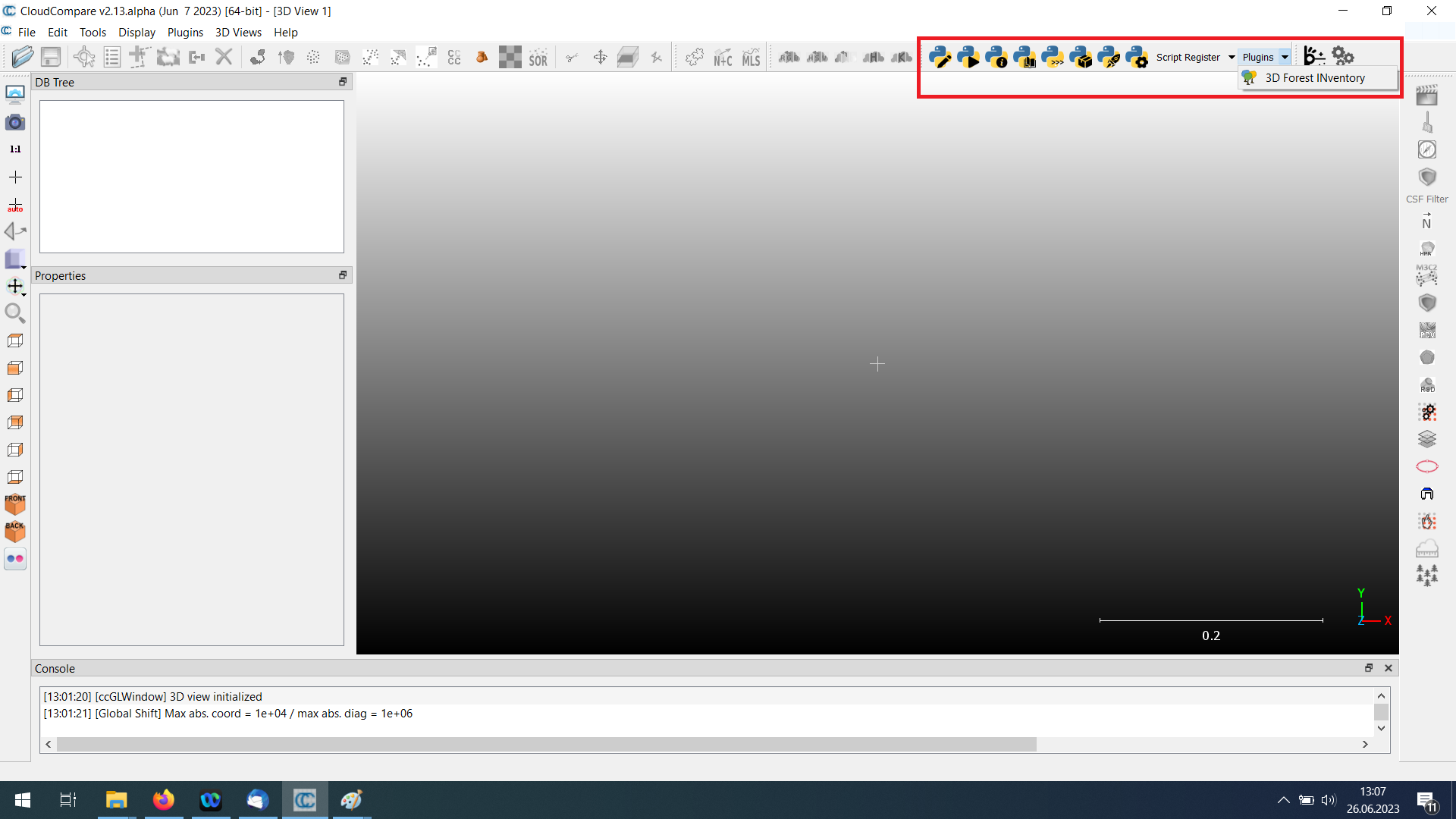
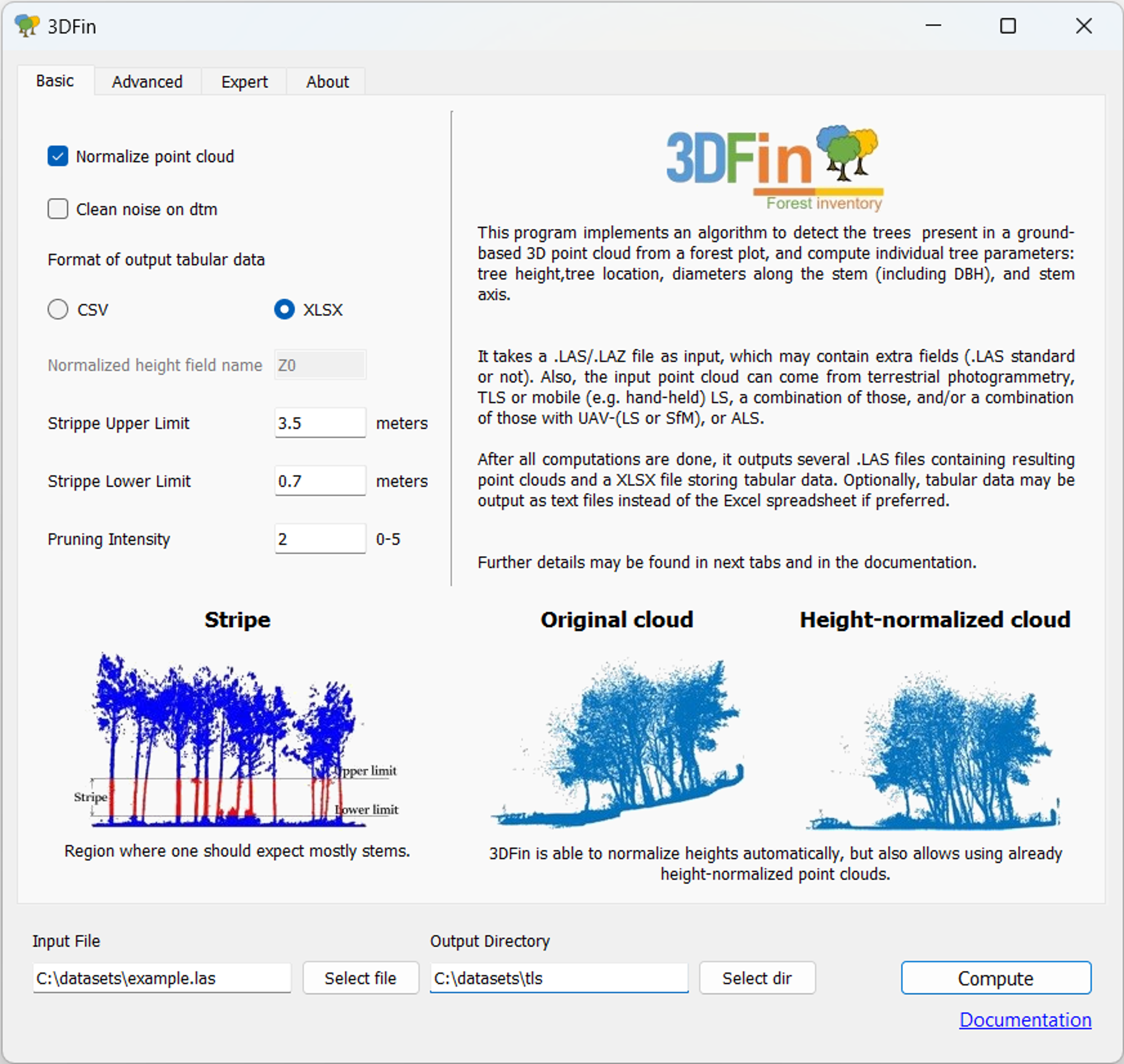
Running the plugin will open 3DFin's graphical user interface (GUI).
3DFin GUI. It is common to any version of 3DFin.
2. QGIS plugin
3DFin is also available as a plugin in QGIS. Please follow the instructions available here in order to test it. Note that for now this does not provide much added value in comparison with CloudCompare and Standalone version of 3DFin.
3. Standalone program
3DFin is also available in Windows as a standalone program, which can be downloaded from here:
3DFin standalone does not require a CloudCompare installation and provides the fastest computation times.
Older versions of 3DFin standalone may also be downloaded from Releases. From there, simply navigate to the desired version and click on 3DFin.exe.
4. Python package (3DFin)
3DFin and its dependencies may be installed and launched in any OS (Windows, Linux and macOS) as a Python package:
pip install 3DFin
python -m three_d_fin
If you are a macOS or Linux user and you may want to try 3DFin, this is the way you should proceed.
pip will also install a script entry point in your Python installation's bin|script directory, so alternatively you can launch 3DFin from the command line with:
3DFin[.exe]
macOS user may need to install and use an openMP capable compiler, such as GCC from Homebrew in order to install the dependencies.
Usage
CloudCompare plugin is the reccomended way of using 3DFin, as it provides enhanced features for visualisation of the results and exporting of the outputs (it allows to export the results as a CloudCompare native BIN file).
By default, running 3DFin (either the CloudCompare plugin or any version of 3DFin) will open a GUI window.
For batch processing you can use the CLI capabilities of 3DFin and running the following command:
3DFin[.exe] cli --help
will give you an overview of the available parameters.
Citing 3DFin
As of now, the best way to cite 3DFin is by referring to the original paper describing the algorithm behind:
Cabo, C., Ordóñez, C., López-Sánchez, C. A., & Armesto, J. (2018). Automatic dendrometry: Tree detection, tree height and diameter estimation using terrestrial laser scanning. International Journal of Applied Earth Observation and Geoinformation, 69, 164–174. https://doi.org/10.1016/j.jag.2018.01.011
Or directly citing the repository itself:
3DFin: 3D Forest Inventory. 3DFin https://github.com/3DFin/3DFin.
We are currently working on a scientific article about 3DFin, which may be published in 2023.
References
CloudCompare-PythonRuntime, by Thomas Montaigu: CloudCompare-PythonRuntime
Acknowledgement
3DFin has been developed at the Centre of Wildfire Research of Swansea University (UK) in collaboration with the Research Institute of Biodiversity (CSIC, Spain) and the Department of Mining Exploitation of the University of Oviedo (Spain).
Funding provided by the UK NERC project (NE/T001194/1):
'Advancing 3D Fuel Mapping for Wildfire Behaviour and Risk Mitigation Modelling'
and by the Spanish Knowledge Generation project (PID2021-126790NB-I00):
‘Advancing carbon emission estimations from wildfires applying artificial intelligence to 3D terrestrial point clouds’.
1 maintainer

Download files
Download the file for your platform. If you're not sure which to choose, learn more about installing packages.
Source Distribution
Built Distribution
Filter files by name, interpreter, ABI, and platform.
If you're not sure about the file name format, learn more about wheel file names.
Copy a direct link to the current filters
File details
Details for the file 3dfin-0.3.2.tar.gz.
File metadata
- Download URL: 3dfin-0.3.2.tar.gz
- Upload date:
- Size: 4.7 MB
- Tags: Source
- Uploaded using Trusted Publishing? No
- Uploaded via: twine/4.0.2 CPython/3.11.7
File hashes
| Algorithm | Hash digest | |
|---|---|---|
| SHA256 |
9e2d74c2e6ae6db00fdb575f28eed4390cdcd0109acf873b01f9cb0f370e5d02
|
|
| MD5 |
fabbade61f9608f1e7032a242bb9c18e
|
|
| BLAKE2b-256 |
8ce9462c64b66f53f44573f07eac1ae0737d7593d1fc08995b133f73d121fffb
|
File details
Details for the file 3dfin-0.3.2-py3-none-any.whl.
File metadata
- Download URL: 3dfin-0.3.2-py3-none-any.whl
- Upload date:
- Size: 4.7 MB
- Tags: Python 3
- Uploaded using Trusted Publishing? No
- Uploaded via: twine/4.0.2 CPython/3.11.7
File hashes
| Algorithm | Hash digest | |
|---|---|---|
| SHA256 |
c823e4ebfa279a4fceb26fa780d1ab13c12531591c284f3a186f2573f9c92e31
|
|
| MD5 |
571f193b046c3fce2cf588618fd30a59
|
|
| BLAKE2b-256 |
339aaba5dc915029c45d68d32a430ac7df63267dafd6e39119aaa5e7d9842803
|







