
BeautifulReport
一个基于unittest.TestResult模块实现的测试用例模板, 可把测试中的结果通过BeautifulReport整合成一个可视化的报表.
如何使用它?
>>> pip install BeautifulReport
import unittest
from BeautifulReport import BeautifulReport

if __name__ == '__main__':
    test_suite = unittest.defaultTestLoader.discover('./tests', pattern='test*.py')
    result = BeautifulReport(test_suite)
    result.report(filename='测试报告', description='测试deafult报告', report_dir='report', theme='theme_default')
Report API简介
-
BeautifulReport.report
- report (
filename -> 测试报告名称, 如果不指定默认文件名为report.html
description -> 测试报告用例名称展示
report_dir='.' -> 报告文件写入路径
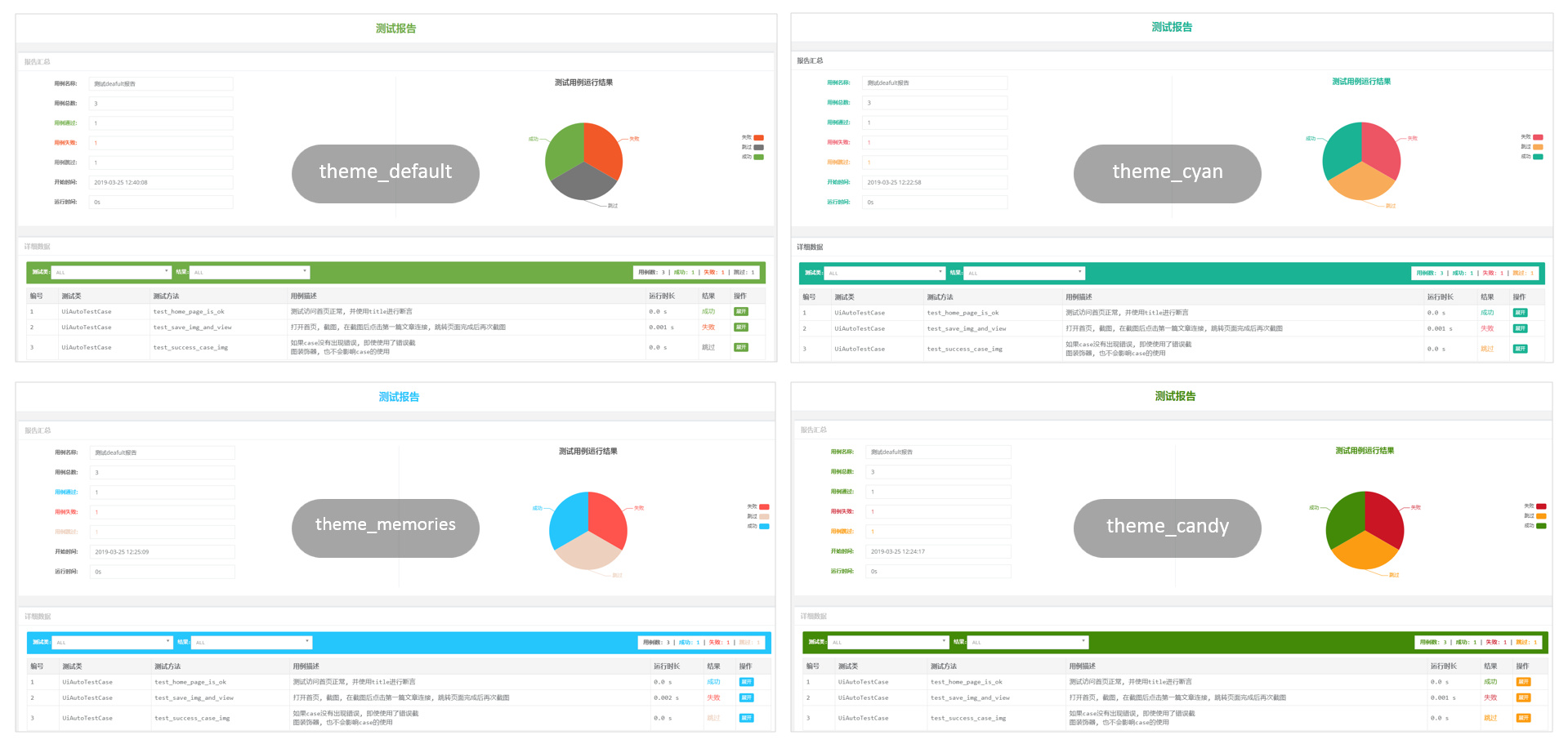
theme='theme_default' -> 报告主题样式 theme_default theme_cyan theme_candy theme_memories
)
- report (
-
BeautifulReport.add_test_img
如果使用报告过程中需要把测试报告的截图放在报告中, 可以使用add_test_img方法
- add_test_img ( *pargs )
可以在测试用例上挂载一个装饰器, 实例内容如下
- 默认存放的图片路径是img, 需要在当前测试项目的启动路径下, 创建一个img文件夹
- 传递给装饰器的图片,在运行测试前可以不存在, 运行测试之后生成即可.
- 当文件在报告中展示后, 想要看到原图, 可以点击报告中的缩略图查看完整的截图
import unittest
from BeautifulReport import BeautifulReport


class UnittestCaseSecond(unittest.TestCase):
    """ 测试代码生成与loader 测试数据"""

    def test_equal(self):
        """
        test 1==1
        :return:
        """
        import time
        time.sleep(1)
        self.assertTrue(1 == 1)

    @BeautifulReport.add_test_img('测试报告.png')
    def test_is_none(self):
        """
        test None object
        :return:
        """
        save_some_img('测试报告.png')
        self.assertIsNone(None)
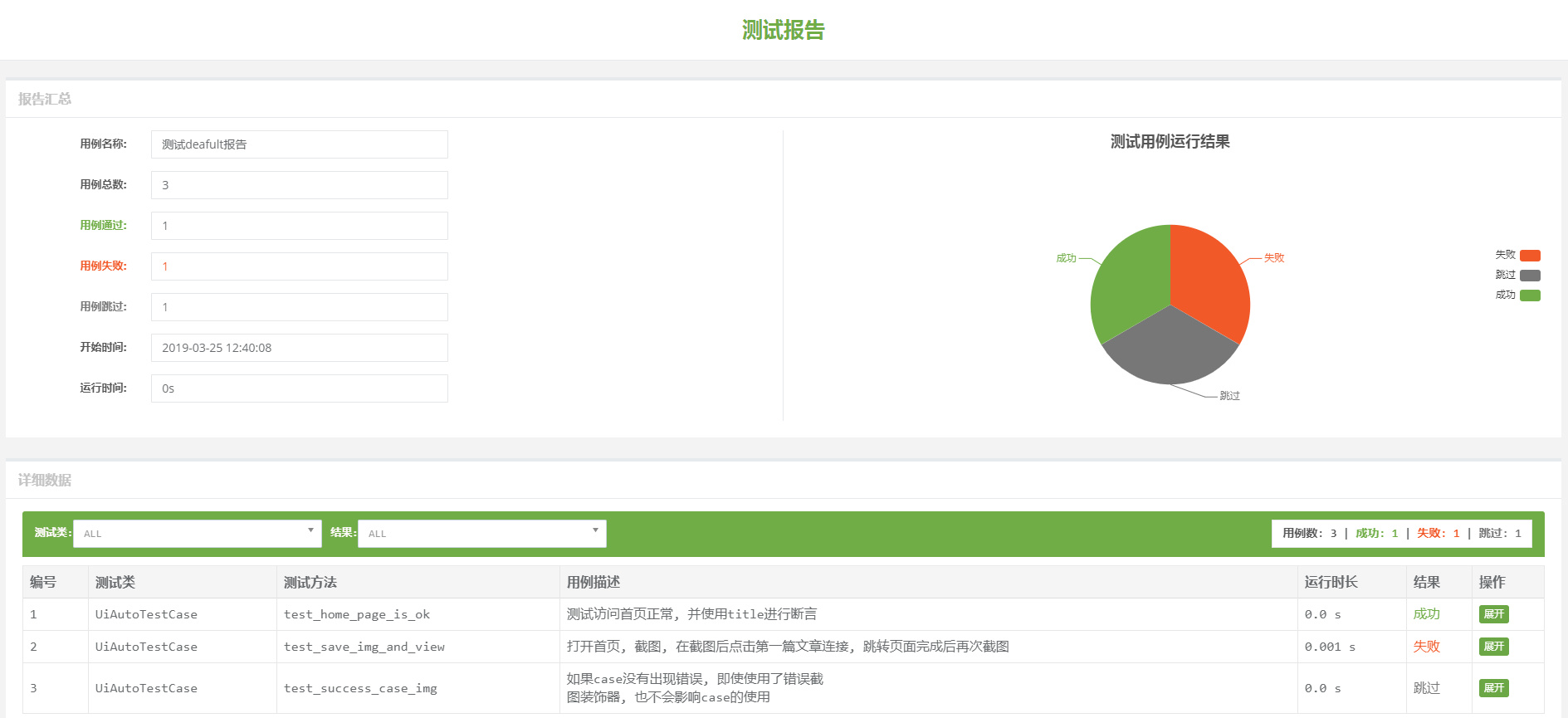
- 运行sample之后生成如下报告
- 主题样式
感谢原作者 TesterlifeRaymond 的代码贡献,本人在原基础上修复了部分bug并增加了主题样式的自定义
1 maintainer

Metadata
1 maintainer
Release files for BeautifulReport 0.1.3
For a detailed explanation of source distributions (sdists) and built distributions (wheels), please see the package formats documentation.
Source distribution (sdist)
| File | Size | Uploaded | Provenance | Actions |
|---|---|---|---|---|
| BeautifulReport-0.1.3.tar.gz | 31.0 kB | Without provenance | Details for BeautifulReport-0.1.3.tar.gz |
Release files / BeautifulReport-0.1.3.tar.gz
| Download URL | BeautifulReport-0.1.3.tar.gz |
|---|---|
| Size | 31.0 kB |
| Tags | Source |
|
SHA-256 checksum How to use checksums |
2c6b064248580e73b65feea36e1d74d5f3c1a0187825ab04ec909e3c016f138b
|
|
BLAKE2b-256 checksum How to use checksums |
b32cb944e50172b72ce94f2b495a761e66ee3c4d517cee226469727749224f13
|
| Upload date | |
|
Uploaded using Trusted Publishing? What is trusted publishing? |
No |
| Uploaded via |
twine/3.1.1 pkginfo/1.5.0.1 requests/2.22.0 setuptools/46.0.0.post20200309 requests-toolbelt/0.9.1 tqdm/4.43.0 CPython/3.7.4
|
Security for BeautifulReport 0.1.3
Provenance
Provenance describes where a file came from. On PyPI, provenance is shared via attestations, which provide a verifiable record of the build or publishing details. View details, limitations and caveats.
No provenance found
None of the files in this release were uploaded with provenance metadata.
A note on package security
PyPI is a repository for distributing packages, not a service for auditing them. While third-party security researchers and our staff do their best to detect and remove malicious packages, PyPI cannot guarantee the quality, security or suitability of any given package.
To learn more about protecting yourself from malicious actors, visit our package security documentation.














