
Live2dTK
Live2d performance on tkinter based on live2d_py
使用前需要安装第三方库及其他附加库:
pip install Live2dTK
示例:
from tkinter import Tk, Frame
from Live2dTK import Live2dFrame

demo = Tk()
demo.attributes('-transparent', 'black')	# 想要实现背景透明,必须有这一行
frame = Frame(demo)
frame.pack()
Debugging = Live2dFrame(frame, model_path=r"E:\IDE\Plugins\live2d\米塔\3.model3.json",
                        width=1000, height=1000)
Debugging.pack()
demo.mainloop()
模型位置不强求,但仍然建议构建规范的项目目录:
.scr
+-live2d
	+model_name
+py_file
结果:
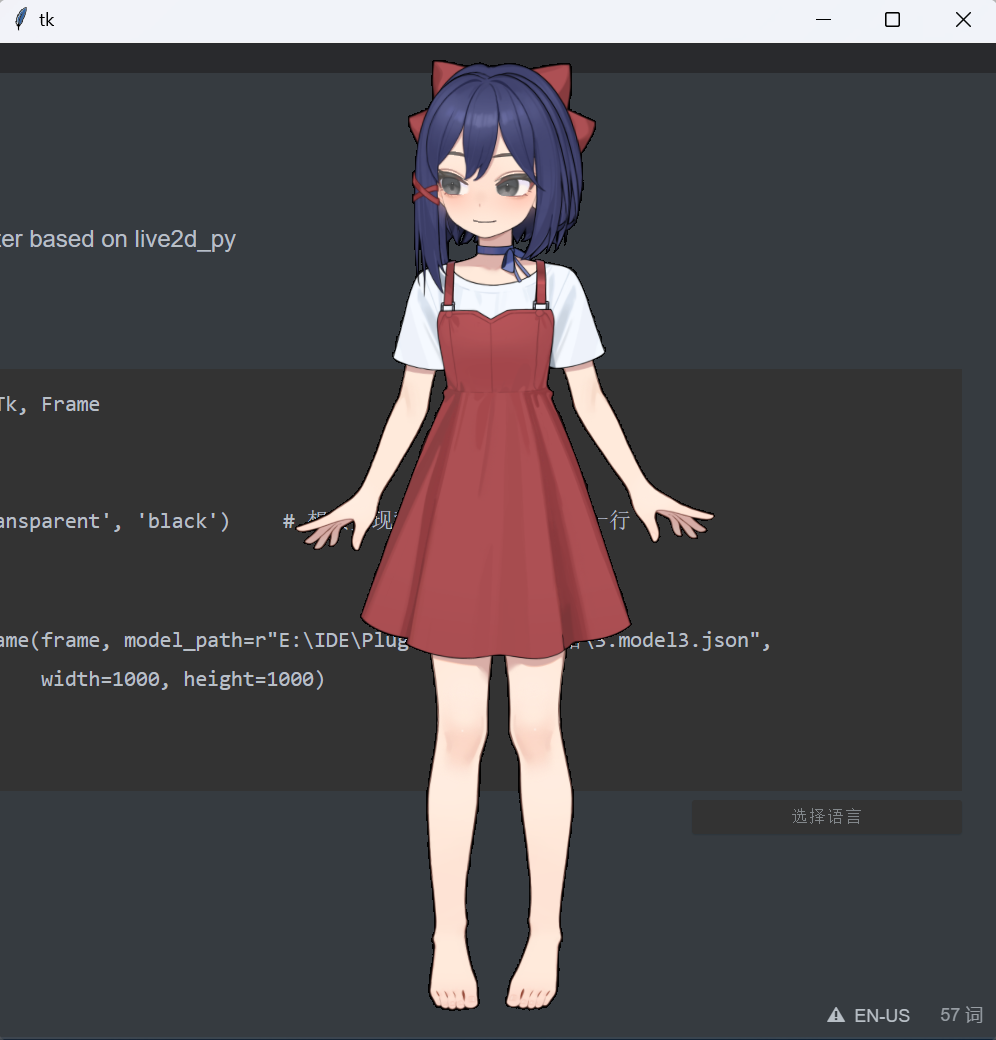
其中,附加函数:
def on_start_callback(cls, group: str, no: int):"""动作开始触发事件"""
def on_finish_callback(cls):"""动作结束调用函数"""
def end(cls):"""结束之后的资源释放事件"""
def touch(self):"""被点击事件"""
该模块主要集成的live2d功能来自live2d-py 可以根据改项目的其他方法改写以实现更多的可玩性,当前模块后续也会封装更多的api。
另附上一个Demo:demo
效果如下:

加油啊,做黄油的大哥哥!
1.0.1更新内容
添加版本选择,初始化时可以根据模型版本选择2/3版本,默认为3
Live2dFrame(master, model_versions=3, model_path=r"...", width=1000, height=1000)
添加帧数控制,当设置帧数大于等于120帧则忽略
Live2dFrame(master, model_path=r"...", fps=120, width=1000, height=1000)
模型点击触发动作,前提是模型文件存在动作
Debugging = Live2dFrame(master, model_path=r"...",fps=120, width=1000, height=1000)
Debugging.pack()
Debugging.bind("<Button-1>", lambda _: Debugging.model.StartRandomMotion())	# 左键点击时触发动作
修复Resources路径处理: RESOURCES_DIRECTORY
1 maintainer

Metadata
1 maintainer
Release files for Live2dTk 1.0.1
For a detailed explanation of source distributions (sdists) and built distributions (wheels), please see the package formats documentation.
Source distribution (sdist)
| File | Size | Uploaded | Provenance | Actions |
|---|---|---|---|---|
| live2dtk-1.0.1.tar.gz | 6.5 kB | Without provenance | Details for live2dtk-1.0.1.tar.gz |
Built distribution (wheel)
| File | Interpreter | ABI | Platform | Actions Reset |
|---|---|---|---|---|
| live2dtk-1.0.1-py3-none-any.whl | Python 3 | none | any | Details for live2dtk-1.0.1-py3-none-any.whl |
Total release size: 10.6 kB
Release files / live2dtk-1.0.1.tar.gz
| Download URL | live2dtk-1.0.1.tar.gz |
|---|---|
| Size | 6.5 kB |
| Tags | Source |
|
SHA-256 checksum How to use checksums |
605ead922309123d93c88eb40e521b408345aa535865ecadf94b37d9e81212b1
|
|
BLAKE2b-256 checksum How to use checksums |
fd8f5fdc17045e48fad36a6986c4a37c81004cc2f278eb4ea118fec8bbd16b8d
|
| Upload date | |
|
Uploaded using Trusted Publishing? What is trusted publishing? |
No |
| Uploaded via |
twine/6.1.0 CPython/3.12.7
|
Release files / live2dtk-1.0.1-py3-none-any.whl
| Download URL | live2dtk-1.0.1-py3-none-any.whl |
|---|---|
| Size | 4.1 kB |
| Tags | Python 3 |
|
SHA-256 checksum How to use checksums |
b1bf483ab5e015a1dc02c4febbd8108dc9fa6675e612e3f30adbb97cdc4fa25f
|
|
BLAKE2b-256 checksum How to use checksums |
77e1365692eb5fc84e1131a3b96aba8be20034b38f20855be6a9cdc5bbf74e60
|
| Upload date | |
|
Uploaded using Trusted Publishing? What is trusted publishing? |
No |
| Uploaded via |
twine/6.1.0 CPython/3.12.7
|
Security for Live2dTk 1.0.1
Provenance
Provenance describes where a file came from. On PyPI, provenance is shared via attestations, which provide a verifiable record of the build or publishing details. View details, limitations and caveats.
No provenance found
None of the files in this release were uploaded with provenance metadata.
A note on package security
PyPI is a repository for distributing packages, not a service for auditing them. While third-party security researchers and our staff do their best to detect and remove malicious packages, PyPI cannot guarantee the quality, security or suitability of any given package.
To learn more about protecting yourself from malicious actors, visit our package security documentation.














