
Welcome to Mathics-Django


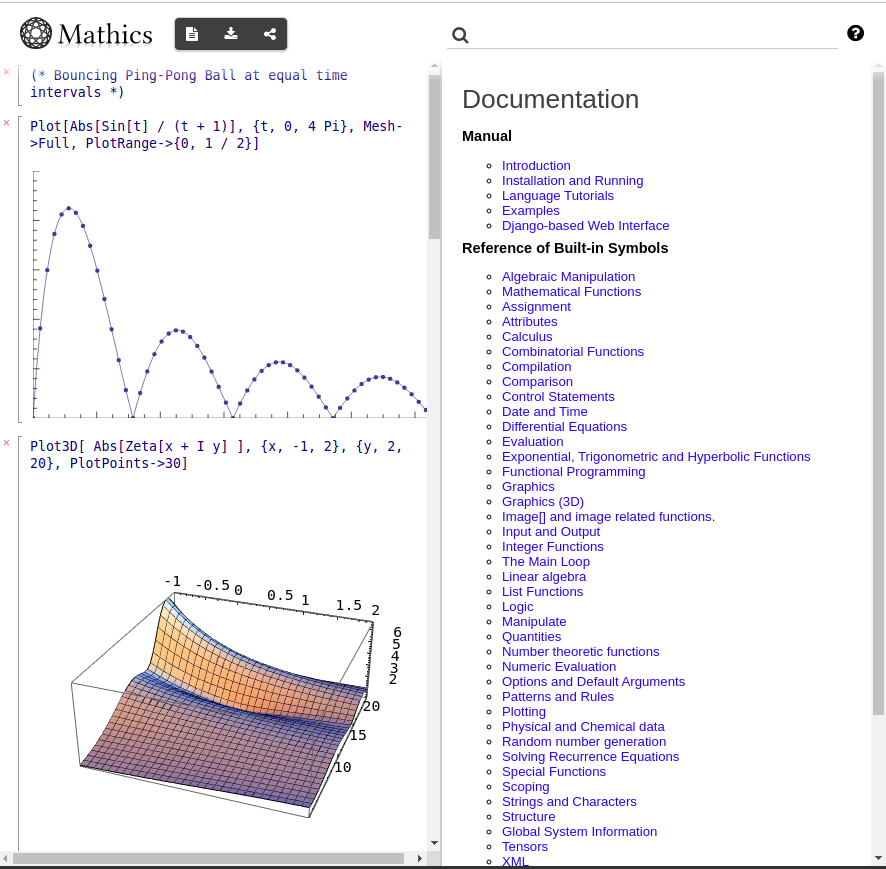
This is the Django front-end to Mathics.
Features:
Extensive online documentation
Integrated graphics, via three.js, and MathML mathematics output
Notebook-like sessions
Note: in the future we intend to also proved a Jupyter-like interface.
ScreenShot
mathicsserver: a Django-based Web interface
Installing
This package needs a working Mathics3, the core engine, installed as well as a recent version of Django. For Django, you will need mysql or mariadb installed, since that is where worksheets are stored.
See the Installing Mathics for instructions on installing Mathics3.
If you are a novice at installing Python packages, consider using either a pre-built OS package if available under “Packaging status” above, or the mathics docker image.
Ubuntu/Debian Specific OS dependent packages
On Ubuntu or Debian:
apt install default-libmysqlclient-dev.
Install from PyPI
Once Mathics3 is installed, run:
pip install Mathics-Django
Install from Github source
From the place root directory that github was checked out:
make install
Running
This is a Django project, so Dango’s manage.py script used.
A simple way to start Mathics Django when GNU make is installed (which is the case on most POSIX systems):
make runserver
Underneath this runs the Python program manage.py in mathics_django directory.
To get a list of the available commands, type python mathics_django/manage.py help. To get help on a specific command give that command at the end. For example two commands that are useful are the runserver and testserver commands. python mathics_django/manage.py help runserver will show options in running the Django server.
Once the server is started you will see a URL listed that lookss like this:
Starting development server at http://127.0.0.1:8000/
Quit the server with CONTROL-C.
Point your browser to the URL listed above. Here it is http://127.0.0.1:8000
Environment Variables
There are two special environment variables of note which controls where the Mathics database is located. This database is saves authentication and worksheet information.
By default the database used is DATADIR + mathics.sqlite where DATADIR is under AppData/Python/Mathics/ for MS-Windows and ~/.local/var/mathics/ for all others. If you want to specify your own database file set environment variable MATHICS_DJANGO_DB_PATH.
If you just want to set the mathics.sqlite portion, you can use the environment variable MATHICS_DJANGO_DB.
Information for the online-documentation comes from one of two places, DOC_USER_HTML_DATA_PATH if that exists and DOC_SYSTEM_HTML_DATA_PATH as fallback if that doesn’t exist. The latter is created when the package is built. The former allows for the user or developer to update this information. In the future it will take into account plugins that have been added.
Contributing
Please feel encouraged to contribute to Mathics! Create your own fork, make the desired changes, commit, and make a pull request.
License
Mathics-Django is released under the GNU General Public License Version 3 (GPL3).
1 maintainer

Metadata
1 maintainer
Release files for Mathics-Django 6.0.0
For a detailed explanation of source distributions (sdists) and built distributions (wheels), please see the package formats documentation.
Built distributions (wheels)
| File | Actions Reset | |||
|---|---|---|---|---|
| Mathics_Django-6.0.0-py3.10.egg | Legacy Egg format | - | - | Details for Mathics_Django-6.0.0-py3.10.egg |
| Mathics_Django-6.0.0-py3.9.egg | Legacy Egg format | - | - | Details for Mathics_Django-6.0.0-py3.9.egg |
| Mathics_Django-6.0.0-py3.8.egg | Legacy Egg format | - | - | Details for Mathics_Django-6.0.0-py3.8.egg |
| Mathics_Django-6.0.0-py3.7.egg | Legacy Egg format | - | - | Details for Mathics_Django-6.0.0-py3.7.egg |
| Mathics_Django-6.0.0-py3.6.egg | Legacy Egg format | - | - | Details for Mathics_Django-6.0.0-py3.6.egg |
| Mathics_Django-6.0.0-py3-none-any.whl | Python 3 | none | any | Details for Mathics_Django-6.0.0-py3-none-any.whl |
Total release size: 68.5 MB
Release files / Mathics_Django-6.0.0-py3.10.egg
| Download URL | Mathics_Django-6.0.0-py3.10.egg |
|---|---|
| Size | 11.4 MB |
| Tags | Egg |
|
SHA-256 checksum How to use checksums |
5e3587164c945e9af5d47dfecca6842de4c9ffd0aadd65763eda6cb7a062e725
|
|
BLAKE2b-256 checksum How to use checksums |
c6c884ef9c08a46bb35323984214e25de02f9d378ac27bfee7a03f9fd24cdae9
|
| Upload date | |
|
Uploaded using Trusted Publishing? What is trusted publishing? |
No |
| Uploaded via |
twine/4.0.2 CPython/3.8.12
|
Release files / Mathics_Django-6.0.0-py3.9.egg
| Download URL | Mathics_Django-6.0.0-py3.9.egg |
|---|---|
| Size | 11.4 MB |
| Tags | Egg |
|
SHA-256 checksum How to use checksums |
1fa160f08dbed8f30254f45a70c6c6623f7e8a6e27d53285b3a59904a7fa6f83
|
|
BLAKE2b-256 checksum How to use checksums |
cf69902fa1bd4ed3acbdab5cde69db4a4332798e6d0f92c6240ae085305f3784
|
| Upload date | |
|
Uploaded using Trusted Publishing? What is trusted publishing? |
No |
| Uploaded via |
twine/4.0.2 CPython/3.8.12
|
Release files / Mathics_Django-6.0.0-py3.8.egg
| Download URL | Mathics_Django-6.0.0-py3.8.egg |
|---|---|
| Size | 11.4 MB |
| Tags | Egg |
|
SHA-256 checksum How to use checksums |
d31c7c1c64f9a260775cceedf90e21fd0a22ae48744908bf85cded55535ee80c
|
|
BLAKE2b-256 checksum How to use checksums |
5ffe7868922ee71d066f37d30a282dfe10d66feaf2bb513437d12fb73970f319
|
| Upload date | |
|
Uploaded using Trusted Publishing? What is trusted publishing? |
No |
| Uploaded via |
twine/4.0.2 CPython/3.8.12
|
Release files / Mathics_Django-6.0.0-py3.7.egg
| Download URL | Mathics_Django-6.0.0-py3.7.egg |
|---|---|
| Size | 11.4 MB |
| Tags | Egg |
|
SHA-256 checksum How to use checksums |
17b8b871d81233e629ad21f9ce2f89dca80d7f97aa7191f364f5674c532b26bb
|
|
BLAKE2b-256 checksum How to use checksums |
e875c1205dc7a19e0c3e60d355f5d778565c27aa402a94da0f954bf02f0b90bf
|
| Upload date | |
|
Uploaded using Trusted Publishing? What is trusted publishing? |
No |
| Uploaded via |
twine/4.0.2 CPython/3.8.12
|
Release files / Mathics_Django-6.0.0-py3.6.egg
| Download URL | Mathics_Django-6.0.0-py3.6.egg |
|---|---|
| Size | 11.4 MB |
| Tags | Egg |
|
SHA-256 checksum How to use checksums |
1a826c0aaddb99611b06fef1f9e6ad95205924c07e3478e1b4b2b268bde688cc
|
|
BLAKE2b-256 checksum How to use checksums |
5ea7d5d8c583454273359d629513cd926aa2c2fdbd77526b231eff01d65dfc09
|
| Upload date | |
|
Uploaded using Trusted Publishing? What is trusted publishing? |
No |
| Uploaded via |
twine/4.0.2 CPython/3.8.12
|
Release files / Mathics_Django-6.0.0-py3-none-any.whl
| Download URL | Mathics_Django-6.0.0-py3-none-any.whl |
|---|---|
| Size | 11.4 MB |
| Tags | Python 3 |
|
SHA-256 checksum How to use checksums |
2a66903ad306c43948fa864f982d825932afa6be36d6488dd8357bd758d49b34
|
|
BLAKE2b-256 checksum How to use checksums |
81cb0ee61086268ff42d11200a5b7b943904822e32f1c96e4681a5ce96d23fd6
|
| Upload date | |
|
Uploaded using Trusted Publishing? What is trusted publishing? |
No |
| Uploaded via |
twine/4.0.2 CPython/3.8.12
|
Security for Mathics-Django 6.0.0
Provenance
Provenance describes where a file came from. On PyPI, provenance is shared via attestations, which provide a verifiable record of the build or publishing details. View details, limitations and caveats.
No provenance found
None of the files in this release were uploaded with provenance metadata.
A note on package security
PyPI is a repository for distributing packages, not a service for auditing them. While third-party security researchers and our staff do their best to detect and remove malicious packages, PyPI cannot guarantee the quality, security or suitability of any given package.
To learn more about protecting yourself from malicious actors, visit our package security documentation.














