
MyProx
A simple web frontend for accessing and managing VMs running on Proxmox VE. It is targeted on end-users.
Main Features
- List all VMs a user has permissions on
- Manage VM state, e.g. starting and stopping
- Open SPICE console (virt-viewer)
- Authentication against Proxmox (username/password, OIDC)
- Support connecting to multiple Proxmox nodes/clusters
- Web frontend has responsive design
- Does not require root privileges
- Built on light-weight CherryPy framework
- No JavaScript bloat; no external font/JS includes
- Simple installation using pip, few dependencies
Installation
Install using PyPi:
pip3 install myprox
Quickstart
After installing "MyProx" as shown above, just execute the tool to get it running:
myprox
Configuration can be done in the file /etc/myprox/myprox.conf. A commented example file can be downloaded at https://github.com/towalink/myprox/blob/main/src/myprox/templates/myprox.conf.
Screenshots
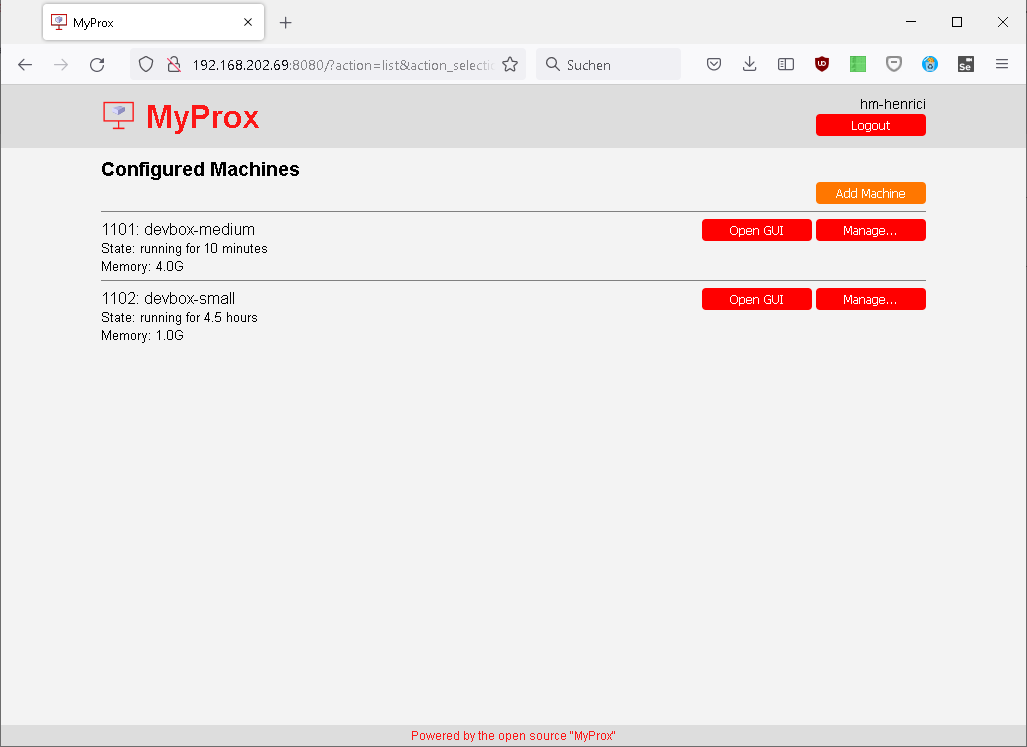
See additional screenshots in the "screenshots" folder.
Special features
Support for OIDC authentication
If your Proxmox installation is set up to authenticate against an OIDC provider like Keycloak, you can still use MyProx. MyProx still authenticates against your Proxmox cluster but no longer based on username and password.
You need to set the URL of your MyProx installation as a valid redirect URL in the Proxmox client configuration of your identity provider, e.g. https://myprox.mydomain.de/redirect_uri. Then set the OIDC-related options, at least the Proxmox realm to be used. Now you can leave username and password fields empty in the login form to authenticate against your OIDC provider.
Reporting bugs
In case you encounter any bugs, please report the expected behavior and the actual behavior so that the issue can be reproduced and fixed.
Developers
Clone repository
Clone this repo to your local machine using https://github.com/towalink/myprox.git
Install the module temporarily to make it available in your Python installation:
pip3 install -e <path to directory with setup.py>
License

- AGPL3 license
- Copyright 2022 © Dirk Henrici.
- Note: This project is not affiliated with Proxmox, it just accesses its REST API.
1 maintainer

Metadata
1 maintainer
Release files for MyProx 1.2.3
For a detailed explanation of source distributions (sdists) and built distributions (wheels), please see the package formats documentation.
Source distribution (sdist)
| File | Size | Uploaded | Provenance | |
|---|---|---|---|---|
| myprox-1.2.3.tar.gz | 35.5 kB | Without provenance | Details |
Built distribution (wheel)
| File | Interpreter | ABI | Platform | Reset |
|---|---|---|---|---|
| myprox-1.2.3-py3-none-any.whl | Python 3 | none | any | Details |
Total release size: 74.5 kB
Release files / myprox-1.2.3.tar.gz
| Download URL | myprox-1.2.3.tar.gz |
|---|---|
| Size | 35.5 kB |
| Tags | Source |
|
SHA-256 checksum How to use checksums |
0efeedfeae74c2565a074be30447c76da2eac9af3fca5e8663741d76a509eeff
|
|
BLAKE2b-256 checksum How to use checksums |
222fe3de714082200cb3c71ef7bcd2988b9d1285e6529fdcfad59e94020a3227
|
| Upload date | |
|
Uploaded using Trusted Publishing? What is trusted publishing? |
No |
| Uploaded via |
twine/6.1.0 CPython/3.12.12
|
Release files / myprox-1.2.3-py3-none-any.whl
| Download URL | myprox-1.2.3-py3-none-any.whl |
|---|---|
| Size | 39.1 kB |
| Tags | Python 3 |
|
SHA-256 checksum How to use checksums |
f9caa97e2285a3f81df595f761b90f7fb7ca855d18078384214acad6146e4fe9
|
|
BLAKE2b-256 checksum How to use checksums |
5fec311c7e5a18fe6d1dd5c98e10cb3afca486c2be13fef759e4b328aaef53f3
|
| Upload date | |
|
Uploaded using Trusted Publishing? What is trusted publishing? |
No |
| Uploaded via |
twine/6.1.0 CPython/3.12.12
|
Security for MyProx 1.2.3
Provenance
Provenance describes where a file came from. On PyPI, provenance is shared via attestations, which provide a verifiable record of the build or publishing details. View details, limitations and caveats.
No provenance found
None of the files in this release were uploaded with provenance metadata.
A note on package security
PyPI is a repository for distributing packages, not a service for auditing them. While third-party security researchers and our staff do their best to detect and remove malicious packages, PyPI cannot guarantee the quality, security or suitability of any given package.
To learn more about protecting yourself from malicious actors, visit our package security documentation.














