
OpenSimula





OpenSimula is a component-based time simulation environment in Python, focused on the thermal and energy simulation of buildings and their HVAC installations — though it can be used to simulate any system whose state evolves over time. It implements the ASHRAE 140 standard test suite to validate its building load and HVAC calculations.
Documentation · Getting started · User guide · Component list
What it does
A project is built from components — spaces, walls, windows, constructions, schedules, HVAC equipment, weather files — wired together and simulated hour by hour (or at any other time step). OpenSimula takes care of:
- Building thermal simulation: multi-space heat balance, constructions with thermal mass, windows and solar gains, ground-coupled surfaces, internal gains and schedules.
- HVAC systems: from an ideal loads system (
HVAC_perfect_system) to direct-expansion and water-based single- and multi-zone systems, coils, fans, pumps, chillers and heat pumps. - Solar geometry and shadows: direct and diffuse shadow calculations between the surfaces of a project, with an interactive 3D Plotly view — including an animated view of shadows changing throughout the day.
- Everything else a simulation needs: psychrometrics (via PsychroLib), day/week/year schedules, arbitrary math expressions as inputs, and reading weather data (TMY3, MET) or generic data files (CSV, Excel).
- Validation against ASHRAE 140: the
ASHRAE_140/folder in this repository reproduces the standard's load, heating, cooling, air-side HVAC and weather test cases as runnable notebooks, comparing OpenSimula's results against the reference values.
Projects can be defined as plain Python dictionaries, JSON or Excel files, and results come
back as component Variable time series or pandas DataFrames, ready to plot or export.
Installation
pip install opensimula
Requires Python 3.12 or later.
Quick example
import opensimula as osm

project_dict = {
    "name": "First example",
    "time_step": 3600,
    "n_time_steps": 24 * 7,
    "initial_time": "01/01/2001 00:00:00",
    "components": [
        {
            "type": "Day_schedule",
            "name": "working_day",
            "time_steps": [8 * 3600, 5 * 3600, 2 * 3600, 4 * 3600],
            "values": [0, 100, 0, 80, 0],
            "interpolation": "STEP",
        },
        {
            "type": "Day_schedule",
            "name": "holiday_day",
            "time_steps": [],
            "values": [0],
            "interpolation": "STEP",
        },
        {
            "type": "Week_schedule",
            "name": "office_week",
            "days_schedules": ["working_day"] * 5 + ["holiday_day"] * 2,
        },
    ],
}

sim = osm.Simulation()
pro = sim.new_project("First example")
pro.read_dict(project_dict)
pro.simulate()

sim.plot(pro.dates(), [pro.component("office_week").variable("values")])
This is deliberately minimal — the Getting started
guide walks through a full building, and the jupyter_test/ and ASHRAE_140/ folders in
this repository contain complete, runnable building and HVAC examples.
Working in Jupyter
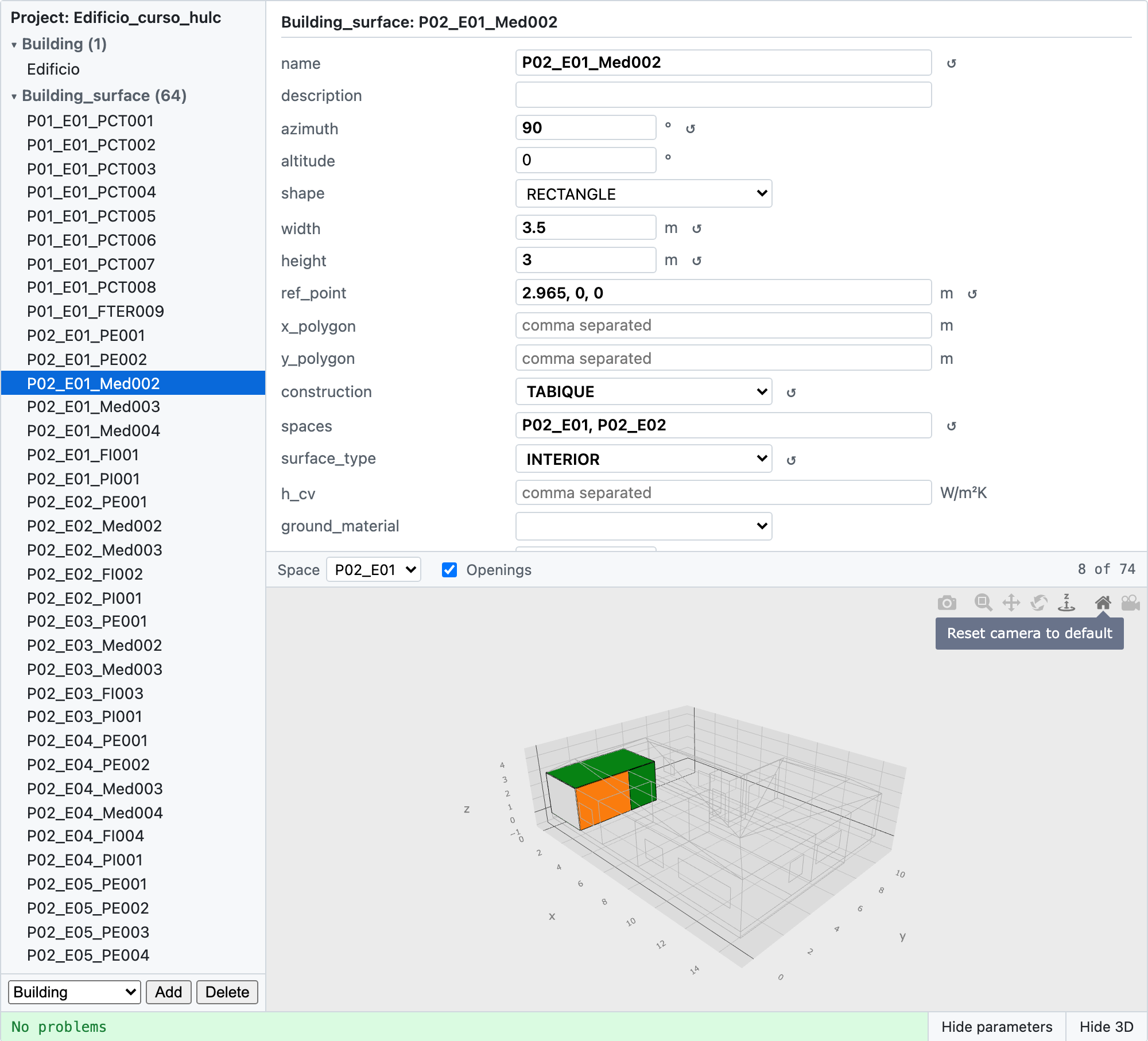
OpenSimula ships an interactive project editor as a Jupyter
widget (pro.editor()),
built on anywidget so it works the same in Jupyter, JupyterLab, VS
Code notebooks and Marimo. It shows every component's parameters as a form generated from
each component's own schema, together with an interactive 3D view of the building.
Component types
Components are grouped by what they define:
- Building:
Building,Space_type,Space,Building_surface,Opening,Solar_surface. - Constructions:
Material,Construction,Glazing,Frame,Opening_type. - HVAC (air side):
HVAC_perfect_system,DX_unit,HVAC_DX_system,Water_coil,Fan,HVAC_SZW_system,HVAC_MZW_system. - HVAC (water side):
Pump,Chiller_heat_pump,HVAC_water_system. - Schedules:
Day_schedule,Week_schedule,Year_schedule. - Files:
File_met,File_data. - Utilities:
Calculator.
See the Component list for every parameter and variable of each one.
Package dependencies
- numpy
- pandas
- scipy
- shapely
- psychrolib
- plotly
- matplotlib
- anywidget
- jsonschema
- nbformat
- openpyxl
- tqdm
These are installed automatically with pip install opensimula.
Documentation and support
Full documentation, including the getting started guide, user guide and component reference, is at jfcoronel.github.io/OpenSimula. Bugs and feature requests are tracked on GitHub Issues.
Contributing
Contributions are welcome: bug reports, fixes, new components, validation cases and examples. See CONTRIBUTING.md for how to set up a development environment, run the tests and submit a pull request.
Citing OpenSimula
If you use OpenSimula in your research, please cite it with its DOI, 10.5281/zenodo.23210985, which always resolves to the latest version (each version also has its own DOI, listed on Zenodo). The full metadata is in CITATION.cff (GitHub's "Cite this repository" button generates APA and BibTeX entries from it).
Main Developers
- Juan F. Coronel, Universidad de Sevilla
License
OpenSimula is released under the MIT License.
1 maintainer

Metadata
1 maintainer
Release files for opensimula 0.8.8
For a detailed explanation of source distributions (sdists) and built distributions (wheels), please see the package formats documentation.
Source distribution (sdist)
| File | Size | Uploaded | Provenance | |
|---|---|---|---|---|
| opensimula-0.8.8.tar.gz | 179.4 kB | Without provenance | Details |
Built distribution (wheel)
| File | Interpreter | ABI | Platform | Reset |
|---|---|---|---|---|
| opensimula-0.8.8-py3-none-any.whl | Python 3 | none | any | Details |
Total release size: 358.7 kB
Release files / opensimula-0.8.8.tar.gz
| Download URL | opensimula-0.8.8.tar.gz |
|---|---|
| Size | 179.4 kB |
| Tags | Source |
|
SHA-256 checksum How to use checksums |
0a9c53d2f392b9a545c7440e5fe54e419ef9b396c21cc606c0510722a577efaf
|
|
BLAKE2b-256 checksum How to use checksums |
846deee00738c7027d56c7317d193823095e2f41deb372f49a73028fac107bb4
|
| Upload date | |
|
Uploaded using Trusted Publishing? What is trusted publishing? |
No |
| Uploaded via |
uv/0.9.15 {"installer":{"name":"uv","version":"0.9.15","subcommand":["publish"]},"python":null,"implementation":{"name":null,"version":null},"distro":{"name":"macOS","version":null,"id":null,"libc":null},"system":{"name":null,"release":null},"cpu":null,"openssl_version":null,"setuptools_version":null,"rustc_version":null,"ci":null}
|
Release files / opensimula-0.8.8-py3-none-any.whl
| Download URL | opensimula-0.8.8-py3-none-any.whl |
|---|---|
| Size | 179.4 kB |
| Tags | Python 3 |
|
SHA-256 checksum How to use checksums |
99f4ac10476afdddd3479a2bd4b6237b4e8a17bbb3d83f4dd7438a4aad306ca0
|
|
BLAKE2b-256 checksum How to use checksums |
30e151d33fd62f6688e5eb519352278386c1962531d2d60f6427f4dcd6d69245
|
| Upload date | |
|
Uploaded using Trusted Publishing? What is trusted publishing? |
No |
| Uploaded via |
uv/0.9.15 {"installer":{"name":"uv","version":"0.9.15","subcommand":["publish"]},"python":null,"implementation":{"name":null,"version":null},"distro":{"name":"macOS","version":null,"id":null,"libc":null},"system":{"name":null,"release":null},"cpu":null,"openssl_version":null,"setuptools_version":null,"rustc_version":null,"ci":null}
|
Security for opensimula 0.8.8
Provenance
Provenance describes where a file came from. On PyPI, provenance is shared via attestations, which provide a verifiable record of the build or publishing details. View details, limitations and caveats.
No provenance found
None of the files in this release were uploaded with provenance metadata.
A note on package security
PyPI is a repository for distributing packages, not a service for auditing them. While third-party security researchers and our staff do their best to detect and remove malicious packages, PyPI cannot guarantee the quality, security or suitability of any given package.














