
OpenTEA

OpenTEA is a graphical user interface engine. It convert a set of degrees of freedom, expressed in SCHEMA, into graphical forms.
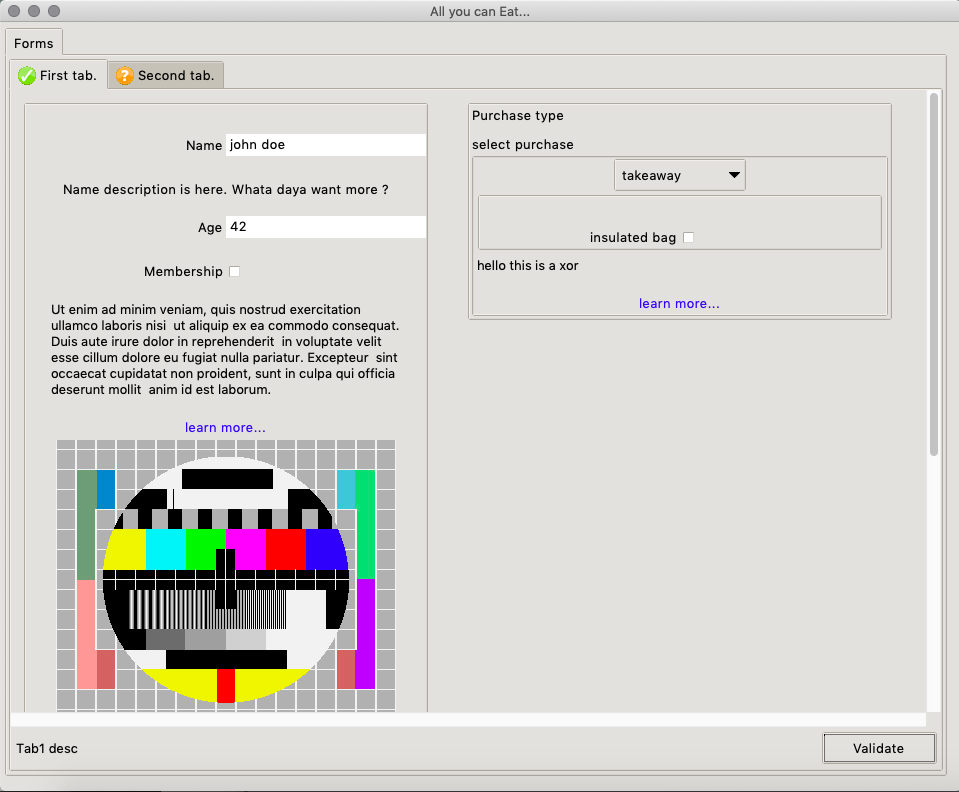
The documentation is currently available in ReadtheDocs
Installation
Opentea is OpenSource (Cecill-B) available on PiPY.
>pip install opentea
then test your installation with
>opentea3 test-gui trivial
Basic Usage
OpenTEA is a GUI engine, based on the json-SCHEMA description. For example, assume a nested information conforming to the following SCHEMA :
---
title: "Trivial form..."
type: object
properties:
  first_tab:
    type: object
    title: Only tab.
    process: custom_callback.py
    properties:
      first_block:
        type: object
        title: Custom Block
        properties:
          number_1:
            title: "Number 1"
            type: number
            default: 32.
          operand:
            title: "Operation"
            type: string
            default: "+"
            enum: ["+", "-", "*", "/"]
          number_2:
            title: "Number 2"
            type: number
            default: 10.
          result:
            title: "result"
            state: disabled
            type: string
            default: "-"
The openTEA GUI will show as :
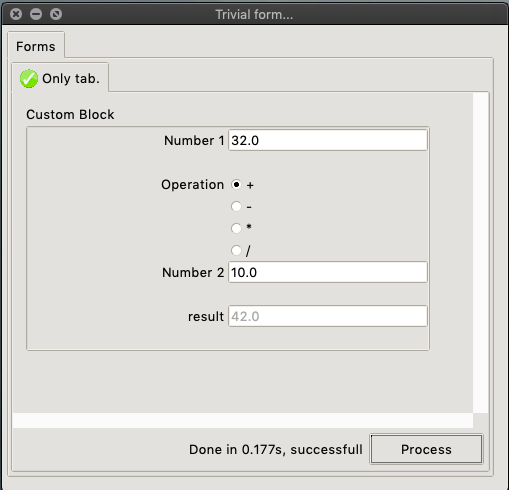
In this form, a callback can be added to each tab.
The corresponding custom_callback.py script is :
"""Module for the first tab."""

from opentea.process_utils import process_tab

def custom_fun(nob):
    """Update the result."""

    operation = nob["first_tab"]["first_block"]["operand"]
    nb1 = nob["first_tab"]["first_block"]["number_1"]
    nb2 = nob["first_tab"]["first_block"]["number_2"]

    res = None
    if operation == "+":
        res = nb1 + nb2
    elif operation == "-":
        res = nb1 - nb2
    elif operation == "*":
        res = nb1 * nb2
    elif operation == "/":
        res = nb1 / nb2
    else:
        res = None

    nob["first_tab"]["first_block"]["result"] = res
    return nob

if __name__ == "__main__":
    process_tab(custom_fun)
Note that OpenTEA meomory is a classical nested object named here nob. The memory I/O can be done the usual Python way : nob["first_tab"]["first_block"]["result"] = res.
We however encourage the use our nested object helper , available on PyPI, which gives a faster -an still pythonic- access to the nested object. The name of the package is, unsurprisigly nob.
Finally, the data recorded by the GUI is available as a YAML file, conforming to the SCHEMA Validation:
first_tab:
  first_block:
    number_1: 32.0
    number_2: 10.0
    operand: +
    result: 42.0
Command line
A small CLI makes available small tools for developpers. Only two tools are present now.
Call the CLI using opentea3:
Usage: opentea3 [OPTIONS] COMMAND [ARGS]...

  ---------------    O P E N T E A  III  --------------------

  You are now using the Command line interface of Opentea 3, a Python3
  Tkinter GUI engine based on SCHEMA specifications, created at CERFACS
  (https://cerfacs.fr).

  This is a python package currently installed in your python environement.
  See the full documentation at : https://opentea.readthedocs.io/en/latest/.

Options:
  --help  Show this message and exit.

Commands:
  test-gui     Examples of OpenTEA GUIs
  test-schema  Test if a yaml SCHEMA_FILE is valid for an opentea GUI.
Acknowledgments
This work was funded, among many sources, by the CoE Excellerat and the National project ICARUS. Many thanks to the people from SAFRAN group for their feedback.
2 maintainers


Release files for opentea 3.11.0
For a detailed explanation of source distributions (sdists) and built distributions (wheels), please see the package formats documentation.
Source distribution (sdist)
| File | Size | Uploaded | |
|---|---|---|---|
| opentea-3.11.0.tar.gz | 633.5 kB | Details |
Built distribution (wheel)
| File | Interpreter | ABI | Platform | Reset |
|---|---|---|---|---|
| opentea-3.11.0-py3-none-any.whl | Python 3 | none | any | Details |
Total release size: 1.4 MB
Release files / opentea-3.11.0.tar.gz
| Download URL | opentea-3.11.0.tar.gz |
|---|---|
| Size | 633.5 kB |
| Tags | Source |
|
SHA-256 checksum How to use checksums |
5e0c145c7620a719c889ea4b79dae50d2ff42e8ce8e4943a4eb89f755b89b8a0
|
|
BLAKE2b-256 checksum How to use checksums |
782ac3d13603885a2bcd887c9ed97abcc44b535dbd0602bb89f5e7448e8984d5
|
| Upload date | |
|
Uploaded using Trusted Publishing? What is trusted publishing? |
No |
| Uploaded via |
twine/6.2.0 CPython/3.14.2
|
Release files / opentea-3.11.0-py3-none-any.whl
| Download URL | opentea-3.11.0-py3-none-any.whl |
|---|---|
| Size | 731.2 kB |
| Tags | Python 3 |
|
SHA-256 checksum How to use checksums |
2b8393629d637387450c618a3be5f8d5b9488dfd3945af0f4310fb357f50281f
|
|
BLAKE2b-256 checksum How to use checksums |
f96d49bfb4bb5e9ba641574f5b5049ac9dd97a00bb07c96d8ba57e1b20066e50
|
| Upload date | |
|
Uploaded using Trusted Publishing? What is trusted publishing? |
No |
| Uploaded via |
twine/6.2.0 CPython/3.14.2
|














