
Pituophis


Python 3 library for building Gopher clients and servers
Pituophis, at the moment, requires nine modules: os, re, sockets, asyncio, ssl, mimetypes, glob, and urllib, which are standard in most Python 3.7 installations, and natsort. Pituophis can simply be loaded as a module like this:
import pituophis
Server
Pituophis can act as a powerful Gopher server, with full Bucktooth-style gophermap and globbing support. Scripting is also supported through alt handlers (used in the event of a 404) or fully custom handlers (replaces Pituophis' handler entirely).
The simplest method of getting a server up and running is with the pituophis.serve() function. See the examples and docs for more information. If you'd like to see a server built with Pituophis that can search an index, try Gophew.
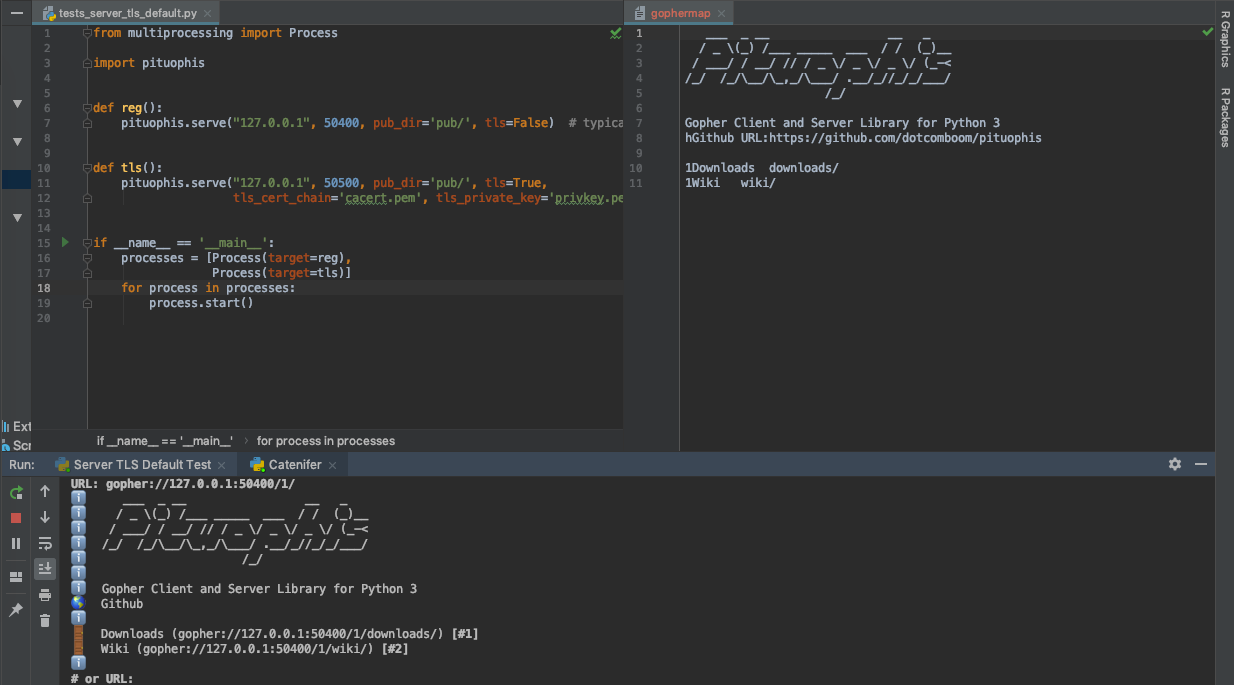
Client
Pituophis can also grab files and parse menus from Gopher servers. Simple fetching is done with Request().get() and get(), and Request().stream() can be used for lower-level access as a BufferedReader. The get functions return a Response type. See the docs for more information.
TreeGopher
An interactive demo of Pituophis' client features is provided in the form of TreeGopher, a graphical Gopher client in ~200 lines of code. It uses Pituophis, PySimpleGUI, and Pyperclip. It can browse Gopher in a hierarchical structure (similarly to WSGopher32, Cyberdog, and Little Gopher Client), read text files, download and save binary files (writing in chunks using Request().stream(), and running on another thread), recognize URL: links and use search services.

Examples
Getting menus and files as plain text:
pituophis.get('gopher.floodgap.com').text()
pituophis.get('gopher://gopher.floodgap.com/1/').text()
pituophis.get('gopher://gopher.floodgap.com:70/0/gopher/proxy').text()
pituophis.get('gophers://khzae.net:105/1/').text() # gophers:// URL support
Getting a menu, parsed:
menu = pituophis.get('gopher.floodgap.com').menu()
for item in menu:
    print(item.type)
    print(item.text)
    print(item.path)
    print(item.host)
    print(item.port)
Using search services:
pituophis.get('gopher://gopher.floodgap.com:70/7/v2/vs%09toast').text()
Downloading a binary:
pituophis.get('gopher://gopher.floodgap.com:70/9/gopher/clients/win/hgopher2_3.zip').binary
Requests can also be created from a URL:
import pituophis
req = pituophis.parse_url('gopher://gopher.floodgap.com/7/v2/vs%09food')
print('Getting', req.url())
rsp = req.get()
print(rsp.text())
1 maintainer

Metadata
1 maintainer
Release files for Pituophis 1.1
For a detailed explanation of source distributions (sdists) and built distributions (wheels), please see the package formats documentation.
Source distribution (sdist)
| File | Size | Uploaded | Provenance | Actions |
|---|---|---|---|---|
| Pituophis-1.1.tar.gz | 9.5 kB | Without provenance | Details for Pituophis-1.1.tar.gz |
Built distribution (wheel)
| File | Interpreter | ABI | Platform | Actions Reset |
|---|---|---|---|---|
| Pituophis-1.1-py3-none-any.whl | Python 3 | none | any | Details for Pituophis-1.1-py3-none-any.whl |
Total release size: 19.8 kB
Release files / Pituophis-1.1.tar.gz
| Download URL | Pituophis-1.1.tar.gz |
|---|---|
| Size | 9.5 kB |
| Tags | Source |
|
SHA-256 checksum How to use checksums |
406f60bde8189b601e2024be5ec78e09e2227879dc271bf8e899299c584d4a21
|
|
BLAKE2b-256 checksum How to use checksums |
9b36db6d8b8f77ba400236e0bc3039822aa7b4775c99218390c1fc086fbb171a
|
| Upload date | |
|
Uploaded using Trusted Publishing? What is trusted publishing? |
No |
| Uploaded via |
twine/3.1.1 pkginfo/1.5.0.1 requests/2.23.0 setuptools/41.2.0 requests-toolbelt/0.9.1 tqdm/4.46.0 CPython/3.8.2
|
Release files / Pituophis-1.1-py3-none-any.whl
| Download URL | Pituophis-1.1-py3-none-any.whl |
|---|---|
| Size | 10.2 kB |
| Tags | Python 3 |
|
SHA-256 checksum How to use checksums |
d7d5d36c31e28f0bfcc10723c7358ce6ca93da5f93bd0947e7f0d39b2393b15b
|
|
BLAKE2b-256 checksum How to use checksums |
8a8687f10d4b30501eb05fb3522492261d6cad73d138c129c1a7abd3cefb90d5
|
| Upload date | |
|
Uploaded using Trusted Publishing? What is trusted publishing? |
No |
| Uploaded via |
twine/3.1.1 pkginfo/1.5.0.1 requests/2.23.0 setuptools/41.2.0 requests-toolbelt/0.9.1 tqdm/4.46.0 CPython/3.8.2
|
Security for Pituophis 1.1
Provenance
Provenance describes where a file came from. On PyPI, provenance is shared via attestations, which provide a verifiable record of the build or publishing details. View details, limitations and caveats.
No provenance found
None of the files in this release were uploaded with provenance metadata.
A note on package security
PyPI is a repository for distributing packages, not a service for auditing them. While third-party security researchers and our staff do their best to detect and remove malicious packages, PyPI cannot guarantee the quality, security or suitability of any given package.
To learn more about protecting yourself from malicious actors, visit our package security documentation.














