
Pythonect is a new, experimental, general-purpose dataflow programming language based on Python. It provides both a visual programming language and a text-based scripting language. The text-based scripting language aims to combine the quick and intuitive feel of shell scripting, with the power of Python. The visual programming language is based on the idea of a diagram with “boxes and arrows”. Crazy? Most definitely. And yet, strangely enough, it works!
Hello, world
Here is the canonical “Hello, world” example program in Pythonect:
"Hello, world" -> print
Or:
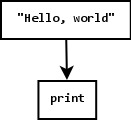
See the Pythonect documentation for a detailed walkthrough of the language and its features.
Installation
There are a few ways to install Pythonect.
You can install directly from PyPI using easy_install or pip:
easy_install Pythonect
or:
pip install Pythonect
You can clone the git repository somewhere in your system:
git clone git://github.com/ikotler/pythonect.git
Then you should do following steps:
cd pythonect
python setup.py install
Alternatively, if you use pip, you can install directly from the git repository:
pip install \
        git+git://github.com/ikotler/pythonect.git@master#egg=pythonect \
        -r https://github.com/ikotler/pythonect/raw/master/doc/requirements.txt
For any of the above methods, if you want to do a system-wide installation, you will have to do this with root permissions (e.g. using su or sudo).
Build Status 
Licensing
Pythonect is available under the BSD 3-Clause License; see LICENSE for details.
1 maintainer

Release files for Pythonect 0.6.0
For a detailed explanation of source distributions (sdists) and built distributions (wheels), please see the package formats documentation.
Source distribution (sdist)
| File | Size | Uploaded | |
|---|---|---|---|
| Pythonect-0.6.0.tar.gz | 679.3 kB | Details |
Release files / Pythonect-0.6.0.tar.gz
| Download URL | Pythonect-0.6.0.tar.gz |
|---|---|
| Size | 679.3 kB |
| Tags | Source |
|
SHA-256 checksum How to use checksums |
1a3917877c8cf1f32cecb71c9ec5fe9ee891eb2579e054489e7497bf2c0c1db7
|
|
BLAKE2b-256 checksum How to use checksums |
2a93f2b4294f850157faace37ed809d6f0319435980dbc2cf6ffd444670e8629
|
| Upload date | |
|
Uploaded using Trusted Publishing? What is trusted publishing? |
No |














