
QRainbowStyle is a fully customizable stylesheet for Python and Qt applications.
This module provides a function to load pre-compiled stylesheets. To generate your own style based on custom color palette clone package from project homepage.
qrainbowstyle.windows module adds frameless windows and message boxes. From version v0.8 module supports native Windows calls. Features:
Borders snapping
Minimize, restore, close animations
Size grips on borders
Frame shadow
Aero shake
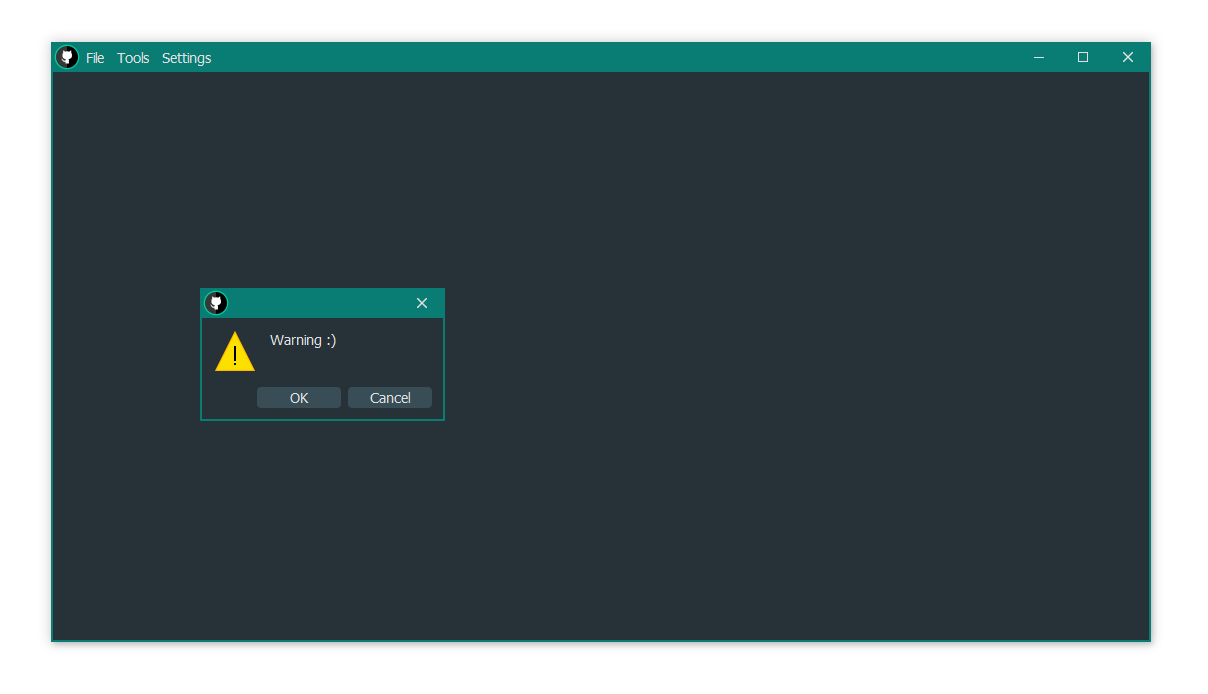
On Linux and Darwin qrainbowstyle will load class with its own implementation of these features. Due to a bug in Qt, window minimizing is not supported on MacOS.
First, start importing our module
import qrainbowstyleThen you can get stylesheet provided by QRainbowStyle for various Qt wrappers as shown below
# PySide2
stylesheet = qrainbowstyle.load_stylesheet_pyside2(style='oceanic')
# PyQt5
stylesheet = qrainbowstyle.load_stylesheet_pyqt5(style='oceanic')
Alternatively, from environment variables provided by QtPy, Qt.Py
# QtPy
stylesheet =  qrainbowstyle.load_stylesheet(style='oceanic')
# Qt.Py
stylesheet = qrainbowstyle.load_stylesheet(style='oceanic', qt_api=Qt.__binding__)
Finally, set your QApplication with it
app.setStyleSheet(stylesheet)To load frameless window in your app import both qrainbowstyle and qrainbowstyle.windows modules
import qrainbowstyle
import qrainbowstyle.windows
Initialize qt app and load choosen stylesheet. Next, create instances of frameless window and your master widget with content you want to show.
# Create app and load selected stylesheet
app = QtWidgets.QApplication(sys.argv)
app.setStyleSheet(qrainbowstyle.load_stylesheet(style="oceanic"))

# Package options
# qrainbowstyle.alignButtonsLeft()      # align titlebar buttons to left side
# qrainbowstyle.useDarwinButtons()      # use darwin style buttons
qrainbowstyle.setAppName("My new application")  # set global name for application
# qrainbowstyle.setAppIcon("icon.ico")    # set global app icon

# Create frameless mainwindow
win = qrainbowstyle.windows.FramelessWindow()

# Create content widget and pass reference to main window
widget = MasterWidget(win)

# Add widget to main window and show it
win.addContentWidget(widget)
win.show()

sys.exit(app.exec())
Enjoy!
1 maintainer

Release files for qrainbowstyle 0.9.6
For a detailed explanation of source distributions (sdists) and built distributions (wheels), please see the package formats documentation.
Source distribution (sdist)
| File | Size | Uploaded | |
|---|---|---|---|
| qrainbowstyle-0.9.6.tar.gz | 1.6 MB | Details |
Built distribution (wheel)
| File | Interpreter | ABI | Platform | Reset |
|---|---|---|---|---|
| qrainbowstyle-0.9.6-py3-none-any.whl | Python 3 | none | any | Details |
Total release size: 3.2 MB
Release files / qrainbowstyle-0.9.6.tar.gz
| Download URL | qrainbowstyle-0.9.6.tar.gz |
|---|---|
| Size | 1.6 MB |
| Tags | Source |
|
SHA-256 checksum How to use checksums |
01effc7d9764a6a2aee26af19a245322046e07bf6bf4576d21938ee34c67e421
|
|
BLAKE2b-256 checksum How to use checksums |
851bc447f5d83c7f4f715091dff25598882f501ae4caae6b00483377370009b4
|
| Upload date | |
|
Uploaded using Trusted Publishing? What is trusted publishing? |
No |
| Uploaded via |
twine/3.8.0 pkginfo/1.8.2 readme-renderer/32.0 requests/2.27.1 requests-toolbelt/0.9.1 urllib3/1.26.8 tqdm/4.62.3 importlib-metadata/4.11.1 keyring/23.5.0 rfc3986/2.0.0 colorama/0.4.4 CPython/3.9.10
|
Release files / qrainbowstyle-0.9.6-py3-none-any.whl
| Download URL | qrainbowstyle-0.9.6-py3-none-any.whl |
|---|---|
| Size | 1.7 MB |
| Tags | Python 3 |
|
SHA-256 checksum How to use checksums |
d9de32b7440e7e431f4cab11427bf15db14a5569aa292ff256f8f2ac046c1c3d
|
|
BLAKE2b-256 checksum How to use checksums |
3101fab1c79ad31db71c407568da3c0fdbea01654c675c5b58adfc5f7509a72b
|
| Upload date | |
|
Uploaded using Trusted Publishing? What is trusted publishing? |
No |
| Uploaded via |
twine/3.8.0 pkginfo/1.8.2 readme-renderer/32.0 requests/2.27.1 requests-toolbelt/0.9.1 urllib3/1.26.8 tqdm/4.62.3 importlib-metadata/4.11.1 keyring/23.5.0 rfc3986/2.0.0 colorama/0.4.4 CPython/3.9.10
|














