
Pixel art image scaling - Scale2x, Scale3x, Scale2xSFX and Scale3xSFX in pure Python


Overview
ScaleNx, encompassing Scale2x, Scale3x, Scale2xSFX, and Scale3xSFX, is a group of pixel-art scaling algorithms, intended to rescale images without introducing additional colors and blurring sharp edges.
Scale2x and Scale3x (aka AdvMAME2x and AdvMAME3x) algorithms were developed by Andrea Mazzoleni for the sole purpose of scaling up small graphics like icons and game sprites while keeping sharp edges, avoiding blurs, and, unlike nearest neighbour interpolation, taking into account diagonal patterns to avoid converting image into square mosaic.
Later on improved versions, called Scale2xSFX and Scale3xSFX, were introduced for the same purpose, providing better diagonals rendering and less artifacts on some patterns.
| Fig. 1. Example of consecutive upscaling with Scale3xSFX. |
|---|
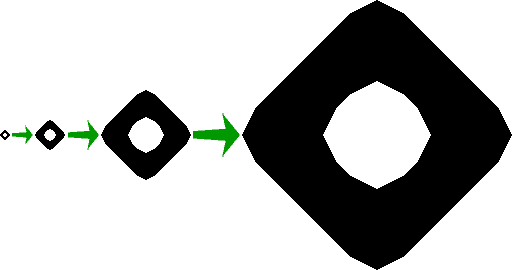 |
| Consecutive upscaling of tiny diagonal object with Scale3xSFX thrice. Source object on the left upscaled 3x3x3=27 times bigger in linear size, i.e. 27x27=729 times bigger by area, meaning that 728 out of 729 resulting pixels are purely artificial; yet the result looks surprisingly clear. |
Being initially created for tiny game sprite images, these algorithms appeared to be useful for some completely different tasks, e.g. scaling up text scans with low resolution before OCR, to improve OCR quality, or upscaling old low quality gravure and line art prints. One of the advantages of ScaleNx algorithms is that they don't use any empirical chroma mask or something else specifically adopted for game sprites on screen, and therefore are capable to work efficiently on any image, including images intended for print.
| Fig. 2. Example of low resolution drawing upscaling with Scale3xSFX. |
|---|
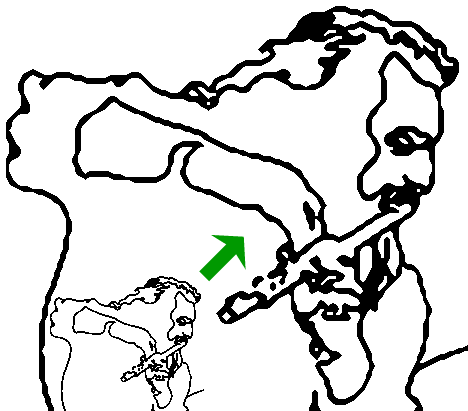 |
| Jagged lines of low resolution original are turned into smoother diagonals. |
Unfortunately, while specialised Scale2x and Scale3x screen renderers (e.g. scalers for DOS emulators) are numerous, it appears to be next to impossible to find ready-made batch processing application working with arbitrary images in common graphics formats.
Therefore, due to severe demand for general purpose ScaleNx library, and apparent lack thereof, current general purpose pure Python implementation of algorithms above was developed. Current implementation does not use any third party import, and therefore is quite cross-platform and next to omnicompatible.
Note that current PyPI-distributed package is intended for developers, and therefore include ScaleNx core module only.
For example of practical complete Python program for single and batch image rescaling, based on ScaleNx module, with Tkinter GUI, multiprocessing etc., please visit ScaleNx at Github. PNG support in this program is based on PyPNG, and PPM and PGM support - on PyPNM; both of the above are pure Python modules with good backward compatibility, which makes whole program rather cross-platform.
Python compatibility
Current ScaleNx version is maximal backward compatibility build, created specifically for PyPI distribution. While most of the development was performed using Python 3.12, comprehensive testing with other versions was carried out, and current ScaleNx module proven to work with antique Python 3.4 (reached end of life 18 Mar 2019) under Windows XP 32-bit (reached extended end of support 8 Apr 2014).
Installation
python -m pip install --upgrade scalenx.
Usage
As of version 2026.2.12.34, recommended ScaleNx module usage is:
from scalenx import scaleNx
scaled_image = scaleNx(source_image, n, sfx)
where:
source_imageis source image data aslist[list[list[int]]];intnvalue should be either2or3, meaning the choice between Scale2* and Scale3* methods;boolsfxmeans whether you choose ScaleNxSFX methods rather than classic ScaleNx;scaled_imageis resulting image data aslist[list[list[int]]].
However, legacy module access (as of version 2024.11.24) still works, and for, say, Scale2x it looks like:
from scalenx import scalenx
scaled_image = scalenx.scale2x(source_image)
therefore no changes required for programs written using older (2024-2025) versions of ScaleNx.
Copyright and redistribution
Current Python implementation was written by Ilya Razmanov and may be freely used, copied and improved. In case of making substantial improvements it's almost obligatory to share your work with the developer and lesser species.
References
-
Scale2x and Scale3x algorithms description by the inventor, Andrea Mazzoleni.
-
Scale2xSFX and Scale3xSFX algorithms description at dead forum article, archived copy.
-
Pixel-art scaling algorithms review at Wikipedia.
-
Current ScaleNx implementation main page with some explanations and illustration.
-
ScaleNx source code at Github - current ScaleNx source at Github, containing main program for single and batch image processing, with GUI, multiprocessing etc..
-
ScaleNx source code for Python 3.4 at Github - same as above, but fully compatible with Python 3.4 (both ScaleNx and image formats I/O and main application).
1 maintainer

Release files for ScaleNx 2026.8.6.34
For a detailed explanation of source distributions (sdists) and built distributions (wheels), please see the package formats documentation.
Source distribution (sdist)
| File | Size | Uploaded | |
|---|---|---|---|
| scalenx-2026.8.6.34.tar.gz | 9.4 kB | Details |
Built distribution (wheel)
| File | Interpreter | ABI | Platform | Reset |
|---|---|---|---|---|
| scalenx-2026.8.6.34-py3-none-any.whl | Python 3 | none | any | Details |
Total release size: 22.1 kB
Release files / scalenx-2026.8.6.34.tar.gz
| Download URL | scalenx-2026.8.6.34.tar.gz |
|---|---|
| Size | 9.4 kB |
| Tags | Source |
|
SHA-256 checksum How to use checksums |
d090d1cd2e4210a442ffec1055c8c8ca9cbaf87876c8a97e011c30b2d63d4726
|
|
BLAKE2b-256 checksum How to use checksums |
7cac9be7c54dadf6007e43c2ce2f2658648b936fa0fffc1515eb0d1d4dd901a4
|
| Upload date | |
|
Uploaded using Trusted Publishing? What is trusted publishing? |
No |
| Uploaded via |
twine/6.2.0 CPython/3.12.10
|
Release files / scalenx-2026.8.6.34-py3-none-any.whl
| Download URL | scalenx-2026.8.6.34-py3-none-any.whl |
|---|---|
| Size | 12.7 kB |
| Tags | Python 3 |
|
SHA-256 checksum How to use checksums |
0f229ac35522262c991b0dcb32540832bcacb0a95e5beac0e45d96e1c459bc1b
|
|
BLAKE2b-256 checksum How to use checksums |
f60163a53fa307a64264465a99b73ba6bef1285893c67c3221a83b9216042459
|
| Upload date | |
|
Uploaded using Trusted Publishing? What is trusted publishing? |
No |
| Uploaded via |
twine/6.2.0 CPython/3.12.10
|














