
🚀🎬 ShortGPT
<img src="https://dcbadge.vercel.app/api/server/uERx39ru3R?compact=true&style=flat">
<img src="https://img.shields.io/twitter/url/https/twitter.com/rayventurahq.svg?style=social&label=Follow%20%40RayVentura">
<img src="https://img.shields.io/github/stars/rayventura/shortgpt?style=social">
<img src="https://static.pepy.tech/personalized-badge/shortgpt?period=month&units=international_system&left_color=blue&right_color=green&left_text=Downloads/month">
<img src="https://img.shields.io/badge/docs-visit-blue">
<img src="https://github.com/RayVentura/ShortGPT/assets/121462835/083c8dc3-bac5-42c1-a08d-3ff9686d18c5" alt="ShortGPT-logo" style="border-radius: 20px;" width="18%"/>
⚡ Automating video and short content creation with AI ⚡
If you're only interested in using ShortGPT programatically (pip library), go on the documentation website.
Otherwise, follow the installation steps below for running the web app locally.
🎥 Showcase (Full video on YouTube)
https://github.com/RayVentura/ShortGPT/assets/121462835/a802faad-0fd7-4fcb-aa82-6365c27ea5fe
🎥 Voice Dubbing
https://github.com/RayVentura/ShortGPT/assets/121462835/06f51b2d-f8b1-4a23-b299-55e0e18902ef
🌟 Show Your Support
We hope you find ShortGPT helpful! If you do, let us know by giving us a star ⭐ on the repo. It's easy, just click on the 'Star' button at the top right of the page. Your support means a lot to us and keeps us motivated to improve and expand ShortGPT. Thank you and happy content creating! 🎉

🛠️ How it works
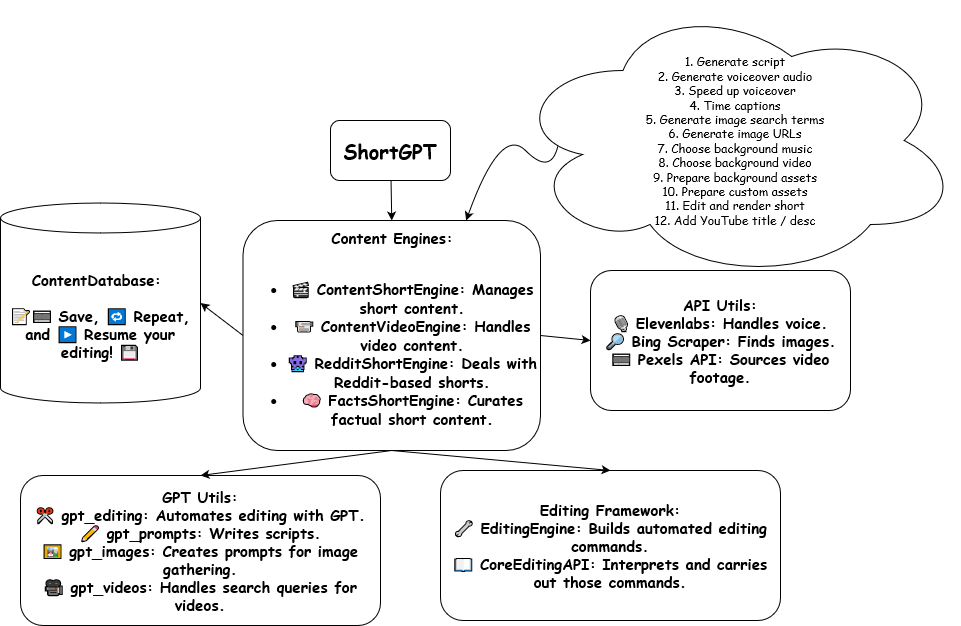
📝 Introduction to ShortGPT
ShortGPT is a powerful framework for automating content creation. It simplifies video creation, footage sourcing, voiceover synthesis, and editing tasks.
-
🎞️ Automated editing framework: Streamlines the video creation process with an LLM oriented video editing language.
-
📃 Scripts and Prompts: Provides ready-to-use scripts and prompts for various LLM automated editing processes.
-
🗣️ Voiceover / Content Creation: Supports multiple languages including English 🇺🇸, Spanish 🇪🇸, Arabic 🇦🇪, French 🇫🇷, Polish 🇵🇱, German 🇩🇪, Italian 🇮🇹, Portuguese 🇵🇹, Russian 🇷🇺, Mandarin Chinese 🇨🇳, Japanese 🇯🇵, Hindi 🇮🇳,Korean 🇰🇷, and way over 30 more languages (with EdgeTTS)
-
🔗 Caption Generation: Automates the generation of video captions.
-
🌐🎥 Asset Sourcing: Sources images and video footage from the internet, connecting with the web and Pexels API as necessary.
-
🧠 Memory and persistency: Ensures long-term persistency of automated editing variables with TinyDB.
🚀 Quick Start: Run ShortGPT on Google Colab (https://colab.research.google.com/drive/1_2UKdpF6lqxCqWaAcZb3rwMVQqtbisdE?usp=sharing)
If you prefer not to install the prerequisites on your local system, you can use the Google Colab notebook. This option is free and requires no installation setup.
-
Click on the link to the Google Colab notebook: https://colab.research.google.com/drive/1_2UKdpF6lqxCqWaAcZb3rwMVQqtbisdE?usp=sharing
-
Once you're in the notebook, simply run the cells in order from top to bottom. You can do this by clicking on each cell and pressing the 'Play' button, or by using the keyboard . Enjoy using ShortGPT!
Instructions for running shortGPT
This guide provides step-by-step instructions for installing ImageMagick and FFmpeg on your system, which are both required to do automated editing. Once installed, you can proceed to run runShortGPT.py successfully.
Installation Steps
Follow the instructions below to install ImageMagick, FFmpeg, and clone the shortGPT repository:
Step 1 and 2, install Ffmpeg and ImageMagick
For the updated installation steps, please follow Step 1 and 2 in our official documentation docs.shortgpt.ai/docs/how-to-install.
Step 3: Clone the shortGPT Repository
-
Open a terminal or command prompt.
-
Execute the following command to clone the shortGPT repository:
git clone https://github.com/rayventura/shortgpt.git
Step 4: Install Python Dependencies
-
Open a terminal or command prompt.
-
Navigate to the directory where
runShortGPT.pyis located (the cloned repo). -
Execute the following command to install the required Python dependencies:
pip install -r requirements.txtThis command will install the necessary packages specified in the
requirements.txtfile.
Running runShortGPT.py Web Interface
Once you have successfully installed ImageMagick, FFmpeg, and the Python dependencies, you can run runShortGPT.py by following these steps:
-
Open a terminal or command prompt.
-
Navigate to the directory where
runShortGPT.pyis located (the cloned repo). -
Execute the following command to run the script:
python runShortGPT.py -
After running the script, a Gradio interface should open at your local host on port 31415 (http://localhost:31415).
Framework overview
-
🎬 The
ContentShortEngineis designed for creating shorts, handling tasks from script generation to final rendering, including adding YouTube metadata. -
🎥 The
ContentVideoEngineis ideal for longer videos, taking care of tasks like generating audio, automatically sourcing background video footage, timing captions, and preparing background assets. -
🗣️ The
ContentTranslationEngineis designed to dub and translate entire videos, from mainstream languages to more specific target languages. It takes a video file, or youtube link, transcribe it's audio, translates the content, voices it in a target language, adds captions , and gives back a new video, in a totally different language. -
🎞️ The automated
EditingEngine, using Editing Markup Language and JSON, breaks down the editing process into manageable and customizable blocks, comprehensible to Large Language Models.
💡 ShortGPT offers customization options to suit your needs, from language selection to watermark addition.
🔧 As a framework, ShortGPT is adaptable and flexible, offering the potential for efficient, creative content creation.
More documentation incomming, please be patient.
Technologies Used
ShortGPT utilizes the following technologies to power its functionality:
-
Moviepy: Moviepy is used for video editing, allowing ShortGPT to make video editing and rendering
-
Openai: Openai is used for automating the entire process, including generating scripts and prompts for LLM automated editing processes.
-
ElevenLabs: ElevenLabs is used for voice synthesis, supporting multiple languages for voiceover creation.
-
EdgeTTS: Microsoft's FREE EdgeTTS is used for voice synthesis, supporting way many more language than ElevenLabs currently.
-
Pexels: Pexels is used for sourcing background footage, allowing ShortGPT to connect with the web and access a wide range of images and videos.
-
Bing Image: Bing Image is used for sourcing images, providing a comprehensive database for ShortGPT to retrieve relevant visuals.
These technologies work together to provide a seamless and efficient experience in automating video and short content creation with AI.
💁 Contributing
As an open-source project in a rapidly developing field, we are extremely open to contributions, whether it would be in the form of a new feature, improved infrastructure, or better documentation.
🔗 Get in touch on Twitter 🐦
Keep up with the latest happenings, announcements, and insights about Short-GPT by checking out our Twitter accounts. Spark a conversation with our developer and the AI's own account for fascinating dialogues, latest news about the project, and more.
- Developer: Stay updated @RayVentura. Deep-dive into behind-the-scenes, project news, and related topics from the person behind ShortGPT.
We're eager to interact with you and listen to your feedback, concepts, and experiences with Short-GPT. Come on board on Twitter and let's navigate the future of AI as a team! 💡🤖
<img src="https://api.star-history.com/svg?repos=RayVentura/ShortGPT&type=Date" alt="Star History Chart">
1 maintainer

Release files for shortgpt 0.1.31
For a detailed explanation of source distributions (sdists) and built distributions (wheels), please see the package formats documentation.
Source distribution (sdist)
| File | Size | Uploaded | |
|---|---|---|---|
| shortgpt-0.1.31.tar.gz | 52.9 kB | Details |
Built distribution (wheel)
| File | Interpreter | ABI | Platform | Reset |
|---|---|---|---|---|
| shortgpt-0.1.31-py3-none-any.whl | Python 3 | none | any | Details |
Total release size: 129.0 kB
Release files / shortgpt-0.1.31.tar.gz
| Download URL | shortgpt-0.1.31.tar.gz |
|---|---|
| Size | 52.9 kB |
| Tags | Source |
|
SHA-256 checksum How to use checksums |
fc06b394dc3586f8d94cf390346e7ae8efbd329ead8107a4b5dbe78884ba1de9
|
|
BLAKE2b-256 checksum How to use checksums |
9d0db3d64b2dc8e7fd03a636333022eb6e5c6f251ff62044ea11bcbc41ded65c
|
| Upload date | |
|
Uploaded using Trusted Publishing? What is trusted publishing? |
No |
| Uploaded via |
twine/4.0.2 CPython/3.9.7
|
Release files / shortgpt-0.1.31-py3-none-any.whl
| Download URL | shortgpt-0.1.31-py3-none-any.whl |
|---|---|
| Size | 76.1 kB |
| Tags | Python 3 |
|
SHA-256 checksum How to use checksums |
98c3c2f37198e59e488e016e6be924af027b42c707dcee1307071a1d01e09756
|
|
BLAKE2b-256 checksum How to use checksums |
7801f60eecc7f6f7392cbcec293236a21ab6c658ec21879b407c97a8ab668942
|
| Upload date | |
|
Uploaded using Trusted Publishing? What is trusted publishing? |
No |
| Uploaded via |
twine/4.0.2 CPython/3.9.7
|














