
ThodarKuri (Generic Recursive Template Engine)
- A Generic Recursive Template Engine which generates a JSON/Dictionary which can be edited from the code and then the same values can be filled in the tesmplates to write them as new variants of the template.
- Check out the example code in repo ( https://github.com/Palani-SN/ThodarKuri ) for reference
Template commands to be used (only 3 statements)
- Command 1 : adds the key Title to the current dict with value None
R[Title]
- Command 2 : adds the key Plot to the current dict with value as dict of file template_plot.html
R[Plot] => template_plot.html
- Command 3 : adds the key Bar to the current dict with value as list of dict of file template_bar.html
( R[Bar] => template_bar.html )*
Parser
- Generate a Skeleton of type Dictionary/JSON from a specified entrypoint
- Sample usage of the file is as given below (Refer html_plot - SR1 for template examples in EXAMPLES folder)
from ThodarKuri.Parser import ParserTemplateEngine
import json

Parser = ParserTemplateEngine();
Settings = Parser.ParseEntryPoint("html_plot - SR1/template_index.html");

print(json.dumps(Settings, sort_keys=True, indent=4));
- Note : Template files to be placed in the same folder path for use
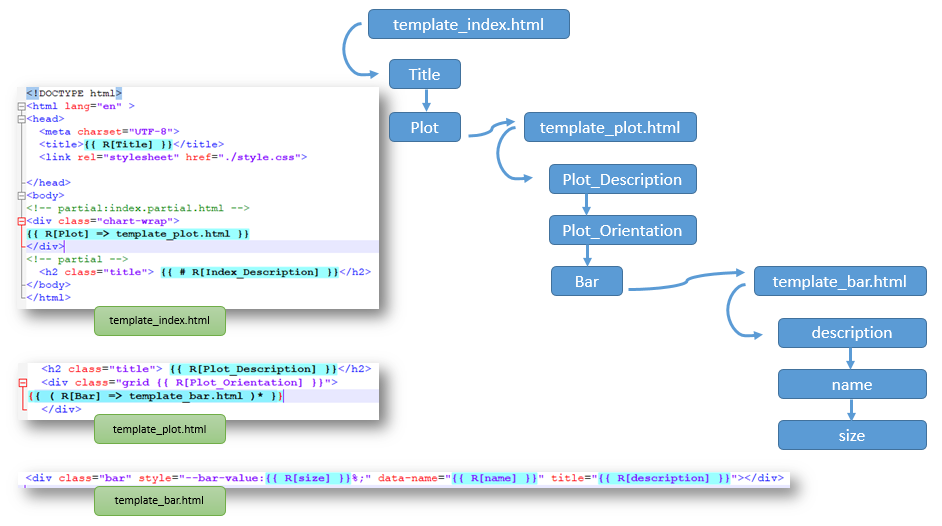
{
    "Plot": {
        "Bar": [
            {
                "description": null,
                "name": null,
                "size": null
            }
        ],
        "Plot_Description": null,
        "Plot_Orientation": null
    },
    "Title": null
}
ParserTemplateEngine (class from Parser.py)
- Initialising class helps to configure the RegexEdges and it also validates the pattern based on the second parameter FuncCallTemplate
- Arguments
- Arg1 - RegexEdges (a tuple with start and end delimiters)
- Arg2 - FuncCallTemplate is the sample string with "self.FUNC_CALL()" keyword to validate the RegexEdges
- Sample regex configurations in ParserTemplateEngine Initialisation is shown below
## Default RegexEdges=("{{", "}}"),
## FuncCallTemplate="{{self.FUNC_CALL()}}"
TE1 = ParserTemplateEngine();

## RegexEdges=("_StArT_", "_eNd_"),
## FuncCallTemplate="_StArT_self.FUNC_CALL()_eNd_"
TE2 = ParserTemplateEngine(("_StArT_", "_eNd_"), "_StArT_self.FUNC_CALL()_eNd_");

## RegexEdges=("<<", ">>"),
## FuncCallTemplate="<<self.FUNC_CALL()>>"
TE3 = ParserTemplateEngine(("<<", ">>"), "<<self.FUNC_CALL()>>");

## RegexEdges=("\\[\\[", "\\]\\]"),
## FuncCallTemplate="[[self.FUNC_CALL()]]"
TE4 = ParserTemplateEngine(("\\[\\[", "\\]\\]"), "[[self.FUNC_CALL()]]");

## RegexEdges=("{\\[<{\\[", "}\\]>}\\]"),
## FuncCallTemplate="{[<{[self.FUNC_CALL()}]>}]"
TE5 = ParserTemplateEngine(("{\\[<{\\[", "}\\]>}\\]"), "{[<{[self.FUNC_CALL()}]>}]");
ParseEntryPoint()
- Parses the template Name/Path and file Name/Path.
- Returns the differences between them as a dict.
## Definition
def ParseEntryPoint(self, TemplateName, DebugTokens = False):
- Arguments
- Arg 1 - TemplateName (Name of the EntryPoint template to be edited)
- Arg 2 - DebugTokens (If True prints the return Dict, If false doesnt print)
- Returns
- Dict - the result as a dictionary (keys and default values like a schema: Return_values)
Filler
- To be used to fill a template from code using JSON skeleton/Dictionary that is parsed using parser class and EntryPoint template
- Sample usage of the file is as given below (Refer html_plot - SR1 for template examples in EXAMPLES folder)
from ThodarKuri.Filler import FillerTemplateEngine
import json

SettingsAsJson = """
{
    "Plot": {
        "Bar": [
            {
                "description": "African Caribbean in Barbados",
                "name": "1000GENOMES:phase_3:ACB",
                "size": 96
            },
            {
                "description": "African Ancestry in Southwest US",
                "name": "1000GENOMES:phase_3:ASW",
                "size": 61
            },
            {
                "description": "Bengali in Bangladesh",
                "name": "1000GENOMES:phase_3:BEB",
                "size": 86
            },
            {
                "description": "Chinese Dai in Xishuangbanna, China",
                "name": "1000GENOMES:phase_3:CDX",
                "size": 93
            },
            {
                "description": "Utah residents with Northern and Western European ancestry",
                "name": "1000GENOMES:phase_3:CEU",
                "size": 99
            },
            {
                "description": "Colombian in Medellin, Colombia",
                "name": "1000GENOMES:phase_3:CLM",
                "size": 94
            },
            {
                "description": "Esan in Nigeria",
                "name": "1000GENOMES:phase_3:ESN",
                "size": 99
            },
            {
                "description": "Finnish in Finland",
                "name": "1000GENOMES:phase_3:FIN",
                "size": 99
            },
            {
                "description": "British in England and Scotland",
                "name": "1000GENOMES:phase_3:GBR",
                "size": 91
            },
            {
                "description": "Kinh in Ho Chi Minh City, Vietnam",
                "name": "1000GENOMES:phase_3:KHV",
                "size": 99
            },
            {
                "description": "Luhya in Webuye, Kenya",
                "name": "1000GENOMES:phase_3:LWK",
                "size": 99
            },
            {
                "description": "Mende in Sierra Leone",
                "name": "1000GENOMES:phase_3:MSL",
                "size": 85
            },
            {
                "description": "Mexican Ancestry in Los Angeles, California",
                "name": "1000GENOMES:phase_3:MXL",
                "size": 64
            },
            {
                "description": "Peruvian in Lima, Peru",
                "name": "1000GENOMES:phase_3:PEL",
                "size": 85
            },
            {
                "description": "Punjabi in Lahore, Pakistan",
                "name": "1000GENOMES:phase_3:PJL",
                "size": 96
            }
        ],
        "Plot_Description": "Horizontal Bar Chart",
        "Plot_Orientation": "horizontal"
    },
    "Title": "Template Engine Demo"
}
"""

settings = json.loads(SettingsAsJson)

Filler = FillerTemplateEngine();
FilledString = Filler.FillEntryPoint(Settings, "html_plot - SR1/template_index.html", "html_plot - SR1/index.html");
- The Output of the above code looks as follows
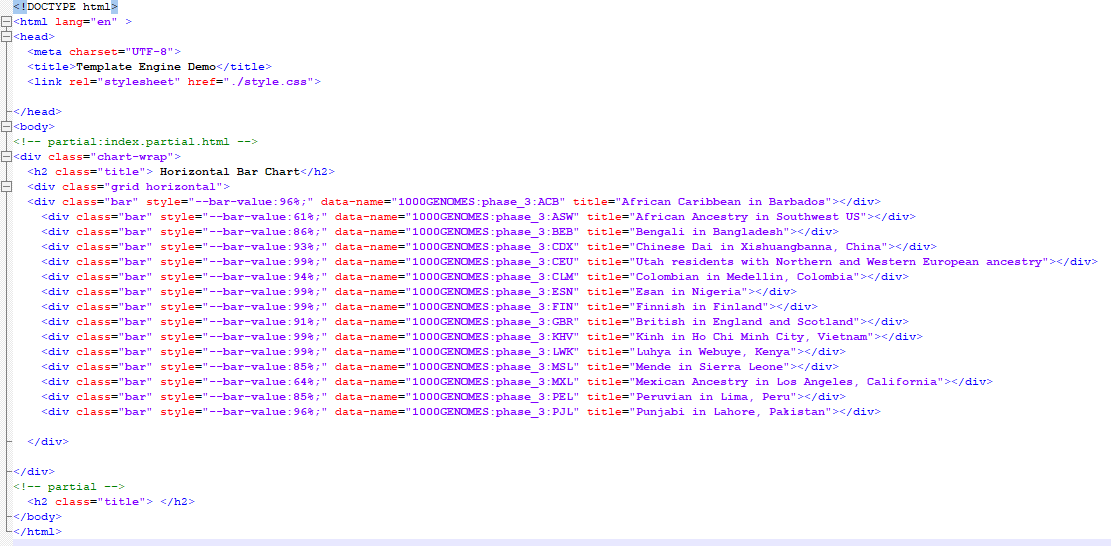
FillerTemplateEngine (class from Filler.py)
- Initialising class helps to configure the RegexEdges and it also validates the pattern based on the second parameter FuncCallTemplate
- Arguments
- Arg1 - RegexEdges (a tuple with start and end delimiters)
- Arg2 - FuncCallTemplate is the sample string with "self.FUNC_CALL()" keyword to validate the RegexEdges
- Sample regex configurations in FillerTemplateEngine Initialisation is shown below.
## Default RegexEdges=("{{", "}}"),
## FuncCallTemplate="{{self.FUNC_CALL()}}"
TE1 = FillerTemplateEngine();

## RegexEdges=("_StArT_", "_eNd_"),
## FuncCallTemplate="_StArT_self.FUNC_CALL()_eNd_"
TE2 = FillerTemplateEngine(("_StArT_", "_eNd_"), "_StArT_self.FUNC_CALL()_eNd_");

## RegexEdges=("<<", ">>"),
## FuncCallTemplate="<<self.FUNC_CALL()>>"
TE3 = FillerTemplateEngine(("<<", ">>"), "<<self.FUNC_CALL()>>");

## RegexEdges=("\\[\\[", "\\]\\]"),
## FuncCallTemplate="[[self.FUNC_CALL()]]"
TE4 = FillerTemplateEngine(("\\[\\[", "\\]\\]"), "[[self.FUNC_CALL()]]");

## RegexEdges=("{\\[<{\\[", "}\\]>}\\]"),
## FuncCallTemplate="{[<{[self.FUNC_CALL()}]>}]"
TE5 = FillerTemplateEngine(("{\\[<{\\[", "}\\]>}\\]"), "{[<{[self.FUNC_CALL()}]>}]");
FillEntryPoint()
- Gets the Template Name/Path of the template function calls that is going to be used.
- Will initialize the MapDict for updating the function calls in the template.
## Definition
def FillEntryPoint(self, MapDict, TemplateName, FileName = None, DebugTokens = False):
- Arguments
- Arg1 - MapDict (a dict that contains the key of the template to be filled with the value)
- Arg2 - TemplateName (Entry Point Template name which needs to be edited)
- Arg3 - FileName (New file name which needs to be created with the filled content)
- Arg4 - DebugTokens (If True prints the return str, If false doesnt print)
- Returns
- Str - string created by dictionary values recursively filled in the template string
1 maintainer

Release files for thodarkuri 1.0.2
For a detailed explanation of source distributions (sdists) and built distributions (wheels), please see the package formats documentation.
Source distribution (sdist)
| File | Size | Uploaded | |
|---|---|---|---|
| thodarkuri-1.0.2.tar.gz | 171.7 kB | Details |
Release files / thodarkuri-1.0.2.tar.gz
| Download URL | thodarkuri-1.0.2.tar.gz |
|---|---|
| Size | 171.7 kB |
| Tags | Source |
|
SHA-256 checksum How to use checksums |
def84c047c18b36a79d0ab9a52ed6b45fee7f1d0ad7914b8c1a0615035724be3
|
|
BLAKE2b-256 checksum How to use checksums |
24cfcf57ba023cddc5985018f9bd19a363774cb63de80f14507b3fd91d20c512
|
| Upload date | |
|
Uploaded using Trusted Publishing? What is trusted publishing? |
No |
| Uploaded via |
twine/3.4.2 importlib_metadata/6.7.0 pkginfo/1.10.0 requests/2.26.0 requests-toolbelt/1.0.0 tqdm/4.67.1 CPython/3.7.12
|














