
TkinterDnD2
Eliav2/tkinterdnd2 is a fork of the (unmaintained) pmgagne/tkinterdnd2 which is a python wrapper for tkdnd .
This repo was originally forked and edited for the purpose of publishing to pypi so one could simply install this package with pip install tkinterdnd2.
This repository is being maintained to ensure availability of tkinterdnd2 into the future, providing Tkinter native drag and drop support for windows, unix and Mac OSX.
What is TkDnD
tkDnD2 is a tcl/Tk extension adding native drag and drop support.
This repository contains the compiled binaries from https://github.com/petasis/tkdnd/releases/tag/tkdnd-release-test-v2.9.5 and my own compiled binaries for full Tcl 9 support: https://github.com/Squiblydoo/tkdnd.
Install
python -m pip install tkinterdnd2
Usage
import tkinter as tk

from tkinterdnd2 import DND_FILES, TkinterDnD

root = TkinterDnD.Tk()  # notice - use this instead of tk.Tk()

lb = tk.Listbox(root)
lb.insert(1, "drag files to here")

def on_drop(event):
    # event.data is a raw Tcl list string, not a Python list - see note below
    for path in root.tk.splitlist(event.data):
        lb.insert(tk.END, path)

# register the listbox as a drop target
lb.drop_target_register(DND_FILES)
lb.dnd_bind('<<Drop>>', on_drop)

lb.pack()
root.mainloop()
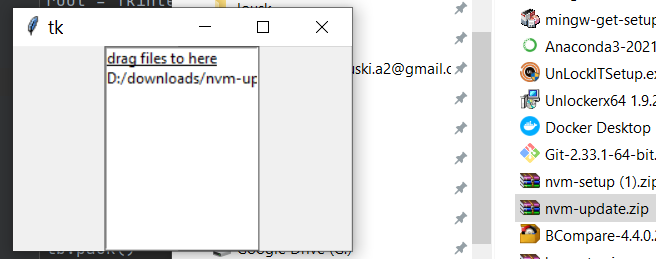
[!NOTE]
event.datais a raw Tcl list, not a Python list or plain string. When multiple files are dropped, their paths come back space-separated in a single string, and any path containing a space is wrapped in{braces}so it can still be told apart from the others. Useroot.tk.splitlist(event.data)(as above) to get a clean Python list of paths — don't split the string yourself, since that will break on braced/spaced paths.
see any of the demos for usage examples.
Framework Integration
If you are using a GUI framework that manages its own Tk root window (such as PySimpleGUI or CustomTkinter), you cannot use TkinterDnD.Tk() as the root. Instead, call TkinterDnD.require() on the framework's existing root after it has been created. This loads tkdnd into the shared Tcl interpreter, making drag-and-drop available to all widgets in the process.
The following are some simple examples:
PySimpleGUI
import PySimpleGUI as sg
from tkinterdnd2 import TkinterDnD, DND_FILES

def on_drop(event):
    # event.data is a raw Tcl list; use splitlist to handle multiple/spaced paths, see note above
    files = window.TKroot.tk.splitlist(event.data)
    window["-FILE-"].update(files[0])

layout = [
    [sg.Text("Drag & Drop a File Here")],
    [sg.Input("", key="-FILE-")],
    [sg.Button("OK"), sg.Button("Cancel")],
]

window = sg.Window("File Drop", layout, finalize=True)

# Inject DnD into PySimpleGUI's own root — no dummy window needed
TkinterDnD.require(window.TKroot)

# Register any widget as a drop target
window["-FILE-"].widget.drop_target_register(DND_FILES)
window["-FILE-"].widget.dnd_bind("<<Drop>>", on_drop)

while True:
    event, values = window.read()
    if event in (sg.WIN_CLOSED, "Cancel"):
        break

window.close()
CustomTkinter
import customtkinter as ctk
from tkinterdnd2 import TkinterDnD, DND_FILES

def on_drop(event):
    # event.data is a raw Tcl list; use splitlist to handle multiple/spaced paths, see note above
    files = app.tk.splitlist(event.data)
    entry.delete(0, "end")
    entry.insert(0, files[0])

app = ctk.CTk()
app.title("File Drop")

# Inject DnD into CustomTkinter's root
TkinterDnD.require(app)

entry = ctk.CTkEntry(app, width=400, placeholder_text="Drag a file here...")
entry.pack(padx=20, pady=20)

entry.drop_target_register(DND_FILES)
entry.dnd_bind("<<Drop>>", on_drop)

app.mainloop()
pyinstaller
When using pyinstaller, you should use the hook-tkinterdnd2.py file included to collect the TkDnD binaries and build them into the project. To use it, copy it into the base directory of your project, then run pyinstaller as follows:
pyinstaller -F -w myproject/myproject.py --additional-hooks-dir=.
2 maintainers


Metadata
2 maintainers
Release files for tkinterdnd2 0.6.3
For a detailed explanation of source distributions (sdists) and built distributions (wheels), please see the package formats documentation.
Source distribution (sdist)
| File | Size | Uploaded | |
|---|---|---|---|
| tkinterdnd2-0.6.3.tar.gz | 735.1 kB | Details |
Built distribution (wheel)
| File | Interpreter | ABI | Platform | Reset |
|---|---|---|---|---|
| tkinterdnd2-0.6.3-py3-none-any.whl | Python 3 | none | any | Details |
Total release size: 1.6 MB
Release files / tkinterdnd2-0.6.3.tar.gz
| Download URL | tkinterdnd2-0.6.3.tar.gz |
|---|---|
| Size | 735.1 kB |
| Tags | Source |
|
SHA-256 checksum How to use checksums |
53ed472ec08705702e087b5664f0534ca53a07a67102255f9cdc82bc5094158b
|
|
BLAKE2b-256 checksum How to use checksums |
32e750713531e91cbbd546a72f3044742fa43914bdebab3e012cccb28da5eb8a
|
| Upload date | |
|
Uploaded using Trusted Publishing? What is trusted publishing? |
No |
| Uploaded via |
twine/6.1.0 CPython/3.12.3
|
Release files / tkinterdnd2-0.6.3-py3-none-any.whl
| Download URL | tkinterdnd2-0.6.3-py3-none-any.whl |
|---|---|
| Size | 816.6 kB |
| Tags | Python 3 |
|
SHA-256 checksum How to use checksums |
50c7386302104bfb30d8e15b4cc53c0581bc51a28186ff4d7ad3cb2cc820c936
|
|
BLAKE2b-256 checksum How to use checksums |
f486fb62a6251863085d9e4ccf80cd0e55a19b91fab752a0b245d59aecade8f8
|
| Upload date | |
|
Uploaded using Trusted Publishing? What is trusted publishing? |
No |
| Uploaded via |
twine/6.1.0 CPython/3.12.3
|














