
USB-Imager
USB-Imager is a GUI tool to write bootable disk images to USB key.
| License | GPLv3 |
|---|---|
| Copyright | © 2021 by Skynet-Research |
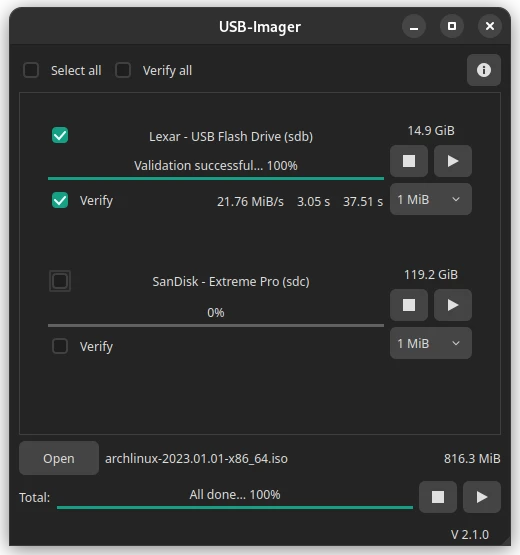
1. Features
- No root privileges required.
- Drives get unmounted and locked (if encrypted) before writing.
- Writing support for hybrid ISOs by checking the MBR signature.
- Adjustable write buffer
Planned:
- Automatic deactivation of LVM2 volumes before writing
- Write to multiple USB keys simultaneously
- Checksum verification after copying
- Multilanguage support
2. Requirements
Requirements for an installation with pip:
-
Debian based linux (e.g. Ubuntu):
For *ubuntu linux open
Software & Updatesand activate theuniverserepository or activate it via terminal.$ sudo add-apt-repository universe && sudo apt update $ sudo apt install python3-pip gir1.2-udisks-2.0 qt5-default
-
Red Hat based linux (e.g. Fedora):
$ sudo dnf install python3-pyside2
-
Slackware based linux (e.g. openSUSE):
$ sudo zypper install python3-pyside2 typelib-1_0-UDisks-2_0
3. Installation
-
Arch based linux:
The installation of
usb-imager-gitcan be done via any package manager that supports theAUR.$ sudo pacman -S trizen $ trizen -S usb-imager-git
-
pip / pipenv:
If the distribution's own package manager is not supported yet, the USB-Imager can alternatively be installed via the Python package manager
pip.Please try to install USB-Imager without
sudofirst. Only sometimes it necessary to do a system-wide installation, because in some distributions the search path$PATHis not configured correctly to find the startup program.$ pip3 install -U usb-imager $ pip3 uninstall usb-imager
or pipenv:
$ pipenv install usb-imager
$ pipenv run usb-imager
$ pipenv uninstall usb-imager
4. Usage
Start USB-Imager via the desktop icon or just type usb-imager in your terminal window.
5. Tested linux distributions
-
Arch based:
- Manjaro 20.2.1 "Nibia" ->
KDE Plasma,Xfce,Gnome,Cinnamon,Mate
- Manjaro 20.2.1 "Nibia" ->
-
Debian based:
- Ubuntu "Bionic Beaver", "Focal Fossa" ->
Kylin,Kubuntu,Xubuntu
- Ubuntu "Bionic Beaver", "Focal Fossa" ->
-
Red Hat based:
- Fedora 33 ->
Workstation
- Fedora 33 ->
-
Slackware based:
- openSUSE 15.2 "Leap" ->
Gnome
- openSUSE 15.2 "Leap" ->
6. Support
If you want to report a bug or request a feature, you can do so here. You can also write an email to skynet-devel@mailbox.org.
7. Acknowledgements
Thanks to:
- the programmers at SUSE Linux Products GmbH for their SUSE Studio Imagewriter. It was the inspiration for this little tool.
- Rico for Beta-Testing.
- my loved ones for their almost infinite patience.
Changelog:
Version 1.1
usb-imager-gitis now available in the Arch-LinuxAURrepository- Writing buffer values changed
- Improved error detection and error messages in case of missing dependencies
- Code improvements and minor bug fixes
Version 1.0
- Initial version
1 maintainer

Release files for USB-Imager 1.1
For a detailed explanation of source distributions (sdists) and built distributions (wheels), please see the package formats documentation.
Source distribution (sdist)
| File | Size | Uploaded | |
|---|---|---|---|
| usb-imager-1.1.tar.gz | 115.6 kB | Details |
Built distribution (wheel)
| File | Interpreter | ABI | Platform | Reset |
|---|---|---|---|---|
| usb_imager-1.1-py3-none-any.whl | Python 3 | none | any | Details |
Total release size: 229.3 kB
Release files / usb-imager-1.1.tar.gz
| Download URL | usb-imager-1.1.tar.gz |
|---|---|
| Size | 115.6 kB |
| Tags | Source |
|
SHA-256 checksum How to use checksums |
1bdb5451486ba34b297707c758147a57012a0a27f29c4befbdfc5f155ba220a8
|
|
BLAKE2b-256 checksum How to use checksums |
d4d386c7b356ae9ed067018365287e24c7b1929058adf418ea89788e3027509c
|
| Upload date | |
|
Uploaded using Trusted Publishing? What is trusted publishing? |
No |
| Uploaded via |
twine/3.3.0 pkginfo/1.7.0 requests/2.25.1 setuptools/53.1.0 requests-toolbelt/0.9.1 tqdm/4.58.0 CPython/3.9.2
|
Release files / usb_imager-1.1-py3-none-any.whl
| Download URL | usb_imager-1.1-py3-none-any.whl |
|---|---|
| Size | 113.7 kB |
| Tags | Python 3 |
|
SHA-256 checksum How to use checksums |
48f833c45e50b6b62e6f6e627fe34ad203909baa4bff02181ea868632541869a
|
|
BLAKE2b-256 checksum How to use checksums |
43b2e18eff80154d8c5689bcd9e5a39446c9ca10d9443413b0e62ffc2f4b3cce
|
| Upload date | |
|
Uploaded using Trusted Publishing? What is trusted publishing? |
No |
| Uploaded via |
twine/3.3.0 pkginfo/1.7.0 requests/2.25.1 setuptools/53.1.0 requests-toolbelt/0.9.1 tqdm/4.58.0 CPython/3.9.2
|














