
ULLR
Pronounced "OOH-ler"
A serial <-> MQTT interface for sports timing.
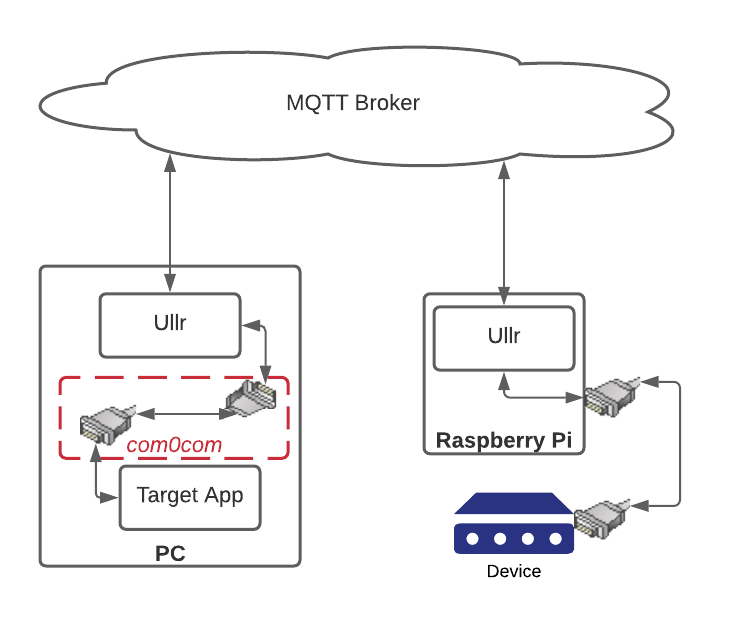
Ullr allows for the two-way exchange of data between serial devices and computers over the internet, using MQTT as an intermediary. This is particularly useful for connecting to faraway devices that aren't on the same LAN. Ullr allows for connecting an arbitrary number of devices to an arbitrary number of computers.
Ullr works for connecting remotely to things like weather stations, sensors, or other devices that send simple data intermittently. It is not designed for high volume devices like modems or printers.
Installation
Python environment
pip install ullr
Windows executable
If you don't have or don't wish to use a Python environment, a Windows executable version is available in the source repository on GitHub.
Get the source
The source code is always available at https://github.com/zhenry9/Ullr.
Configuration
Modify config.ini to suit your needs, or configure interactively using the the software. The web interface is fully featured to alow for the configuration of device and MQTT broker settings.
Usage
Ullr borrows terminology from the original RS232 protocol.
Default
Ullr
This starts Ullr with a web interface on localhost:5000.
If Ullr is run without command line options, it will attempt to load devices from the default config file. This
will be '~/.config/ullr/config.ini', or '/etc/ullr/config.ini' if run as superuser.
If you are running Ullr for the first time or with an empty config file, no devices will be loaded. You can add
devices interactively using the web interface.
CLI
ullr --nowebui
This will load Ullr with a command line interface only, whithout the web interface. Configuration can be done interactively from the command line.
Empty
ullr --empty
This will ignore the default config file and start Ullr without any devices loaded. This is useful for fixing bad config files, or creating new ones from scratch.
From file
ullr --file FILENAME
This will attempt to start Ullr by loading the devices specified in an arbitrary config file at FILENAME.
Display help page
Ullr --help
This prints out the help page for command line options.
Virtual COM ports
On the computer (DTE) side of the connection you'll need to set up a virtual null modem to allow Ullr to communicate with the target software. This is just a pair of com ports connected to each other. Ullr connects to one port, and your software application connects to the other.
On Windows this can be accomplished with com0com.
In the above example, we could use com0com to create a virtual null modem with ports COM20 and COM21. Ullr would connect to COM20, and the PC software to COM21.
Licensing and Copyright
GNU GPL v3 License Copyright (c) Zach Henry.
1 maintainer

Metadata
1 maintainer
Release files for Ullr 0.1.17
For a detailed explanation of source distributions (sdists) and built distributions (wheels), please see the package formats documentation.
Source distribution (sdist)
| File | Size | Uploaded | |
|---|---|---|---|
| Ullr-0.1.17.tar.gz | 90.2 kB | Details |
Built distribution (wheel)
| File | Interpreter | ABI | Platform | Reset |
|---|---|---|---|---|
| Ullr-0.1.17-py3-none-any.whl | Python 3 | none | any | Details |
Total release size: 187.3 kB
Release files / Ullr-0.1.17.tar.gz
| Download URL | Ullr-0.1.17.tar.gz |
|---|---|
| Size | 90.2 kB |
| Tags | Source |
|
SHA-256 checksum How to use checksums |
b36349bb266687aab05fceaadf6ecefa1335615694d4e872295ddd8b11f83afe
|
|
BLAKE2b-256 checksum How to use checksums |
9137b6f2ca2f11a785922fda1f12b3c39cd97c29b45181149d4ef11c955b444b
|
| Upload date | |
|
Uploaded using Trusted Publishing? What is trusted publishing? |
No |
| Uploaded via |
twine/4.0.1 CPython/3.9.13
|
Release files / Ullr-0.1.17-py3-none-any.whl
| Download URL | Ullr-0.1.17-py3-none-any.whl |
|---|---|
| Size | 97.1 kB |
| Tags | Python 3 |
|
SHA-256 checksum How to use checksums |
2df907328fa7394762f0af821965ad94e0d0d593e3b3f67ce4b2706229460d26
|
|
BLAKE2b-256 checksum How to use checksums |
d50affbc3ba87a3b69839304aff306ecd655c58c3ac7671666c98d35199cd150
|
| Upload date | |
|
Uploaded using Trusted Publishing? What is trusted publishing? |
No |
| Uploaded via |
twine/4.0.1 CPython/3.9.13
|














