
Venv Cleaner
A simple TUI/GUI tool for cleaning up old or unused Python virtual environments (venv directories).
How to Use
The easiest way to run in TUI mode is using uvx:
uvx venvcleaner
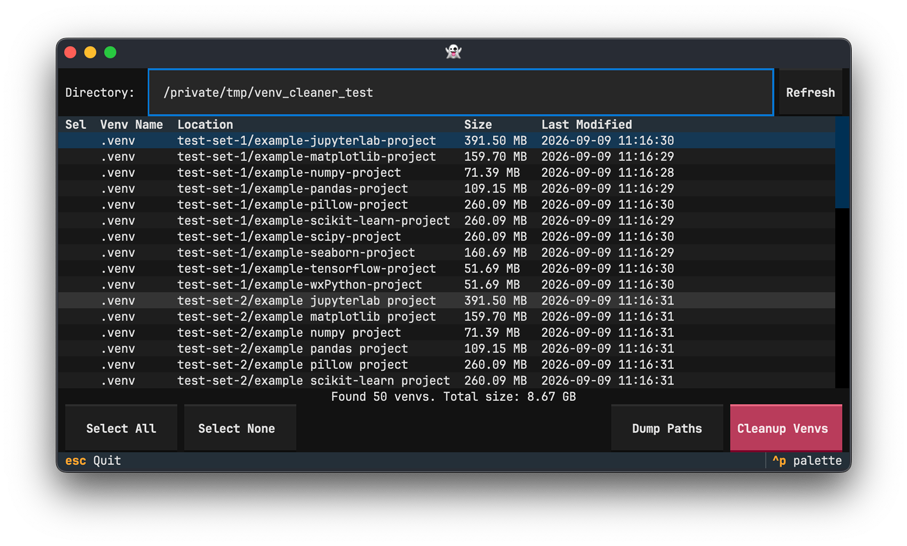
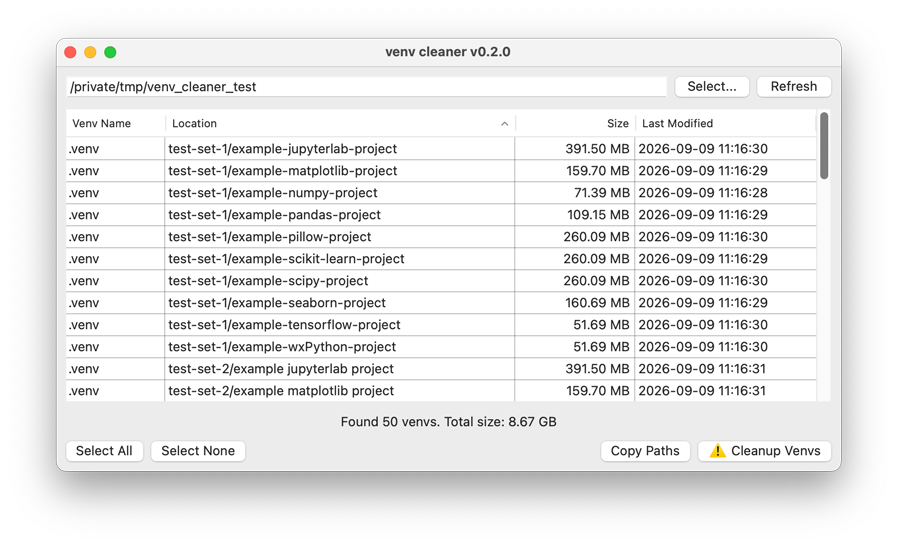
You can also run in GUI mode:
uvx --with wxpython venvcleaner
You can specify a target directory:
uvx venvcleaner /path/to/target-directory
TUI or GUI?
Venv Cleaner chooses the UI as follows:
- GUI mode when wxPython is installed,
--no-guiis not set, and a display is available. - TUI mode otherwise (including when you pass
--no-gui).
On Linux, if both DISPLAY and WAYLAND_DISPLAY are unset (typical for SSH sessions without display forwarding), Venv Cleaner runs in TUI mode even when wxPython is installed. You can also force TUI mode with --no-gui on any platform.
Using GUI mode on Linux
If you want to use GUI mode on Linux, you will need to build wxPython via pip. Please see Building wxPython for Linux via Pip and wxWidgets for GTK installation.
Alternatively, on some Linux systems, you can use the -f (--find-links) option to specify the download URL of wxPython package:
# for Ubuntu 24.04
uvx -f https://extras.wxpython.org/wxPython4/extras/linux/gtk3/ubuntu-24.04 \
    --with wxpython==4.2.5 venvcleaner
Installing into a Persistent Environment
If you want to install Venv Cleaner into a persistent environment:
uv tool install "venvcleaner[gui]@latest"

# for Ubuntu 24.04
uv tool install -f https://extras.wxpython.org/wxPython4/extras/linux/gtk3/ubuntu-24.04 \
    --with wxpython==4.2.5 venvcleaner@latest

# run Venv Cleaner (GUI when available, otherwise TUI)
venvcleaner

# force TUI mode
venvcleaner --no-gui
Features
- Scans the target directory recursively for virtual environments (directories containing a
pyvenv.cfgfile). - In TUI mode, you can change the target directory by editing the path field and pressing Enter, or refresh the scan with the Refresh button.
- In GUI mode, you can change or refresh the target directory with the Select... or Refresh buttons.
- Choose which venvs to clean using the selection list.
- Select All selects all detected venvs.
- Select None clears the selection.
- In TUI mode, press Space to toggle the current row. In GUI mode, use the multi-select list.
- Copy Paths (GUI) copies the paths of selected venvs to your clipboard. You can paste them into a terminal to run shell commands manually. For example:
ls /path/to/project-1/.venv "/path/to/project 2/.venv"
rm -r /path/to/project-1/.venv "/path/to/project 2/.venv"
- Dump Paths (TUI) prints the full paths of selected venvs to stdout, one per line, and exits. This is useful on SSH or other remote sessions where clipboard access is unavailable. For example:
venvcleaner --no-gui /path/to/scan  # select venvs, then press Dump Paths
# /path/to/project-1/.venv
# /path/to/project-2/.venv
- Cleanup Venvs deletes the selected venv directories. In TUI mode, cleanup progress is briefly printed to the terminal, then the TUI resumes.
TUI Key Bindings
| Key | Action |
|---|---|
↑ / ↓ |
Move within the venv list |
Space |
Toggle selection of the current row |
Tab / Shift+Tab |
Move focus between widgets |
Enter |
Activate the focused button / confirm path input |
a |
Select All |
n |
Select None |
r |
Refresh |
d |
Dump Paths |
Esc / q |
Quit |
In modal dialogs, press Esc to close, or use the buttons. Click a column header to sort the list.
Environment Variables
TUI mode reads optional settings from:
~/.config/venvcleaner/.env
| Variable | Description |
|---|---|
TEXTUAL_THEME |
Textual theme name (for example textual-light, textual-dark, or ansi-dark). If unset or empty, the Textual default theme is used. |
Example:
mkdir -p ~/.config/venvcleaner
echo 'TEXTUAL_THEME=textual-light' > ~/.config/venvcleaner/.env
You can also set TEXTUAL_THEME in your shell environment. Existing environment variables take precedence over values in .env.
License
This software is distributed under the terms of the MIT License.
1 maintainer

Metadata
1 maintainer
Release files for venvcleaner 0.2.1
For a detailed explanation of source distributions (sdists) and built distributions (wheels), please see the package formats documentation.
Source distribution (sdist)
| File | Size | Uploaded | |
|---|---|---|---|
| venvcleaner-0.2.1.tar.gz | 13.4 kB | Details |
Built distribution (wheel)
| File | Interpreter | ABI | Platform | Reset |
|---|---|---|---|---|
| venvcleaner-0.2.1-py3-none-any.whl | Python 3 | none | any | Details |
Total release size: 27.8 kB
Release files / venvcleaner-0.2.1.tar.gz
| Download URL | venvcleaner-0.2.1.tar.gz |
|---|---|
| Size | 13.4 kB |
| Tags | Source |
|
SHA-256 checksum How to use checksums |
158b93be8a21a81d3dc55fee91303cd42b58b644b493d90d689005b625c10e2d
|
|
BLAKE2b-256 checksum How to use checksums |
c6ed8886cee1fd537dea3ebff074de8eecd90d0551c1b9a871feee1ac80b3e08
|
| Upload date | |
|
Uploaded using Trusted Publishing? What is trusted publishing? |
No |
| Uploaded via |
twine/7.0.0 CPython/3.10.20
|
Release files / venvcleaner-0.2.1-py3-none-any.whl
| Download URL | venvcleaner-0.2.1-py3-none-any.whl |
|---|---|
| Size | 14.4 kB |
| Tags | Python 3 |
|
SHA-256 checksum How to use checksums |
803dd5e053c8d800e0b5017ce737fc2226407057e130bffd2e2b4be219284f4d
|
|
BLAKE2b-256 checksum How to use checksums |
afaad5aea599cfddd612d23422fc9b9e86aab3a54be4724ff126253c8e88f2c7
|
| Upload date | |
|
Uploaded using Trusted Publishing? What is trusted publishing? |
No |
| Uploaded via |
twine/7.0.0 CPython/3.10.20
|














