





重大更新
目前仓库已在PYPI上发布,可以直接使用pip安装
pip install wx-push-services
从现在开始,您可以直接使用命令行推送本地文件内容,具体操作如下: 在推送消息之前,请于环境变量中添加所需变量如后文所示。在命令行环境下,我们也可以直接使用 wx-push-services -cf 来指定配置文件。如果您不知道如何生成配置文件,请直接执行 wx-push-services 程序会在当前目录下自动生成。请按照后文填写必要参数,后续可直接运行。
使用 wx-push-services -h 查看帮助
wx-push-services -m <"messgage text"> -df <disable message_file mode> -mf <message_file_path> -cf <config_file_path>
# 示例:
wx-push-services -mf message.log
wx-push-services -df -m '"消息测试"'
如果您在集成或使用该项目的过程中有任何问题,欢迎提出,我会尽力解答您的疑问。也可以在该项目的GitHub Repo提出Issue获取帮助。
怎样使用微信以及微信推送服务
主要用途
实现微信推送服务的两种方式
调用企业微信应用 使用该种方法时请按照下文方式获得必要token。
使用web hook调用企业微信机器人
使用该种方式时仅需要知道企业微信机器人的web hook key。在使用之前,请确保已在企业微信群里中添加企业微信机器人,并按照下文方法获得web hook key。
使用方式
1. 注册企业微信,获取必要token
使用企业微信应用时获取以下信息:
注册网址:https://work.weixin.qq.com/
获取企业ID
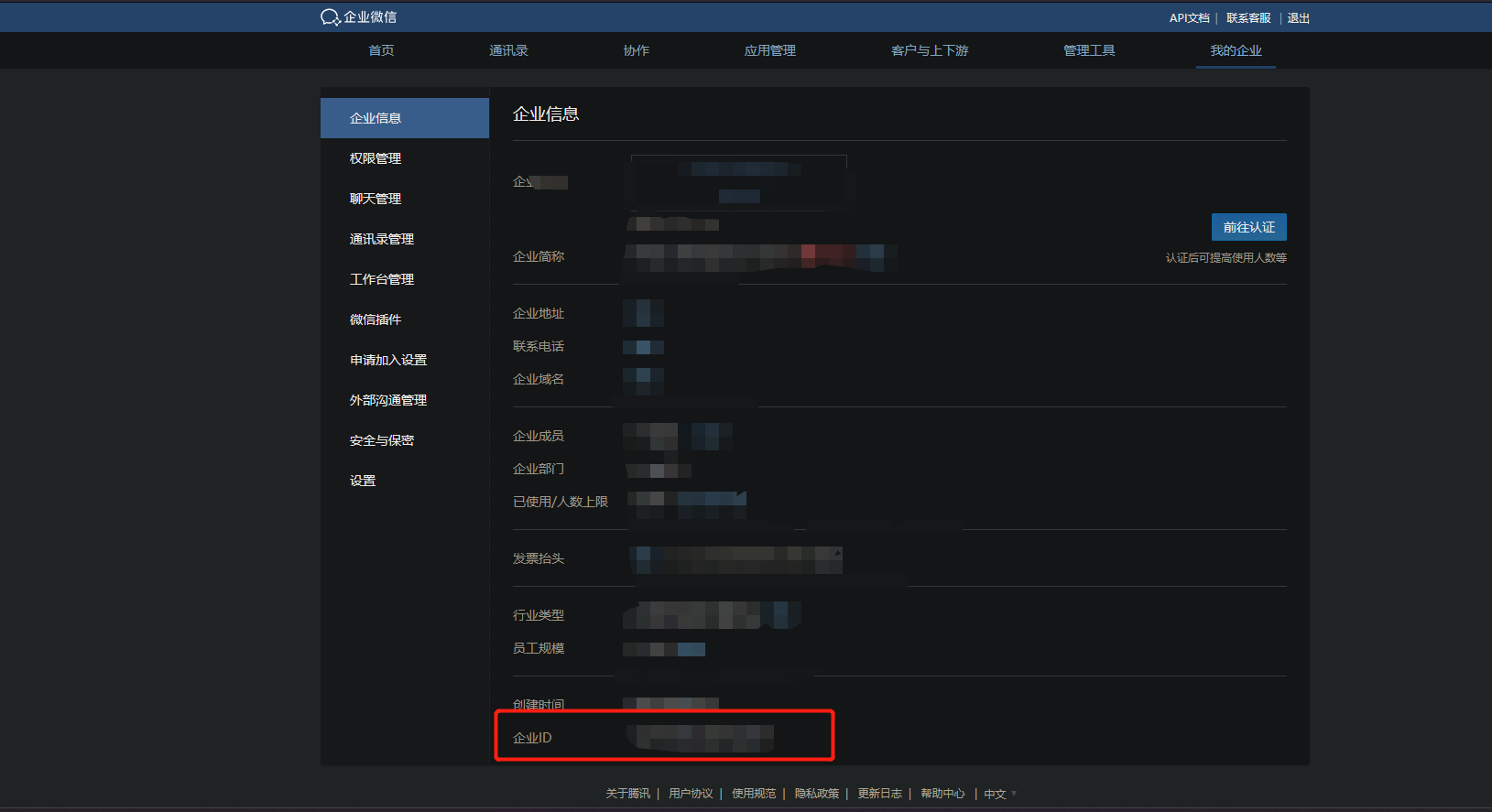
在仓库secrets中添加如下变量:CORP_ID=your_id
添加应用并获取下述变量
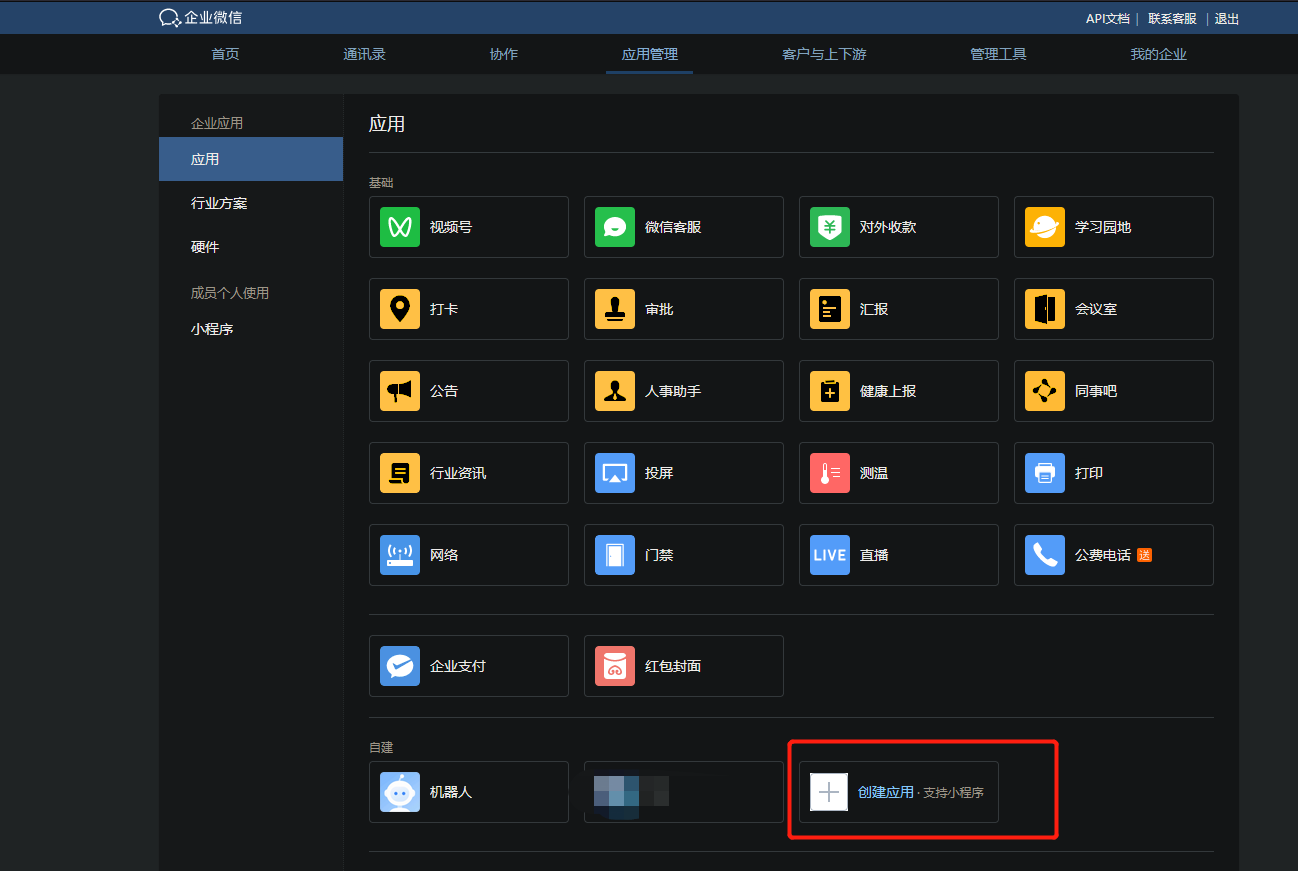
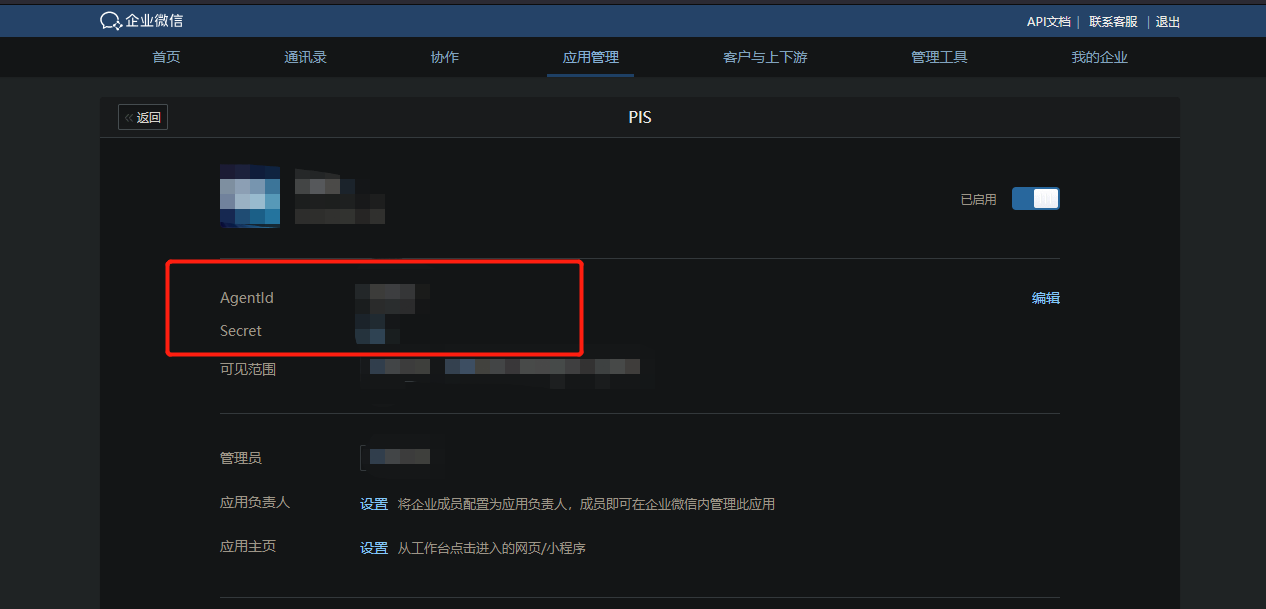
在仓库secrets中添加:APP_SECRET=your_app_secret以及APP_ID=your_app_id
使用机器人webhook方式时,请添加以下变量:
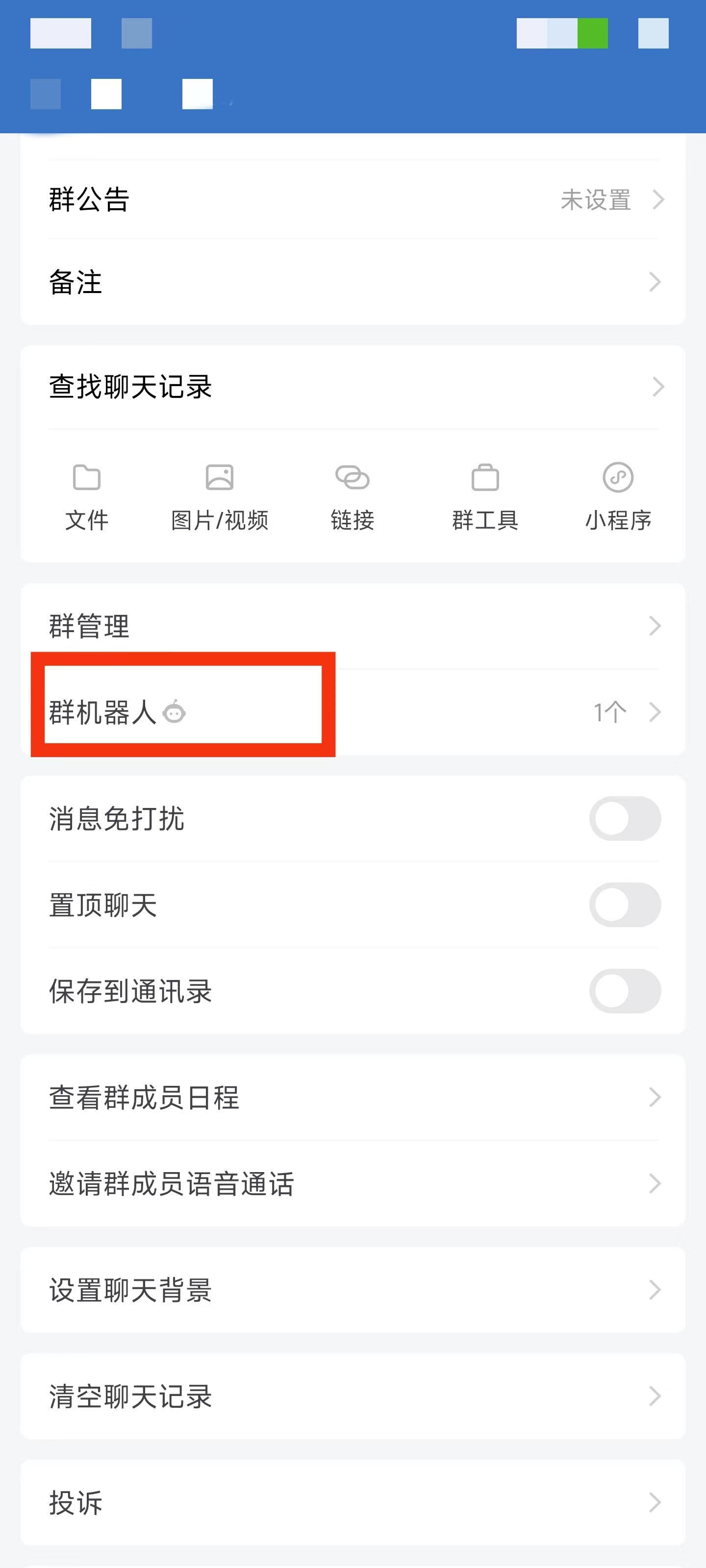
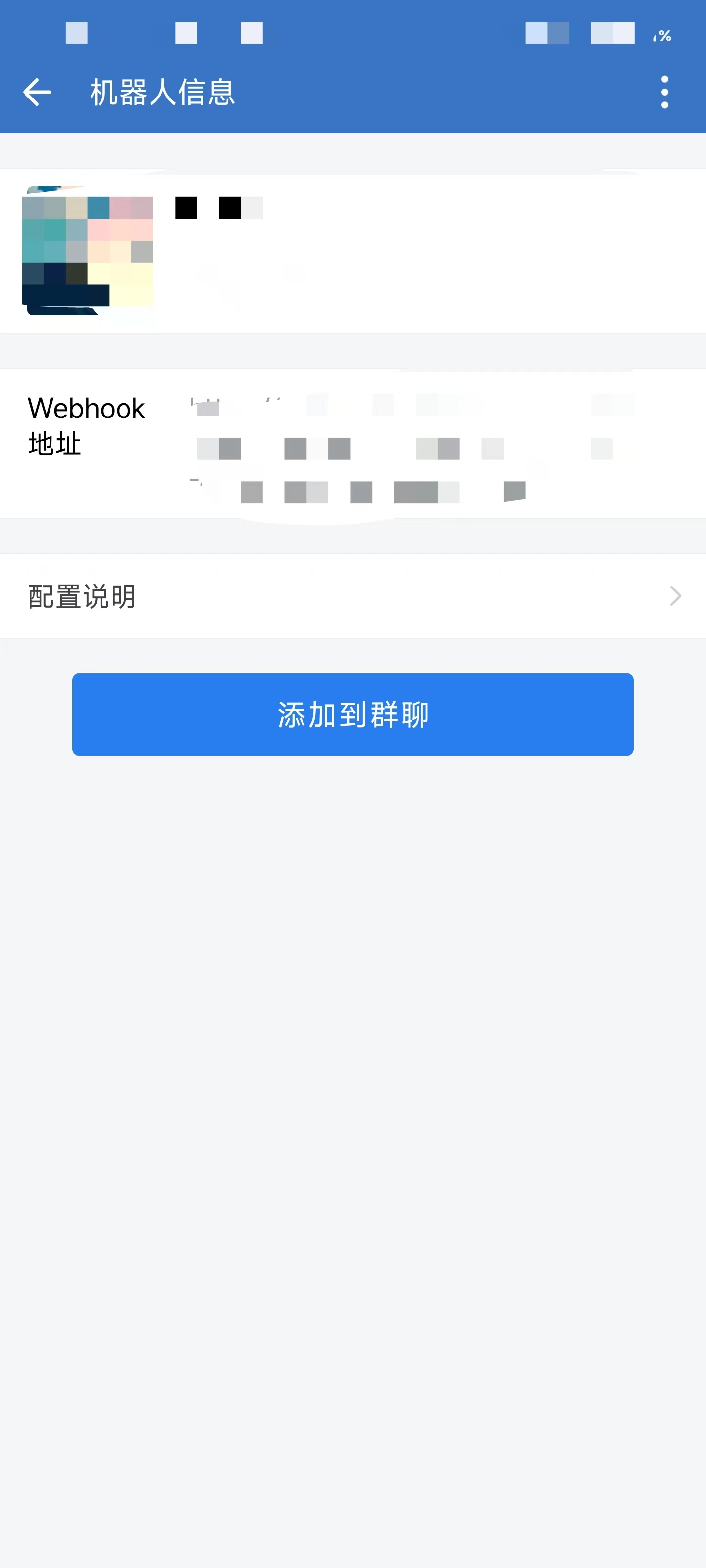
找到群聊,在其中点击机器人配置,获取webhookkey中key字段;在仓库中添加key=your_web_hook_key
至此,必要信息已手机完毕。
1. 安装python运行库
执行pip install -r requirments.txt
3. 生成并填写配置文件
初次运行main.py中的demo,会在当前目录下生成config.ini配置文件,如下面代码所示:
[Config]
corp_id = your corp_id # Enter your enterprise ID of wechat background here.
app_id = your app_id # Enter your application ID of enterprise wechat background here
app_secret = your app_secret # Enter your application secret of enterprise wechat background here
# 使用APP_PUSH方式时以上必填
# 使用WEB_HOOK_PUSH方式仅需填写下述消息
key = your key # Enter the webhook key of the enterprise's wechat group chat robot here依次按照# .......中的提示填写必要信息。
4. 运行示例demo
在main.py中再次运行示例demo
# wxps = APP_PUSH()
hookps = WEB_HOOK_PUSH()
test = (
    "# 企业微信消息测试"
    + "## •  二级标题"
    + "## •  测试通过"
)
hookps.send_message(message=test, markdown=False)
即可发送成功,此时可在微信中看到相应信息。
注意事项
经过测试。markdown信息并不能在微信查看。只能在企业微信查看。所以,如果想要在微信查看,需要将markdown类型消息改为text类型
1 maintainer

Release files for WX-Push-Services 1.0.24
For a detailed explanation of source distributions (sdists) and built distributions (wheels), please see the package formats documentation.
Source distribution (sdist)
| File | Size | Uploaded | |
|---|---|---|---|
| WX_Push_Services-1.0.24.tar.gz | 9.2 kB | Details |
Built distribution (wheel)
| File | Interpreter | ABI | Platform | Reset |
|---|---|---|---|---|
| WX_Push_Services-1.0.24-py3-none-any.whl | Python 3 | none | any | Details |
Total release size: 20.5 kB
Release files / WX_Push_Services-1.0.24.tar.gz
| Download URL | WX_Push_Services-1.0.24.tar.gz |
|---|---|
| Size | 9.2 kB |
| Tags | Source |
|
SHA-256 checksum How to use checksums |
a19eb1ce1a749e51992ece266d5186c1a504387fea13bc36832127767e7912f1
|
|
BLAKE2b-256 checksum How to use checksums |
da97edf8405a98d5e7f7d651535e64f0528f2e87a17a45d57565e58ce9794f29
|
| Upload date | |
|
Uploaded using Trusted Publishing? What is trusted publishing? |
No |
| Uploaded via |
twine/4.0.2 CPython/3.11.3
|
Release files / WX_Push_Services-1.0.24-py3-none-any.whl
| Download URL | WX_Push_Services-1.0.24-py3-none-any.whl |
|---|---|
| Size | 11.4 kB |
| Tags | Python 3 |
|
SHA-256 checksum How to use checksums |
f2c99a364eb0d00a2b3eb10964373b8c9716857dd41c02af2e6167dd5d1ef8a1
|
|
BLAKE2b-256 checksum How to use checksums |
cee7312683e41e59344659214f532d44be5331385c7d3cc836e0889e20597c4d
|
| Upload date | |
|
Uploaded using Trusted Publishing? What is trusted publishing? |
No |
| Uploaded via |
twine/4.0.2 CPython/3.11.3
|














