
WaveDromPy
This is a python module and command line fully compatible with WaveDrom, which is originally implemented in JavaScript. It is useful if you want to generate wavedrom diagrams from a python environment or simply don't want to install the Node.js environment just to use WaveDrom as simple command line.
WaveDromPy is for example used in sphinxcontrib-wavedrom to render wavedrom for Sphinx documentation. While the original project renders the diagrams in JavaScript in the browser, WaveDromPy renders them to SVG files.
This tool is a direct translation of original Javascript file WaveDrom.js to Python. No extra feature added. We seek to have it fully compatible.
The tool WaveDromPy directly converts WaveDrom compatible JSON files into SVG format.


Installation
It is most easy to just install wavedrom via pip/pypi:
pip install wavedrom
Alternatively you can install the latest version from this repository:
pip install git+https://github.com/wallento/wavedrompy
or from your local copy:
pip install .
Usage
You can either use the tool from Python:
import wavedrom
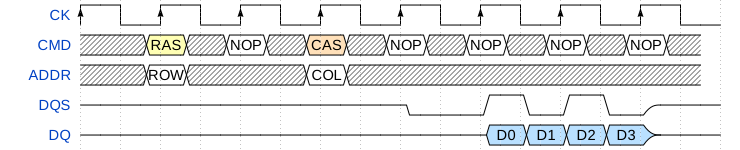
svg = wavedrom.render("""
{ "signal": [
 { "name": "CK",   "wave": "P.......",                                              "period": 2  },
 { "name": "CMD",  "wave": "x.3x=x4x=x=x=x=x", "data": "RAS NOP CAS NOP NOP NOP NOP", "phase": 0.5 },
 { "name": "ADDR", "wave": "x.=x..=x........", "data": "ROW COL",                     "phase": 0.5 },
 { "name": "DQS",  "wave": "z.......0.1010z." },
 { "name": "DQ",   "wave": "z.........5555z.", "data": "D0 D1 D2 D3" }
]}""")
svg.saveas("demo1.svg")
This will render a waveform as:
You can find more examples in the WaveDrom tutorial.
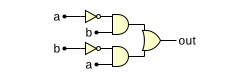
A second feature is that WaveDrom can render logic circuit diagrams:
import wavedrom
svg = wavedrom.render("""
{ "assign":[
  ["out",
    ["|",
      ["&", ["~", "a"], "b"],
      ["&", ["~", "b"], "a"]
    ]
  ]
]}""")
svg.saveas("demo2.svg")
This will render a as:
You can find more examples in the WaveDrom tutorial2.
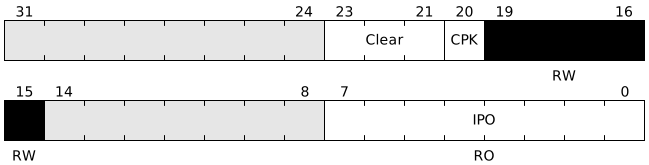
Finally, wavedrom can draw registers as bitfields:
import wavedrom
svg = wavedrom.render("""
{"reg": [
  { "name": "IPO",   "bits": 8, "attr": "RO" },
  {                  "bits": 7 },
  { "name": "<o>B</o><b>R<i>K</i></b>",   "bits": 5, "attr": "RW", "type": 4 },
  { "name": "CPK",   "bits": 1 },
  { "name": "Clear", "bits": 3 },
  { "bits": 8 }
  ]
]}""")
svg.saveas("demo3.svg")
This will render as:
This mode is documented as part of the bit-field JavaScript package.
Alternatively, WaveDromPy can be called from the command line:
wavedrompy --input input.json --svg output.svg
Important notice
The command line uses Python's JSON interpreter that is more restrictive (coherent with the JSOC spec), while the JavaScript json is more relaxed:
- All strings have to be written between quotes (""),
- Extra comma (,) not supported at end of lists or dictionaries
AsciiDoctor example
An AsciiDoctor example is provided to directly generate timing diagrams from AsciiDoctor formatted documents.
1 maintainer

Metadata
1 maintainer
Release files for wavedrom 2.0.3.post3
For a detailed explanation of source distributions (sdists) and built distributions (wheels), please see the package formats documentation.
Source distribution (sdist)
| File | Size | Uploaded | Provenance | Actions |
|---|---|---|---|---|
| wavedrom-2.0.3.post3.tar.gz | 137.7 kB | Without provenance | Details for wavedrom-2.0.3.post3.tar.gz |
Release files / wavedrom-2.0.3.post3.tar.gz
| Download URL | wavedrom-2.0.3.post3.tar.gz |
|---|---|
| Size | 137.7 kB |
| Tags | Source |
|
SHA-256 checksum How to use checksums |
327b4d5dca593c81257c202fea516f7a908747fb11527c359f034f5b7af7f47b
|
|
BLAKE2b-256 checksum How to use checksums |
be716739e3abac630540aaeaaece4584c39f88b5f8658ce6ca517efec455e3de
|
| Upload date | |
|
Uploaded using Trusted Publishing? What is trusted publishing? |
No |
| Uploaded via |
twine/4.0.0 CPython/3.10.4
|
Security for wavedrom 2.0.3.post3
Provenance
Provenance describes where a file came from. On PyPI, provenance is shared via attestations, which provide a verifiable record of the build or publishing details. View details, limitations and caveats.
No provenance found
None of the files in this release were uploaded with provenance metadata.
A note on package security
PyPI is a repository for distributing packages, not a service for auditing them. While third-party security researchers and our staff do their best to detect and remove malicious packages, PyPI cannot guarantee the quality, security or suitability of any given package.
To learn more about protecting yourself from malicious actors, visit our package security documentation.














