
XlsxWriter
XlsxWriter is a Python module for writing files in the Excel 2007+ XLSX file format.
XlsxWriter can be used to write text, numbers, formulas and hyperlinks to multiple worksheets and it supports features such as formatting and many more, including:
100% compatible Excel XLSX files.
Full formatting.
Merged cells.
Defined names.
Charts.
Autofilters.
Data validation and drop down lists.
Conditional formatting.
Worksheet PNG/JPEG images.
Rich multi-format strings.
Cell comments.
Memory optimisation mode for writing large files.
It supports Python 2.5, 2.6, 2.7, 3.1, 3.2, 3.3, Jython and PyPy and uses standard libraries only.
Here is a simple example:
import xlsxwriter


# Create an new Excel file and add a worksheet.
workbook = xlsxwriter.Workbook('demo.xlsx')
worksheet = workbook.add_worksheet()

# Widen the first column to make the text clearer.
worksheet.set_column('A:A', 20)

# Add a bold format to use to highlight cells.
bold = workbook.add_format({'bold': 1})

# Write some simple text.
worksheet.write('A1', 'Hello')

# Text with formatting.
worksheet.write('A2', 'World', bold)

# Write some numbers, with row/column notation.
worksheet.write(2, 0, 123)
worksheet.write(3, 0, 123.456)

# Insert an image.
worksheet.insert_image('B5', 'logo.png')

workbook.close()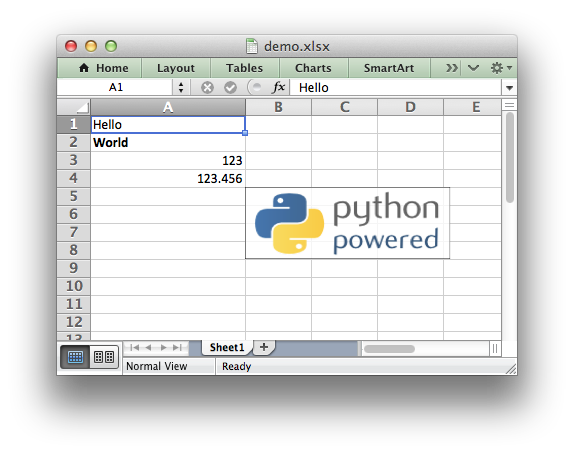
See the full documentation at: http://xlsxwriter.readthedocs.org
Release notes: https://xlsxwriter.readthedocs.org/en/latest/changes.html
1 maintainer

Metadata
1 maintainer
Release files for xlsxwriter 0.5.0
For a detailed explanation of source distributions (sdists) and built distributions (wheels), please see the package formats documentation.
Source distribution (sdist)
| File | Size | Uploaded | |
|---|---|---|---|
| XlsxWriter-0.5.0.tar.gz | 203.2 kB | Details |
Release files / XlsxWriter-0.5.0.tar.gz
| Download URL | XlsxWriter-0.5.0.tar.gz |
|---|---|
| Size | 203.2 kB |
| Tags | Source |
|
SHA-256 checksum How to use checksums |
b3d435288f74e572337b6df9a3c1bcbe2ed119b3cf14796bb6fd66bfe0455362
|
|
BLAKE2b-256 checksum How to use checksums |
678f8ceaa50e84ccec63a33a07d3a0442a03684fb3aa93d27697dcfd8edafeb6
|
| Upload date | |
|
Uploaded using Trusted Publishing? What is trusted publishing? |
No |














