
Detecting shapes with OpenCV, and getting all the important information in a DataFrame
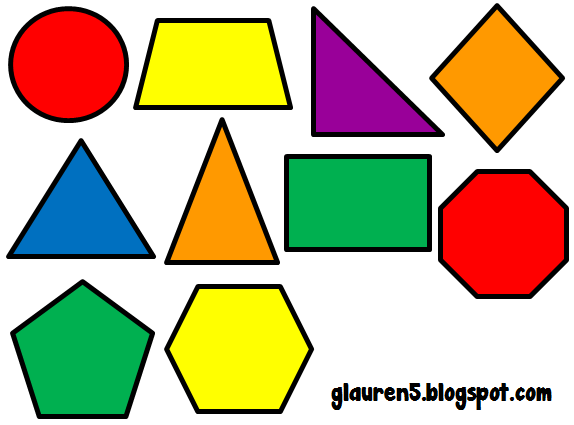
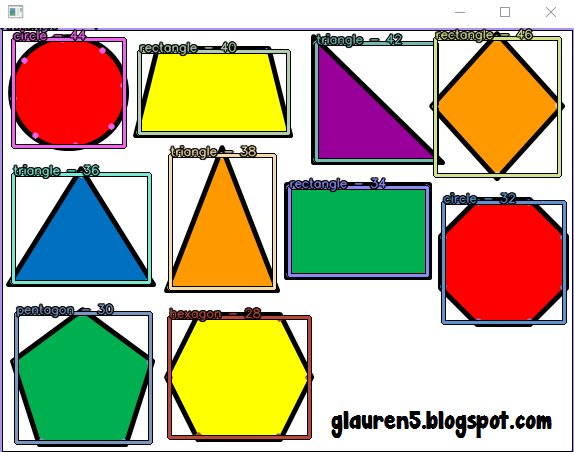
$pip install a-cv2-shape-finder

from a_cv2_shape_finder import get_shapes_using_ADAPTIVE_THRESH_GAUSSIAN_C,get_shapes_using_ADAPTIVE_THRESH_MEAN_C,get_shapes_using_THRESH_OTSU

import cv2

import pandas as pd

from a_cv2_imshow_thread import add_imshow_thread_to_cv2

from a_cv_imwrite_imread_plus import add_imwrite_plus_imread_plus_to_cv2

import numpy as np

add_imwrite_plus_imread_plus_to_cv2()

add_imshow_thread_to_cv2()

image2=cv2.imread_plus( r"http://clipart-library.com/img/2000719.png")


#method1 (best results)

df, bw_pic = get_shapes_using_ADAPTIVE_THRESH_GAUSSIAN_C(

    im=image2.copy(),

    method=cv2.CHAIN_APPROX_SIMPLE,

    approxPolyDPvar=0.02,

    constant_subtracted=2,

    block_size=11,

    return_bw_pic=True,

)

#method2 (good results)

df, bw_pic = get_shapes_using_ADAPTIVE_THRESH_MEAN_C(

    im=image2.copy(),

    method=cv2.CHAIN_APPROX_SIMPLE,

    approxPolyDPvar=0.04,

    constant_subtracted=2,

    block_size=11,

    return_bw_pic=True,

)


#method3 (not always good results)

df, bw_pic = get_shapes_using_THRESH_OTSU(

    im=image2.copy(),

    method=cv2.CHAIN_APPROX_SIMPLE,

    approxPolyDPvar=0.01,

    kernel=(1, 1),

    start_thresh=50,

    end_thresh=255,

    return_bw_pic=True,

)


   aa_arcLength  aa_isContourConvex  aa_center_x  aa_center_y   aa_area                                                                                                                   aa_convexHull  aa_len_convexHull  aa_len_cnts   aa_shape                              aa_rotated_rectangle aa_minEnclosingCircle_center  aa_minEnclosingCircle_radius                                                                                            aa_fitEllipse                 aa_fitLine  aa_h0  aa_h1  aa_h2  aa_h3  aa_bound_start_x  aa_bound_start_y  aa_bound_end_x  aa_bound_end_y  aa_bound_width  aa_bound_height

0   1994.000000                True          286          212  242952.0                                                                                [[[573, 0]], [[573, 424]], [[0, 424]], [[0, 0]]]                  4            4  rectangle          [[0, 0], [573, 0], [573, 424], [0, 424]]                   (286, 212)                           356                                                                                                     <NA>     ((573, 212), (0, 212))     -1     -1      1     -1                 0                 0             574             425             574              425

1     17.656854                True          511          398      23.0                [[[509, 397]], [[510, 396]], [[513, 396]], [[514, 397]], [[514, 400]], [[513, 401]], [[510, 401]], [[509, 400]]]                  8            8     circle  [[509, 396], [514, 396], [514, 401], [509, 401]]                   (511, 398)                             2                                            ((511.5, 398.5), (5.830951690673828, 5.830951690673828), 0.0)     ((573, 398), (0, 398))      2     -1     -1      0               509               396             515             402               6                6

2     67.213203               False          402          395     128.0                                                          [[[396, 388]], [[406, 387]], [[409, 399]], [[405, 401]], [[397, 401]]]                  5            7       oval  [[395, 388], [407, 386], [409, 400], [397, 401]]                   (402, 394)                             8    ((401.52850341796875, 394.2469482421875), (13.484291076660156, 29.70796012878418), 84.56861877441406)  ((573, 1267), (0, -1646))      3      1     -1      0               396               387             410             402              14               15

3     88.183766               False          543          396     172.5                                                          [[[538, 386]], [[551, 389]], [[550, 401]], [[543, 401]], [[535, 400]]]                  5           10       oval  [[535, 400], [538, 386], [552, 389], [549, 403]]                   (542, 394)                             9     ((540.5974731445312, 393.8035888671875), (14.401185989379883, 27.078874588012695), 93.7881088256836)   ((573, 561), (0, -2567))      4      2     -1      0               535               386             552             402              17               16

4     42.384776                True          530          393     122.5  [[[530, 386]], [[532, 386]], [[535, 389]], [[535, 397]], [[533, 400]], [[528, 401]], [[525, 398]], [[525, 392]], [[527, 388]]]                  9            9       oval  [[525, 401], [525, 386], [535, 386], [535, 401]]                   (530, 393)                             7   ((530.2174682617188, 393.71160888671875), (11.07934856414795, 15.688089370727539), 10.645519256591797)   ((573, -138), (0, 6796))      6      3      5      0               525               386             536             402              11               16

5     12.242641               False          530          393       7.5                                            [[[531, 395]], [[530, 396]], [[529, 395]], [[529, 393]], [[530, 391]], [[531, 391]]]                  6            7       oval  [[529, 391], [531, 391], [531, 396], [529, 396]]                   (530, 393)                             2    ((530.2325439453125, 393.48016357421875), (2.533412456512451, 5.182924270629883), 12.179041862487793)    ((573, -82), (0, 6120))     -1     -1     -1      4               529               391             532             397               3                6

6     53.941125               False          520          393     102.0                [[[521, 386]], [[525, 389]], [[525, 396]], [[522, 400]], [[519, 401]], [[515, 398]], [[514, 394]], [[516, 389]]]                  8           12       oval  [[511, 395], [519, 384], [528, 391], [520, 402]]                   (520, 393)                             7   ((519.7500610351562, 393.70819091796875), (10.821428298950195, 15.00129222869873), 12.044055938720703)    ((573, 263), (0, 1652))      7      4     -1      0               514               386             526             402              12               16

7    124.911687               False          475          395     252.5                [[[471, 386]], [[477, 386]], [[488, 389]], [[487, 398]], [[480, 410]], [[475, 409]], [[466, 398]], [[467, 392]]]                  8           15       oval  [[463, 405], [469, 383], [489, 389], [483, 411]]                   (477, 397)                            13  ((477.4767761230469, 396.48944091796875), (20.678686141967773, 25.679677963256836), 21.347288131713867)   ((573, 781), (0, -1472))      9      6      8      0               466               386             489             411              23               25

8     10.242641                True          482          393       7.5                              [[[484, 394]], [[483, 395]], [[482, 395]], [[481, 394]], [[481, 393]], [[482, 392]], [[484, 392]]]                  7            7     circle  [[481, 392], [484, 392], [484, 395], [481, 395]]                   (482, 393)                             1                  ((482.6419372558594, 393.3580627441406), (3.061401844024658, 3.7628066539764404), 45.0)     ((573, 302), (0, 876))     -1     -1     -1      7               481               392             485             396               4                4

9     81.112698               False          459          399     212.5                              [[[465, 386]], [[466, 405]], [[463, 410]], [[458, 410]], [[454, 403]], [[455, 391]], [[458, 387]]]                  7           11       oval  [[453, 386], [465, 386], [466, 409], [454, 410]]                   (461, 398)                            12      ((460.94775390625, 397.08856201171875), (13.2537202835083, 25.697481155395508), 2.9813687801361084)  ((573, 2400), (0, -7608))     11      7     10      0               454               386             467             411              13               25


#Let's draw the results from the second picture

#There is nothing better than Pandas to process data.

image = image2.copy()

for name, group in df.groupby("aa_h3"):

    if name == 0:

        continue

    fabb = (

        np.random.randint(50, 250),

        np.random.randint(50, 250),

        np.random.randint(50, 250),

    )

    for key, item in group.loc[(group.aa_area > 200) & (

    group.aa_shape.isin(['rectangle', 'triangle', 'circle', 'pentagon', 'hexagon']))].iterrows():

        image = cv2.drawContours(

            image, item.aa_convexHull, -1, color=fabb, thickness=5, lineType=cv2.LINE_AA

        )

        image = cv2.rectangle(

            image,

            (item.aa_bound_start_x, item.aa_bound_start_y),

            (item.aa_bound_end_x, item.aa_bound_end_y),

            (0, 0, 0),

            3,

        )

        image = cv2.rectangle(

            image,

            (item.aa_bound_start_x, item.aa_bound_start_y),

            (item.aa_bound_end_x, item.aa_bound_end_y),

            fabb,

            2,

        )

        image = cv2.putText(

            image,

            f'{str(item.aa_shape)} - {name}',

            (item.aa_bound_start_x, item.aa_bound_start_y),

            cv2.FONT_HERSHEY_SIMPLEX,

            0.4,

            (0, 0, 0),

            2,

            cv2.LINE_AA,

        )

        image = cv2.putText(

            image,

            f'{str(item.aa_shape)} - {name}',

            (item.aa_bound_start_x, item.aa_bound_start_y),

            cv2.FONT_HERSHEY_SIMPLEX,

            0.4,

            fabb,

            1,

            cv2.LINE_AA,

        )


cv2.imshow_thread([image, bw_pic])
1 maintainer

Metadata
1 maintainer
Release files for a-cv2-shape-finder 0.11
For a detailed explanation of source distributions (sdists) and built distributions (wheels), please see the package formats documentation.
Source distribution (sdist)
| File | Size | Uploaded | Provenance | Actions |
|---|---|---|---|---|
| a_cv2_shape_finder-0.11.tar.gz | 9.4 kB | Without provenance | Details for a_cv2_shape_finder-0.11.tar.gz |
Built distribution (wheel)
| File | Interpreter | ABI | Platform | Actions Reset |
|---|---|---|---|---|
| a_cv2_shape_finder-0.11-py3-none-any.whl | Python 3 | none | any | Details for a_cv2_shape_finder-0.11-py3-none-any.whl |
Total release size: 22.0 kB
Release files / a_cv2_shape_finder-0.11.tar.gz
| Download URL | a_cv2_shape_finder-0.11.tar.gz |
|---|---|
| Size | 9.4 kB |
| Tags | Source |
|
SHA-256 checksum How to use checksums |
dd8039bd8ed250e530a82fa8c2af78ed4345b8a683177b67ae38031805ef675a
|
|
BLAKE2b-256 checksum How to use checksums |
4bfc9143f49188dc2efd7a93d842659ce49408277dd253ddb2a849c63e78c448
|
| Upload date | |
|
Uploaded using Trusted Publishing? What is trusted publishing? |
No |
| Uploaded via |
twine/4.0.1 CPython/3.9.13
|
Release files / a_cv2_shape_finder-0.11-py3-none-any.whl
| Download URL | a_cv2_shape_finder-0.11-py3-none-any.whl |
|---|---|
| Size | 12.6 kB |
| Tags | Python 3 |
|
SHA-256 checksum How to use checksums |
4fb3cbd98c05006bbe036abcdbce853d6d12e7f390a01b67e72838de3881c084
|
|
BLAKE2b-256 checksum How to use checksums |
a60da8e75361d7c6720993fcf5d9eb066ed9e9bf4faa0ca4808391ec32d0b734
|
| Upload date | |
|
Uploaded using Trusted Publishing? What is trusted publishing? |
No |
| Uploaded via |
twine/4.0.1 CPython/3.9.13
|
Security for a-cv2-shape-finder 0.11
Provenance
Provenance describes where a file came from. On PyPI, provenance is shared via attestations, which provide a verifiable record of the build or publishing details. View details, limitations and caveats.
No provenance found
None of the files in this release were uploaded with provenance metadata.
A note on package security
PyPI is a repository for distributing packages, not a service for auditing them. While third-party security researchers and our staff do their best to detect and remove malicious packages, PyPI cannot guarantee the quality, security or suitability of any given package.
To learn more about protecting yourself from malicious actors, visit our package security documentation.














