






BigBrother
BigBrother is an Alliance Auth plugin, originally written by Andrew Xadi, that performs continuous pilot auditing, compliance monitoring, intelligence gathering, and behavioral analysis. It monitors activity such as skills, cyno capabilities, SP injections, corporation movement, assets, clones, and more, then delivers structured leadership-focused reports.
All while invisible to the general membership unless you choose to expose it to them. No "adding chars" to it, it pulls relevant information from CorpTools.
Index
Core Requirements
The following AllianceAuth plugins are required:
allianceauth >= 5.5.0
allianceauth-corptools >= 3.0.0b13
django-esi >= 10.0.0
django-eveonline-sde >= 0.0.1b2
Recommended plugins
allianceauth-discordbot >= 4.1.0   # Required for Discord notifications and ticket system
aa-charlink >= 1.11.1              # Required for corp compliance filter checks
Optional plugins
allianceauth-afat >= 4.1.1         # Required for PAP/Fleet participation compliance
allianceauth-blacklist >= 0.1.1    # Add / check for blacklisted characters
aa-contacts >= 0.10.2              # Automatic hostile/friendly contact syncing
SDE Setup (required for static data)
Add the following to your local.py:
INSTALLED_APPS = [
    # ...
    "eve_sde",  # Only if not already added for another app
    # ...
]

INSTALLED_APPS = [
    "modeltranslation",
] + INSTALLED_APPS

if "eve_sde" in INSTALLED_APPS:
    # Run at 12:00 UTC each day
    CELERYBEAT_SCHEDULE["EVE SDE :: Check for SDE Updates"] = {
        "task": "eve_sde.tasks.check_for_sde_updates",
        "schedule": crontab(minute="0", hour="12"),
    }
And run:
auth esde_load_sde
Install Instructions
After making sure to add the above prerequisite applications.
source /home/allianceserver/venv/auth/bin/activate && cd /home/allianceserver/myauth/
pip install aa-bb
vi myauth/settings/local.py
Add aa_bb to your INSTALLED_APPS. Ensure that the prerequisite applications listed above are also present in INSTALLED_APPS.
python manage.py migrate && python manage.py collectstatic --noinput
restart the things exit your venv
sudo supervisorctl restart myauth:
In your supervisor.conf (baremetal only, skip if docker)
[program:worker]
command=/home/allianceserver/venv/auth/bin/celery -A myauth worker -P threads -c 10 -l INFO -n %(program_name)s_%(process_num)02d
directory=/home/allianceserver/myauth
user=allianceserver
numprocs=2
process_name=%(program_name)s_%(process_num)02d
stdout_logfile=/home/allianceserver/myauth/log/worker.log
stderr_logfile=/home/allianceserver/myauth/log/worker.log
autostart=true
autorestart=true
startsecs=10
stopwaitsecs = 600
killasgroup=true
priority=998

[eventlistener:memmon]
command=/home/allianceserver/venv/auth/bin/memmon -p worker_00=512MB -p worker_01=512MB -p gunicorn=512MB
directory=/home/allianceserver/myauth
events=TICK_60
stdout_logfile=/home/allianceserver/myauth/log/memmon.log
stderr_logfile=/home/allianceserver/myauth/log/memmon.log
It is also recommended to disable gunicorn timeout, an example can be seen here: (both docker and baremetal)
- For baremetal
[program:gunicorn]
user = allianceserver
directory=/home/allianceserver/myauth
command=/home/allianceserver/venv/auth/bin/gunicorn myauth.wsgi --workers=3 --timeout 0
stdout_logfile=/home/allianceserver/myauth/log/gunicorn.log
stderr_logfile=/home/allianceserver/myauth/log/gunicorn.log
autostart=true
autorestart=true
stopsignal=INT
- For docker
allianceauth_gunicorn:
  ports:
    - 8000:8000
  container_name: allianceauth_gunicorn
  <<: *allianceauth-base
  entrypoint: [
    "gunicorn",
    "myauth.wsgi",
    "--bind=0.0.0.0:8000",
    "--workers=2",
    "--timeout=0",
    "--max-requests=500",
    "--max-requests-jitter=50"
  ]
then reload supervisor and restart auth
sudo supervisorctl reload
sudo supervisorctl restart myauth:
In your AA Admin navigate to AA_BB
- Navigate to Big Brother Config
- Under Core Activation
- Make sure Warmer Is Active is enabled
- Disabling this may decrease server load, however, if you do not disable the gunicorn timeout, the Dashboards may never load.
- Enable any features you plan to use
- PAPs/AFAT
- LOA
- Daily Messages (messages that repeat every 24 hours)
- Recurring Stats
- Optional Messages 1-5
- Set the number of days for an LOA
- Make sure Warmer Is Active is enabled
- Under Notifications
- Select if you would like to opt out of any notifications sent to the main Discord Webhook for user changes
- By default, the app will not send a notification when a new user adds their audit; however, this can be enabled.
- When enabled, it will treat non-existent data as old data and send a notification to discord on all the user's stats (assuming you have those stats notifications enabled), treating them as if they are changes.
- Under Ping / Messaging Rules
- Enter in your desired role ID that you wish to be pinged and select the conditions under which those roles will be pinged.
- Select any @here conditions
- Select any @everyone conditions
- Under Webhooks
-
Don't forget you can send it to a thread by using
https://discordapp.com/api/webhooks/<url>/<url>?thread_id=<threadid>
The thread must be in the same channel that the webhook is configured to.- The main "Webhook" This is used to send notifications of user and corp changes to Discord
- LOA Webhook
- Daily Webhook
- Recurring Stats
- Optional Message Webhooks 1-5
- Under Schedules
- Configure specific schedules for daily messages, optional messages, and recurring stats.
- Under User State and Membership
-
Failure to configure this will result in AA_BB not working
- Configure what states you consider "members" you will receive updates on these in discord
- Configure what states you consider "guest" these will be preloaded into cache, but not notified in discord.
- Configure what corporations you consider to be members, these are friendly entities.
- You do not need to configure a corporation if your corporation is inside an alliance that is set as member
- Configure what alliances you consider to be members.
- Configure ignore corporations, such as alt corps, that will be ignored when checks are run
- Under Hostile / Whitelist Rules
- Configure Alliances you consider hostile
- Coming Soon(tm) the ability to consider anyone who isn't a member /ignored as hostile
- Configure Corporations you consider hostile
- Configure Whitelisted Alliance and Corporations, these act the same as ignored and are... ignored
- Configure if you consider all null sec, minus what you ignore/whitelist/member, as hostile.
- Configure if all player structures are hostile, minus what you ignore/whitelist/member.
- Configure if all npc stations are hostile, minus what you ignore/whitelist/member.
- Configure Excluded systems and stations, these will be ignored and can be considered the same as "member" "ignored" or "whitelisted"
- Configure Alliances you consider hostile
- Under Core Activation
Once you are satisfied with the configuration, you may explore the other configurations available, such as ticket tool configuration, recurring stats, and daily and optional messages.
Okay, but now you want it to actually do the things, go to Periodic Tasks and Run BB run regular updates
Once the task has run for the first time, it will post in the discord webhook when it has completed (about an hour) and will inform you to go back and enable the tasks, you must enable BB run regular updates but the other tasks are based on your needs.
Features
Dashboard
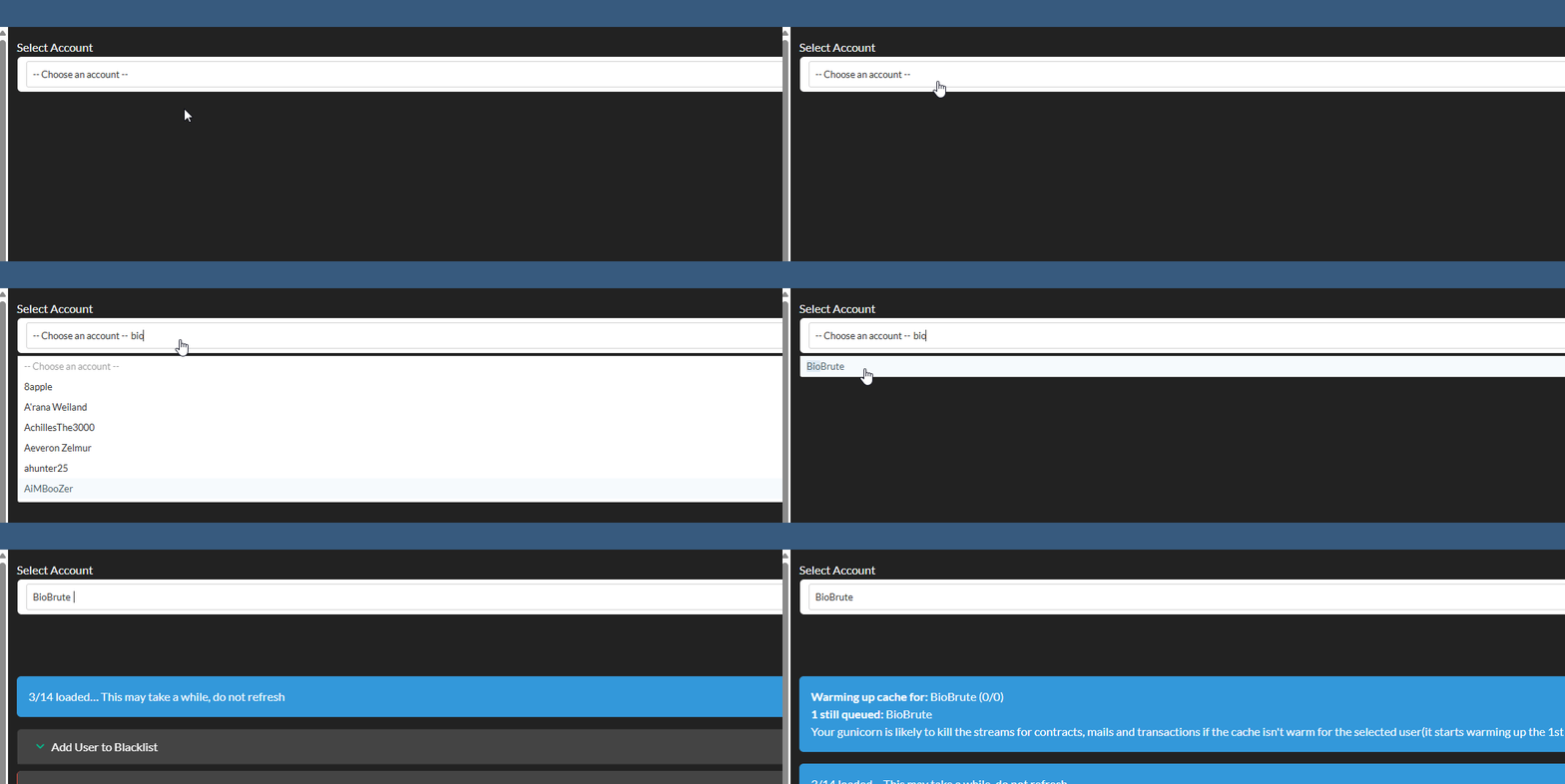
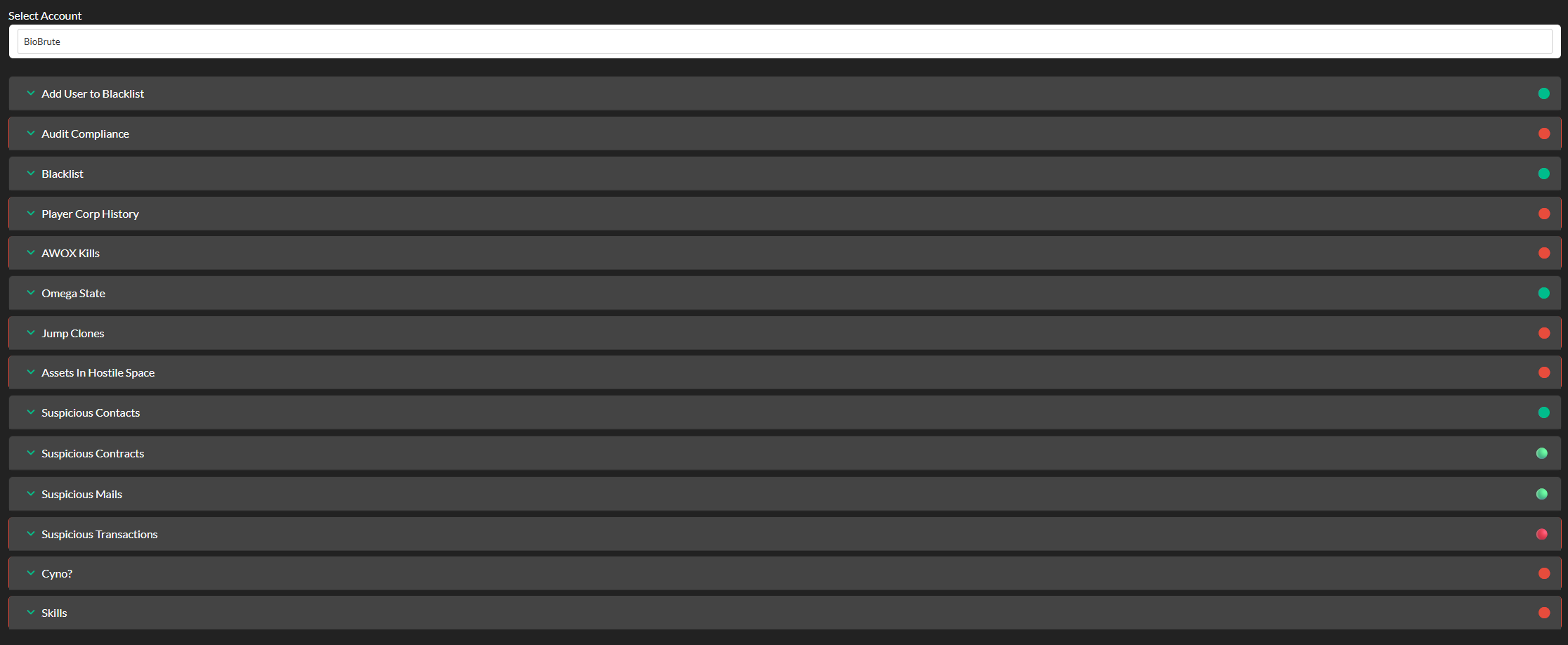
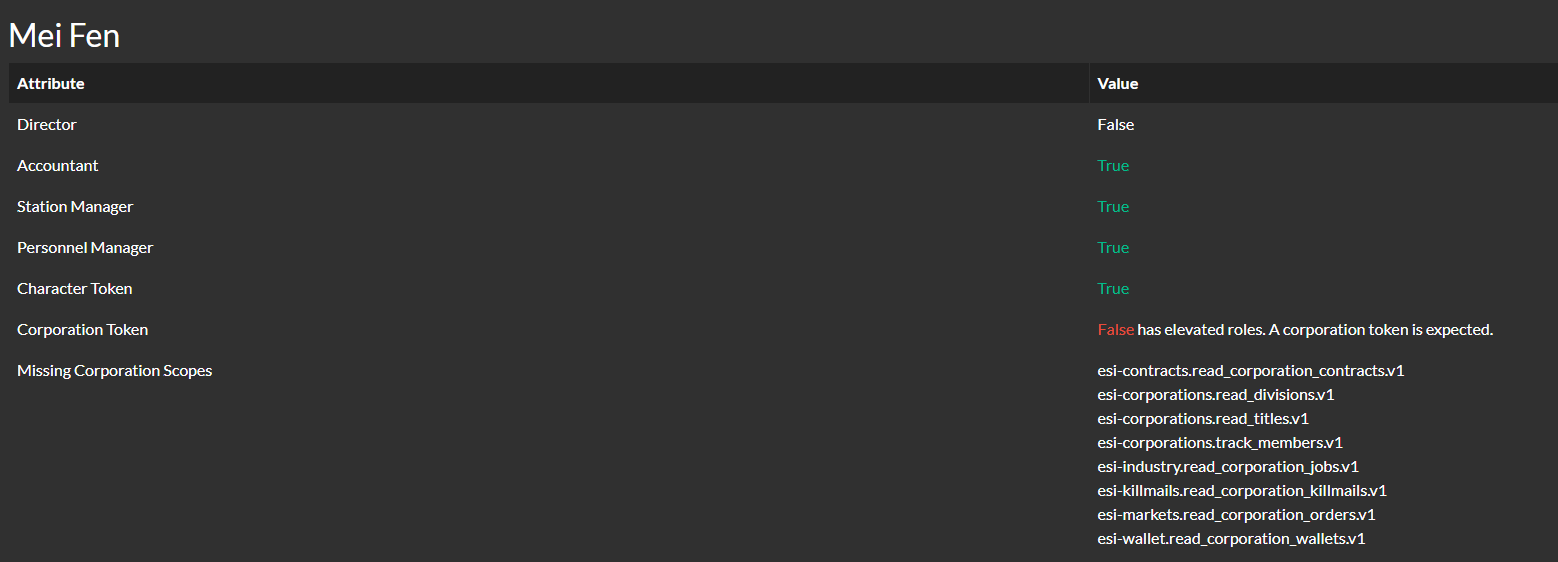
The BigBrother dashboard provides a unified view of any pilot in your organization.
Selecting a user displays a set of analytical cards that summarize compliance, risk factors, and suspicious activity signals.
Tracked metrics include:
-
Blacklist Status
- Whether the pilot or any linked character appears on the blacklist, and you can add the user to blacklist.
- Whether the pilot or any linked character appears on the blacklist, and you can add the user to blacklist.
-
Audit Completion
- Whether all characters and corporations associated with the user have been fully audited.
- Whether all characters and corporations associated with the user have been fully audited.
-
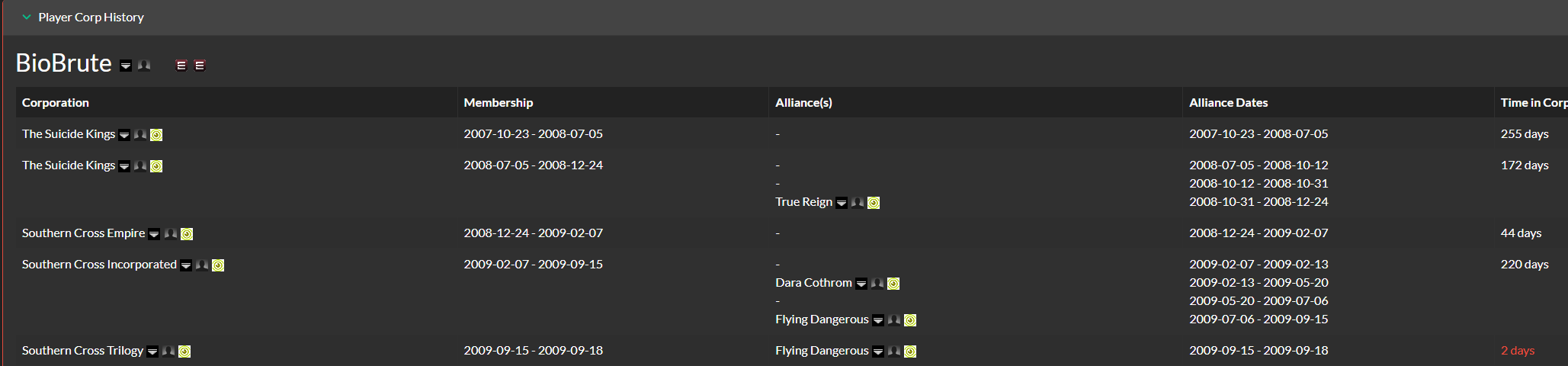
Corporation Stability
- Detection of short or erratic corporation history (“corp hopping”) that may indicate instability or intent to evade tracking.
- Detection of short or erratic corporation history (“corp hopping”) that may indicate instability or intent to evade tracking.
-
AWOX Activity
- Identification of kills against friendly entities that may indicate internal security risks.
- Identification of kills against friendly entities that may indicate internal security risks.
-
Account State
- Whether individual characters are Omega or Alpha, useful for evaluating cyno capability, skill progression, and account investment.
- Whether individual characters are Omega or Alpha, useful for evaluating cyno capability, skill progression, and account investment.
-
Hostile Jump Clone Placement
- Detection of jump clones located in regions or structures considered hostile.
- Detection of jump clones located in regions or structures considered hostile.
-
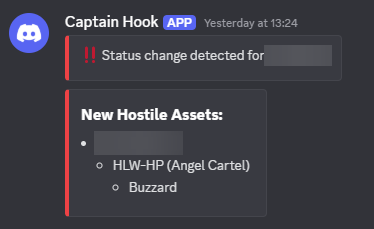
Hostile Asset Placement
- Identification of assets located in hostile regions, including breakdown by character and location.
- Identification of assets located in hostile regions, including breakdown by character and location.
-
Hostile Contacts
- Checks for contacts marked as hostile, which may indicate ties to enemy groups.
- Checks for contacts marked as hostile, which may indicate ties to enemy groups.
-
Hostile Contracts
- Detection of contracts sent to or received from hostile entities, helping highlight supply-chain leaks or suspicious ISK movement.
- Detection of contracts sent to or received from hostile entities, helping highlight supply-chain leaks or suspicious ISK movement.
-
Suspicious Mails
- Detection of in-game mail to or from entities that are considered hostile.
- Detection of in-game mail to or from entities that are considered hostile.
-
Suspicious Transactions
- Checks for transactions, such as player donations and trades, that may be related to hostile entity activity.
- Checks for transactions, such as player donations and trades, that may be related to hostile entity activity.
-
Cyno Check
- Provides a breakdown of what each character belonging to the user is capable of when it comes to cynos.
-
This includes owning and being able to fly potentially interesting ships
-
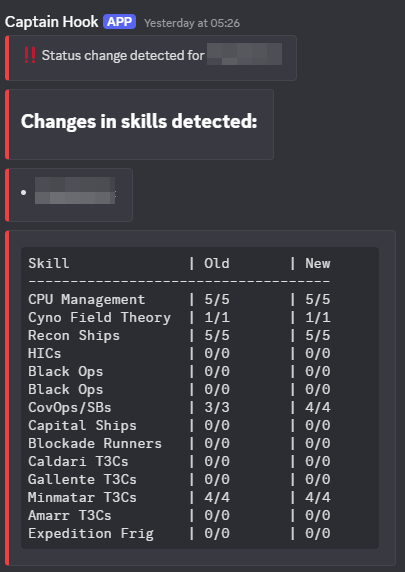
Skill Check A breakdown of potentially interesting skills
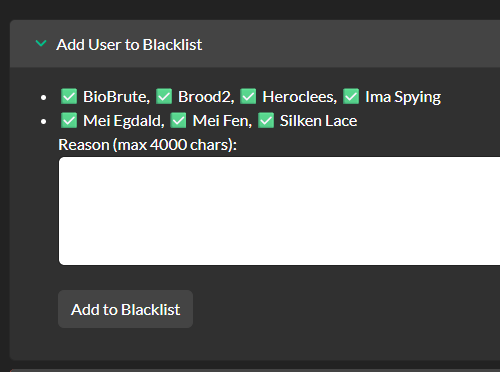
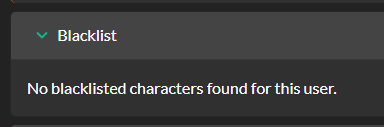










Corp Dashboard
-
Suspicious Transactions
- Checks for transactions, such as corporation donations, that may be related to hostile entity activity.
-
Hostile Contracts
- Detection of contracts sent to or received from hostile entities, helping highlight supply-chain leaks or suspicious ISK movement.
-
Hostile Asset Placement
- Identification of assets located in hostile regions or structures.
Discord Notifications
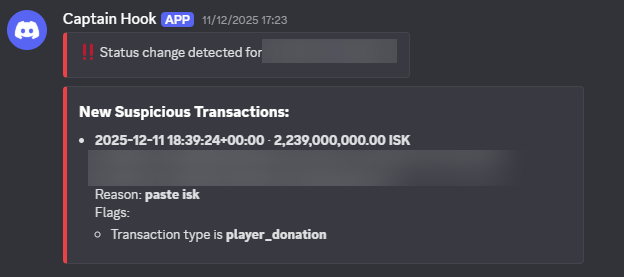
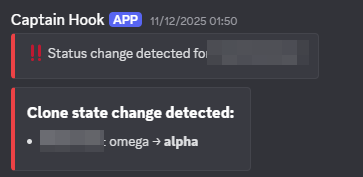
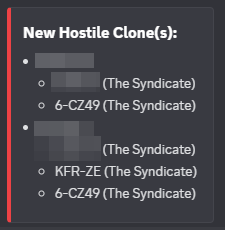
All outbound Discord notifications are serialized through a dedicated task to ensure messages never overlap and always arrive in chronological order.
- Get instant notifications about any corp or user changes that have been listed above under their respective categories, each part of a user's discord notification is adjustable in the settings.
Ticket System
BigBrother can automatically generate tickets to notify leadership when pilots violate compliance or operational rules.
- Triggers include:
- Charlink Compliance Filters
- Detects when users have not added required applications or connections via aa-charlink.
- PAP Compliance
- Flags users who fall below configured PAP or activity thresholds.
- Character Removal From Auth
- Creates a ticket when a user removes a character from AllianceAuth, potentially hiding assets or behavior.
- AWOX Activity
- Generates a ticket when a pilot AWOXs a friendly character.
- Missing Corporation Audit (Director Role)
- Detects directors who have not enabled or completed corporation audits.
- AFK Detection
- Flags users who go AFK without registering an LOA in Auth.
- Missing Discord Link
- Generates a ticket when a user has not connected their Discord account to Auth.
- Charlink Compliance Filters
Non Specific Ticket Configuration
- Ping Targets
- Choose which roles to notify when a ticket is created.
- Ticket Category
- Tickets are created as new channels inside a category, deleting the channel will close the ticket
- Exemptions
- Users can be marked as exempt from specific checks to avoid ticket spam where it is unnecessary.
Automated Discord Messages
- Configure an unlimited number of messages to be sent to up to five different discord webhooks, each with their own individual schedules.
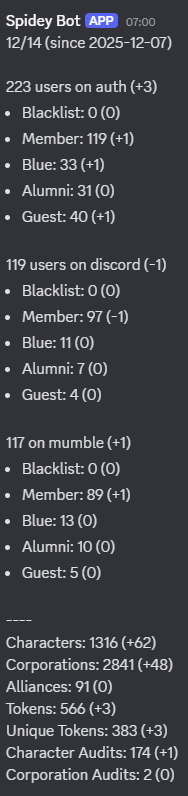
Recurring stats
- Send stats to a webhook that covers interesting statistics from AA
aa-contacts Integration
BigBrother integrates directly with aa-contacts to provide continuous hostile contact monitoring.
What it does
- Periodically syncs contact data from aa-contacts
- Contacts below 0 status are added to hostile
- Both Corp and Alliances
- Contacts above 0 are added to members
- Both Corp and Alliances
- Contacts at 0 (neutral)
- You are presented with 3 choices
- Ignore, do nothing.
- Add them to ignore list.
- Add them to hostile list.
- You are presented with 3 choices
- Contacts below 0 status are added to hostile
What it does NOT do
- It does not delete or create contacts in game
- It does not overwrite manually-added BigBrother contacts
Permissions
Below is the full list of permissions exposed by the application:
| Permission | Description |
|---|---|
| basic_access | Can access Big Brother |
| full_access | Can view all main characters in Big Brother |
| recruiter_access | Can view main characters in Guest state only in Big Brother |
| basic_access_cb | Can access Corp Brother |
| full_access_cb | Can view all corps in Corp Brother |
| recruiter_access_cb | Can view guest’s corps only in Corp Brother (Guest State Configurable) |
| can_blacklist_characters | Can add characters to blacklist |
| can_access_loa | Can access and submit a Leave Of Absence request |
| can_view_all_loa | Can view all Leave Of Absence requests |
| can_manage_loa | Can manage Leave Of Absence requests |
| can_access_paps | Can access PAP Stats |
| can_generate_paps | Can generate PAP Stats |
To correct the above, see instructions here
Fix Duplicated Tasks error
Find the duplicate
SELECT
  minute,
  hour,
  day_of_week,
  day_of_month,
  month_of_year,
  timezone,
  COUNT(*) AS cnt
FROM django_celery_beat_crontabschedule
GROUP BY
  minute,
  hour,
  day_of_week,
  day_of_month,
  month_of_year,
  timezone
HAVING COUNT(*) > 1;
Get the ID, replace the cron with the duplicate values
SELECT
  id,
  minute,
  hour,
  day_of_week,
  day_of_month,
  month_of_year,
  timezone
FROM django_celery_beat_crontabschedule
WHERE
  minute = '0'
  AND hour = '12'
  AND day_of_week = '0'
  AND day_of_month = '*'
  AND month_of_year = '*'
  AND timezone = 'UTC';
Find out if any tasks are using the schedules, replace the numbers with the proper IDs
SELECT id, name, crontab_id
FROM django_celery_beat_periodictask
WHERE crontab_id IN (5, 12);
If some tasks are using both, reassign one of them
UPDATE django_celery_beat_periodictask
SET crontab_id = 5
WHERE crontab_id = 12;
Finally delete the duplicate
DELETE FROM django_celery_beat_crontabschedule
WHERE id IN (12);
1 maintainer

Metadata
1 maintainer
Release files for aa-bb 3.3.7
For a detailed explanation of source distributions (sdists) and built distributions (wheels), please see the package formats documentation.
Source distribution (sdist)
| File | Size | Uploaded | Provenance | Actions |
|---|---|---|---|---|
| aa_bb-3.3.7.tar.gz | 277.8 kB | With provenance | Details for aa_bb-3.3.7.tar.gz |
Built distribution (wheel)
| File | Interpreter | ABI | Platform | Actions Reset |
|---|---|---|---|---|
| aa_bb-3.3.7-py3-none-any.whl | Python 3 | none | any | Details for aa_bb-3.3.7-py3-none-any.whl |
Total release size: 676.8 kB
Release files / aa_bb-3.3.7.tar.gz
| Download URL | aa_bb-3.3.7.tar.gz |
|---|---|
| Size | 277.8 kB |
| Tags | Source |
|
SHA-256 checksum How to use checksums |
4b149beeff49e2ebcf96a5723c48229d0d58ebf9bf1ad4163f992aa1ebb8ed28
|
|
BLAKE2b-256 checksum How to use checksums |
a87c1642a921daac457c9e2d7e0fb93ae9d4e2b1086c5dfbd181dc62f605605d
|
| Upload date | |
|
Uploaded using Trusted Publishing? What is trusted publishing? |
Yes |
| Uploaded via |
twine/7.0.0 CPython/3.13.16
|
Provenance
Provenance describes where a file came from. On PyPI, provenance is shared via attestations, which provide a verifiable record of the build or publishing details. View details, limitations and caveats.


PyPI Publish Attestation
PyPI verified that this artifact, at this checksum, originated from the publisher listed below.
Signed by GitHub Actions, verified by PyPI on Oct 22, 2026.
Transparency logRelease files / aa_bb-3.3.7-py3-none-any.whl
| Download URL | aa_bb-3.3.7-py3-none-any.whl |
|---|---|
| Size | 399.1 kB |
| Tags | Python 3 |
|
SHA-256 checksum How to use checksums |
0b7aff6a0d848e14760842207a726338c11ba2c83c46d06d9a3bd8342173ee57
|
|
BLAKE2b-256 checksum How to use checksums |
9e672b9f310d72c7338961c3bd7ad262001a0bf8c3fe183e2d2c1e12668e726b
|
| Upload date | |
|
Uploaded using Trusted Publishing? What is trusted publishing? |
Yes |
| Uploaded via |
twine/7.0.0 CPython/3.13.16
|
Provenance
Provenance describes where a file came from. On PyPI, provenance is shared via attestations, which provide a verifiable record of the build or publishing details. View details, limitations and caveats.
PyPI Publish Attestation
PyPI verified that this artifact, at this checksum, originated from the publisher listed below.
Signed by GitHub Actions, verified by PyPI on Oct 22, 2026.
Transparency logSecurity for aa-bb 3.3.7
Provenance
Provenance describes where a file came from. On PyPI, provenance is shared via attestations, which provide a verifiable record of the build or publishing details. View details, limitations and caveats.
Full provenance
All 2 files in this release have been uploaded with provenance metadata.
Attestation for aa_bb-3.3.7.tar.gz
PyPI Publish Attestation
PyPI verified that this artifact, at this checksum, originated from the publisher listed below.
Signed by GitHub Actions, verified by PyPI on Oct 22, 2026.
Transparency logA note on package security
PyPI is a repository for distributing packages, not a service for auditing them. While third-party security researchers and our staff do their best to detect and remove malicious packages, PyPI cannot guarantee the quality, security or suitability of any given package.
To learn more about protecting yourself from malicious actors, visit our package security documentation.














