
AA Discord Ping Formatter
App for formatting pings for Discord in Alliance Auth
Contents
Installation
Important: This app is a plugin for Alliance Auth. If you don't have Alliance Auth running already, please install it first before proceeding. (see the official AA installation guide for details)
Step 1 - Install app
Make sure you are in the virtual environment (venv) of your Alliance Auth installation. Then install the latest version:
pip install aa-discord-ping-formatter
Step 2 - Update your AA settings
Configure your AA settings (local.py) as follows:
- Add
'discordpingformatter',toINSTALLED_APPS
Step 3 - Finalize the installation
Run migrations & copy static files
python manage.py collectstatic
python manage.py migrate
Restart your supervisor services for AA
Step 4 - Setup permissions
Now you can setup permissions in Alliance Auth for your users. Add discordpingformatter | aa discord ping formatter | Can access this app to the states and/or groups you would like to have access.
Updating
To update your existing installation of AA Discord Ping Formatter first enable your virtual environment.
Then run the following commands from your AA project directory (the one that contains manage.py).
pip install -U aa-discord-ping-formatter
python manage.py collectstatic
python manage.py migrate
Finally restart your AA supervisor services.
Screenshots
View in Alliance Auth
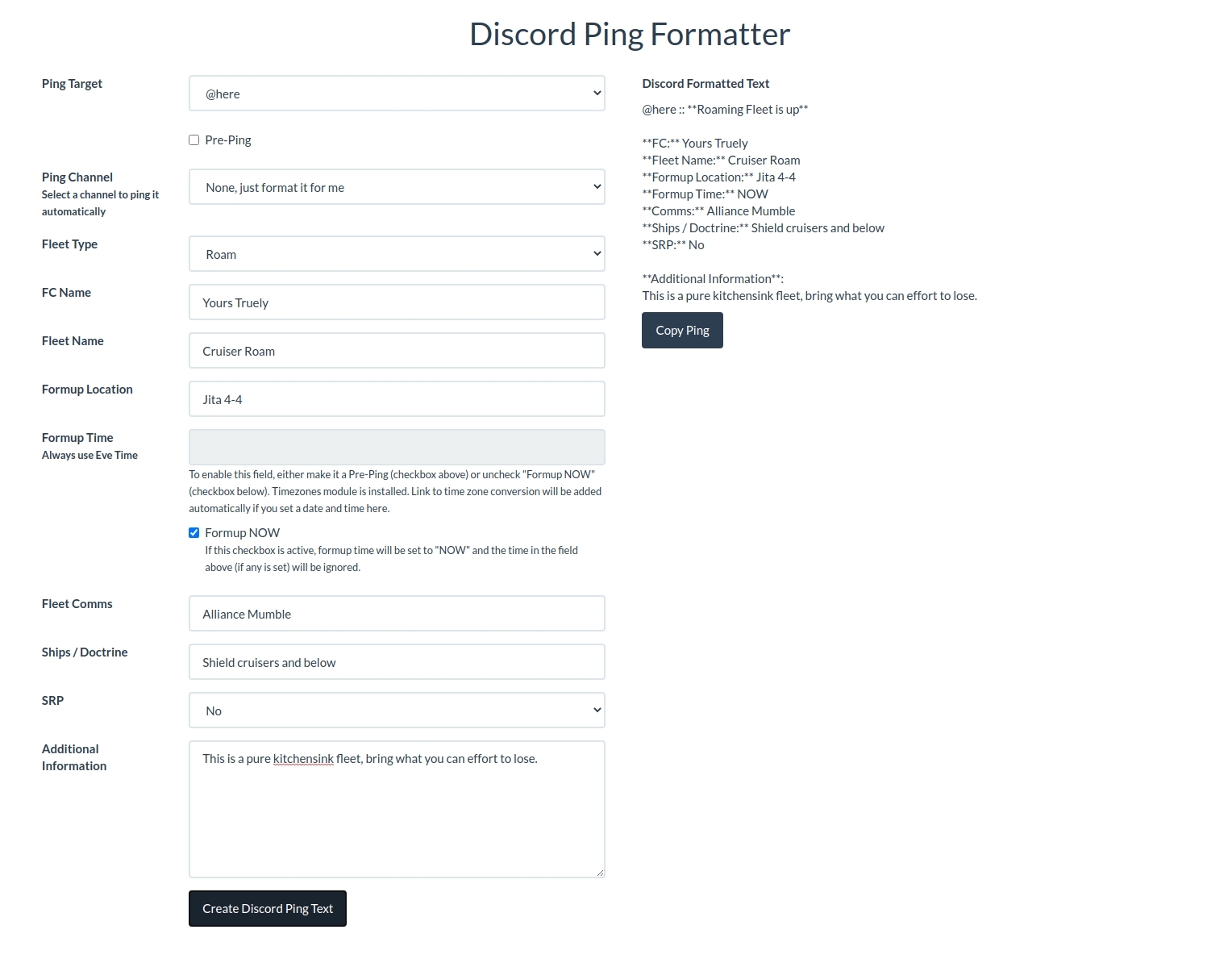
Discord Ping
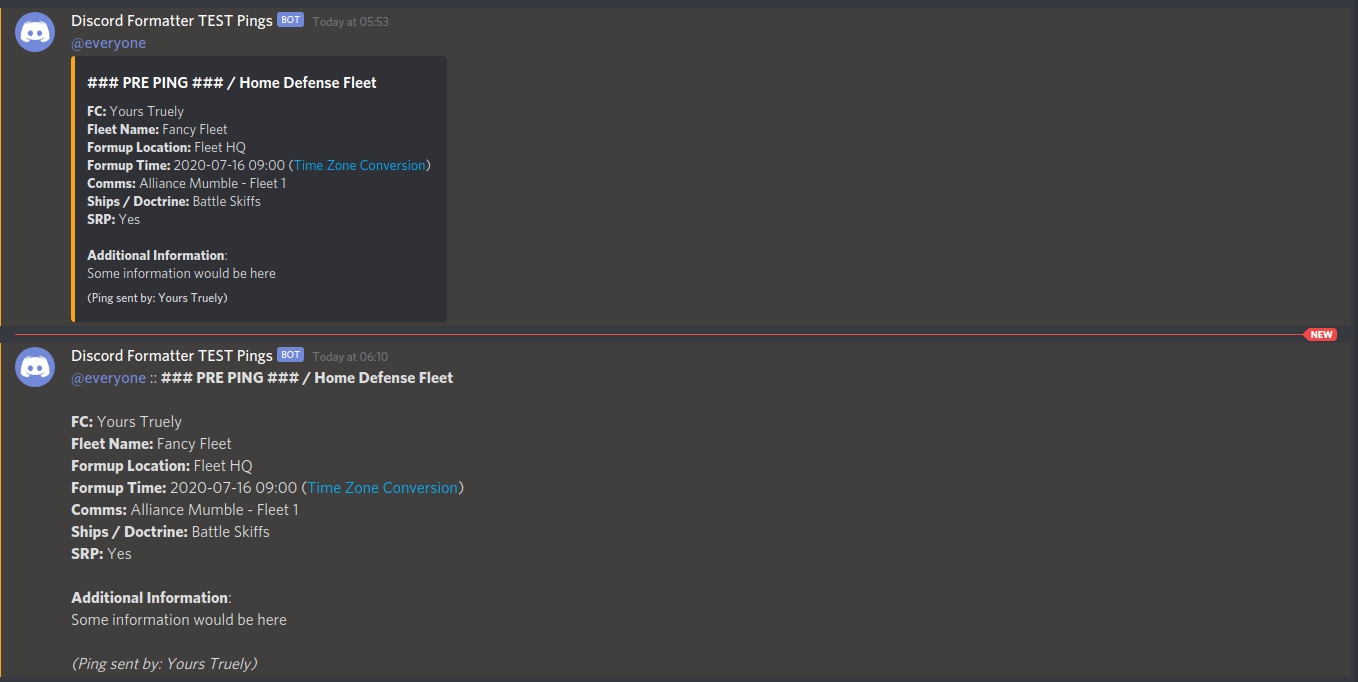
(Example for embedded ping (top) and non embedded ping (bottom))
Configuration
Embed Webhook Pings
You have the option to embed your webhook pings. To do so you can enable it via:
## AA Discord Ping Formatter
AA_DISCORDFORMATTER_WEBHOOK_EMBED_PING = True
Adding Ping Targets
Per default you have 2 ping targets you can select from. That's @everyone and @here. If you need more than these 2, you can add them to your local.py and override the default behaviour that way.
Open your local.py in an editor of your choice and add the following at the end.
## AA Discord Ping Formatter
AA_DISCORDFORMATTER_ADDITIONAL_PING_TARGETS = [
    {
        'roleId': 'xxxxxxxxxxxxxxxxxx',
        'roleName': 'Member'
    },
    {
        # restricted to "Capital FCs" (GroupID 5) and "Super Capital FCs" (GroupID 7)
        'restrictedToGroup': [
            5,
            7,
        ],
        'roleId': 'xxxxxxxxxxxxxxxxxx',
        'roleName': 'Capital Pilots'
    },
]
To get the roleId go to your Discord Server Settings » Roles and right click the role you need and copy the ID. You might need to activate the Developer Mode for your Discord account in order to do so. You activate the Developmer Mode in your account settings under Appearance » Advanced » Developer Mode.
Important: Both, roleId and roleName need to be without the @, it will be added automatically. roleName needs to be spelled exactly as it is on Discord.
Adding Fleet Types
Per default you have 4 fleet types you can select from. That's Roam, Home Defense, StratOP and CTA. If you need more than these 4, you can add them to your local.py and override the default behaviour that way.
Open your local.py in an editor of your choice and add the following at the end.
## AA Discord Ping Formatter
AA_DISCORDFORMATTER_ADDITIONAL_FLEET_TYPES = [
    # example for embedded webhook pings
    {
        'fleetType': 'Mining',
        'embedColor': '#4F545C' # can be empty but needs to be set. Needs to be #hex and 6 digits
    },

    # example for non embedded webhook pings
    'Ratting',
]
Both examples will work, no matter if you have AA_DISCORDFORMATTER_WEBHOOK_EMBED_PING enabled or not. But keep in mind, to set a custom color for your embed, it needs to be defined like in the first example. The color needs to be your standard hex color code like you define it in (for example) CSS as well. Pre-defined fleet types are by default: Roam = green, Home Defense = yellow, StratOP = orange, CTA = red
Adding Ping Channels
Per default, your ping will just be formatted for you to copy and paste. But, if your FCs are too lazy even for that, you can configure webhooks. One for each channel you might want to ping.
Open your local.py in an editor of your choice and add the following at the end.
## AA Discord Ping Formatter
AA_DISCORDFORMATTER_ADDITIONAL_PING_WEBHOOKS = [
    {
        'discordChannelName': 'Fleet Pings (#fleet-pings)',
        'discordWebhookUrl': 'https://discordapp.com/api/webhooks/xxxxxxxxxxxxxxxxxx/yyyyyyyyyyyyyyyyyyyyyyyyyyyyyyyyyyyyyyyyyyyyyyyyyyyyyyyyyyyyyyyyyyyy'
    },
    {
        'discordChannelName': 'Pre Pings (#pre-pings)',
        'discordWebhookUrl': 'https://discordapp.com/api/webhooks/xxxxxxxxxxxxxxxxxx/yyyyyyyyyyyyyyyyyyyyyyyyyyyyyyyyyyyyyyyyyyyyyyyyyyyyyyyyyyyyyyyyyyyy'
    },
    {
        # restricted to "Capital FCs" (GroupID 5) and "Super Capital FCs" (GroupID 7)
        'restrictedToGroup': [
            5,
            7,
        ],
        'discordChannelName': 'Capital Pings (#capital-pings)',
        'discordWebhookUrl': 'https://discordapp.com/api/webhooks/xxxxxxxxxxxxxxxxxx/yyyyyyyyyyyyyyyyyyyyyyyyyyyyyyyyyyyyyyyyyyyyyyyyyyyyyyyyyyyyyyyyyyyy'
    }
]
Fleet Comms, Formup Location and Doctrine
Values for Fleet Comms, Formup Location and Doctrine can be pre-defined as suggestions, so your FCs have a quick selection of the most used comms, stagings and doctrines to select from. These are not fixed values in the form, since we use a combination of input and select fields here. So FCs are absolutely free to something completely different in those 3 fields than the pre-defined suggestions.
To define these 3 fields, open your local.py in an editor of your choice and add the following:
Fleet Comms
## AA Discord Ping Formatter
AA_DISCORDFORMATTER_FLEET_COMMS = [
    'Alliance Mumble',
    'Coalition Mumble',
    'Spy Account Mumble' # :-P
]
Fleet Staging
## AA Discord Ping Formatter
AA_DISCORDFORMATTER_FLEET_FORMUP_LOCATIONS = [
    'Alliance Staging System',
    'Coalition Staging System'
]
Doctrine
## AA Discord Ping Formatter
AA_DISCORDFORMATTER_FLEET_DOCTRINES = [
    'Battle Skiffs',
    'Combat Nereus',
    'Attack Corvettes'
]
1 maintainer

Metadata
1 maintainer
Release files for aa-discord-ping-formatter 1.1.4
For a detailed explanation of source distributions (sdists) and built distributions (wheels), please see the package formats documentation.
Source distribution (sdist)
| File | Size | Uploaded | |
|---|---|---|---|
| aa-discord-ping-formatter-1.1.4.tar.gz | 497.5 kB | Details |
Built distribution (wheel)
| File | Interpreter | ABI | Platform | Reset |
|---|---|---|---|---|
| aa_discord_ping_formatter-1.1.4-py3-none-any.whl | Python 3 | none | any | Details |
Total release size: 1.0 MB
Release files / aa-discord-ping-formatter-1.1.4.tar.gz
| Download URL | aa-discord-ping-formatter-1.1.4.tar.gz |
|---|---|
| Size | 497.5 kB |
| Tags | Source |
|
SHA-256 checksum How to use checksums |
0c2f2e3ccc573cfc30741782affdb9d65a8f2164e8fba17dfd5b68fc2d45c77c
|
|
BLAKE2b-256 checksum How to use checksums |
97745f6a78876ee1b1d522b4a8848d110a4fa357e9f402543ae1ddbb6da530db
|
| Upload date | |
|
Uploaded using Trusted Publishing? What is trusted publishing? |
No |
| Uploaded via |
twine/3.1.1 pkginfo/1.5.0.1 requests/2.24.0 setuptools/47.1.1 requests-toolbelt/0.9.1 tqdm/4.46.1 CPython/3.7.8
|
Release files / aa_discord_ping_formatter-1.1.4-py3-none-any.whl
| Download URL | aa_discord_ping_formatter-1.1.4-py3-none-any.whl |
|---|---|
| Size | 506.3 kB |
| Tags | Python 3 |
|
SHA-256 checksum How to use checksums |
9366257941f72627d99b4934a5d82f9c7bf34c3eeb63651a40533b821b7cfde6
|
|
BLAKE2b-256 checksum How to use checksums |
00f6fdcd2fe2aab662169ad2d1a811625e0b71ecd581145fbb388a2092cb0643
|
| Upload date | |
|
Uploaded using Trusted Publishing? What is trusted publishing? |
No |
| Uploaded via |
twine/3.1.1 pkginfo/1.5.0.1 requests/2.24.0 setuptools/47.1.1 requests-toolbelt/0.9.1 tqdm/4.46.1 CPython/3.7.8
|














