
Certainly! Here is the comprehensive README for the 'abstract_audio' module:
Abstract Audio
The 'abstract_audio' module provides functionalities to capture and manipulate audio input from a microphone and save it into a text file. It also includes an abstract GUI to display the state of audio recording and playback.
Installation
You can install the module using pip:
pip install abstract_audio
Usage
Speech-to-Text Application
The 'speech_to_text_gui.py' script provides a simple speech-to-text application with a graphical user interface (GUI). The application uses the SpeechRecognition library to perform speech recognition and PySimpleGUI for GUI implementation. It allows you to record your voice, transcribe the audio to text, and save it in a file called 'voice.txt'.
To use the speech-to-text application, run the following command:
python speech_to_text_gui.py
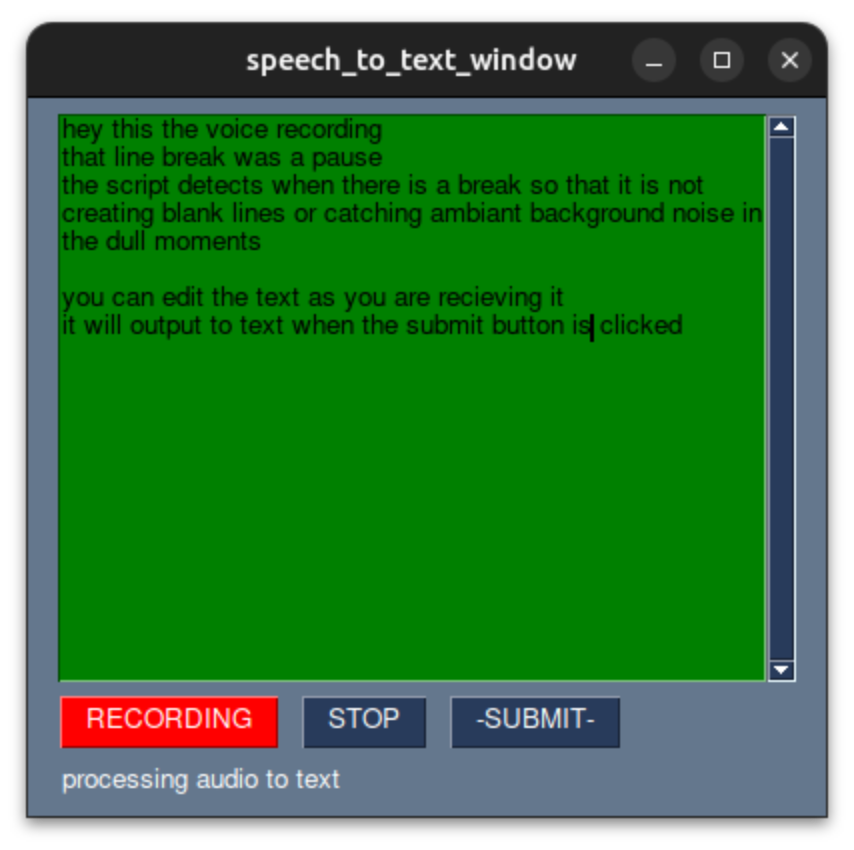
The GUI window will open, displaying a 'record' button. Click on the 'record' button to start recording your voice. The GUI screen will turn green to indicate that it is recording. Once you stop speaking, the recorded audio will be processed using the Google Web Speech API, and the recognized text will be displayed in the GUI window.
Volume Commands
The 'volume_commands.py' module provides a set of volume control commands for Windows operating systems. It allows you to control the system's volume, mute, and unmute the system, check the current volume, and change the volume incrementally.
To use the volume commands, import the 'volume_commands' object from the 'volume_commands.py' module:
from abstract_audio.volume_states.volume_commands import volume_commands
Then, you can use the methods provided by the 'volume_commands' object to control the system's volume:
# Check the current volume
current_volume = volume_commands.check_volume()
print("Current Volume:", current_volume)

# Set the volume to a specific value
volume_commands.set_volume(50)  # Sets the volume to 50%

# Change the volume incrementally
volume_commands.change_volume(10)  # Increases the volume by 10%
Note: The volume control commands are currently supported only on Windows operating systems.
Source Code Map
The 'src' directory contains the following packages and modules:
- 'audio_player': Contains platform-specific implementations for audio playback.
- 'volume_states': Provides volume control commands for Windows operating systems.
- 'init.py': Initialization module for the 'abstract_audio' package.
- 'speech_to_text_gui.py': Main script for the speech-to-text application.
Requirements
The 'abstract_audio' module has the following dependencies:
- abstract_utilities>=0.0.1740
- abstract_gui>=0.0.53.5
- pydub>=0.25.1
- SpeechRecognition>=3.10.0
- PySimpleGUI (already included in 'speech_to_text_gui.py' script)
Please ensure that these dependencies are installed before using the module.
License
This module is licensed under the MIT License. See the 'LICENSE' file for more details.
Contact
For any inquiries or feedback, you can contact the author at partners@abstractendeavors.com.
Acknowledgments
The 'abstract_audio' module was developed by putkoff.
For more information, visit the GitHub repository: https://github.com/AbstractEndeavors/abstract_essentials/tree/main/abstract_audio
The setup.py file and source code provided in the 'src' directory are parts of the 'abstract_audio' module.
Please note that the 'audio_player' and 'volume_states' packages in the 'src' directory contain platform-specific implementations for audio playback and volume control. The module currently supports volume control Windows and Linux operating systemss.
The 'abstract_audio' module is in the alpha development stage and may have limitations or issues. Please refer to the GitHub repository for updates and contributions.
Author: putkoff Date: 8/1/23
Thank you for using the 'abstract_audio' module! We hope it fulfills your audio recording and manipulation needs. If you have any questions or suggestions, feel free to reach out to us at partners@abstractendeavors.com. Happy coding!
1 maintainer

Metadata
1 maintainer
Release files for abstract-audio 0.0.1.14
For a detailed explanation of source distributions (sdists) and built distributions (wheels), please see the package formats documentation.
Source distribution (sdist)
| File | Size | Uploaded | |
|---|---|---|---|
| abstract_audio-0.0.1.14.tar.gz | 11.6 kB | Details |
Release files / abstract_audio-0.0.1.14.tar.gz
| Download URL | abstract_audio-0.0.1.14.tar.gz |
|---|---|
| Size | 11.6 kB |
| Tags | Source |
|
SHA-256 checksum How to use checksums |
482353fb413fedd4284a04a08e7edd97a092b2e43a84980b6f790bbd480bbd86
|
|
BLAKE2b-256 checksum How to use checksums |
52c0db314e5da20909522e0d5d14e0285977c6761c8d64f0a158071905c86ae3
|
| Upload date | |
|
Uploaded using Trusted Publishing? What is trusted publishing? |
No |
| Uploaded via |
twine/4.0.2 CPython/3.11.4
|














