
Achilterm is a lightweight UTF-8 web based terminal.
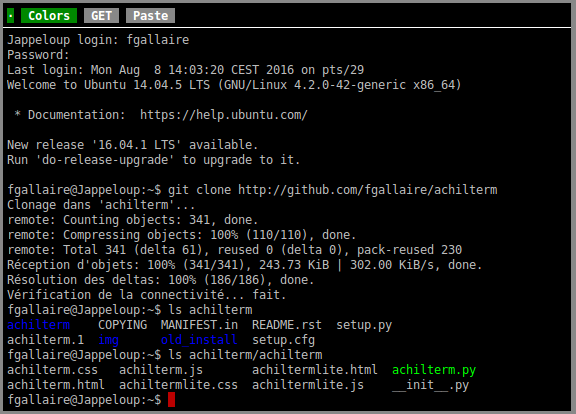
Achilterm is written in Python (and some AJAX javascript for client side).
Achilterm is very simple to install on Linux, MacOS X, FreeBSD, Solaris, cygwin and any Unix that runs Python.
Achilterm is initially forked from Ajaxterm which was inspired by Anyterm.
Achilterm is developed by Florent Gallaire fgallaire@gmail.com.
Website: http://fgallaire.github.io/achilterm.
Download and Install
To install the last stable version from PyPI:
sudo pip install achilterm
To install the development version from GitHub:
git clone https://github.com/fgallaire/achilterm.git
cd achilterm
sudo python setup.py install
To run Achilterm after installation:
achilterm
To run Achilterm from the source without installation:
./achilterm/achilterm.py
Then point your browser to this URL : http://localhost:8022/
Documentation and Caveats
Achilterm support Python 2.5 and above and Python 3.2 and above
Achilterm require WebOb >= 1.0
If run as root achilterm will run /bin/login, otherwise it will run ssh localhost. To use an other command use the -c option.
By default Achilterm only listen at 127.0.0.1:8022. For remote access, it is strongly recommended to use https SSL/TLS, and that is simple to configure if you use the apache web server using mod_proxy.
Using ssl will also speed up achilterm (probably because of keepalive).
Using GET HTTP request seems to speed up achilterm, just click on GET in the interface, but be warned that your keystrokes might be loggued (by apache or any proxy). I usually enable it after the login.
Achiltermlite
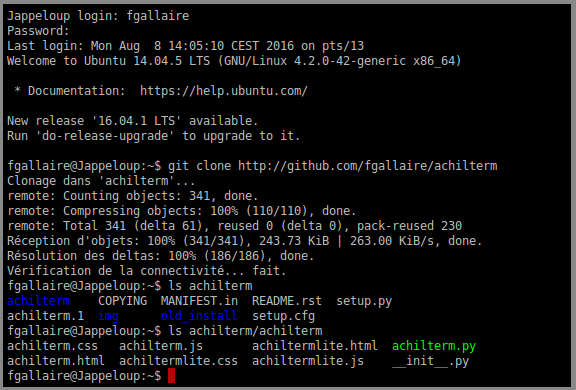
Achiltermlite is a stripped-down client-side version of Achilterm.
Commandline usage
usage: achilterm.py [options]

options:
  -h, --help            show this help message and exit
  -pPORT, --port=PORT   Set the TCP port (default: 8022)
  -cCMD, --command=CMD  set the command (default: /bin/login or ssh localhost)
  -l, --log             log requests to stderr (default: quiet mode)
  -d, --daemon          run as daemon in the background
  -PPIDFILE, --pidfile=PIDFILE
                        set the pidfile (default: /var/run/achilterm.pid)
  -iINDEX_FILE, --index=INDEX_FILE
                        default index file (default: achilterm.html)
  -uUID, --uid=UID      Set the daemon's user id
  -L, --lite            use Achiltermlite
Configuration example
Listen 443
NameVirtualHost *:443

<VirtualHost *:443>
   ServerName localhost
   SSLEngine On
   SSLCertificateKeyFile ssl/apache.pem
   SSLCertificateFile ssl/apache.pem

   ProxyRequests Off
   <Proxy *>
           Order deny,allow
           Allow from all
   </Proxy>
   ProxyPass /achilterm/ http://localhost:8022/
   ProxyPassReverse /achilterm/ http://localhost:8022/
</VirtualHost>
Old versions
Achilterm 0.13 require Python 2.5 and above
Older Achilterm versions only support latin1, if you use Ubuntu or any LANG==en_US.UTF-8 distribution don’t forget to $ unset LANG:
Achilterm 0.12 require WebOb >= 1.2 (use it with Python 2.6 and 2.7)
Achilterm 0.11 require WebOb < 1.0 (use it with Python 2.5)
Compared to anyterm
There are no partial updates, achilterm updates either all the screen or nothing. That make the code simpler and I also think it’s faster. HTTP replies are always gzencoded. When used in 80x25 mode, almost all of them are below the 1500 bytes (size of an ethernet frame) and we just replace the screen with the reply (no javascript string handling).
Achilterm polls the server for updates with an exponentially growing timeout when the screen hasn’t changed. The timeout is also resetted as soon as a key is pressed. Anyterm blocks on a pending request and use a parallel connection for keypresses. The anyterm approch is better when there aren’t any keypress.
License
Achilterm files are released under the GNU AGPLv3 or above license.
Achilterm codebase from Ajaxterm by Antony Lesuisse (email: al AT udev.org), License Public Domain.
1 maintainer

Download files
Download the file for your platform. If you're not sure which to choose, learn more about installing packages.
Source Distribution
Built Distribution
Filter files by name, interpreter, ABI, and platform.
If you're not sure about the file name format, learn more about wheel file names.
Copy a direct link to the current filters
File details
Details for the file Achilterm-0.19.tar.gz.
File metadata
- Download URL: Achilterm-0.19.tar.gz
- Upload date:
- Size: 58.5 kB
- Tags: Source
- Uploaded using Trusted Publishing? No
File hashes
| Algorithm | Hash digest | |
|---|---|---|
| SHA256 |
2c0f386e14cfcb118b02ce3d1663eef9d192becf5dba32408bf54aa1e163d850
|
|
| MD5 |
f8377dbd12af27cc0c512fae3b6128a7
|
|
| BLAKE2b-256 |
9df9d8f1297daa63041492a2c65a2cbc1ad34b1f030123da5025bde67f250486
|
File details
Details for the file Achilterm-0.19-py2.py3-none-any.whl.
File metadata
- Download URL: Achilterm-0.19-py2.py3-none-any.whl
- Upload date:
- Size: 16.0 kB
- Tags: Python 2, Python 3
- Uploaded using Trusted Publishing? No
File hashes
| Algorithm | Hash digest | |
|---|---|---|
| SHA256 |
0907951f8f4cfc5770646bc3069a2984af5fd98f127975e1603aed13d574644d
|
|
| MD5 |
185bde80211b730e07ad906f582ea9da
|
|
| BLAKE2b-256 |
45f3913dc6d9147b66c3adc8781aae8842833e59400deda439d05c32de7cabe2
|







